Fabric API Needed by Resource Tree 1.2.2+26.1
requiredMatching file found Matched file: 0.155.3+26.1.2

Modrinth · Minecraft mod
Organize your resource packs into folders — drag & drop, navigate, color-code, rename, delete, create folders, search, sort, and manage each pack in-game with ease.
Quick answer
Resource Tree 1.2.2+26.1 targets 26.1, 26.1.1, 26.1.2 with Fabric. It must be installed on the client. Do not install it on the dedicated server. All 1 required mods have matching files.
Where it goes
It must be installed on the client. Do not install it on the dedicated server.
This file is marked client-only.
1.2.2+26.1 on 26.1.2. Every mod below is checked against that same setup.
Install Fabric API first. We found matching files for this game-version and loader setup. 1 comes through another mod in the chain.
1 extra mod was pulled in by another dependency. Indented rows show who needs each one. We only count dependency files that match this setup. A file for another loader does not fill the gap.
Before you install it
Built for Resource Tree 1.2.2+26.1 on 26.1.2. Pick another file and the loader, install side or required mods may change.
Use 1.2.2+26.1. It targets 26.1, 26.1.1, 26.1.2 with Fabric; another release may have different loader, side or dependency requirements.
Install Fabric API first. We found matching files for this game-version and loader setup. 1 comes through another mod in the chain.
It must be installed on the client. Do not install it on the dedicated server.
Use the “Get this file” button beside 1.2.2+26.1. It opens that exact file at the source.
About this project
Resource Tree adds folder navigation to Minecraft's resource pack screen, so you can organize your packs into subfolders instead of scrolling through one massive list.

resourcepacks directory automatically appear in the resource pack screen<Folder> indicating how many packs are directly inside
+ button next to the ≡ button to create a new folder in the current directory
▫️NEW▫️⇅ button next to the search bar to open the sort menu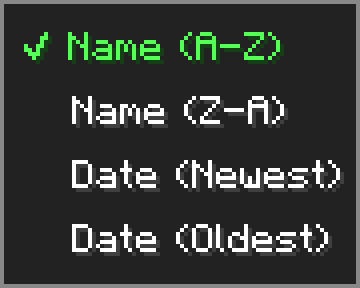
▫️NEW▫️Click the ≡ button next to "Open Pack Folder" to open the options menu.
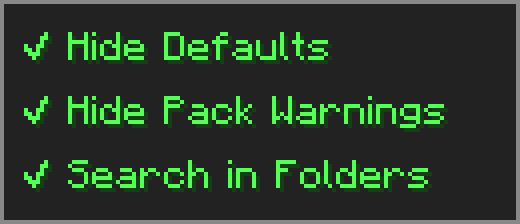
⚠️ Essential — dragging packs from Available to Selected may behave unexpectedly — use the arrow button or shift+click instead.
➕ Resourcify — works great for browsing and installing packs directly in-game.
Project description from Modrinth.
Pick your setup
Choose the version and loader you play, then open the matching release.
Check the dependencies, then try the file in a copied instance before changing a world you care about.
Recent files
resource-tree-1.2.2+26.1.jar
6 May 2026
resource-tree-1.2.1+26.1.jar
6 Apr 2026
Looking for an older file? The official Modrinth project page is in Resources.
 mod
Allows players to adjust their flight speed in Creative and Spectator modes with dynamic mouse-scroll tuning, sprint momentum, and anti-rubberbanding.
 mod
Bed Chat Hider is a client-only Fabric mod that adds a simple "Hide Chat" / "Show Chat" toggle button next to the "Leave Bed" button while sleeping.
 mod
Enhances vanilla wolves with unique personalities (Aggressive, Pacifist, Normal), smarter AI, safety behaviors, and combat improvements.