Mod Menu Optional for Good Asset Fetcher b1.7.3-1.1.0
optionalNo matching file

Modrinth · Minecraft mod
Beta 1.7.3 library mod to provide assets from any version of Minecraft to other mods.
Quick answer
Good Asset Fetcher b1.7.3-1.1.0 targets b1.7.3 with babric, Fabric. It must be installed on the client. Do not install it on the dedicated server. 1 required mod needs a matching file.
Where it goes
It must be installed on the client. Do not install it on the dedicated server.
This file is marked client-only.
b1.7.3-1.1.0. Change the file and its required mods may change too.
Install StationAPI, Fabric Language Kotlin first, but 1 required mod has no matching file for this setup. Do not mix loader builds to force a match.
We only count dependency files that match this setup. A file for another loader does not fill the gap.
Before you install it
Built for Good Asset Fetcher b1.7.3-1.1.0. Pick another file and the loader, install side or required mods may change.
Use b1.7.3-1.1.0. It targets b1.7.3 with babric, Fabric; another release may have different loader, side or dependency requirements.
Install StationAPI, Fabric Language Kotlin first, but 1 required mod has no matching file for this setup. Do not mix loader builds to force a match.
It must be installed on the client. Do not install it on the dedicated server.
Use the “Get this file” button beside b1.7.3-1.1.0. It opens that exact file at the source.
About this project
Library mod for StationAPI that provides an interface for other mods to fetch resources from official Mojang jars on the
fly when starting the game; this allows mods to utilise the game's assets without incurring license violations.
Currently only supports clientside assets (not datapacks).
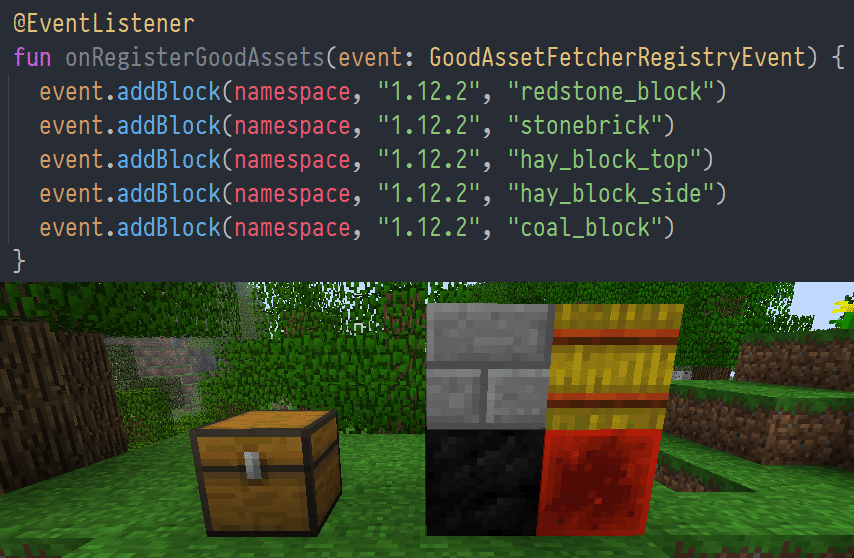
Import pw.tmpim.mygoodmods:good-asset-fetcher from Maven (see the version badge above for the latest version):
repositories {
  maven("https://repo.lem.sh/releases") {
    name = "Lemmmy Repo"
    content {
      includeGroupAndSubgroups("sh.lem")
      includeGroupAndSubgroups("pw.tmpim")
    }
  }
}

dependencies {
  modImplementation("pw.tmpim.mygoodmods:good-asset-fetcher:1.0.4")
}
Register a client-only endpoint for your mod in fabric.mod.json if you don't already have one:
  {
    "entrypoints": {
      "stationapi:event_bus_client": "com.example.yourmod.ExampleModClientListener"
    },
    "depends": {
      "good-asset-fetcher": "1.x"
    }
  }
Listen to the GoodAssetFetcherRegistryEvent and call addResourceFile, addBlock, or addItem:
public class ExampleEventListener {
    @Entrypoint.Namespace
    public static Namespace NAMESPACE;

    @EventListener
    public void onRegisterGoodAssets(GoodAssetFetcherRegistryEvent event) {
        // shorthands for blocks and items:
        event.addBlock(NAMESPACE, "1.12.2", "redstone_block");
        event.addItem(NAMESPACE, "1.12.2", "stick");

        // load an asset by full path:
        event.addResourceFile(NAMESPACE, "1.12.2", "assets/minecraft/textures/blocks/stone.png");
    }
}
Use the textures under assets/your-mod/stationapi/textures/block/stone.png:
{
  "parent": "minecraft:block/cube_all",
  "textures": {
    "all": "your-mod:block/stone"
  }
}
During the game's init phase, before resource packs are loaded, Good Asset Fetcher loads the version manifest from the
Minecraft Launcher to get a listing of all game versions. This listing is then cached indefinitely at.minecraft/mods/good-asset-fetcher/asset-cache/versionManifest-$modVersion.json.
Then, GoodAssetFetcherRegistryEvent is called to fetch the resource definitions for every mod. Mods may request to
fetch assets from (almost?) any version of the game.
When resource packs are loaded, the mod injects its own dynamic resource pack at runtime. When this is first loaded
during a session, it checks for any missing assets in the mod's cache directory,.minecraft/mods/good-asset-fetcher/asset-cache.
Armed with the knowledge of all the missing assets and their associated game versions, good-asset-fetcher will
download each version's manifest and jar in-memory, validate the hash, and extract the required files. This process is
done during resource pack load, so it will block the game the first time it happens, and then ideally remain cached
permanently in .minecraft/mods/good-asset-fetcher/asset-cache.
Since StationAPI stores assets in a slightly different location to most versions of vanilla, the mod performs the
following path conversions to the destination file path automatically:
| Source path | Cached path |
|---|---|
assets/minecraft/textures/blocks |
assets/${namespace}/stationapi/textures/block |
assets/minecraft/textures/items |
assets/${namespace}/stationapi/textures/item |
If your use case is not properly covered, theaddResourceFile(Namespace namespace, String gameVersion, String sourcePath, String destPath) overload is available for
you to specify your own destination path. Note, however, that it will still go through the same string replacements as
above.
This mod is licensed under the MIT license.
Project description from Modrinth.
Pick your setup
Choose the version and loader you play, then open the matching release.
Check the dependencies, then try the file in a copied instance before changing a world you care about.
Recent files
good-asset-fetcher-1.1.0.jar
13 Jun 2026
good-asset-fetcher-1.0.4.jar
2 Apr 2026
Looking for an older file? The official Modrinth project page is in Resources.
 mod
A Library Mod for the BetterX Team
 mod
A Fabric utility mod that aims to streamline common modding tasks, particularly those related to world creation. As a successor to BCLib, WoVer is intended to eventually take its place.
 mod
A Support lib to simplify Configs with an automated UI, Grid-Based UI-Layouts, Simplified Network management and other usefull utilities.


