Fabric API Needed by Disable My Mods Please 1.2.0+mc26.3
requiredMatching file found Matched file: 0.164.0+26.3

Modrinth · Minecraft mod
Are you tired of mods that you want to disable but you have to restart the launcher and find the mod. well lucky you, with this you can do that all in minecraft itself
Quick answer
Disable My Mods Please 1.2.0+mc26.3 targets 26.3 with Fabric. It must be installed on the client. Do not install it on the dedicated server. All 3 required mods have matching files.
Where it goes
It must be installed on the client. Do not install it on the dedicated server.
This file is marked client-only.
1.2.0+mc26.3. Change the file and its required mods may change too.
Install Fabric API, Mod Menu, Text Placeholder API first. We found matching files for this game-version and loader setup. 1 comes through another mod in the chain.
1 extra mod was pulled in by another dependency. Indented rows show who needs each one. We only count dependency files that match this setup. A file for another loader does not fill the gap.
Before you install it
Built for Disable My Mods Please 1.2.0+mc26.3. Pick another file and the loader, install side or required mods may change.
Use 1.2.0+mc26.3. It targets 26.3 with Fabric; another release may have different loader, side or dependency requirements.
Install Fabric API, Mod Menu, Text Placeholder API first. We found matching files for this game-version and loader setup. 1 comes through another mod in the chain.
It must be installed on the client. Do not install it on the dedicated server.
Use the “Get this file” button beside 1.2.0+mc26.3. It opens that exact file at the source.
About this project
Disable My Mods Please lets you disable and enable mods without searching through your mods folder.
If the mod does well then I shall create a server for bugs and issues and more updates
How it works:
it changes the names of the mods from .jar to .jar.disabled
This mod is more useful if you use the normal minecraft launcher, because modrinth already uses has a way to disable mods. that used to be to rename it to .jar.disabled when i created this but now they changed it to something else
Larger modpacks take longer to load ofcourse!
Step 1. Click the mods tab from mod menu in the main menu
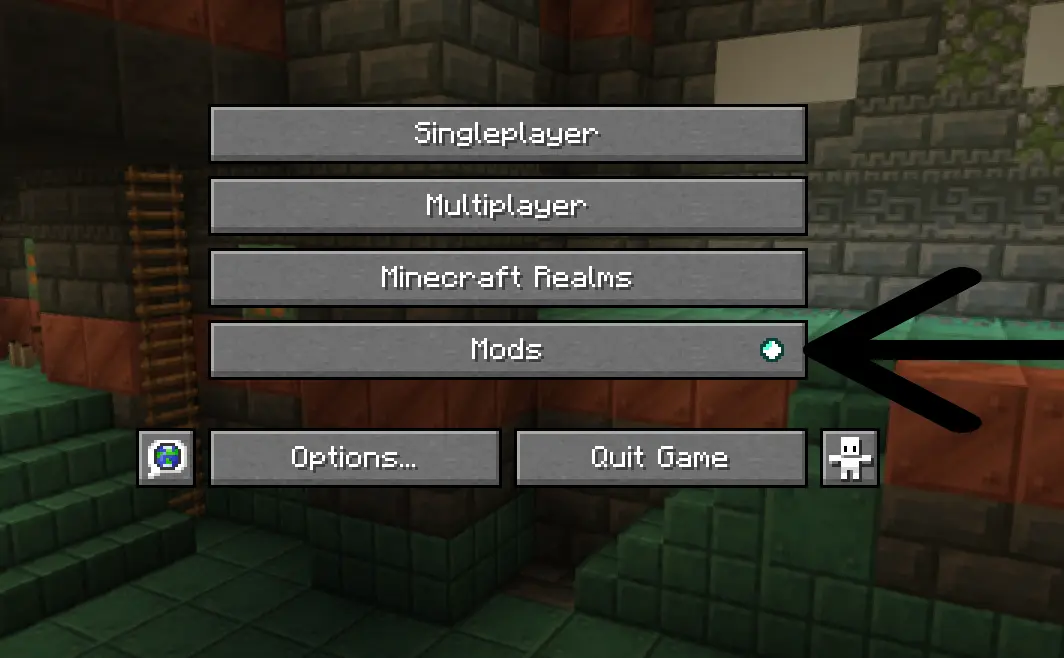
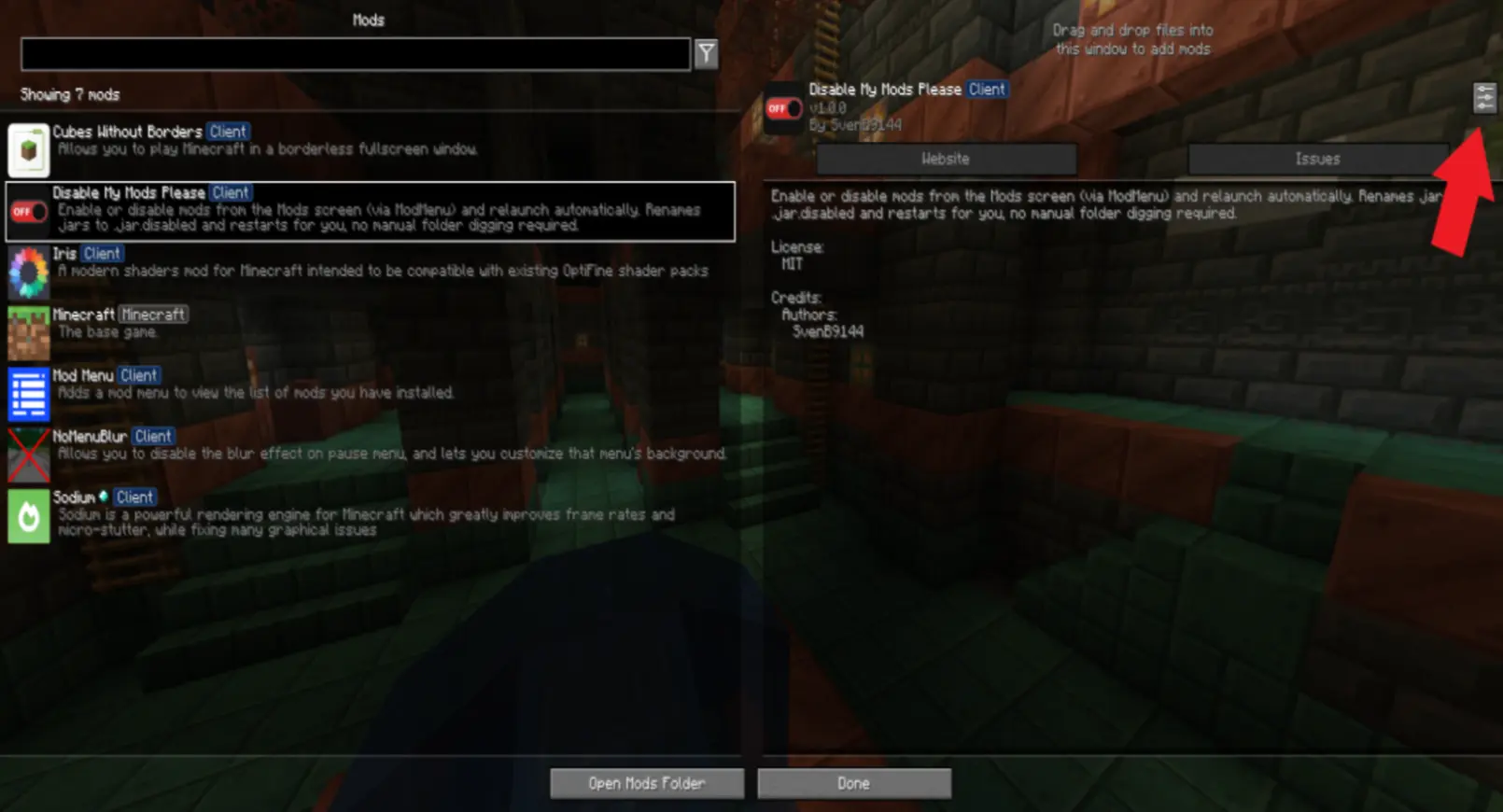
step 2. Look for the Disable My Mods Please mod on the left sidebar and click the config button
(I had to make the image blurry because of the image size limit)
step 3. Search for the mod that you want to disable or enable and press the button on the right next to that mod.
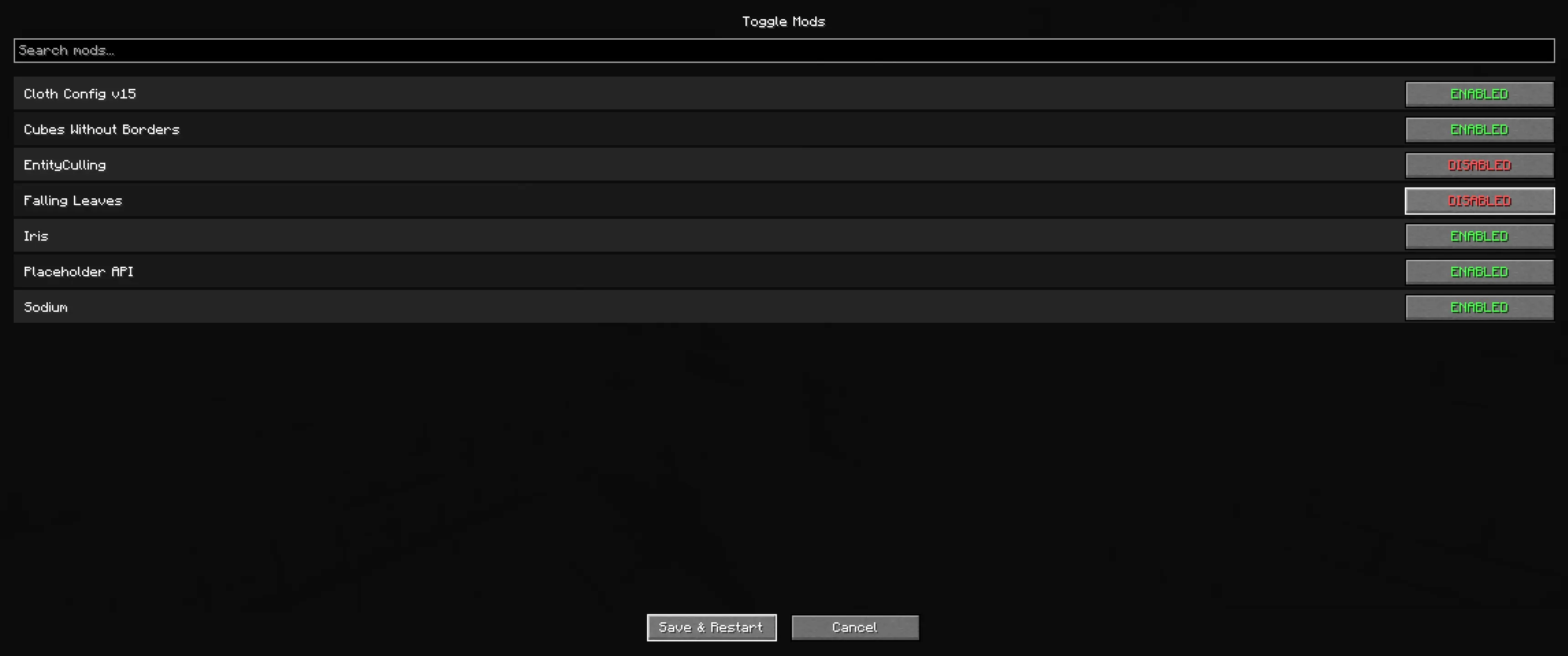
step 4. Press Save and restart
step 5. Watch it restart automatically
Extra features:
Futre plans
1.20.1 - Supported
1.20.5 and 1.20.6 - Supported
1.21.X - Supported
26.X - Supported
1.20.2, 1.20.3 and 1.20.4 are not supported
Thank you for downloading my mod! :)
Project description from Modrinth.
Pick your setup
Choose the version and loader you play, then open the matching release.
Showing the newest 12 of 24 game versions. Older files are in the list below.
Check the dependencies, then try the file in a copied instance before changing a world you care about.
Recent files
disablemymodsplease-1.2.0+mc26.3.jar
21 Oct 2026
disablemymodsplease-1.2.0+mc26.2.jar
21 Oct 2026
disablemymodsplease-1.2.0+mc26.1.jar
21 Oct 2026
disablemymodsplease-1.2.0+mc1.21.1.jar
21 Oct 2026
disablemymodsplease-1.2.0+mc1.20.1.jar
21 Oct 2026
disablemymodsplease-1.1.0+mc26.3.jar
25 Sept 2026
disablemymodsplease-1.1.0+mc26.2.jar
25 Sept 2026
disablemymodsplease-1.1.0+mc26.1.jar
25 Sept 2026
disablemymodsplease-1.1.0+mc1.20.1.jar
25 Sept 2026
disablemymodsplease-1.1.0+mc1.21.1.jar
25 Sept 2026
disablemymodsplease-1.0.1+mc1.21.1.jar
20 Sept 2026
disablemymodsplease-1.0.1+mc1.20.1.jar
20 Sept 2026
Looking for an older file? The official Modrinth project page is in Resources.
 mod
modAn expansive open-ended magic mod inspired by the web serials Pact and Pale by wildbow.
 mod
mod"Remote-control cars, Planes, Boats, and heli with a bindable remote and first-person camera"
 mod
modA Minecraft Mod witch adds crystals...