Cloth Config API Needed by MCAI - Client 2
requiredMatching file found Matched file: 13.0.138+fabric

Modrinth · Minecraft mod
MCAI - Client is the client-side version of MCAI.
Quick answer
MCAI - Client 2 targets 1.20, 1.20.1, 1.20.2 with Fabric. It must be installed on the client. Do not install it on the dedicated server. All 2 required mods have matching files.
Where it goes
It must be installed on the client. Do not install it on the dedicated server.
This file is marked client-only.
2. Change the file and its required mods may change too.
Install Cloth Config API, Fabric API first. We found matching files for this game-version and loader setup.
We only count dependency files that match this setup. A file for another loader does not fill the gap.
Before you install it
Built for MCAI - Client 2. Pick another file and the loader, install side or required mods may change.
Use 2. It targets 1.20, 1.20.1, 1.20.2 with Fabric; another release may have different loader, side or dependency requirements.
Install Cloth Config API, Fabric API first. We found matching files for this game-version and loader setup.
It must be installed on the client. Do not install it on the dedicated server.
Use the “Get this file” button beside 2. It opens that exact file at the source.
About this project
Have you ever played Minecraft alone? Well, let me tell you something - it gets very lonely, very quickly when you're all alone in a vast blocky world and the only human-ish thing in the game just makes 'hrm' and 'huh' noises. This mod aims to alleviate that by providing you access to your very own AIs for you to chat with.
MCAI requires setup to work properly. This is because c.ai, like most websites, requires an authorization token before it gives you any data.
Luckily, obtaining your authorization token is simple.
First, head to c.ai. Log in or create a new account.
Then, open Inspect Element, navigate to Application, find Local Storage -> https://beta.character.ai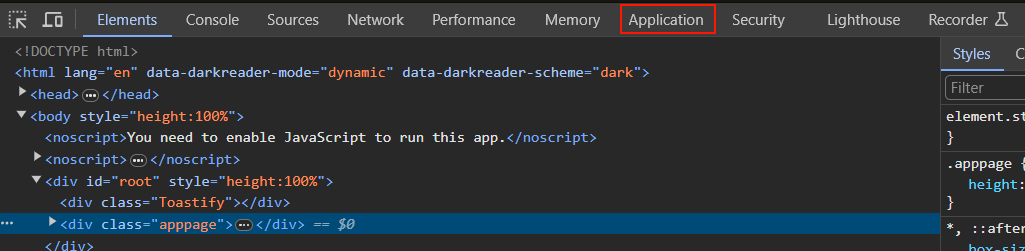

Once you're there, you will need to find a key called char_token. This should be a JSON file with two keys; value and ttl. You can ignore the ttl key; you only need the value key.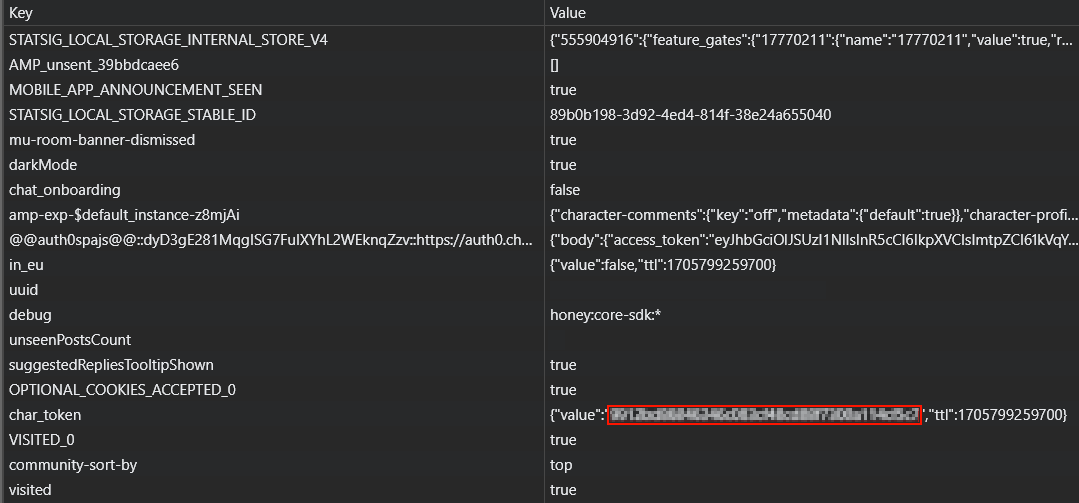
Copy the value of the value key, go to either the mod config (mcai.toml) and locate [General], where you will find the authorization field in which you can paste the value of value. Then you're good to go! Alternatively, you can use the /ai authorize <token> command in-game to automatically update the configuration file.
To register an AI to chat with, you can manually edit the configuration file, or you can use the command /ai register <character id> <aliases (optional)>. The aliases field is an optional space-separated list of alternative names to ping the AI with in chat, sort of like a nicknames system for the AI.
The character id field is used to get basic information about the character (like their name) and also as a way to know which character to send messages to. You can obtain the character ID of a character by going to c.ai, opening a chat with the character you want the ID from, and then copying the value of char= from the URL.
There are two methods to chat with registered AIs - pinging them in a message via @<AI's name/alias> or via the /ai talk <name> <text> command.
[insert gif of chatting with an AI here]
/ai authorize <token> - an admin-only command that changes the access token the mod uses to interface with c.ai in-game.
/ai context <name> <broadcast (optional)> - retrieves the last few messages from the chat with the AI. Note that changing the format in the MCAI config may or may not cause it to fail when retrieving the name of the message sender. As the command defaults to only giving you context, broadcast is an available option for admins to broadcast the last few messages to everyone in chat.
/ai disable <name> - like /ai unregister, but less permanent.
/ai enable <name> - undoes /ai disable.
/ai list - lists all available AIs and relevant information (such as whether they're enabled, and their aliases).
/ai register <character id> <aliases (optional)> - character ID is the ID obtained from the c.ai website. Registers an AI so that you can chat with 'em.
/ai unregister <character id> - permanently removes an AI.
/ai reload - reloads the mod's config so that any edits made with an external tool are loaded without requiring a complete restart of Minecraft.
/ai reset <name> - wipes the memory of an AI.
/ai talk <name> <text> - alternative to pinging the AI that's arguably more clunky.
Q: Is this mod client-side?
A: Yes! This is the client side version of MCAI.
Q: How do I talk with an AI?
A: Read this!
Q: I don't like the AIs randomly responding to my messages! How do I stop them from doing that?
A: You can disable random responses by switching the disableRandomResponses to true in the config's general section.
Q: Will you make a Forge port?
A: Nope! You're welcome to port it yourself, if you really want it on Forge, though.
Project description from Modrinth.
Pick your setup
Choose the version and loader you play, then open the matching release.
Check the dependencies, then try the file in a copied instance before changing a world you care about.
Recent files
mcai-client-1.20.4-2.jar
19 May 2024
mcai-client-1.20.4-1.jar
1 Mar 2024
Looking for an older file? The official Modrinth project page is in Resources.
 mod
Browse every structure in the game, and lots of info about them! Pack Tools for pack devs. Compactible with all mods!
 mod
Paste large texts into writable books and signs with automatic page splitting
 mod
Love Chinese mythology but all the other cultivation mods are low Minecraft versions? This Immortal Cultivation Mod (修仙) is a Minecraft mod that adds a Chinese fantasy cultivation system in Minecraft!