Minecraft version
Back to mods 
Modrinth · Minecraft mod
Fractal
Library for item subgroups for the creative menu
Choose a version Pick your version below, then grab the matching file.
Quick answer
Which Fractal release should I use?
Latest stable file 2.2.0+26.3-neoforge
Game version 26.3
Loader NeoForge
Fractal 2.2.0+26.3-neoforge targets 26.3 with NeoForge. Installation on the client is optional. Installation on the dedicated server is optional. No extra mods listed for this file.
Where it goes
Is Fractal required on the client, server, or both?
Installation on the client is optional. Installation on the dedicated server is optional.
Client Optional
Dedicated server Optional
Loader for this release NeoForge
Required install it here Optional supported, not mandatory Not supported do not install here Source doesn’t say do not assume
The source marks this as usable on both the client and server.
What else does Fractal 2.2.0+26.3-neoforge need?
2.2.0+26.3-neoforge. Change the file and its required mods may change too.
This file does not list any required mods. Do not add a library just because a different file uses it.
This file does not list any required or optional mods.
Before you install it
Add Fractal without breaking your instance.
Built for Fractal 2.2.0+26.3-neoforge. Pick another file and the loader, install side or required mods may change.
- 01
Stick to this file
Use 2.2.0+26.3-neoforge. It targets 26.3 with NeoForge; another release may have different loader, side or dependency requirements.
- 02
Bring the mods it needs
This file does not list any required mods. Do not add a library just because a different file uses it.
- 03
Put it on the correct side
Installation on the client is optional. Installation on the dedicated server is optional.
- 04
Pick the file you checked
Use the “Get this file” button beside 2.2.0+26.3-neoforge. It opens that exact file at the source.
About this project
What does Fractal add?
About Fractal
This repo is a fork of lib39/fractal by unascribed, with added support for styled groups. I will take care of this repo while unascribed is busy.
Fractal introduces item subgroups for the creative menu.
Why Fractal?
- Fractals Subgroups are very condensed, allowing you to add up to 12 subgroups for each of your tabs
- Creating a new ItemSubGroup only takes one line of code and no changes in the way you assign your items to groups. Just pass them the ItemSubGroup instead of your main item group
Limitations
- More than 12 subgroups per item group, while fully functional, will look weird.
- The tiny font used for the labels does not support full unicode
Examples
Vanilla Style Subgroups
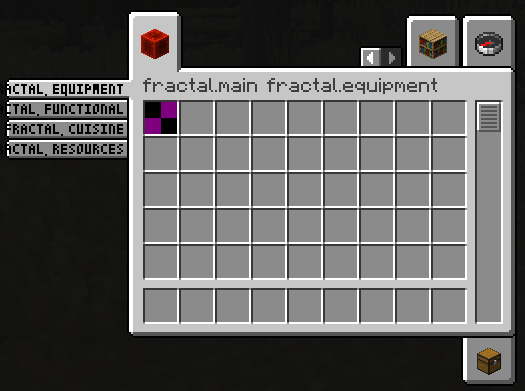
public static final Identifier GROUP_ID = new Identifier("mymod", "main");

public static final ItemGroup MAIN = FabricItemGroup.builder()
		.icon(() -> new ItemStack(Blocks.REDSTONE_BLOCK))
		.entries((displayContext, entries) -> entries.add(Items.APPLE))
		.displayName(Text.translatable("mymod.1"))
		.noRenderedName()
		.build();

public static final ItemGroup EQUIPMENT = new ItemSubGroup.Builder(MAIN, Text.translatable("itemGroup.mymod.equipment")).entries((displayContext, entries) -> entries.add(Items.APPLE)).build();
public static final ItemGroup FUNCTIONAL = new ItemSubGroup.Builder(MAIN, Text.translatable("itemGroup.mymod.functional")).styled(STYLE).entries((displayContext, entries) -> entries.add(Items.BAKED_POTATO)).build();
public static final ItemGroup CUISINE = new ItemSubGroup.Builder(MAIN, Text.translatable("itemGroup.mymod.cuisine")).entries((displayContext, entries) -> entries.add(Items.CACTUS)).build();
public static final ItemGroup RESOURCES = new ItemSubGroup.Builder(MAIN, Text.translatable("itemGroup.mymod.resources")).styled(STYLE).entries((displayContext, entries) -> entries.add(Items.DANDELION)).build();

@Override
public void onInitialize() {
    Registry.register(Registries.ITEM_GROUP, GROUP_ID, MAIN);
}
Applying a custom style
You are also able to apply a style to your ItemSubGroups, by supplying custom background, tab, subtab and scrollbar textures. You can even mix and match!
In this example, the first two ItemSubGroups use a custom style by supplying texture files that are being shipped with your mod. The latter two tabs use the vanilla style.
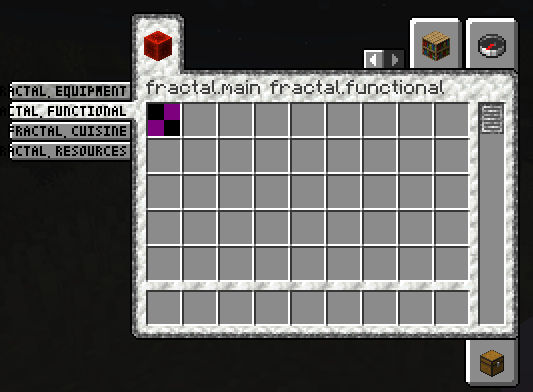
// Texture (put into \resources\assets\fractal\textures\gui\container\creative_inventory)
public static final Identifier BACKGROUND_TEXTURE = new Identifier("fractal", "textures/gui/container/creative_inventory/custom_background.png");

// Sprites (put into \resources\assets\fractal\textures\gui\sprites\container\creative_inventory)
public static final Identifier SCROLLBAR_ENABLED_TEXTURE = new Identifier("fractal", "container/creative_inventory/custom_scrollbar_enabled");
public static final Identifier SCROLLBAR_DISABLED_TEXTURE = new Identifier("fractal", "container/creative_inventory/custom_scrollbar_disabled");

public static final Identifier SUBTAB_SELECTED_TEXTURE = new Identifier("fractal", "container/creative_inventory/custom_subtab_selected");
public static final Identifier SUBTAB_UNSELECTED_TEXTURE = new Identifier("fractal", "container/creative_inventory/custom_subtab_unselected");

public static final Identifier TAB_TOP_FIRST_SELECTED_TEXTURE = new Identifier("fractal", "container/creative_inventory/custom_tab_top_first_selected");
public static final Identifier TAB_TOP_SELECTED_TEXTURE = new Identifier("fractal", "container/creative_inventory/custom_tab_top_selected");
public static final Identifier TAB_TOP_LAST_SELECTED_TEXTURE = new Identifier("fractal", "container/creative_inventory/custom_tab_top_last_selected");
public static final Identifier TAB_TOP_FIRST_UNSELECTED_TEXTURE = new Identifier("fractal", "container/creative_inventory/custom_tab_top_first_unselected");
public static final Identifier TAB_TOP_UNSELECTED_TEXTURE = new Identifier("fractal", "container/creative_inventory/custom_tab_top_unselected");
public static final Identifier TAB_TOP_LAST_UNSELECTED_TEXTURE = new Identifier("fractal", "container/creative_inventory/custom_tab_top_last_unselected");
public static final Identifier TAB_BOTTOM_FIRST_SELECTED_TEXTURE = new Identifier("fractal", "container/creative_inventory/custom_tab_bottom_first_selected");
public static final Identifier TAB_BOTTOM_SELECTED_TEXTURE = new Identifier("fractal", "container/creative_inventory/custom_tab_bottom_selected");
public static final Identifier TAB_BOTTOM_LAST_SELECTED_TEXTURE = new Identifier("fractal", "container/creative_inventory/custom_tab_bottom_last_selected");
public static final Identifier TAB_BOTTOM_FIRST_UNSELECTED_TEXTURE = new Identifier("fractal", "container/creative_inventory/custom_tab_bottom_first_unselected");
public static final Identifier TAB_BOTTOM_UNSELECTED_TEXTURE = new Identifier("fractal", "container/creative_inventory/custom_tab_bottom_unselected");
public static final Identifier TAB_BOTTOM_LAST_UNSELECTED_TEXTURE = new Identifier("fractal", "container/creative_inventory/custom_tab_bottom_last_unselected");

public static final ItemSubGroup.Style STYLE = new ItemSubGroup.Style.Builder()
        .background(BACKGROUND_TEXTURE)
        .scrollbar(SCROLLBAR_ENABLED_TEXTURE, SCROLLBAR_DISABLED_TEXTURE)
        .subtab(SUBTAB_SELECTED_TEXTURE, SUBTAB_UNSELECTED_TEXTURE)
        .tab(TAB_TOP_FIRST_SELECTED_TEXTURE, TAB_TOP_SELECTED_TEXTURE, TAB_TOP_LAST_SELECTED_TEXTURE, TAB_TOP_FIRST_UNSELECTED_TEXTURE, TAB_TOP_UNSELECTED_TEXTURE, TAB_TOP_LAST_UNSELECTED_TEXTURE,
                TAB_BOTTOM_FIRST_SELECTED_TEXTURE, TAB_BOTTOM_SELECTED_TEXTURE, TAB_BOTTOM_LAST_SELECTED_TEXTURE, TAB_BOTTOM_FIRST_UNSELECTED_TEXTURE, TAB_BOTTOM_UNSELECTED_TEXTURE, TAB_BOTTOM_LAST_UNSELECTED_TEXTURE)
        .build();

public static final ItemGroup EQUIPMENT = new ItemSubGroup.Builder(MAIN, Text.translatable("itemGroup.mymod.equipment")).styled(STYLE).entries((displayContext, entries) -> entries.add(Items.APPLE)).build();
public static final ItemGroup FUNCTIONAL = new ItemSubGroup.Builder(MAIN, Text.translatable("itemGroup.mymod.functional")).styled(STYLE).entries((displayContext, entries) -> entries.add(Items.BAKED_POTATO)).build();
public static final ItemGroup CUISINE = new ItemSubGroup.Builder(MAIN, Text.translatable("itemGroup.mymod.cuisine")).entries((displayContext, entries) -> entries.add(Items.CACTUS)).build();
public static final ItemGroup RESOURCES = new ItemSubGroup.Builder(MAIN, Text.translatable("itemGroup.mymod.resources")).entries((displayContext, entries) -> entries.add(Items.DANDELION)).build();
Project description from Modrinth.
Pick your setup
Fractal by Minecraft version and loader
Choose the version and loader you play, then open the matching release.
Minecraft version
26.2
2 loader buildsMinecraft version
26.1.2
1 loader buildMinecraft version
26.1.1
2 loader buildsMinecraft version
26.1
2 loader buildsMinecraft version
1.21.11
2 loader buildsMinecraft version
1.21.10
1 loader buildMinecraft version
1.21.9
1 loader buildMinecraft version
1.21.8
1 loader buildMinecraft version
1.21.7
1 loader buildMinecraft version
1.21.6
1 loader buildMinecraft version
1.21.5
1 loader buildShowing the newest 12 of 21 game versions. Older files are in the list below.
Check the dependencies, then try the file in a copied instance before changing a world you care about.
Recent files
Fractal versions and loaders
2.2.0+26.3-neoforge
Fractal-2.2.0+26.3-neoforge.jar
5 Nov 2026
Client Optional Server Optional Dependencies No extras listed Listed on Release listing
Check the 26.3 · NeoForge setup 26.3NeoForge release
1.7.0+26.3
fractal-1.7.0+26.3.jar
5 Nov 2026
Client Optional Server Optional Dependencies No extras listed Listed on Release listing
Check the 26.3 · Fabric setup 26.3Fabric release
2.1.2+26.2-neoforge
Fractal-2.1.2+26.2-neoforge.jar
20 Jun 2026
Client Optional Server Optional Dependencies No extras listed Listed on Release listing
Check the 26.2 · NeoForge setup 26.2NeoForge release
1.6.1+26.2
fractal-1.6.1+26.2.jar
20 Jun 2026
Client Optional Server Optional Dependencies No extras listed Listed on Release listing
Check the 26.2 · Fabric setup 26.2Fabric release
1.6.1+26.1
fractal-1.6.1+26.1.jar
26 Apr 2026
Client Optional Server Optional Dependencies No extras listed Listed on Release listing
Check the 26.1.2 · Fabric setup 26.126.1.126.1.2Fabric release
2.1.0+26.1-neoforge
fractal-2.1.0+26.1-neoforge.jar
5 Apr 2026
Client Optional Server Optional Dependencies No extras listed Listed on Release listing
Check the 26.1.1 · NeoForge setup 26.126.1.1NeoForge release
1.6.0+26.1
fractal-1.6.0+26.1.jar
5 Apr 2026
Client Optional Server Optional Dependencies No extras listed Listed on Release listing
Check the 26.1.1 · Fabric setup 26.126.1.1Fabric release
1.5.0+1.21.11
fractal-1.5.0+1.21.11.jar
16 Mar 2026
Client Optional Server Optional Dependencies No extras listed Listed on Release listing
Check the 1.21.11 · Fabric setup 1.21.11Fabric release
1.4.0+1.21.1
fractal-1.4.0+1.21.1.jar
16 Mar 2026
Client Optional Server Optional Dependencies No extras listed Listed on Release listing
Check the 1.21.1 · Fabric setup 1.21.1Fabric release
2.1.0+1.21.11-neoforge
fractal-2.1.0+1.21.11-neoforge.jar
16 Mar 2026
Client Optional Server Optional Dependencies No extras listed Listed on Release listing
Check the 1.21.11 · NeoForge setup 1.21.11NeoForge release
1.7.0+1.21.1-neoforge
fractal-1.7.0+1.21.1-neoforge.jar
16 Mar 2026
Client Optional Server Optional Dependencies No extras listed Listed on Release listing
Check the 1.21.1 · NeoForge setup 1.21.1NeoForge release
2.0.0+1.21.11-neoforge
fractal-neoforge-2.0.0+1.21.11-neoforge.jar
23 Dec 2025
Client Optional Server Optional Dependencies No extras listed Listed on Release listing
Check the 1.21.11 · NeoForge setup 1.21.11NeoForge release
Looking for an older file? The official Modrinth project page is in Resources.
 mod
CurseForge + Modrinth · Minecraft
Antarchy
Adding 45+ mobs, 8+ bosses, 3 fleshed out dimensions, and more
 mod
CurseForge + Modrinth · Minecraft
Terracart Reloaded
Terraria Cart in Minecraft, Right click track and have fun!
 mod
CurseForge + Modrinth · Minecraft
Polydium
Well-rounded client-side optimization mod. Extremely compatible Vulkan backend for 1.21.11-26.1.2. By Polyfrost, best with OneClient.