Searchables Optional for Emotecraft (Forge) emotecraft-neoforge-for-MC1.21.7-3.0.0-b.build.139
optionalMatching file found Matched file: Searchables-neoforge-1.21.8-1.0.2.jar
CurseForge · Minecraft mod
Create your own emotes in Minecraft.
Quick answer
Emotecraft (Forge) emotecraft-neoforge-for-MC1.21.7-3.0.0-b.build.139 targets 1.21.8, 1.21.7 with NeoForge. The project page does not say whether this file belongs on the client, dedicated server, or both. All 1 required mods have matching files.
Where it goes
The project page does not say whether this file belongs on the client, dedicated server, or both.
The source does not explicitly classify this release as client-only or server-only.
emotecraft-neoforge-for-MC1.21.7-3.0.0-b.build.139 on 1.21.8. Every mod below is checked against that same setup.
Install Player Animation Library first. We found matching files for this game-version and loader setup.
We only count dependency files that match this setup. A file for another loader does not fill the gap.
Before you install it
Built for Emotecraft (Forge) emotecraft-neoforge-for-MC1.21.7-3.0.0-b.build.139 on 1.21.8. Pick another file and the loader, install side or required mods may change.
Use emotecraft-neoforge-for-MC1.21.7-3.0.0-b.build.139. It targets 1.21.8, 1.21.7 with NeoForge; another release may have different loader, side or dependency requirements.
Install Player Animation Library first. We found matching files for this game-version and loader setup.
The project page does not say whether this file belongs on the client, dedicated server, or both.
Use the “Get this file” button beside emotecraft-neoforge-for-MC1.21.7-3.0.0-b.build.139. It opens that exact file at the source.
About this project
To avoid security risks, only download the mod from official sources:
🚫 Do NOT download from unofficial sources!
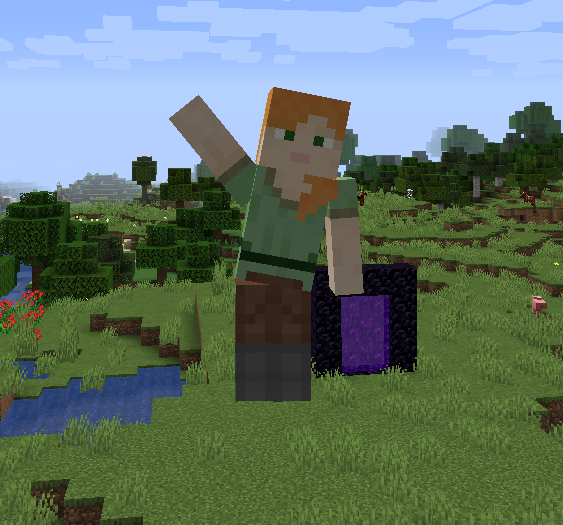
Enjoy default emotes like waving!
Create your own emotes and use them in-game.
Use Blender or Blockbench to design custom emotes.
No need to manually share emotes—sync them seamlessly with other players!
mods folder.emotecraft-*version*-bukkit.jar as a plugin.🚀 You can still connect to vanilla servers - the mod just won’t be active. You can also use online-emotes to play emotes on vanilla servers!
B to open the emote selection wheel..minecraft/emotes.📚 Learn more: Usage Guide

Project description from CurseForge.
Pick your setup
Choose the version and loader you play, then open the matching release.
Showing the newest 12 of 14 game versions. Older files are in the list below.
Check the dependencies, then try the file in a copied instance before changing a world you care about.
Recent files
emotecraft-neoforge-for-MC1.21.7-3.0.0-b.build.139.jar
4 Jan 2026
emotecraft-neoforge-for-MC1.21.7-3.0.0-b.build.127.jar
21 Oct 2025
emotecraft-neoforge-for-MC1.21.7-3.0.0-b.build.123.jar
29 Sept 2025
emotecraft-neoforge-for-MC1.21.7-3.0.0-b.build.122.jar
21 Sept 2025
emotecraft-neoforge-for-MC1.21.7-3.0.0-b.build.121.jar
20 Sept 2025
emotecraft-neoforge-for-MC1.21.7-3.0.0-b.build.120.jar
4 Sept 2025
emotecraft-neoforge-for-MC1.21.7-3.0.0-b.build.119.jar
30 Aug 2025
emotecraft-neoforge-for-MC1.21.7-3.0.0-a.build.112.jar
19 Aug 2025
emotecraft-neoforge-for-MC1.21.7-3.0.0-a.build.110.jar
15 Aug 2025
emotecraft-neoforge-for-MC1.21.7-3.0.0-a.build.109.jar
12 Aug 2025
emotecraft-neoforge-for-MC1.21.7-3.0.0-a.build.108.jar
17 Jul 2025
Looking for an older file? The official CurseForge project page is in Resources.
 mod
A flexible and expandable accessory/equipment API for users and developers.
 mod
A mod that modifies various vanilla HUD elements, such as the bossbar, action bar, sidebar / scoreboard, hotbar, title / subtitle, and more. By Polyfrost, best with OneClient.
 mod
Terrestria is a detailed and vibrant biomes mod for Minecraft running on the Fabric mod loader.