VaultUnlocked Optional for GriefPrevention3D 19.0.3
optionalMatching file found Matched file: 2.20.3

Modrinth · Minecraft mod
A fork of GriefPrevention that adds 3D subdivisions
Quick answer
GriefPrevention3D 19.0.3 targets 1.8.8, 1.8.9, 1.9 with bukkit, Fabric, folia. The project page does not say whether this file belongs on the client, dedicated server, or both. All 1 required mods have matching files.
Where it goes
The project page does not say whether this file belongs on the client, dedicated server, or both.
The source does not explicitly classify this release as client-only or server-only.
19.0.3. Change the file and its required mods may change too.
Install Fabric API first. We found matching files for this game-version and loader setup.
We only count dependency files that match this setup. A file for another loader does not fill the gap.
Before you install it
Built for GriefPrevention3D 19.0.3. Pick another file and the loader, install side or required mods may change.
Use 19.0.3. It targets 1.8.8, 1.8.9, 1.9 with bukkit, Fabric, folia; another release may have different loader, side or dependency requirements.
Install Fabric API first. We found matching files for this game-version and loader setup.
The project page does not say whether this file belongs on the client, dedicated server, or both.
Use the “Get this file” button beside 19.0.3. It opens that exact file at the source.
About this project
The self-service anti-griefing plugin for Minecraft servers — now with full 3D subdivisions




Stop responding to grief and prevent it instead. GriefPrevention stops grief before it starts automatically without any effort from administrators, and with very little (self service) effort from players.
GriefPrevention3D is a fork of the popular GriefPrevention plugin that adds full 3D subdivision support to land claims. Players can now create subdivisions with precise height boundaries for more complex builds.
/3dsubdivideclaims
/3dadminclaims
/aclaim mode admin3d to switch to 3D admin claim mode.griefprevention.adminclaims permission.AllowShapedClaims: false
AllowShapedSubClaims: false
/shapedclaims/shapedsubdivideclaims/mergeclaims
/mergeclaims, then go to the second claim and run /mergeclaims again or right-click with your golden shovel. Both claims and the area between them become one claim./shapedclaims — shape a path that overlaps another claim you own and they merge automatically.AllowNestedSubClaims: false
VisualizationGlow: false
enabled: true
/claim create/claim trust/claim abandonGriefPrevention:
Claims:
MinimumDistance: 0
/claim trust <player> neighbor — Grant a player neighbor trust so they can bypass minimum distance checks for your claims./neighbortrust <player> (alias: /distancetrust <player>) — Standalone command for the same purpose./claim distance check — Show the configured minimum distance and list nearby claims./claim distance toggle — While standing in your own claim, toggle whether ALL players can bypass minimum distance for that claim./scrollresize/witherexplosionsPerPlayerLocale: false in config.yml./claim abandon or /claim trust during that resize session/restrictsubclaim while standing in main claims now instantly restricts all subdivisions inside/trustlist now shows inherited permissions/managetrust and griefprevention.managetrust. Permission-node trust uses /permissiontrust <permission> <access|container|build|manage> or /aclaim trust permission <permission> <type>. It requires griefprevention.permissiontrust, inherited by griefprevention.adminclaims; bare dotted nodes and bracketed [permission.node] targets are accepted.griefprevention.eavesdrop permission to griefprevention.eavesdrop.pm & griefprevention.eavesdrop.softmute for more granular permission controlGriefPrevention3D ships with translations for every language below. Set one for the whole server withLocale: in config.yml, or leave PerPlayerLocale: true and each player is served their own client language,
falling back to English.
| Code | Language |
|---|---|
en |
English |
cs_CZ |
Czech |
de_DE |
German |
es |
Spanish |
fr_FR |
French |
id_ID |
Indonesian (Bahasa Indonesia) |
ja_JP |
Japanese |
ms_MY |
Malay |
pl_PL |
Polish |
pt_BR |
Portuguese (Brazil) |
ru_RU |
Russian |
tr_TR |
Turkish |
uk_UA |
Ukrainian |
zh_CN |
Chinese (Simplified) |
en_PT |
Pirate Speak |
See the Locale guide for how to customise messages or
add a language of your own.
For usage instructions, see the official GriefPrevention3D Documentation.
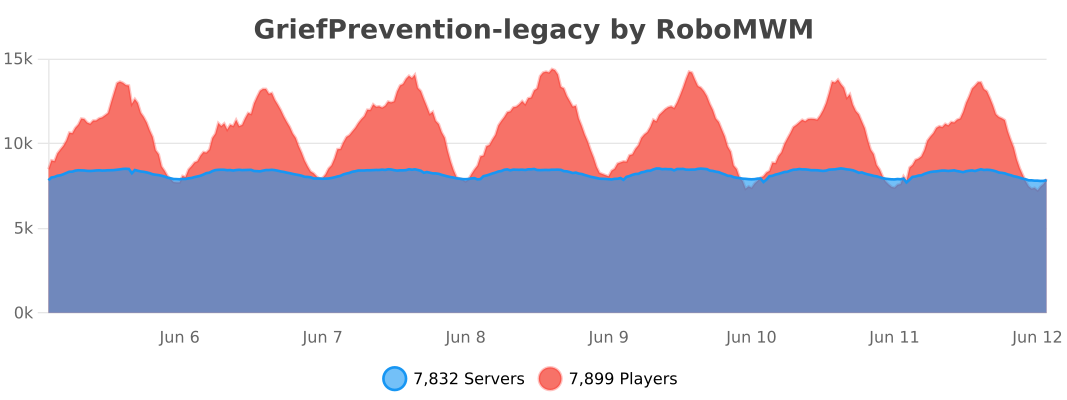
This is a fork of GriefPrevention by RoboMWM.
Project description from Modrinth.
Pick your setup
Choose the version and loader you play, then open the matching release.
Showing the newest 12 of 67 game versions. Older files are in the list below.
Check the dependencies, then try the file in a copied instance before changing a world you care about.
Recent files
GriefPrevention3D.jar
27 Oct 2026
GriefPrevention3D.jar
27 Oct 2026
GriefPrevention3D.jar
23 Oct 2026
GriefPrevention3D.jar
19 Oct 2026
GriefPrevention3D.jar
17 Oct 2026
GriefPrevention3D.jar
17 Oct 2026
GriefPrevention3D.jar
17 Oct 2026
GriefPrevention3D.jar
17 Oct 2026
GriefPrevention3D.jar
11 Oct 2026
GriefPrevention3D.jar
11 Oct 2026
GriefPrevention3D.jar
10 Oct 2026
GriefPrevention3D.jar
10 Oct 2026
Looking for an older file? The official Modrinth project page is in Resources.
 mod
modExplore and discover an intuitive and big magic system with more than 180 spells. Recreation of the old RPG classic mod
 mod
modMojang built a portal frame in the ancient city and never lit it. Now it is the only way into the Nether.
 mod
modFlooring made of wood