Minecraft version
Back to mods 
CurseForge · Minecraft mod
Emoji Type (Fabric/Quilt/NeoForge)
A client-side mod that makes it easier to type emoji (in chat, on signs, etc).
Choose a version Pick your version below, then grab the matching file.
Quick answer
Which Emoji Type (Fabric/Quilt/NeoForge) release should I use?
Latest stable file emojitype 3.1.0-26.2 neoforge
Game version 26.1, 26.1.1, 26.1.2
Loader NeoForge
Emoji Type (Fabric/Quilt/NeoForge) emojitype 3.1.0-26.2 neoforge targets 26.1, 26.1.1, 26.1.2 with NeoForge. The project page does not say whether this file belongs on the client, dedicated server, or both. No extra mods listed for this file.
Where it goes
Is Emoji Type (Fabric/Quilt/NeoForge) required on the client, server, or both?
The project page does not say whether this file belongs on the client, dedicated server, or both.
Client Source doesn’t say
Dedicated server Source doesn’t say
Loader for this release NeoForge
Required install it here Optional supported, not mandatory Not supported do not install here Source doesn’t say do not assume
The source does not explicitly classify this release as client-only or server-only.
What else does Emoji Type (Fabric/Quilt/NeoForge) emojitype 3.1.0-26.2 neoforge need?
emojitype 3.1.0-26.2 neoforge. Change the file and its required mods may change too.
This file does not list any required mods. Do not add a library just because a different file uses it.
This file does not list any required or optional mods.
Before you install it
Add Emoji Type (Fabric/Quilt/NeoForge) without breaking your instance.
Built for Emoji Type (Fabric/Quilt/NeoForge) emojitype 3.1.0-26.2 neoforge. Pick another file and the loader, install side or required mods may change.
- 01
Stick to this file
Use emojitype 3.1.0-26.2 neoforge. It targets 26.1, 26.1.1, 26.1.2 with NeoForge; another release may have different loader, side or dependency requirements.
- 02
Bring the mods it needs
This file does not list any required mods. Do not add a library just because a different file uses it.
- 03
Put it on the correct side
The project page does not say whether this file belongs on the client, dedicated server, or both.
- 04
Pick the file you checked
Use the “Get this file” button beside emojitype 3.1.0-26.2 neoforge. It opens that exact file at the source.
About this project
What does Emoji Type (Fabric/Quilt/NeoForge) add?
🙂 Emoji Type
We recommend Modrinth for a better browsing experience.
This is a client-side mod. Installing it on a server won't do anything.
This mod allows you to type some emoji/symbols more easily in Minecraft. To be clear, this mod (technically) does not add any emoji to the game, it only makes typing the ones already in the game easier. For this reason, emoji typed will be visible to anyone else on a server and will still be there (on signs, books, etc) if you uninstall the mod. I can not absolutely guarantee all symbols/emoji will work on all servers, some servers have plugins that mess with chat and there is really nothing I can do about that.
Typing Emojis
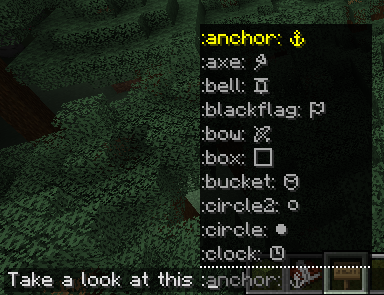
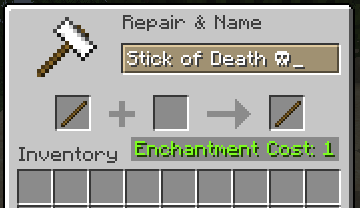
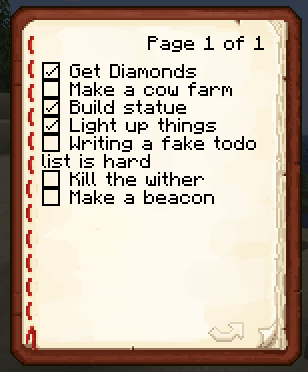
To type an emoji in chat, simply type a ":" (colon), after that a list of all possible emoji keywords will appear. Once you type a keyword it will be replaced with the corresponding emoji or symbol. If you want to type an emoji outside of chat (anvil, sign, etc) the list won't appear but the keywords all still work.
Gallery
In chat:
In anvil:
In book:
On sign:
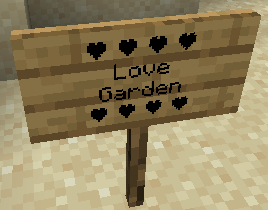
Project description from CurseForge.
Pick your setup
Emoji Type (Fabric/Quilt/NeoForge) by Minecraft version and loader
Choose the version and loader you play, then open the matching release.
Minecraft version
26.1.2
3 loader buildsMinecraft version
26.1.1
3 loader buildsMinecraft version
26.1
3 loader buildsMinecraft version
1.21.11-snapshot
1 loader buildMinecraft version
1.21.11
3 loader buildsMinecraft version
1.21.10
3 loader buildsMinecraft version
1.21.9-snapshot
1 loader buildMinecraft version
1.21.9
3 loader buildsMinecraft version
1.21.8
3 loader buildsMinecraft version
1.21.7
3 loader buildsMinecraft version
1.21.6-snapshot
3 loader buildsShowing the newest 12 of 52 game versions. Older files are in the list below.
Check the dependencies, then try the file in a copied instance before changing a world you care about.
Recent files
Emoji Type (Fabric/Quilt/NeoForge) versions and loaders
emojitype 3.1.0-26.2 neoforge
emoji-type-3.1.0-26.2-neoforge.jar
25 Jun 2026
Client Source doesn’t say Server Source doesn’t say Dependencies No extras listed Listed on Release listing
Check the 26.2 · NeoForge setup NeoForge26.126.1.126.1.2 release
emojitype 3.1.0-26.2 fabric
emoji-type-3.1.0-26.2-fabric.jar
25 Jun 2026
Client Source doesn’t say Server Source doesn’t say Dependencies No extras listed Listed on Release listing
Check the 26.2 · Fabric setup Fabric26.126.1.126.1.2 release
3.1.0-26.2-fabric
emoji-type-3.1.0-26.2-fabric.jar
25 Jun 2026
Client Required Server Not supported Dependencies No extras listed Listed on Release listing
Check the 26.2 · Fabric setup 26.126.1.126.1.226.2 release
3.1.0-26.2-neoforge
emoji-type-3.1.0-26.2-neoforge.jar
25 Jun 2026
Client Required Server Not supported Dependencies No extras listed Listed on Release listing
Check the 26.2 · NeoForge setup 26.126.1.126.1.226.2 release
emoji-type-3.0.0-1.21.10-neoforge.jar
5 Feb 2026
Client Source doesn’t say Server Source doesn’t say Dependencies No extras listed Listed on Release listing
Check the 1.21.11-snapshot · NeoForge setup NeoForge1.21.9-snapshot1.21.91.21.10 release
emoji-type-3.0.0-1.21.10-fabric.jar
5 Feb 2026
Client Source doesn’t say Server Source doesn’t say Dependencies No extras listed Listed on Release listing
Check the 1.21.11 · Fabric setup Fabric1.21.91.21.101.21.11 release
2.3.4-1.21.10-neoforge
emoji-type-2.3.4-1.21.10-neoforge.jar
18 Dec 2025
Client Required Server Not supported Dependencies No extras listed Listed on Release listing
Check the 1.21.11 · NeoForge setup 1.21.101.21.111.21.9NeoForge release
emoji-type-2.3.4-1.21.10-neoforge.jar
18 Dec 2025
Client Source doesn’t say Server Source doesn’t say Dependencies No extras listed Listed on Release listing
Check the 1.21.11-snapshot · NeoForge setup NeoForge1.21.9-snapshot1.21.91.21.10 release
emoji-type-2.3.4-1.21.10-fabric.jar
18 Dec 2025
Client Source doesn’t say Server Source doesn’t say Dependencies No extras listed Listed on Release listing
Check the 1.21.11 · Fabric setup Fabric1.21.91.21.101.21.11 release
emoji-type-2.3.3-1.21.10-neoforge.jar
25 Nov 2025
Client Source doesn’t say Server Source doesn’t say Dependencies No extras listed Listed on Release listing
Check the 1.21.10 · NeoForge setup NeoForge1.21.91.21.10 release
emoji-type-2.3.3-1.21.10-fabric.jar
25 Nov 2025
Client Source doesn’t say Server Source doesn’t say Dependencies No extras listed Listed on Release listing
Check the 1.21.10 · Fabric setup Fabric1.21.91.21.10 release
2.3.3-1.21.10-neoforge
emoji-type-2.3.3-1.21.10-neoforge.jar
25 Nov 2025
Client Required Server Not supported Dependencies No extras listed Listed on Release listing
Check the 1.21.10 · NeoForge setup 1.21.101.21.9NeoForge release
Looking for an older file? The official CurseForge project page is in Resources.
 mod
CurseForge · Minecraft
The Forgotten Gates
Seal any mod until it's earned — after a number of in-game days or by unlocking an advancement. Includes a randomizer and a setup screen for new worlds.
 mod
CurseForge · Minecraft
Sol's MMNM Addon: AbilityProtection Rework (QoL, Improvements)
This addon is an extension and quality of life rework for MMNM's AbilityProtection system.
 mod
CurseForge · Minecraft
Penned In
Store, breed and farm animals in a single block, with no entity lag. Pens change their look to suit what's inside, breed, milk, shear and butcher on their own, and Hopper Pens pipe out items, milk and liquid XP