Fabric API Needed by Effect Tooltips 26.3.0.1
requiredMatching file found Matched file: 0.166.2+26.3
Modrinth · Minecraft mod
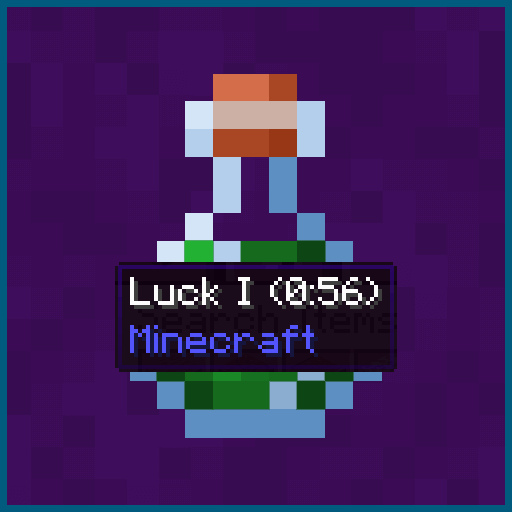
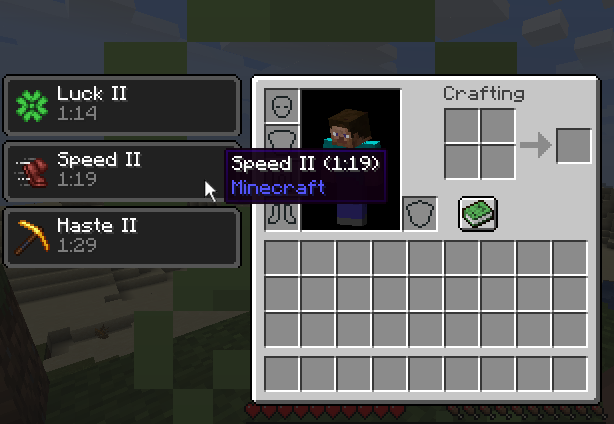
Adds hover tooltips to the status effects region of the player inventory screen.
Quick answer
Effect Tooltips 26.3.0.1 targets 26.3 with Fabric. Installation on the client is optional. Installation on the dedicated server is optional. All 1 required mods have matching files.
Where it goes
Installation on the client is optional. Installation on the dedicated server is optional.
The source marks this as usable on both the client and server.
26.3.0.1 on Fabric. Every mod below is checked against that same setup.
Install Fabric API first. We found matching files for this game-version and loader setup.
We only count dependency files that match this setup. A file for another loader does not fill the gap.
Before you install it
Built for Effect Tooltips 26.3.0.1 on Fabric. Pick another file and the loader, install side or required mods may change.
Use 26.3.0.1. It targets 26.3 with Fabric; another release may have different loader, side or dependency requirements.
Install Fabric API first. We found matching files for this game-version and loader setup.
Installation on the client is optional. Installation on the dedicated server is optional.
Use the “Get this file” button beside 26.3.0.1. It opens that exact file at the source.
About this project
This mod adds a tooltip to status effects displayed in the player inventory. The tooltip contains useful information about the effect such as the name of the mod that added it to the game. The mod also provides an event based API that allows other mods to add new tooltip entries or modify the tooltip in other ways.
Like the mod and want to support me?
This project is sponsored by Nodecraft. Use code DARKHAX for 30% off your first month of service!
Project description from Modrinth.
Pick your setup
Choose the version and loader you play, then open the matching release.
Showing the newest 12 of 19 game versions. Older files are in the list below.
Check the dependencies, then try the file in a copied instance before changing a world you care about.
Recent files
EffectTooltips-fabric-MC26.3-26.3.0.1.jar
27 Sept 2026
EffectTooltips-fabric-MC26.2-26.2.0.1.jar
8 Jul 2026
EffectTooltips-fabric-MC26.1.2-26.1.2.1.jar
8 Jul 2026
EffectTooltips-Fabric-1.20.1-9.0.3.jar
12 Feb 2026
EffectTooltips-Fabric-1.20.4-12.0.2.jar
1 Feb 2024
EffectTooltips-Fabric-1.20.4-12.0.1.jar
13 Jan 2024
EffectTooltips-Fabric-1.20.3-11.0.1.jar
12 Jan 2024
EffectTooltips-Fabric-1.20.2-10.0.2.jar
8 Jan 2024
EffectTooltips-Fabric-1.20.2-10.0.1.jar
3 Jan 2024
EffectTooltips-Fabric-1.20.1-9.0.2.jar
21 Aug 2023
EffectTooltips-Fabric-1.20.1-9.0.1.jar
17 Jul 2023
EffectTooltips-Fabric-1.20-8.0.1.jar
22 Jun 2023
Looking for an older file? The official Modrinth project page is in Resources.
 mod
Mod that aims to fix multiple issues with the Minecraft statistics.🤓
 mod
Create custom summoning rituals for items, mobs and commands.
 mod
A mod that is an extension for the SquareMap mod. It adds additional functionality related to banners within the game: using banner to create markers that visible on the world map. Inspired by squaremap-banners plugin.