Minecraft version
Back to mods 
CurseForge · Minecraft mod
Better Zoom
Smoothly zoom with wheel and hotkeys as much as you want, in a simple way with customizations
Choose a version Pick your version below, then grab the matching file.
Quick answer
Which Better Zoom release should I use?
Latest stable file [Forge 1.21.1] Better Zoom v3.1.1
Game version 1.21.1
Loader Forge
Better Zoom [Forge 1.21.1] Better Zoom v3.1.1 targets 1.21.1 with Forge. The project page does not say whether this file belongs on the client, dedicated server, or both. No extra mods listed for this file.
Where it goes
Is Better Zoom required on the client, server, or both?
The project page does not say whether this file belongs on the client, dedicated server, or both.
Client Source doesn’t say
Dedicated server Source doesn’t say
Loader for this release Forge
Required install it here Optional supported, not mandatory Not supported do not install here Source doesn’t say do not assume
The source does not explicitly classify this release as client-only or server-only.
What else does Better Zoom [Forge 1.21.1] Better Zoom v3.1.1 need?
[Forge 1.21.1] Better Zoom v3.1.1. Change the file and its required mods may change too.
This file does not list any required mods. Do not add a library just because a different file uses it.
This file does not list any required or optional mods.
Before you install it
Add Better Zoom without breaking your instance.
Built for Better Zoom [Forge 1.21.1] Better Zoom v3.1.1. Pick another file and the loader, install side or required mods may change.
- 01
Stick to this file
Use [Forge 1.21.1] Better Zoom v3.1.1. It targets 1.21.1 with Forge; another release may have different loader, side or dependency requirements.
- 02
Bring the mods it needs
This file does not list any required mods. Do not add a library just because a different file uses it.
- 03
Put it on the correct side
The project page does not say whether this file belongs on the client, dedicated server, or both.
- 04
Pick the file you checked
Use the “Get this file” button beside [Forge 1.21.1] Better Zoom v3.1.1. It opens that exact file at the source.
About this project
What does Better Zoom add?

Better Zoom v3.1, allows you to zoom smoothly with wheel scrolling and hotkeys. All of that without any mixin/asm, in order to improve the speed.
The goal of this mod is to provide a simple & suitable smooth zoom with both wheel and hotkeys. It still offers customizations (see screenshots below) while running without any mixin or any additional library.
It's also meant to be optimized and compatible but still including all the necessary features and not fancy stuff.

Press "c" by default to toggle zoom. (Configurable keybind)
Press "+"/"-" or scroll with wheel to zoom in/out (Configurable) - You can also hold these keybinds!
*A new video is being made for 3.1, a lot changed since then!

Configuration GUI (Forge 1.20.1 v3.1.0 reference): (open with 'Alt+c' keybind by default) and at mods/config..:
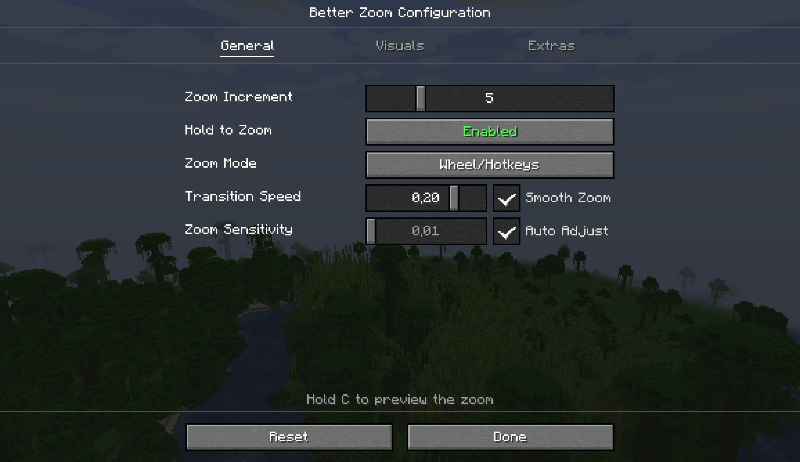
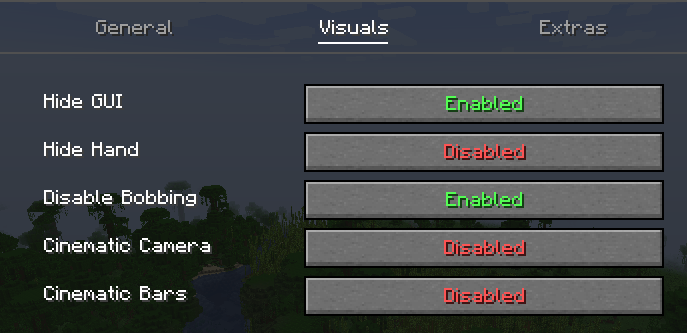
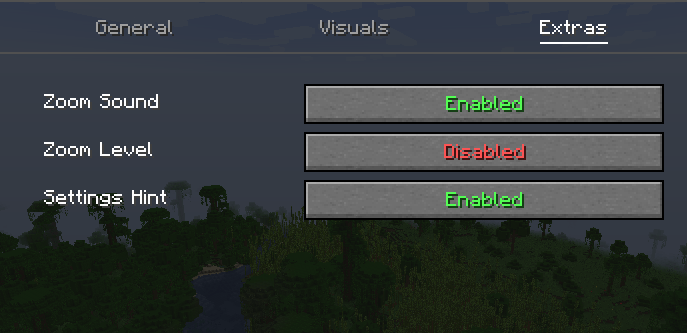
(Tooltips are avilable ingame for more informations)
Custom keybinds: (the ALT+C and C keybind are marked as conflicting but it's fine)
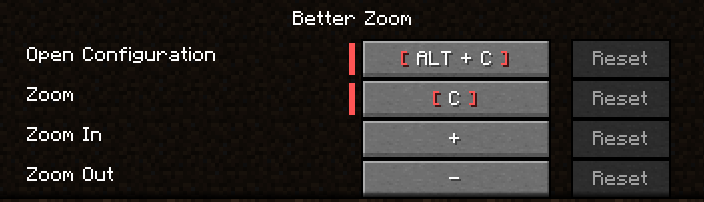
*You can even hold the keybinds of zoom in/out

Translations are available for English and French yet. Feel free to suggest better one, or directly add translations on github with a pull request!
Feel free to add the mod in any modpack published on curseforge! This is highly appreciated.
The code is open source: https://github.com/AwesomeHippo/BetterZoom under MIT license
Project description from CurseForge.
Pick your setup
Better Zoom by Minecraft version and loader
Choose the version and loader you play, then open the matching release.
Minecraft version
1.20.5
1 loader buildMinecraft version
1.20.4
1 loader buildMinecraft version
1.20.3
1 loader buildMinecraft version
1.20.2
1 loader buildMinecraft version
1.20.1
1 loader buildMinecraft version
1.18.2
1 loader buildCheck the dependencies, then try the file in a copied instance before changing a world you care about.
Recent files
Better Zoom versions and loaders
[Forge 1.21.1] Better Zoom v3.1.1
betterzoom-forge-1.21.1-3.1.1.jar
7 Nov 2026
Client Source doesn’t say Server Source doesn’t say Dependencies No extras listed Listed on Release listing
Check the 1.21.1 · Forge setup Forge1.21.1 release
[Forge 1.18.2] Better Zoom v3.1.1
betterzoom-forge-1.18.2-3.1.1.jar
2 Nov 2026
Client Source doesn’t say Server Source doesn’t say Dependencies No extras listed Listed on Release listing
Check the 1.18.2 · Forge setup Forge1.18.2 release
[Neo 1.21.1] Better Zoom v3.1.1
betterzoom-neoforge-1.21.1-3.1.1.jar
31 Oct 2026
Client Source doesn’t say Server Source doesn’t say Dependencies No extras listed Listed on Release listing
Check the 1.21.1 · NeoForge setup 1.21.1NeoForge release
[Forge 1.20.1] Better Zoom v3.1.1
betterzoom-forge-1.20.1-3.1.1.jar
31 Oct 2026
Client Source doesn’t say Server Source doesn’t say Dependencies No extras listed Listed on Release listing
Check the 1.20.1 · Forge setup 1.20.1Forge release
[Neo 1.21.1] Better Zoom 3.0.0
betterzoom-neoforge-1.21.1-3.0.0.jar
30 Oct 2026
Client Source doesn’t say Server Source doesn’t say Dependencies No extras listed Listed on Release listing
Check the 1.21.1 · NeoForge setup 1.21.1NeoForge release
[Forge 1.20.1] Better Zoom 3.0.0
betterzoom-forge-1.20.1-3.0.0.jar
30 Oct 2026
Client Source doesn’t say Server Source doesn’t say Dependencies No extras listed Listed on Release listing
Check the 1.20.1 · Forge setup 1.20.1Forge release
[Neo 1.21.1] Better Zoom 2.9.0
betterzoom-neoforge-1.21.1-2.9.0.jar
15 Aug 2026
Client Source doesn’t say Server Source doesn’t say Dependencies No extras listed Listed on Release listing
Check the 1.21.1 · NeoForge setup 1.21.1NeoForge release
[Forge 1.20.1] Better Zoom 2.9.0
betterzoom-forge-1.20.1-2.9.0.jar
15 Aug 2026
Client Source doesn’t say Server Source doesn’t say Dependencies No extras listed Listed on Release listing
Check the 1.20.4 · Forge setup 1.20.21.20.1Forge1.20.4 release
[Neo 1.21.1] Better Zoom 2.8.0
betterzoom-neoforge-1.21.1-2.8.0.jar
9 Aug 2026
Client Source doesn’t say Server Source doesn’t say Dependencies No extras listed Listed on Release listing
Check the 1.21.1 · NeoForge setup 1.21.1NeoForge release
[Forge 1.20.1] Better Zoom 2.8.0
betterzoom-forge-1.20.1-2.8.0.jar
9 Aug 2026
Client Source doesn’t say Server Source doesn’t say Dependencies No extras listed Listed on Release listing
Check the 1.20.4 · Forge setup 1.20.21.20.1Forge1.20.4 release
[Neo 1.21.1] Better Zoom 2.7.1
betterzoom-neoforge-1.21.1-2.7.1.jar
2 Jul 2026
Client Source doesn’t say Server Source doesn’t say Dependencies No extras listed Listed on Release listing
Check the 1.21.1 · NeoForge setup 1.21.1NeoForge release
[Forge 1.20.1] Better Zoom 2.7.1
betterzoom-forge-1.20.1-2.7.1.jar
2 Jul 2026
Client Source doesn’t say Server Source doesn’t say Dependencies No extras listed Listed on Release listing
Check the 1.20.4 · Forge setup 1.20.21.20.1Forge1.20.4 release
Looking for an older file? The official CurseForge project page is in Resources.
 mod
CurseForge · Minecraft
Curses and Calamity
Jujutsu Kaisen Mod, Continuation of sorcery age
 mod
CurseForge · Minecraft
Create: Echoes Core
The core mod of Create: Echoes of the Great Derailment: the Crank Press, fixes and optimisations for the mods of the pack, NPC skins and poses.
 mod
CurseForge · Minecraft
Create: Echoes RPG
The story campaign of Create: Echoes of the Great Derailment: 17 mentors, 360+ quests across twelve ages, a journal and a camp that grows into a town.