Fabric API Needed by Fabric Custom Names 0.4.4-26.2
requiredMatching file found Matched file: 0.157.0+26.2
Modrinth · Minecraft mod
Custom names (prefixes, suffixes and nicknames) for Fabric servers
Quick answer
Fabric Custom Names 0.4.4-26.2 targets 26.2 with Fabric. Do not install it on the client. It must be installed on the dedicated server. All 1 required mods have matching files.
Where it goes
Do not install it on the client. It must be installed on the dedicated server.
This file is marked server-only.
0.4.4-26.2. Change the file and its required mods may change too.
Install Fabric API first. We found matching files for this game-version and loader setup.
We only count dependency files that match this setup. A file for another loader does not fill the gap.
Before you install it
Built for Fabric Custom Names 0.4.4-26.2. Pick another file and the loader, install side or required mods may change.
Use 0.4.4-26.2. It targets 26.2 with Fabric; another release may have different loader, side or dependency requirements.
Install Fabric API first. We found matching files for this game-version and loader setup.
Do not install it on the client. It must be installed on the dedicated server.
Use the “Get this file” button beside 0.4.4-26.2. It opens that exact file at the source.
About this project
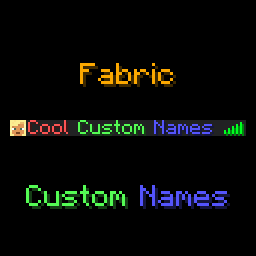
This mod adds a /name, a /itemname and a /itemlore command to Minecraft, which players can use to set a prefix, suffix, or nickname,
or give their items colourful names and lore. Mostly designed to be used in small, private servers, although through the
use of name groups you can also limit which players can use which prefixes/suffixes/nicknames.
Optionally, the mod also has a feature to display custom names in-game, above a player's head. This also features options
to customise the style (background colour and text opacity), as well as customising the lines of text shown.
Supports prefixes/suffixes set with LuckPerms as well!
Feel free to report any bugs, or suggest new features, at the issue tracker.
This mod is licensed under GNU LGPLv3.
If you like this mod, consider donating.
For support and/or any questions you may have, feel free to join my discord.
| Minecraft Version | Status |
|---|---|
| 26.2.x | ✅ Current |
| 26.1.x | ✔️ Available |
| 1.21.11 | ✔️ Available |
| 1.21.9+10 | ✔️ Available |
| 1.21.6+7+8 | ✔️ Available |
| 1.21.5 | ✔️ Available |
| 1.21.4 | ✔️ Available |
| 1.21.2+3 | ✔️ Available |
| 1.21+1 | ✔️ Available |
| 1.20.5+6 | ✔️ Available |
| 1.20.4 | ✔️ Available |
| 1.20.1 | ✔️ Available |
| 1.19.4 | ✔️ Available |
| 1.19.2 | ✔️ Available |
I try to keep support up for the latest drop of Minecraft. Updates to newer Minecraft
versions may be delayed from time to time, as I do not always have the time to immediately update my mods.
Unsupported versions are still available to download, but they won't receive new features or bugfixes.
NeoForge ports are available for Minecraft 26.1 onwards.
This mod is oriented at Fabric Minecraft servers, but works on the client as well. This mod requires the Fabric API.
The /name command can be used as follows:
/name prefix - sets a prefix for your name, or when no prefix is given, clears your prefix.customname.prefix permission./name suffix - sets a suffix for your name, or when no suffix is given, clears your suffix.customname.suffix permission./name nickname - sets a nickname that will appear instead of your IGN, or when no nickname is given, clears your nickname.customname.nick permission./name other <prefix|suffix|nickname> <player>/name <prefix|suffix|nickname> commands, but to set another player's prefix/suffix/nickname. Requires operator or the customname.other permission on top of the respective customname.<nametype> permission.When hovering over a player's name with advanced tooltips enabled, their real name will show up.
The /itemname command can be used to rename the item you're currently holding. Requires operator or the customname.itemname permission.
Similarly, the /itemlore can be used to set the lore of an item you're holding. Requires operator or the customname.itemlore permission.\n can be used to create new lines, \\ can be used to escape a backslash.
Similar to the /name commands, running these commands without arguments resets the item name/lore of the item you're holding.
Minecraft's formatting codes can be used to format your prefix, suffix, nickname, or your item names/lores.
Instead of the § character, use & (to use & in an (item)name, type &&).
Alongside Minecraft's default formatting codes, the &#<hex code> format can be used as well.
Useful tools to easily create formatted names are available here and here.
Usage of formatting codes in names can be disabled in the config file.
Alongside the /name command, this mod also supports reading prefixes and suffixes from the LuckPerms mod.
The mod's configuration file is present in {root config directory}/eclipsescustomname.json.
By default, the configuration file looks like this:
{
  "enable_formatting": true,
  "require_permissions": true,
  "blacklisted_names": [],
  "max_name_length": 16,
  "operators_bypass_restrictions": false,
  "display_above_player": {
    "enabled": false,
    "text_opacity": 255,
    "background_color": "#40000000",
    "lines": [
      "luckperms_prefix prefix nickname suffix luckperms_suffix"
    ]
  },
  "name_groups": {
    "prefix": {},
    "nickname": {},
    "suffix": {}
  }
}
enable_formatting can be used to disable the use of Minecraft formatting codes in names.require_permissions can be used to disable the permission requirement. When set to false, the /name, /itemname and /itemlore commands are available to everyone.blacklisted_names is a list of regexes that are blacklisted. When a prefix, suffix or nickname matches one of these regexes, they won't be able to be used.max_name_length controls how long a player prefix/nickname/suffix can be, which can be 32 at most.operators_bypass_restrictions can be used to disable name restrictions for operators. When this is enabled, operators and people with the permission customname.bypass_restrictions can use spaces in nicknames, bypass the max length restriction, and more.display_above_player controls whether the player's custom name should display above their head in game. This is currently not compatible with hiding name tags using teams. The appearance can be further configured using the following options:text_opacity: controls the opacity of the text. 255 is fully visible, 0 is transparent.background_color: the HEX-background colour of the name. This is in ARGB format, so the first 2 digits indicate the alpha value.lines: controls the lines shown above a player's head. You can use this option to customise on which lines which name types are displayed. By default, all name types are displayed on a single line. All possible name types are listed in the example above.name_groups can be used to create name groups for each name type. Name groups consist of a list of names, which follow the same format used in name commands. You can assign players to one or more name groups by giving them permissions to the respective groups. They will then be able to use names listed in those groups.For example, consider this name groups config:
"name_groups": {
  "prefix": {
    "vip": [
      "&f&l[&7VIP&f&l]",
      "&f&l[&9VIP&f&l]",
      "&f&l[&aVIP&f&l]",
      "&f&l[&bVIP&f&l]",
      "&f&l[&cVIP&f&l]"
    ],
    "legendary": [
      "&f&l[&7Legendary&f&l]",
      "&f&l[&9Legendary&f&l]",
      "&f&l[&aLegendary&f&l]",
      "&f&l[&bLegendary&f&l]",
      "&f&l[&cLegendary&f&l]"
    ]
  },
  "nickname": {},
  "suffix": {}
}
You can then give players the customname.group.prefix.vip permission to allow them to use prefixes from the vip group,
and the customname.group.prefix.legendary permission to allow them to use prefixes from the legendary group. Players
will see these prefixes suggested when entering the /name prefix command, and, when running /name prefix without any
arguments, a chat menu will allow them to select a prefix.
Note that granting players the customname.prefix permission will still allow them to use any prefix. Everything said above
also applies to nicknames and suffixes.
Project description from Modrinth.
Pick your setup
Choose the version and loader you play, then open the matching release.
Showing the newest 12 of 25 game versions. Older files are in the list below.
Check the dependencies, then try the file in a copied instance before changing a world you care about.
Recent files
customname-fabric-0.4.4-26.2.jar
17 Jun 2026
customname-neoforge-0.4.4-26.2.jar
17 Jun 2026
customname-neoforge-0.4.3-26.2.jar
17 Jun 2026
customname-fabric-0.4.3-26.2.jar
17 Jun 2026
customname-fabric-0.4.3-26.1.1.jar
7 Apr 2026
customname-neoforge-0.4.3-26.1.1.jar
7 Apr 2026
customname-fabric-0.4.2-26.1.1.jar
4 Apr 2026
customname-neoforge-0.4.2-26.1.1.jar
4 Apr 2026
customname-fabric-0.4.1-26.1.1.jar
1 Apr 2026
customname-neoforge-0.4.1-26.1.1.jar
1 Apr 2026
customname-fabric-0.4.1-26.1.jar
25 Mar 2026
customname-neoforge-0.4.1-26.1.jar
25 Mar 2026
Looking for an older file? The official Modrinth project page is in Resources.
 mod
modLDLib is a libarary mod for custom rendering, modular gui.
 mod
modHighlight nearby inventories containing an item, and restock items from or deposit items to them directly from your inventory.
 mod
modA project can translate you sodium mod into Chinese







