Minecraft version
Back to mods 
Modrinth · Minecraft mod
Sound Controller
Have complete control over the volume of every sound in the game, with both global and region-based audio controls.
Choose a version Pick your version below, then grab the matching file.
Quick answer
Which Sound Controller release should I use?
Latest stable file 1.4.1-mc26.3
Game version 26.3
Loader NeoForge
Sound Controller 1.4.1-mc26.3 targets 26.3 with NeoForge. It must be installed on the client. Do not install it on the dedicated server. No extra mods listed for this file.
Where it goes
Is Sound Controller required on the client, server, or both?
It must be installed on the client. Do not install it on the dedicated server.
Client Required
Dedicated server Not supported
Loader for this release NeoForge
Required install it here Optional supported, not mandatory Not supported do not install here Source doesn’t say do not assume
This file is marked client-only.
What else does Sound Controller 1.4.1-mc26.3 need?
1.4.1-mc26.3. Change the file and its required mods may change too.
This file does not list any required mods. Do not add a library just because a different file uses it.
This file does not list any required or optional mods.
Before you install it
Add Sound Controller without breaking your instance.
Built for Sound Controller 1.4.1-mc26.3. Pick another file and the loader, install side or required mods may change.
- 01
Stick to this file
Use 1.4.1-mc26.3. It targets 26.3 with NeoForge; another release may have different loader, side or dependency requirements.
- 02
Bring the mods it needs
This file does not list any required mods. Do not add a library just because a different file uses it.
- 03
Put it on the correct side
It must be installed on the client. Do not install it on the dedicated server.
- 04
Pick the file you checked
Use the “Get this file” button beside 1.4.1-mc26.3. It opens that exact file at the source.
About this project
What does Sound Controller add?
Sound Controller


We've all dealt with that loud portal before, or those ridiculously loud mob farms. Perhaps you're even listening out for a particular mob while caving. Have you ever wanted to just fine-tune those specific sounds without being limited by the category sliders?
Sound Controller is a client-side Minecraft mod providing complete volume control over the sounds played in the game. It adds an extra set of options to your sound settings, providing you with per-sound volume sliders, custom regions, and presets!
This mod is available on GitHub and Modrinth. Support for CurseForge has been dropped, but very early Fabric versions can still be found there.
Features
- Sliders for every sound in the game, including those added by mods. Allows setting volumes between 0% to 200%.
- Preview and reset buttons accompanying the volume sliders.
- Search to quickly find the sound you're looking for.
- Filter to your modified volumes, so you can easily find the sounds you've changed.
- Identify noises nearby by replacing the vanilla subtitles with sound IDs (toggleable).
- Regions, so that not all of your volume changes need to be global!
- Presets that can be applied on top of all your volume configurations. Mute the chickens once, and then apply to all your chicken farms!
- Mod and datapack support - your sounds should all be available!
A note on configs
Global volumes and presets are shared across all servers. Regions are stored and loaded per-server
Images
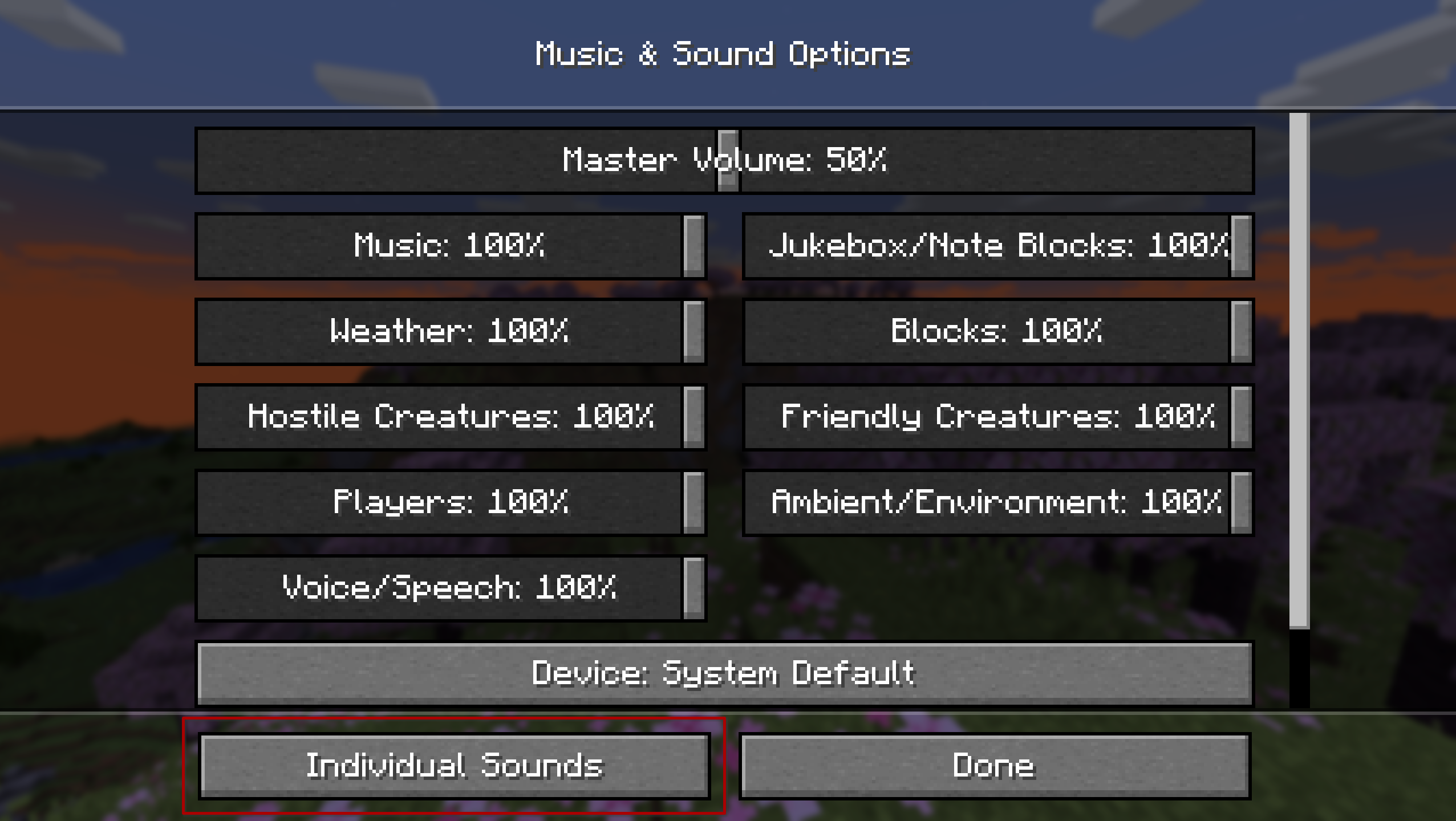
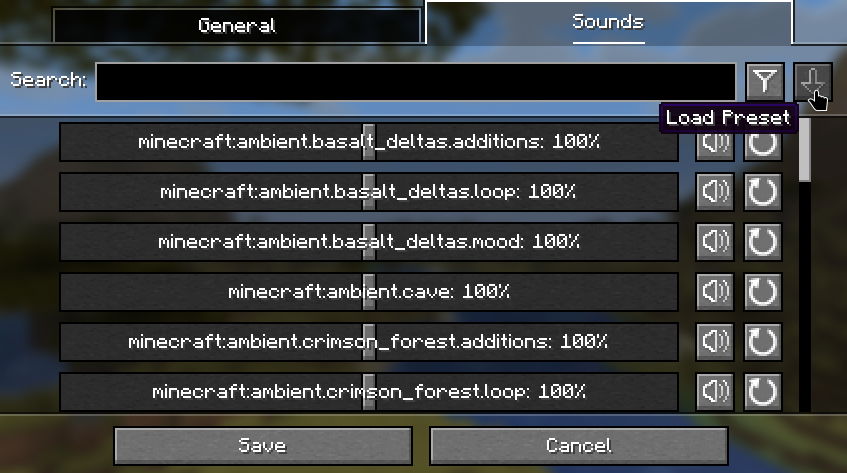
The mod injects an 'Individual Sounds' button into the default sound options screen for quick and easy access. Alternatively, it can be accessed via ModMenu or NeoForge's mods list.
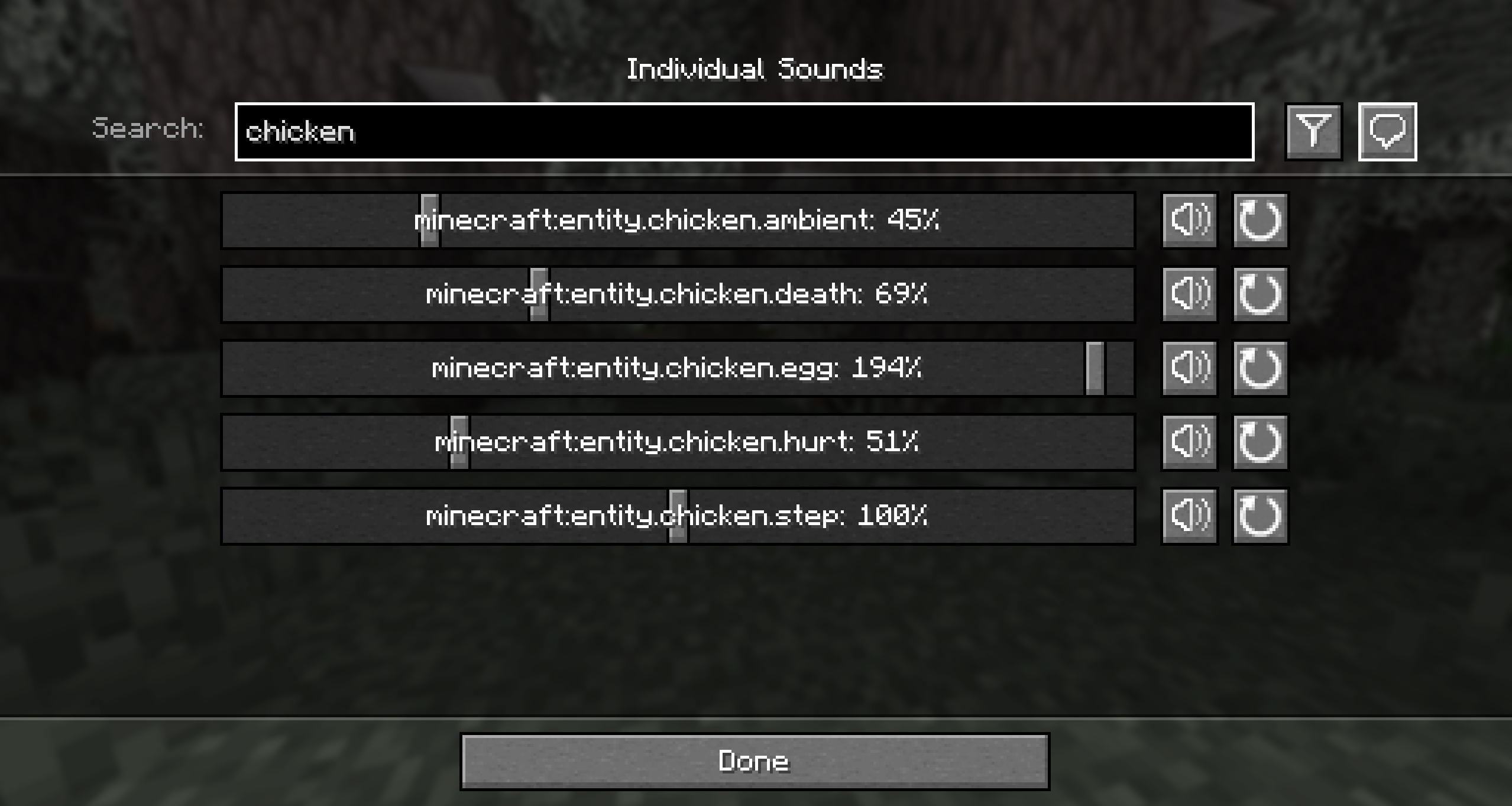
The global tab is where you can set the volumes for all sounds in the game no matter where you are or which server you are on, for a consistent playing experience.
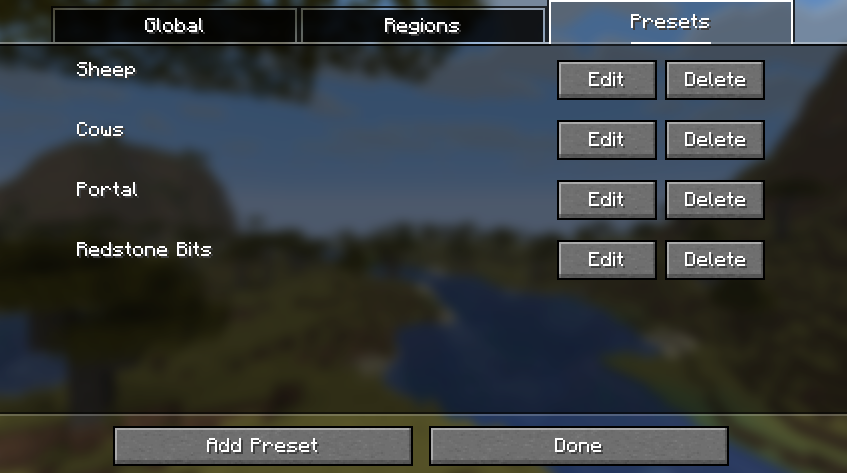
The presets tab displays all of the preset configurations that can be applied on top of your global or regional volume lists. Note that this doesn't replace the list, so you can apply multiple presets at once!
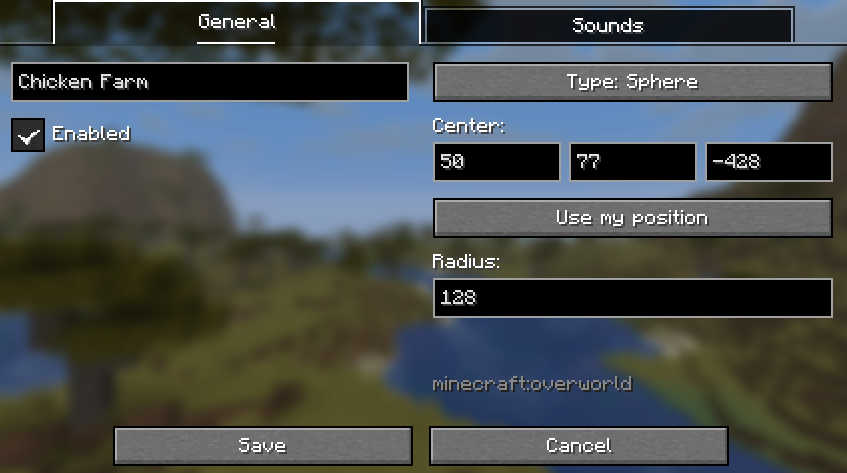
In the region screen, you can pick from two types of geometry. The box region is defined by two diagonally opposing coordinates. The spherical region is defined by a single point and a distance from that point.
Below is the button used to apply a preset to the current volume configuration.
Contributing
Contributions and suggestions are always welcome! Please limit all issues to only one feature at a time - feel free to open multiple at once if you have many ideas. Similarly, please limit pull requests to a single feature at a time and try to follow the existing code style.
To further discuss or get notifications of new updates, check out my Discord. If you like what I do, consider supporting me on Ko-Fi!

Project description from Modrinth.
Pick your setup
Sound Controller by Minecraft version and loader
Choose the version and loader you play, then open the matching release.
Minecraft version
26.2
3 loader buildsMinecraft version
26.1.2
2 loader buildsMinecraft version
26.1.1
2 loader buildsMinecraft version
26.1
2 loader buildsMinecraft version
1.21.11
2 loader buildsMinecraft version
1.21.10
2 loader buildsMinecraft version
1.21.9
2 loader buildsMinecraft version
1.21.8
2 loader buildsMinecraft version
1.21.7
2 loader buildsMinecraft version
1.21.6
2 loader buildsMinecraft version
1.21.5-pre2
2 loader buildsShowing the newest 12 of 27 game versions. Older files are in the list below.
Check the dependencies, then try the file in a copied instance before changing a world you care about.
Recent files
Sound Controller versions and loaders
1.4.1-mc26.3
soundcontroller-neoforge-1.4.1-mc26.3.jar
16 Sept 2026
Client Required Server Not supported Dependencies No extras listed Listed on Release listing
Check the 26.3 · NeoForge setup 26.3NeoForge release
1.4.1-mc26.3
soundcontroller-fabric-1.4.1-mc26.3.jar
16 Sept 2026
Client Required Server Not supported Dependencies 1 required · 1 unchecked Listed on Release listing
Check the 26.3 · Fabric setup 26.3FabricQuilt release
1.4.0-mc1.21.1
soundcontroller-neoforge-1.4.0-mc1.21.1.jar
10 Aug 2026
Client Required Server Not supported Dependencies No extras listed Listed on Release listing
Check the 1.21.1 · NeoForge setup 1.21.1NeoForge release
1.4.0-mc26.2
soundcontroller-neoforge-1.4.0-mc26.2.jar
30 Jun 2026
Client Required Server Not supported Dependencies No extras listed Listed on Release listing
Check the 26.2 · NeoForge setup 26.2NeoForge release
1.4.0-mc26.2
soundcontroller-fabric-1.4.0-mc26.2.jar
30 Jun 2026
Client Required Server Not supported Dependencies 1 required · 1 unchecked Listed on Release listing
Check the 26.2 · Fabric setup 26.2FabricQuilt release
1.3.0-mc26.2
soundcontroller-neoforge-1.3.0-mc26.2.jar
26 Jun 2026
Client Required Server Not supported Dependencies No extras listed Listed on Release listing
Check the 26.2 · NeoForge setup 26.2NeoForge release
1.3.0-mc26.2
soundcontroller-fabric-1.3.0-mc26.2.jar
26 Jun 2026
Client Required Server Not supported Dependencies 1 required · 1 unchecked Listed on Release listing
Check the 26.2 · Fabric setup 26.2FabricQuilt release
1.2.6-mc26.2
soundcontroller-1.2.6-mc26.2.jar
23 Jun 2026
Client Required Server Not supported Dependencies 1 required · 1 unchecked Listed on Release listing
Check the 26.2 · Fabric setup 26.2FabricQuilt release
1.2.5
soundcontroller-1.2.5-mc-26.1.jar
30 Apr 2026
Client Required Server Not supported Dependencies 1 required · 1 unchecked Listed on Release listing
Check the 26.1.2 · Fabric setup 26.126.1.126.1.2Fabric release
1.2.4-mc1.21.11
soundcontroller-1.2.4-mc1.21.11.jar
30 Dec 2025
Client Required Server Not supported Dependencies 1 required · 1 unchecked Listed on Release listing
Check the 1.21.11 · Fabric setup 1.21.11FabricQuilt release
1.2.3-mc1.21.9
soundcontroller-1.2.3-mc1.21.9.jar
19 Oct 2025
Client Required Server Not supported Dependencies 1 required · 1 unchecked Listed on Release listing
Check the 1.21.10 · Fabric setup 1.21.101.21.9FabricQuilt release
1.2.3-mc1.21.6
soundcontroller-1.2.3-mc1.21.6.jar
23 Jun 2025
Client Required Server Not supported Dependencies 1 required · 1 unchecked Listed on Release listing
Check the 1.21.8 · Fabric setup 1.21.61.21.71.21.8Fabric release
Looking for an older file? The official Modrinth project page is in Resources.
 mod
CurseForge + Modrinth · Minecraft
Inventory Slots
A Fabric Minecraft mod for viewing container slot index's at the click of a button! Useful for development/configuration!
 mod
Modrinth · Minecraft
Fake Players
Adds fake player entities with auto-updating skins and item functionality.
 mod
Modrinth · Minecraft
Atay's Weapons/Traps
This mod contains turrets, traps, cameras, NV/thermal vision goggles and a ton of Weapons/Items with abilities. Work with vic's point blank and tacz