Cloth Config API Needed by Compact Chat 3.1.0
requiredMatching file found Matched file: 21.11.153+neoforge

Modrinth · Minecraft mod
Clean up your chat by removing duplicate messages!
Quick answer
Compact Chat 3.1.0 targets 1.21.1, 1.21.2, 1.21.3 with NeoForge. It must be installed on the client. Do not install it on the dedicated server. All 1 required mods have matching files.
Where it goes
It must be installed on the client. Do not install it on the dedicated server.
This file is marked client-only.
3.1.0. Change the file and its required mods may change too.
Install Cloth Config API first. We found matching files for this game-version and loader setup.
We only count dependency files that match this setup. A file for another loader does not fill the gap.
Before you install it
Built for Compact Chat 3.1.0. Pick another file and the loader, install side or required mods may change.
Use 3.1.0. It targets 1.21.1, 1.21.2, 1.21.3 with NeoForge; another release may have different loader, side or dependency requirements.
Install Cloth Config API first. We found matching files for this game-version and loader setup.
It must be installed on the client. Do not install it on the dedicated server.
Use the “Get this file” button beside 3.1.0. It opens that exact file at the source.
About this project
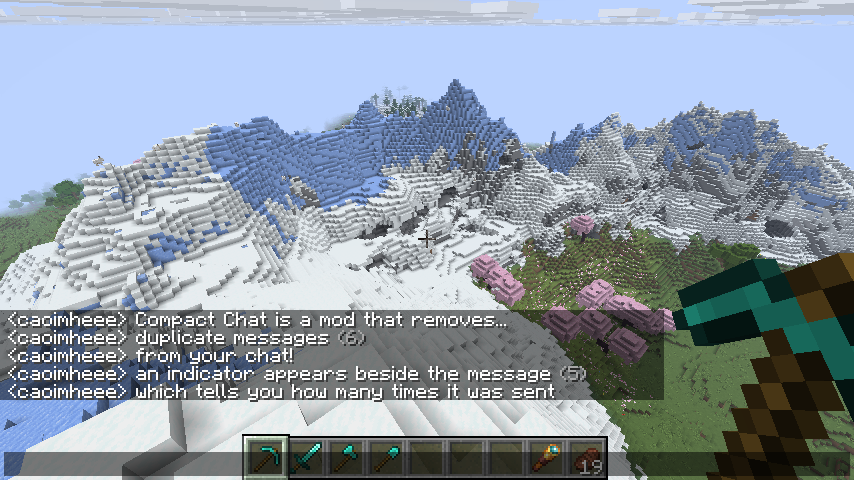
Compact Chat is a Minecraft mod that removes duplicate messages from your chat with many options for customization.


Compact Chat aims to be compatible with other mods, especially those which add timestamps to the start of messages.
By default, Compact Chat will not compact messages which start with a timestamp, but that behavior can be configured
by adjusting the "Ignore first characters count" setting within the configuration screen (requires
ModMenu to open!).
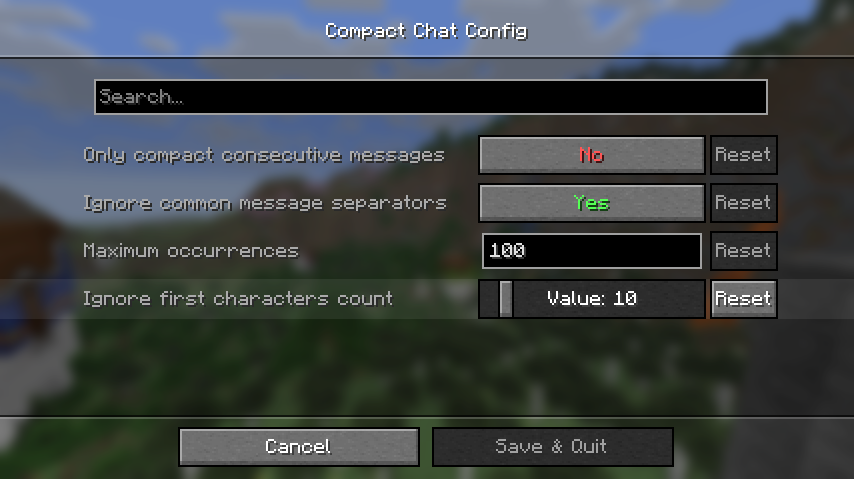
If this value is set, Compact Chat will ignore the first characters in the message up until the specified length.
For example, with the setting set to 10 and a message like so:
[20:19:00] <caoimheee> hello!
Compact Chat will see it as:
<caoimheee> hello!
This project is licensed under the MIT license.
Project description from Modrinth.
Pick your setup
Choose the version and loader you play, then open the matching release.
Showing the newest 12 of 30 game versions. Older files are in the list below.
Check the dependencies, then try the file in a copied instance before changing a world you care about.
Recent files
compact-chat-1.21.1-neoforge-3.1.0.jar
18 Jul 2025
compact-chat-1.21.1-fabric-3.1.0.jar
18 Jul 2025
compact-chat-1.21.1-neoforge-3.0.0.jar
16 Jul 2025
compact-chat-1.21.1-fabric-3.0.0.jar
16 Jul 2025
compact-chat-2.1.1.jar
31 May 2024
compact-chat-2.1.0.jar
27 Feb 2024
compact-chat-2.0.4.jar
3 Feb 2024
compact-chat-2.0.3.jar
23 Dec 2023
compact-chat-2.0.2.jar
14 Jul 2023
compact-chat-2.0.1.jar
9 Jun 2023
compact-chat-2.0.0.jar
7 Feb 2023
CompactChat-1.3-1.18.2.jar
7 Jun 2022
Looking for an older file? The official Modrinth project page is in Resources.
 mod
modDiscover Plants, Animals and Monsters with a Spyglass. Collect them all and take notes in your personal Field Guide!
 mod
modA lightweight add-on for JEI/REI/EMI. Filtering exact items is just a click away!
 mod
modAdds a quest system designed to make info conveyance in modpacks far more intuitive!