Mod Menu Optional for Compact Chat 1.3
optionalNo matching file

Modrinth · Minecraft mod
Clean up your chat by removing duplicate messages!
Quick answer
Compact Chat 1.3 targets 1.18, 1.18.1, 1.18.2 with Fabric. It must be installed on the client. Do not install it on the dedicated server. 2 required mods need a matching file.
Where it goes
It must be installed on the client. Do not install it on the dedicated server.
This file is marked client-only.
1.3 on 1.19-pre5. Every mod below is checked against that same setup.
Install Cloth Config API (Fabric/Forge/NeoForge), Fabric API first, but 2 required mods have no matching file for this setup. Do not mix loader builds to force a match.
We only count dependency files that match this setup. A file for another loader does not fill the gap.
Before you install it
Built for Compact Chat 1.3 on 1.19-pre5. Pick another file and the loader, install side or required mods may change.
Use 1.3. It targets 1.18, 1.18.1, 1.18.2 with Fabric; another release may have different loader, side or dependency requirements.
Install Cloth Config API (Fabric/Forge/NeoForge), Fabric API first, but 2 required mods have no matching file for this setup. Do not mix loader builds to force a match.
It must be installed on the client. Do not install it on the dedicated server.
Use the “Get this file” button beside 1.3. It opens that exact file at the source.
About this project
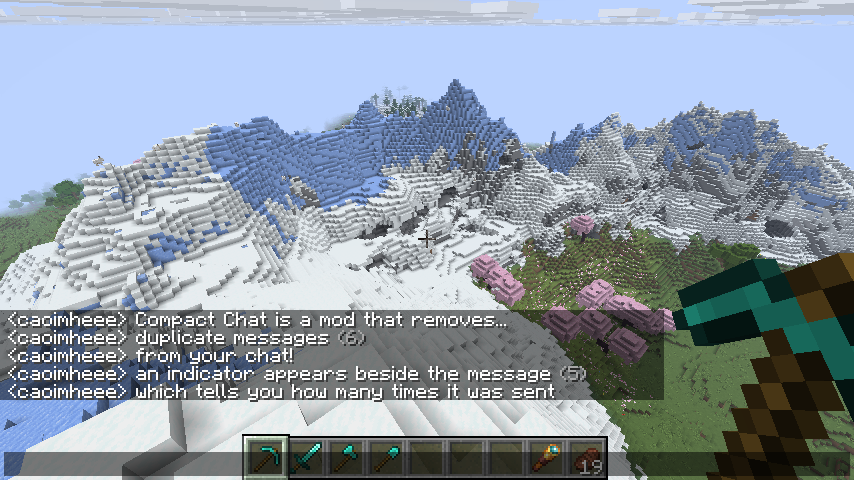
Compact Chat is a Minecraft mod that removes duplicate messages from your chat with many options for customization.


Compact Chat aims to be compatible with other mods, especially those which add timestamps to the start of messages.
By default, Compact Chat will not compact messages which start with a timestamp, but that behavior can be configured
by adjusting the "Ignore first characters count" setting within the configuration screen (requires
ModMenu to open!).
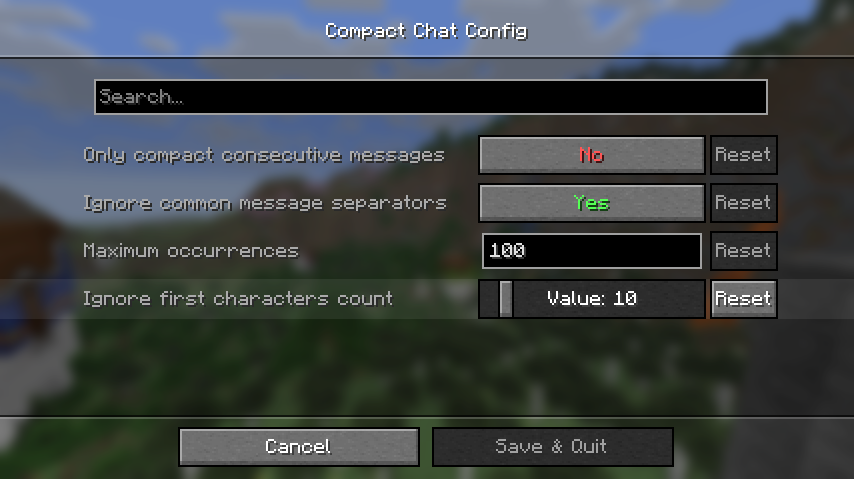
If this value is set, Compact Chat will ignore the first characters in the message up until the specified length.
For example, with the setting set to 10 and a message like so:
[20:19:00] <caoimheee> hello!
Compact Chat will see it as:
<caoimheee> hello!
This project is licensed under the MIT license.
Project description from Modrinth.
Pick your setup
Choose the version and loader you play, then open the matching release.
Showing the newest 12 of 30 game versions. Older files are in the list below.
Check the dependencies, then try the file in a copied instance before changing a world you care about.
Recent files
CompactChat-1.3-1.18.2.jar
7 Jun 2022
CompactChat-1.2.1-1.18.2.jar
5 Jun 2022
CompactChat-1.2-1.19.jar
5 Jun 2022
CompactChat-1.1.2.jar
2 Jun 2022
Looking for an older file? The official Modrinth project page is in Resources.
 mod
modunblock chat, lift restrictions, send no telemetry and more. make your account yours! (supports snapshots)
 mod
modMakes hotbar the same as in Bedrock Edition
 mod
modAllows you to use resources from other directories.