Modrinth · Minecraft mod
Simple Revive
Get Downed instead of Dying so your friends can Revive you!
Quick answer
Which Simple Revive release should I use?
Simple Revive v3.0-mc1.21.1-mod targets 1.21, 1.21.1 with Fabric, Forge, NeoForge. Installation on the client is optional. Installation on the dedicated server is optional. No extra mods listed for this file.
Where it goes
Is Simple Revive required on the client, server, or both?
Installation on the client is optional. Installation on the dedicated server is optional.
The source marks this as usable on both the client and server.
What else does Simple Revive v3.0-mc1.21.1-mod need?
v3.0-mc1.21.1-mod. Change the file and its required mods may change too.
This file does not list any required mods. Do not add a library just because a different file uses it.
This file does not list any required or optional mods.
Before you install it
Add Simple Revive without breaking your instance.
Built for Simple Revive v3.0-mc1.21.1-mod. Pick another file and the loader, install side or required mods may change.
- 01
Stick to this file
Use v3.0-mc1.21.1-mod. It targets 1.21, 1.21.1 with Fabric, Forge, NeoForge; another release may have different loader, side or dependency requirements.
- 02
Bring the mods it needs
This file does not list any required mods. Do not add a library just because a different file uses it.
- 03
Put it on the correct side
Installation on the client is optional. Installation on the dedicated server is optional.
- 04
Pick the file you checked
Use the “Get this file” button beside v3.0-mc1.21.1-mod. It opens that exact file at the source.
About this project
What does Simple Revive add?
You get Downed instead of Dying and other players can Revive you by Sneaking
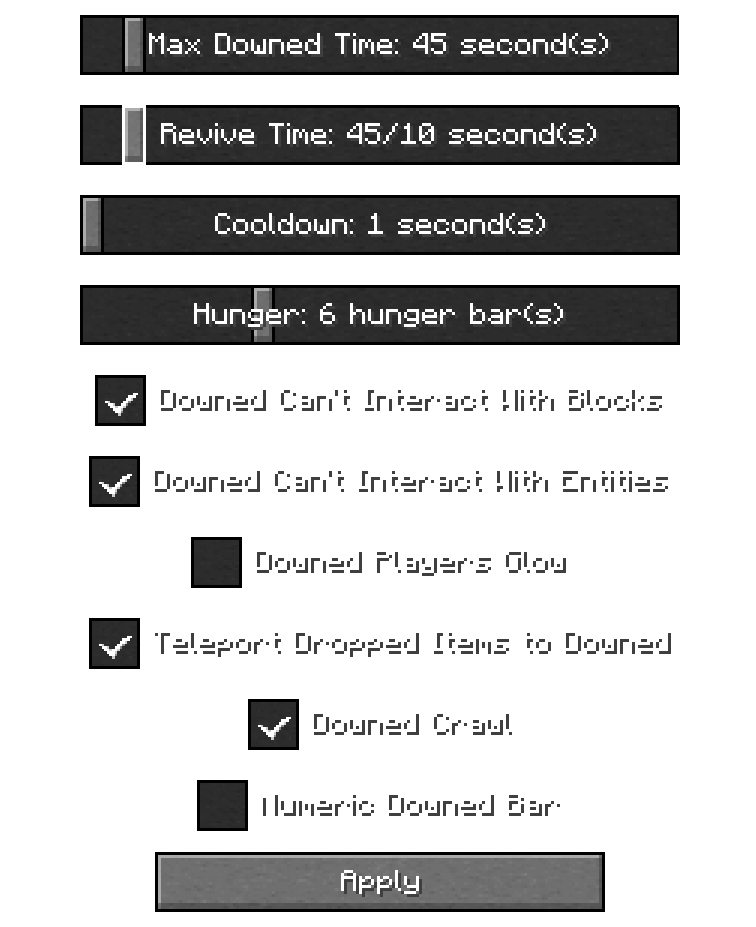
In Game Config Menu
/function simplerevive:admin/config to access the Config Menu
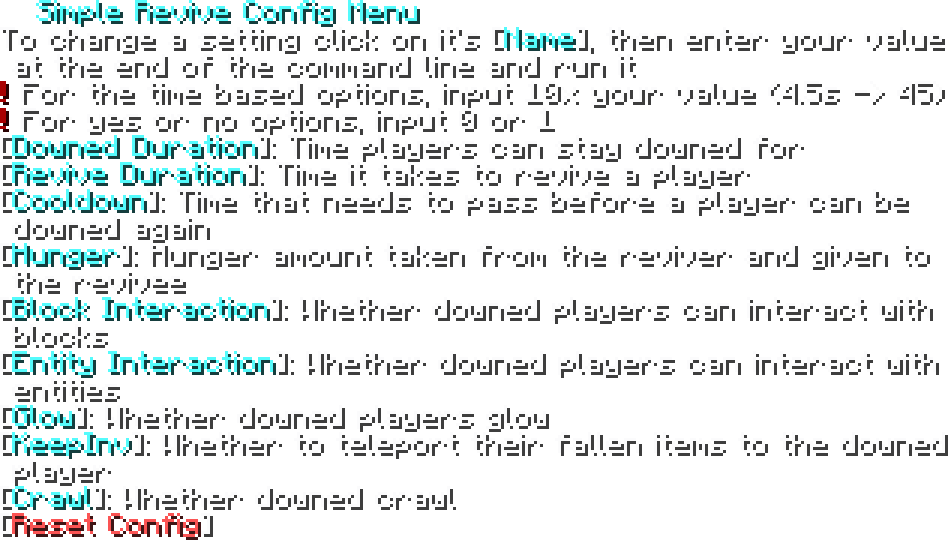
In Game Config Menu (for 1.21.1)
/function simplerevive:admin/config to access the Config Menu
Troubleshooting
If you are having issues with the datapack, try doing these(not all of them at the same time)
- Try running
/reload - Try running
/function simplerevive:admin/reset_config - Make sure you have the file on the proper directory:
[world name]/datapacks/[.zip goes here]for the datapack andmods/[.jar goes here]for the mod version - The EssentialsX plugin might be messing with stuff
- Try restarting the server
Compatibility
- Compatible with Vanilla Tweaks Graves Datapack
- Incompatible with anything that requires the Immediate Respawn gamerule to be off
For Devs and Admins
- If you want to make a player unable to get downed, give them the tag
simplerevive.custom_disable
Known Bugs
- Getting downed will still consume Respawn Anchor charges
Contact me on Discord for any issues! @hexasan
Project description from Modrinth.
Pick your setup
Simple Revive by Minecraft version and loader
Choose the version and loader you play, then open the matching release.
26.1.2
5 loader builds26.1.1
5 loader builds26.1
5 loader builds1.21.11
5 loader builds1.21.10
5 loader builds1.21.9
5 loader builds1.21.8
5 loader builds1.21.7
5 loader builds1.21.6
5 loader builds1.21.5
5 loader builds1.21.4
5 loader buildsShowing the newest 12 of 16 game versions. Older files are in the list below.
Check the dependencies, then try the file in a copied instance before changing a world you care about.
Recent files
Simple Revive versions and loaders
v3.0-mc1.21.1-mod
player-revive-v3.0-mc1.21.1.jar
3 Aug 2026
v3.0-mc1.21.1-datapack
Simple Revive v3.0 mc1.21.1.zip
3 Aug 2026
v3.0-mc1.21.10-mod
player-revive-v3.0-mc1.21.10.jar
1 Aug 2026
v3.0-mc1.21.10-datapack
Simple Revive v3.0 mc1.21.10.zip
1 Aug 2026
v3.0-mc26.1.x-mod
player-revive-v3.0-mc26.1.x.jar
1 Aug 2026
v3.0-mc26.1.x-datapack
simple_revive_v3.0_mc26.1.zip
1 Aug 2026
v3.0-mc26.2-mod
player-revive-v3.0-mc26.2.jar
1 Aug 2026
v3.0-mc26.2-datapack
Simple Revive 3.0.zip
1 Aug 2026
v2.0-mc26.2-mod
player-revive-v2.0-mc26.2.jar
20 Jun 2026
v2.0-mc26.2-datapack
Simple Revive v2.0 26.2.zip
20 Jun 2026
v2.0-1.21.11-Mod
player-revive-v2.0+1.21.11.jar
2 Jan 2026
v2.0-1.21.11-Datapack
Simple Revive v2.0 1.21.11.zip
2 Jan 2026
Looking for an older file? The official Modrinth project page is in Resources.