Minecraft version
Back to mods 
Modrinth · Minecraft mod
F3 ADVANCE
A Fabric mod for Minecraft that replaces the cluttered vanilla F3 debug screen with an organized, color-coded, fully toggleable HUD — split into sections (Position, World, Performance, Player Status, Targeted Block/Entity, System Info), each with per-line
Choose a version Pick your version below, then grab the matching file.
Quick answer
Which F3 ADVANCE release should I use?
Latest stable file 0.1.0+mc26.2
Game version 26.2
Loader Fabric
F3 ADVANCE 0.1.0+mc26.2 targets 26.2 with Fabric. It must be installed on the client. Do not install it on the dedicated server. No extra mods listed for this file.
Where it goes
Is F3 ADVANCE required on the client, server, or both?
It must be installed on the client. Do not install it on the dedicated server.
Client Required
Dedicated server Not supported
Loader for this release Fabric
Required install it here Optional supported, not mandatory Not supported do not install here Source doesn’t say do not assume
This file is marked client-only.
What else does F3 ADVANCE 0.1.0+mc26.2 need?
0.1.0+mc26.2. Change the file and its required mods may change too.
This file does not list any required mods. Do not add a library just because a different file uses it.
This file does not list any required or optional mods.
Before you install it
Add F3 ADVANCE without breaking your instance.
Built for F3 ADVANCE 0.1.0+mc26.2. Pick another file and the loader, install side or required mods may change.
- 01
Stick to this file
Use 0.1.0+mc26.2. It targets 26.2 with Fabric; another release may have different loader, side or dependency requirements.
- 02
Bring the mods it needs
This file does not list any required mods. Do not add a library just because a different file uses it.
- 03
Put it on the correct side
It must be installed on the client. Do not install it on the dedicated server.
- 04
Pick the file you checked
Use the “Get this file” button beside 0.1.0+mc26.2. It opens that exact file at the source.
About this project
What does F3 ADVANCE add?
F3 Advanced
F3 Advanced replaces Minecraft's vanilla F3 debug overlay with a cleaner, organized, color-coded HUD for Fabric.
Features
- Replaces the actual F3 screen instead of drawing a second overlay on top.
- Organized sections for position, world, performance, player status, target info, and system info.
- Per-line toggles for every HUD value, plus whole-section toggles.
- Runtime registry lookups for biomes, blocks, entities, effects, and dimensions, so modded content displays correctly.
- Respects reduced debug info and avoids exposing restricted debug details.
- Mod Menu integration with Cloth Config when installed.
- JSON config fallback at
config/f3advanced.json. - Adjustable colors, position, padding, and background transparency.
- F3+M opens the config screen directly.
Compatibility
This is a client-side Fabric mod. It does not require the server to install F3 Advanced.
Recommended optional mods:
- Mod Menu
- Cloth Config
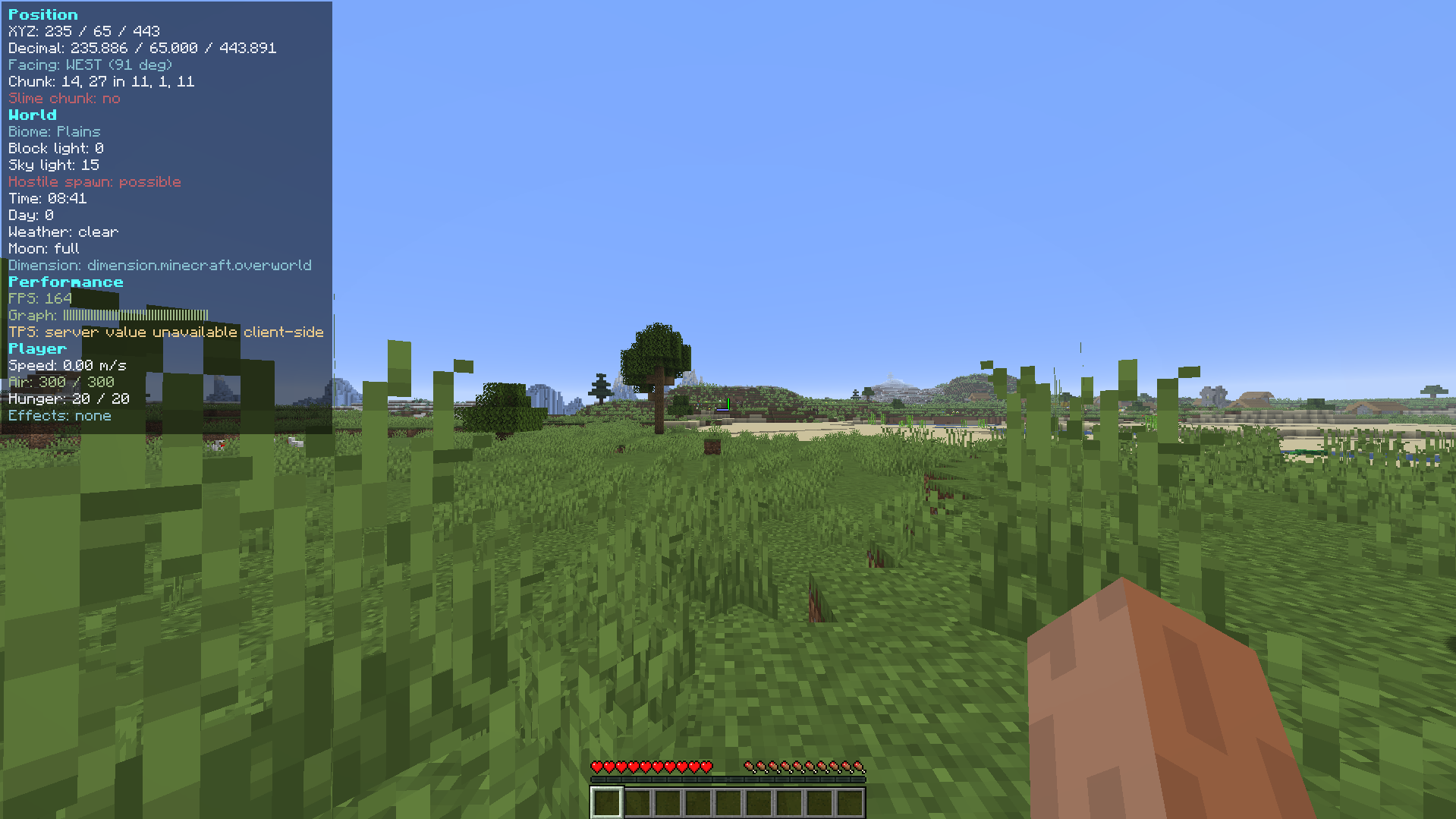
Project description from Modrinth.
Pick your setup
F3 ADVANCE by Minecraft version and loader
Choose the version and loader you play, then open the matching release.
Minecraft version
26.1.2
1 loader buildMinecraft version
26.1.1
1 loader buildMinecraft version
1.21.11
1 loader buildMinecraft version
1.21.10
1 loader buildMinecraft version
1.21.9
1 loader buildMinecraft version
1.21.8
1 loader buildMinecraft version
1.21.7
1 loader buildMinecraft version
1.21.6
1 loader buildMinecraft version
1.21.5
1 loader buildMinecraft version
1.21.4
1 loader buildMinecraft version
1.21.3
1 loader buildShowing the newest 12 of 15 game versions. Older files are in the list below.
Check the dependencies, then try the file in a copied instance before changing a world you care about.
Recent files
F3 ADVANCE versions and loaders
0.1.0+mc26.2
f3advanced-26.2-0.1.0+mc26.2.jar
10 Aug 2026
Client Required Server Not supported Dependencies No extras listed Listed on Release listing
Check the 26.2 · Fabric setup 26.2Fabric release
0.1.0+mc26.1.2
f3advanced-26.1.2-0.1.0+mc26.1.2.jar
10 Aug 2026
Client Required Server Not supported Dependencies No extras listed Listed on Release listing
Check the 26.1.2 · Fabric setup 26.1.2Fabric release
0.1.0+mc26.1.1
f3advanced-26.1.1-0.1.0+mc26.1.1.jar
10 Aug 2026
Client Required Server Not supported Dependencies No extras listed Listed on Release listing
Check the 26.1.1 · Fabric setup 26.1.1Fabric release
0.1.0+mc1.21.1
f3advanced-1.21.1-0.1.0+mc1.21.1.jar
19 Jul 2026
Client Required Server Not supported Dependencies No extras listed Listed on Release listing
Check the 1.21.1 · Fabric setup 1.211.21.1Fabric release
0.1.0+mc1.21.4
f3advanced-1.21.4-0.1.0+mc1.21.4.jar
19 Jul 2026
Client Required Server Not supported Dependencies No extras listed Listed on Release listing
Check the 1.21.4 · Fabric setup 1.21.21.21.31.21.4Fabric release
0.1.0+mc1.21.5
f3advanced-1.21.5-0.1.0+mc1.21.5.jar
19 Jul 2026
Client Required Server Not supported Dependencies No extras listed Listed on Release listing
Check the 1.21.5 · Fabric setup 1.21.5Fabric release
0.1.0+mc1.21.8
f3advanced-1.21.8-0.1.0+mc1.21.8.jar
19 Jul 2026
Client Required Server Not supported Dependencies No extras listed Listed on Release listing
Check the 1.21.8 · Fabric setup 1.21.61.21.71.21.8Fabric release
0.1.0+mc1.21.11
f3advanced-1.21.11-0.1.0+mc1.21.11.jar
19 Jul 2026
Client Required Server Not supported Dependencies No extras listed Listed on Release listing
Check the 1.21.11 · Fabric setup 1.21.91.21.101.21.11Fabric release
Looking for an older file? The official Modrinth project page is in Resources.
 mod
mod Modrinth · Minecraft
ParCoolSkill
A mod that expands ParCool actions into combat skills.
 mod
mod Modrinth · Minecraft
emiautocrafting
Autocrafting similar to NEI but for EMI
 mod
mod Modrinth · Minecraft
Duch Cart Fix
A client-side Fabric mod that automatically switches to a minecart after placing a rail (with offhand support), and offers a one-click mode that places both rail and cart in a single act