Minecraft version
Back to mods 
CurseForge · Minecraft mod
Easier Sleeping
Only a percentage of players has to sleep.
Choose a version Pick your version below, then grab the matching file.
Quick answer
Which Easier Sleeping release should I use?
Latest stable file Easier Sleeping 1.21.1-4.0.1
Game version 1.21.8, 1.21.5, 1.21.4
Loader NeoForge
Easier Sleeping 1.21.1-4.0.1 targets 1.21.8, 1.21.5, 1.21.4 with NeoForge. The project page does not say whether this file belongs on the client, dedicated server, or both. No extra mods listed for this file.
Where it goes
Is Easier Sleeping required on the client, server, or both?
The project page does not say whether this file belongs on the client, dedicated server, or both.
Client Source doesn’t say
Dedicated server Source doesn’t say
Loader for this release NeoForge
Required install it here Optional supported, not mandatory Not supported do not install here Source doesn’t say do not assume
The source does not explicitly classify this release as client-only or server-only.
What else does Easier Sleeping 1.21.1-4.0.1 need?
Easier Sleeping 1.21.1-4.0.1. Change the file and its required mods may change too.
This file does not list any required mods. Do not add a library just because a different file uses it.
This file does not list any required or optional mods.
Before you install it
Add Easier Sleeping without breaking your instance.
Built for Easier Sleeping 1.21.1-4.0.1. Pick another file and the loader, install side or required mods may change.
- 01
Stick to this file
Use Easier Sleeping 1.21.1-4.0.1. It targets 1.21.8, 1.21.5, 1.21.4 with NeoForge; another release may have different loader, side or dependency requirements.
- 02
Bring the mods it needs
This file does not list any required mods. Do not add a library just because a different file uses it.
- 03
Put it on the correct side
The project page does not say whether this file belongs on the client, dedicated server, or both.
- 04
Pick the file you checked
Use the “Get this file” button beside Easier Sleeping 1.21.1-4.0.1. It opens that exact file at the source.
About this project
What does Easier Sleeping add?
Version 4.X.X
For older versions of the mod, check the wiki.
This mod adds that only a percentage of Players have to sleep.
The messages are only shown to players in the same dimension.
Since Minecraft 1.19.1 the Mod is needed on the server and client side.
For 1.19 and before, the Mod is only needed on the server side, but can also be used on the client side.
You need a server to play with friends? You don't know how to set up one? Just rent an already configured server!

Click on the picture above, select a plan (with recommended at least 6 GB),
use my code agent to get 25% off your first month and enjoy playing with your friends!
Support
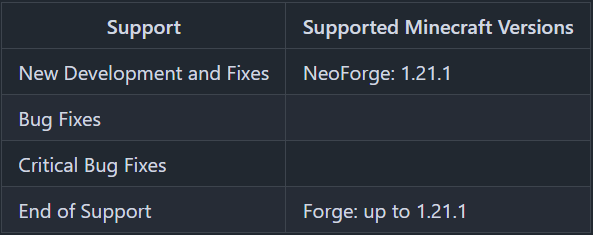
Minecraft versions, for which the mod is not released, are not supported.
You can find a text version here.
Server Config
The config file can be found in the "serverconfig" folder in the "world" folder and is named "easier_sleeping-server.toml". The name of the world folder is set for servers in the "server.properties" file and for clients it is the name of the world/save game in the world list, and it can be found in the "saves" folder in the ".minecraft" folder.
The config can be edited with commands.
The changes done with the commands, will be saved to the config.
- sleep_percent
Percentage of players required to skip the night.
Default: 50 - sleep_messages
List of messages, from which one will be shown, when a player goes to bed
(Available parameters: %player% = Player name)
Default: ["%player% is now in bed."] - wake_messages
List of messages, from which one will be shown, when a player leaves his bed
(Available parameters: %player% = Player name)
Default: ["%player% stood up."] - morning_messages
List of messages, from which one will be shown, when the night was skipped
Default: ["Good Morning"] - all_players_rest
If true, the time since last rest is reset for all players, if enough other players are successfully sleeping. So not every player has to sleep to prevent phantom spawning for him.
Default: false - dimensions
Dimensions in which, the sleeping percentage is active or inactive, depending on the dimension_list_type option.
Default: ["minecraft:overworld"] - dimension_list_type
If dimension_list_type is set to SLEEP_ACTIVE, the dimension list is the list of dimensions in which the sleep voting is active.
If dimension_list_type is set to SLEEP_INACTIVE, the dimension list is the list of dimensions in which the sleep voting is inactive.
Default: "SLEEP_ACTIVE" - block_blacklist
Block names of beds being ignored for sleep percentage.
Examples: minecraft:white_bed, comforts:hammock_white
Commands
/sleep sleep_percent- Shows the current percentage of players required to skip the night./sleep sleep_percent <sleep_percent>- Sets the percentage of players required to skip the night./sleep messages sleep- Shows the list of messages, from which one will be shown, when a player goes to bed/sleep messages sleep add <message>- Adds a message from the list of messages, from which one will be shown, when a player goes to bed/sleep messages sleep remove <message>- Removes a message from the list of messages, from which one will be shown, when a player goes to bed/sleep messages wake- Shows the list of messages, from which one will be shown, when a player leaves his bed/sleep messages wake add <message>- Adds a message from the list of messages, from which one will be shown, when a player leaves his bed/sleep messages wake remove <message>- Removes a message from the list of messages, from which one will be shown, when a player leaves his bed/sleep messages morning- Shows the list of messages, from which one will be shown, when the night was skipped/sleep messages morning add <message>- Adds a message from the list of messages, from which one will be shown, when the night was skipped/sleep messages morning remove <message>- Removes a message from the list of messages, from which one will be shown, when the night was skipped/sleep all_players_rest- Shows, if for all players the last slept time will be reset, if players sleep successfully./sleep all_players_rest <all_players_rest>- Sets, if for all players the last slept time shall be reset, if players sleep successfully./sleep dimension- Shows dimensions in which, the sleeping percentage is active./sleep dimension add <dimension>- Adds a dimension in which, the sleeping percentage is active./sleep dimension remove <dimension>- Removes a dimension in which, the sleeping percentage is active./sleep dimension list_type- Shows the type of the dimensions list. If dimension_list_type is set to SLEEP_ACTIVE, the dimension list is the list of dimensions in which the sleep voting is active. If dimension_list_type is set to SLEEP_INACTIVE, the dimension list is the list of dimensions in which the sleep voting is inactive./sleep dimension list_type <dimension_list_type> <invert_list>- Sets the dimension_list_type. If dimension_list_type is set to SLEEP_ACTIVE, the dimension list is the list of dimensions in which the sleep voting is active. If dimension_list_type is set to SLEEP_INACTIVE, the dimension list is the list of dimensions in which the sleep voting is inactive. If the invert_list parameter is false, the dimensions list is not change. If the invert_list parameter is true, the dimensions list is inverted. All dimensions, which were not on the list before, are added to the list and all dimensions, which were on the list before, are removed.
Thanks for the logo to Muse31.
You can use this mod in non-commercial modpacks without asking.
You can find more mods from me on CurseForge and Modrinth.

Project description from CurseForge.
Pick your setup
Easier Sleeping by Minecraft version and loader
Choose the version and loader you play, then open the matching release.
Minecraft version
1.21.9
1 loader buildMinecraft version
1.21.8
1 loader buildMinecraft version
1.21.7
1 loader buildMinecraft version
1.21.6
1 loader buildMinecraft version
1.21.5
1 loader buildMinecraft version
1.21.4
1 loader buildMinecraft version
1.21.3
1 loader buildMinecraft version
1.21.2
1 loader buildMinecraft version
1.21.1
2 loader buildsMinecraft version
1.21
1 loader buildMinecraft version
1.20.6
1 loader buildShowing the newest 12 of 32 game versions. Older files are in the list below.
Check the dependencies, then try the file in a copied instance before changing a world you care about.
Recent files
Easier Sleeping versions and loaders
Easier Sleeping 1.21.1-4.0.1
EasierSleeping-1.21.1-4.0.1.jar
2 May 2026
Client Source doesn’t say Server Source doesn’t say Dependencies No extras listed Listed on Release listing
Check the 1.21.10 · NeoForge setup 1.21.81.21.51.21.41.21.1 release
Easier Sleeping 1.21.1-4.0.0
EasierSleeping-1.21.1-4.0.0.jar
11 Dec 2025
Client Source doesn’t say Server Source doesn’t say Dependencies No extras listed Listed on Release listing
Check the 1.21.1 · NeoForge setup 1.21.1NeoForge release
Easier Sleeping 1.21.1-3.0.0
EasierSleeping-1.21.1-3.0.0.jar
1 Sept 2024
Client Source doesn’t say Server Source doesn’t say Dependencies No extras listed Listed on Release listing
Check the 1.21.1 · Forge setup Forge1.21.1 release
Easier Sleeping 1.21-3.0.0
EasierSleeping-1.21-3.0.0.jar
30 Aug 2024
Client Source doesn’t say Server Source doesn’t say Dependencies No extras listed Listed on Release listing
Check the 1.21 · Forge setup 1.21Forge release
Easier Sleeping 1.20.6-3.0.0
EasierSleeping-1.20.6-3.0.0.jar
1 Jun 2024
Client Source doesn’t say Server Source doesn’t say Dependencies No extras listed Listed on Release listing
Check the 1.20.6 · Forge setup Forge1.20.6 release
Easier Sleeping 1.20.4-3.0.0
EasierSleeping-1.20.4-3.0.0.jar
13 Dec 2023
Client Source doesn’t say Server Source doesn’t say Dependencies No extras listed Listed on Release listing
Check the 1.20.4 · Forge setup Forge1.20.4 release
Easier Sleeping 1.20.2-3.0.0
EasierSleeping-1.20.2-3.0.0.jar
23 Nov 2023
Client Source doesn’t say Server Source doesn’t say Dependencies No extras listed Listed on Release listing
Check the 1.20.2 · Forge setup 1.20.2Forge release
Easier Sleeping 1.20.2-2.1.3
EasierSleeping-1.20.2-2.1.3.jar
19 Oct 2023
Client Source doesn’t say Server Source doesn’t say Dependencies No extras listed Listed on Release listing
Check the 1.20.2 · Forge setup 1.20.2Forge release
Easier Sleeping 1.20.1-2.1.3
EasierSleeping-1.20.1-2.1.3.jar
6 Jul 2023
Client Source doesn’t say Server Source doesn’t say Dependencies No extras listed Listed on Release listing
Check the 1.20.1 · Forge setup 1.20.1Forge release
Easier Sleeping 1.20-2.1.3
EasierSleeping-1.20-2.1.3.jar
2 Jul 2023
Client Source doesn’t say Server Source doesn’t say Dependencies No extras listed Listed on Release listing
Check the 1.20 · Forge setup Forge1.20 release
Easier Sleeping 1.19.4-2.1.3
EasierSleeping-1.19.4-2.1.3.jar
10 Apr 2023
Client Source doesn’t say Server Source doesn’t say Dependencies No extras listed Listed on Release listing
Check the 1.19.4 · Forge setup 1.19.4Forge release
Easier Sleeping 1.18.2-2.1.3
EasierSleeping-1.18.2-2.1.3.jar
10 Apr 2023
Client Source doesn’t say Server Source doesn’t say Dependencies No extras listed Listed on Release listing
Check the 1.18.2 · Forge setup 1.18.2Forge release
Looking for an older file? The official CurseForge project page is in Resources.
 mod
mod CurseForge + Modrinth · Minecraft
No Chat Restrictions
Restores access to game chat for all accounts
 mod
mod CurseForge + Modrinth · Minecraft
Immersive Frequencies
Talk across any distance with walkie talkies.
 mod
mod CurseForge + Modrinth · Minecraft
Jaden's Nether Expansion
Nether Expansion is a Vanilla Friendly mod that aims to improve & add new content to every aspect of The Nether