Simple Voice Chat Needed by Walkie-Talkie forge-1.3.1
requiredMatching file found Matched file: forge-1.16.5-2.6.21
Modrinth · Minecraft mod
Adds two-way radios with different upgrades.
Quick answer
Walkie-Talkie forge-1.3.1 targets 1.16.5 with Forge. Installation on the client is optional. Installation on the dedicated server is optional. 1 required mod needs a matching file.
Where it goes
Installation on the client is optional. Installation on the dedicated server is optional.
The source marks this as usable on both the client and server.
forge-1.3.1. Change the file and its required mods may change too.
Install Simple Voice Chat, Architectury API first, but 1 required mod has no matching file for this setup. Do not mix loader builds to force a match. 1 comes through another mod in the chain.
1 extra mod was pulled in by another dependency. Indented rows show who needs each one. We only count dependency files that match this setup. A file for another loader does not fill the gap.
Before you install it
Built for Walkie-Talkie forge-1.3.1. Pick another file and the loader, install side or required mods may change.
Use forge-1.3.1. It targets 1.16.5 with Forge; another release may have different loader, side or dependency requirements.
Install Simple Voice Chat, Architectury API first, but 1 required mod has no matching file for this setup. Do not mix loader builds to force a match. 1 comes through another mod in the chain.
Installation on the client is optional. Installation on the dedicated server is optional.
Use the “Get this file” button beside forge-1.3.1. It opens that exact file at the source.
About this project
Warning
This is not an official addon. Please don't go to the Simple Voice Chat discord server for support! Instead, please use GitHub issues
for support. I'll try to provide support as soon as possible but there is no guarantee for how long it will take.This mod requires Simple Voice Chat and Architectury API
If you use Fabric, this mod require Fabric API.
This mod adds two-way radios with different upgrades.
| Minecraft Version | Fabric | Forge |
|---|---|---|
| 1.20.4 | ✅ | ❌ |
| 1.20.2 | ✅ | ✅ |
| 1.20.1 | ✅ | ✅ |
| 1.19.4 | ❌ | ❌ |
| 1.19.3 | ❌ | ❌ |
| 1.19.2 | ✅ | ✅ |
| 1.18.2 | ✅ | ✅ |
| 1.16.5 | ❌ | ✅ |
Notes: Any type of wood and wool is allowed. 1.16.5 replaced lightning rod with iron bars
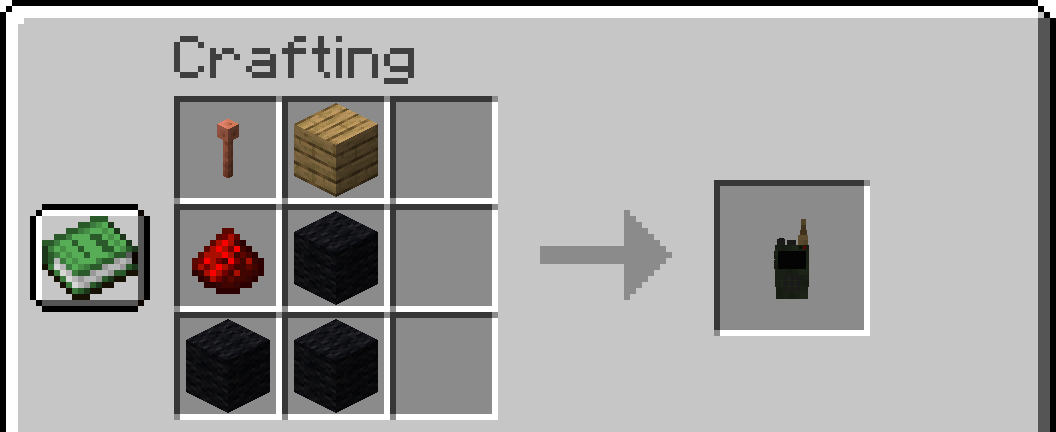
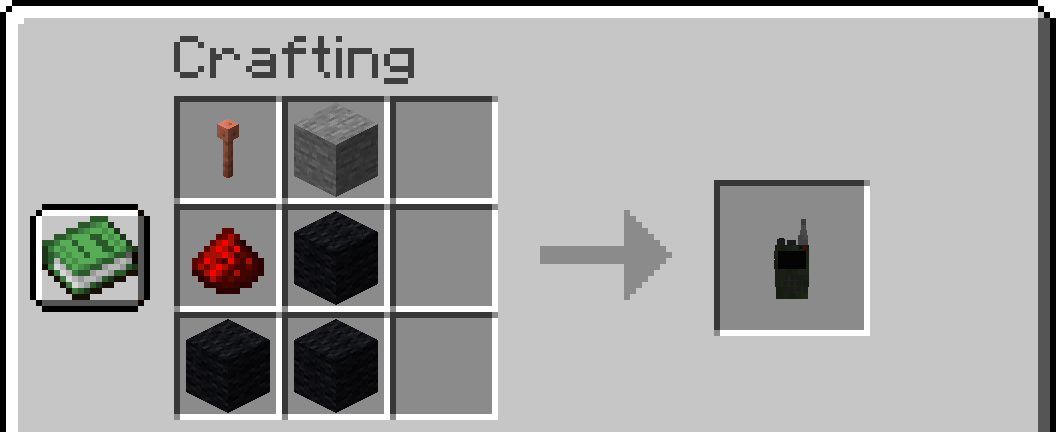
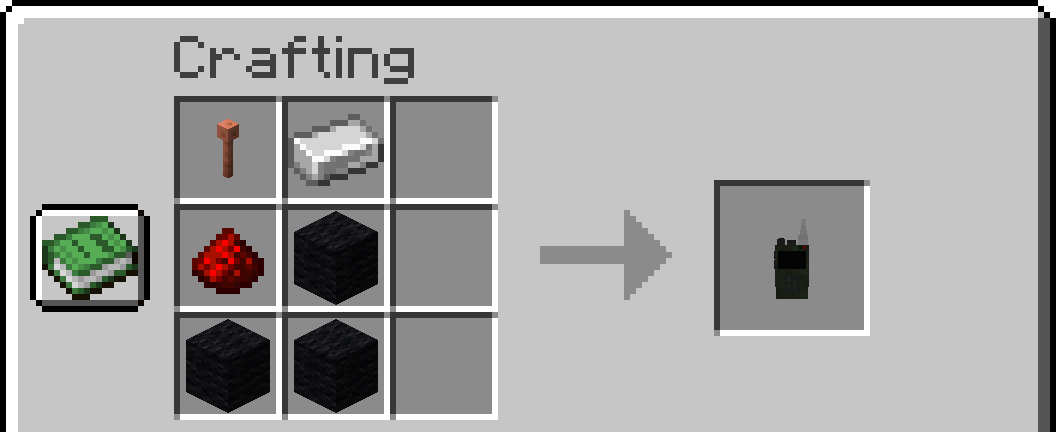
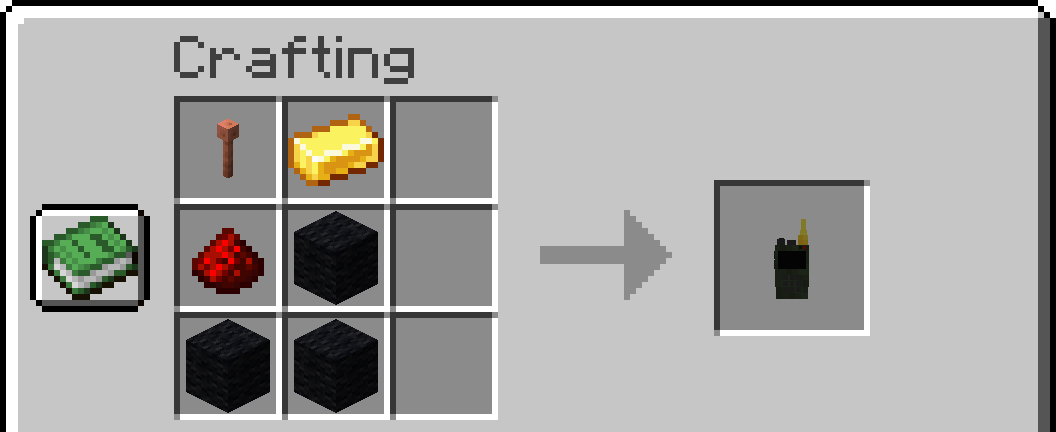
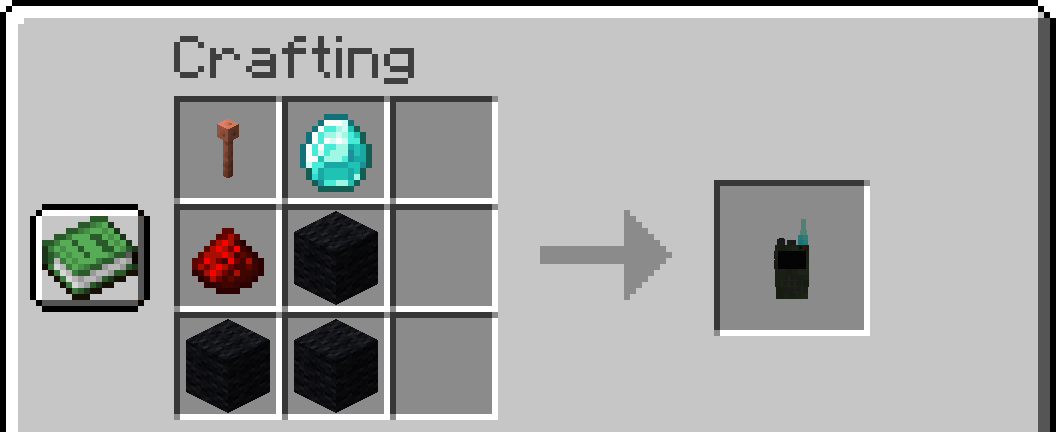
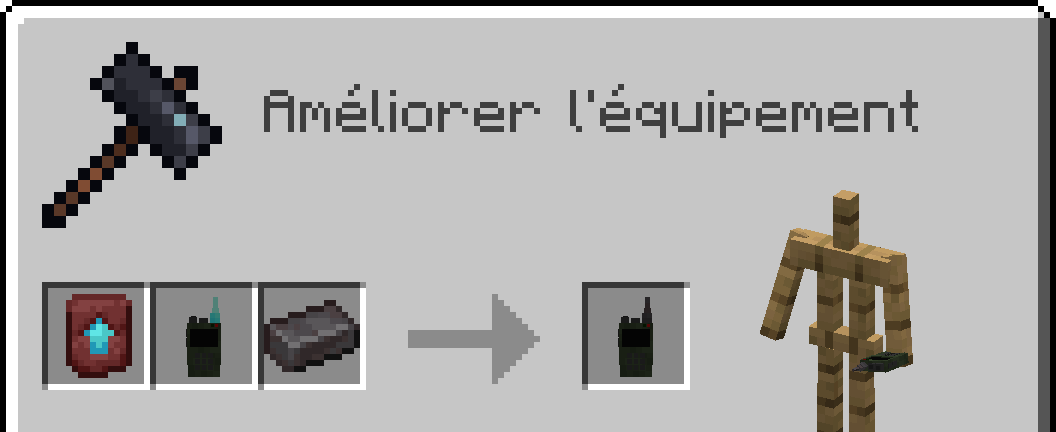
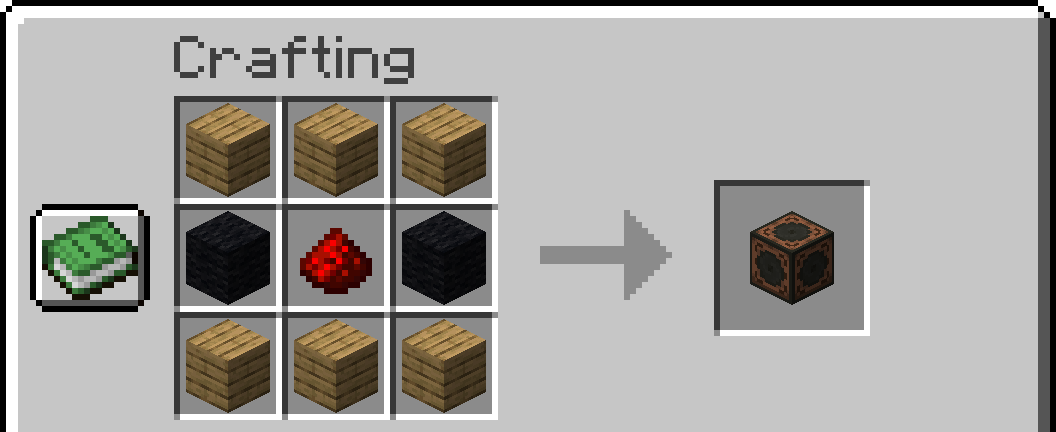
Project description from Modrinth.
Pick your setup
Choose the version and loader you play, then open the matching release.
Check the dependencies, then try the file in a copied instance before changing a world you care about.
Recent files
walkietalkie-forge-1.16.5-1.3.1.jar
27 Mar 2024
walkietalkie-fabric-1.20.4-1.3.0.jar
24 Feb 2024
walkietalkie-forge-1.20.2-1.3.0.jar
24 Feb 2024
walkietalkie-fabric-1.20.2-1.3.0.jar
24 Feb 2024
walkietalkie-forge-1.20.1-1.3.0.jar
24 Feb 2024
walkietalkie-fabric-1.20.1-1.3.0.jar
24 Feb 2024
walkietalkie-forge-1.19.2-1.3.0.jar
24 Feb 2024
walkietalkie-fabric-1.19.2-1.3.0.jar
24 Feb 2024
walkietalkie-forge-1.18.2-1.3.0.jar
24 Feb 2024
walkietalkie-fabric-1.18.2-1.3.0.jar
24 Feb 2024
walkietalkie-forge-1.16.5-1.3.0.jar
24 Feb 2024
walkietalkie-forge-1.16.5-1.2.2.jar
27 Dec 2023
Looking for an older file? The official Modrinth project page is in Resources.
 mod
modSome texture packs glitch when used with Emotecraft. This mod fixes that.
 mod
modHomesteads is for the villagers who would prefer to forge their own path in the wilds. This mod adds 5 new Villagers, the Beekeeper, The Lumberjack, The Trapper, The Prospector and The Forager. As well as a variety of new structures for them to inhabit.
 mod
modDisclosure: The code for this mod was 100% AI generated. A fully client-side mod that automatically scans your inventory and displays every item you are currently able to craft.