Minecraft version
Back to mods 
CurseForge · Minecraft mod
NovoAtlas
A data-driven image based world generator for Minecraft.
Choose a version Pick your version below, then grab the matching file.
Quick answer
Which NovoAtlas release should I use?
Latest stable file NovoAtlas Neoforge 1.8.2+26.2.x
Game version 26.2
Loader NeoForge
NovoAtlas Neoforge 1.8.2+26.2.x targets 26.2 with NeoForge. The project page does not say whether this file belongs on the client, dedicated server, or both. No extra mods listed for this file.
Where it goes
Is NovoAtlas required on the client, server, or both?
The project page does not say whether this file belongs on the client, dedicated server, or both.
Client Source doesn’t say
Dedicated server Source doesn’t say
Loader for this release NeoForge
Required install it here Optional supported, not mandatory Not supported do not install here Source doesn’t say do not assume
The source does not explicitly classify this release as client-only or server-only.
What else does NovoAtlas Neoforge 1.8.2+26.2.x need?
NovoAtlas Neoforge 1.8.2+26.2.x. Change the file and its required mods may change too.
This file does not list any required mods. Do not add a library just because a different file uses it.
This file does not list any required or optional mods.
Before you install it
Add NovoAtlas without breaking your instance.
Built for NovoAtlas Neoforge 1.8.2+26.2.x. Pick another file and the loader, install side or required mods may change.
- 01
Stick to this file
Use NovoAtlas Neoforge 1.8.2+26.2.x. It targets 26.2 with NeoForge; another release may have different loader, side or dependency requirements.
- 02
Bring the mods it needs
This file does not list any required mods. Do not add a library just because a different file uses it.
- 03
Put it on the correct side
The project page does not say whether this file belongs on the client, dedicated server, or both.
- 04
Pick the file you checked
Use the “Get this file” button beside NovoAtlas Neoforge 1.8.2+26.2.x. It opens that exact file at the source.
About this project
What does NovoAtlas add?
NovoAtlas
A data-driven image based world generator for Minecraft. This mod allows you to paint a world's height map and biome map, and then import that to a datapack and allow the Minecraft world generator to fill in the rest of the details!
NovoAtlas is based on Atlas by itsmiir, used under its CC0 license and with permission from the original author. It features several improvements including: Updated for 1.21+, NeoForge support, improved structure-terrain blending, improved underwater cave generation, cave biome maps, and a few other minor tweaks and additions.
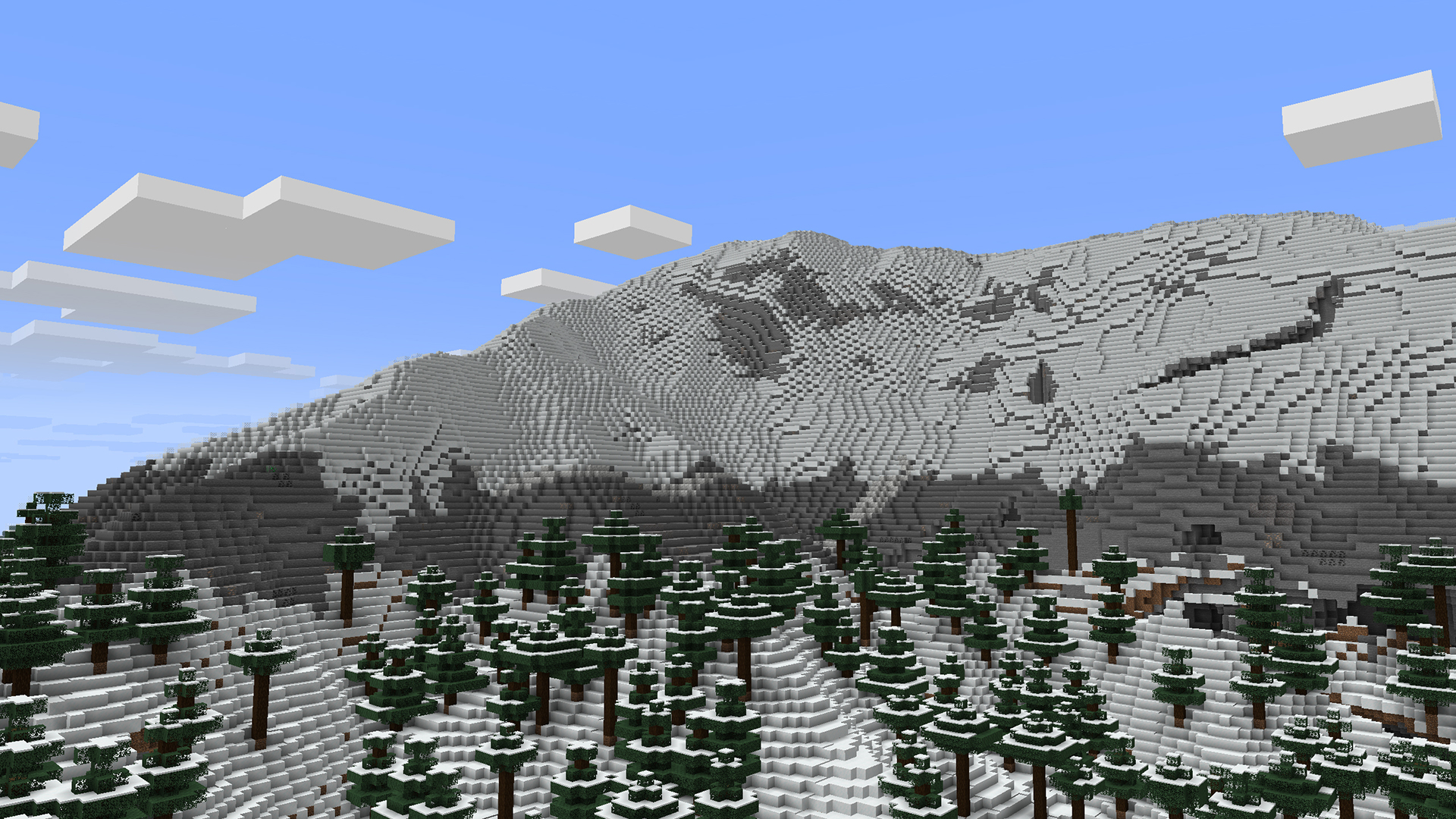
How to Use
The repository wiki describes in detail how to use this mod to create your own worlds/dimensions. But, heres the quick rundown:
- Create or find a grayscale
.pngheight map. To create maps, I would highly recommend using WorldPainter, as it is purpose-built for Minecraft map making and has an option to export a height map. You can also get heightmaps of Earth from a variety of websites, here's a few that I've found (though not tested with NovoAtlas): - Create a copy of the map and paint over it with whatever colours you like. Each colour corresponds to a different biome. Do not mix or blend the colours. Save this image as a
.pngwith 8-bit RGBA encoding. For cave biomes, you can create separate maps for each "layer" of the world. - Create a datapack and add these images to it, you can either copy the example datapack or make one from scratch yourself.
Example datapacks are builtin with the mod, but can also be downloaded separately from the releases page.
Compatibility
NovoAtlas supports the use of custom biomes in its generated dimensions.
This mod will not affect dimensions that are not created using the NovoAtlas generator. However, some world generation features utilized by other mods may not be fully compatible with NovoAtlas dimensions. By nature, NovoAtlas replaces the terrain shape and biome placement logic of the world generator with its own image-supplied logic. Most biomes decorations (including structures, features, and surface rules) should work with NovoAtlas dimensions without any problem, though some noise features, like custom terrain and cave shapes, may not.
Specific mod compatibility notes from mods that I have tested:
- Terrablender: NovoAtlas has a builtin patch to work with for Terrablender surface rules to work with NovoAtlas dimensions, however biome placement features will be disabled.
- Lithostitched: Surface rule modifiers Lithostitched work with NovoAtlas dimensions.
- Terralith: All features except some related to noise work with NovoAtlas dimensions.
- Tectonic: Most of what this mod does is noise related, and, as far as I can tell, does not work with NovoAtlas dimensions.
- Geophilic: All features work with NovoAtlas dimensions.
- Biomes O'Plenty: Biomes may be used in NovoAtlas dimensions and should generate appropriately.
Help and Support
If you're having trouble with the mod, you can join my Discord and make a post in the #help-and-support forum.
Looking for 1.19 or 1.20?
I do not have time or capacity to develop new features or fix issues for old versions myself; any backports of the mod will only be supported by community contribution. If you want a feature or fix backported, please submit a PR on GitHub (or create a fork). You can also get 1.19 and 1.20.1 versions of the original Atlas mod by itsmiir (Fabric only).
Project description from CurseForge.
Pick your setup
NovoAtlas by Minecraft version and loader
Choose the version and loader you play, then open the matching release.
Minecraft version
26.2
3 loader buildsMinecraft version
26.1.2
3 loader buildsMinecraft version
26.1.1
3 loader buildsMinecraft version
26.1
3 loader buildsMinecraft version
1.21.11
3 loader buildsMinecraft version
1.21.10
3 loader buildsMinecraft version
1.21.9-snapshot
2 loader buildsMinecraft version
1.21.9-rc1
2 loader buildsMinecraft version
1.21.9
3 loader buildsMinecraft version
1.21.8
3 loader buildsMinecraft version
1.21.7
3 loader buildsShowing the newest 12 of 21 game versions. Older files are in the list below.
Check the dependencies, then try the file in a copied instance before changing a world you care about.
Recent files
NovoAtlas versions and loaders
NovoAtlas Neoforge 1.8.2+26.2.x
novoatlas-neoforge-1.8.2+26.2.x.jar
11 Oct 2026
Client Source doesn’t say Server Source doesn’t say Dependencies No extras listed Listed on Release listing
Check the 26.2 · NeoForge setup NeoForge26.2 release
1.8.2+26.2.x
novoatlas-neoforge-1.8.2+26.2.x.jar
11 Oct 2026
Client Not supported Server Required Dependencies No extras listed Listed on Release listing
Check the 26.2 · NeoForge setup 26.2NeoForge release
NovoAtlas Fabric 1.8.2+26.2.x
novoatlas-fabric-1.8.2+26.2.x.jar
11 Oct 2026
Client Source doesn’t say Server Source doesn’t say Dependencies 2 required · 2 unchecked Listed on Release listing
Check the 26.2 · Fabric setup FabricQuilt26.2 release
NovoAtlas Fabric 1.8.1+26.1.x
novoatlas-fabric-1.8.1+26.1.x.jar
11 Oct 2026
Client Source doesn’t say Server Source doesn’t say Dependencies 2 required · 2 unchecked Listed on Release listing
Check the 26.1.2 · Fabric setup FabricQuilt26.126.1.1 release
NovoAtlas Neoforge 1.8.1+26.1.x
novoatlas-neoforge-1.8.1+26.1.x.jar
11 Oct 2026
Client Source doesn’t say Server Source doesn’t say Dependencies No extras listed Listed on Release listing
Check the 26.1.2 · NeoForge setup NeoForge26.126.1.126.1.2 release
1.8.1+26.1.x
novoatlas-neoforge-1.8.1+26.1.x.jar
11 Oct 2026
Client Not supported Server Required Dependencies No extras listed Listed on Release listing
Check the 26.1.2 · NeoForge setup 26.126.1.126.1.2NeoForge release
NovoAtlas NeoForge 1.8.1+1.21.1
novoatlas-neoforge-1.8.1+1.21.1.jar
11 Oct 2026
Client Source doesn’t say Server Source doesn’t say Dependencies No extras listed Listed on Release listing
Check the 1.21.1 · NeoForge setup 1.211.21.1NeoForge release
1.8.1+1.21.1
novoatlas-fabric-1.8.1+1.21.1.jar
11 Oct 2026
Client Not supported Server Required Dependencies 1 required · 1 unchecked Listed on Release listing
Check the 1.21.1 · Fabric setup 1.211.21.1FabricQuilt release
NovoAtlas Fabric 1.8.1+1.21.1
novoatlas-fabric-1.8.1+1.21.1.jar
11 Oct 2026
Client Source doesn’t say Server Source doesn’t say Dependencies 1 required · 1 unchecked Listed on Release listing
Check the 1.21.1 · Fabric setup 1.21Fabric1.21.1Quilt release
1.8.1+1.21.1
novoatlas-neoforge-1.8.1+1.21.1.jar
11 Oct 2026
Client Not supported Server Required Dependencies No extras listed Listed on Release listing
Check the 1.21.1 · NeoForge setup 1.211.21.1NeoForge release
NovoAtlas Fabric 1.9.1+26.3.x
novoatlas-fabric-1.9.1+26.3.x.jar
8 Oct 2026
Client Source doesn’t say Server Source doesn’t say Dependencies 2 required · 2 unchecked Listed on Release listing
Check the 26.3 · Fabric setup FabricQuilt26.3 beta
NovoAtlas Neoforge 1.9.1+26.3.x
novoatlas-neoforge-1.9.1+26.3.x.jar
8 Oct 2026
Client Source doesn’t say Server Source doesn’t say Dependencies No extras listed Listed on Release listing
Check the 26.3 · NeoForge setup NeoForge26.3 beta
Looking for an older file? The official CurseForge project page is in Resources.
 mod
mod CurseForge + Modrinth · Minecraft
Player Corpses
A highly configurable corpse mod/datapack that adds lootable corpses where the player died, allowing them to retrieve their items whenever
 mod
mod CurseForge · Minecraft
Camera Monitoring: CCTV System Fully Customizable + Screens
Professional CCTV for Minecraft: PTZ security cameras, live monitor screens that auto-switch to whoever is on camera, patrol and motion tracking modules, alarms and permissions. Fabric, NeoForge and Forge, 1.20.1 to 26.3.
 mod
mod CurseForge · Minecraft
Ultimate Armoury: Tools And Weapons
Three tiers of ores, armor sets with bonuses, 3D helmets, tools and weapons: Mushashite, JoanFoite and Nadienite. Compressed blocks and Ex Deorum meshes and hammers.