CC: Tweaked Needed by CC: Create Redstone Link 0.1.1
requiredMatching file found Matched file: 1.122.0

Modrinth · Minecraft mod
This mod connects Create Redstone Link networks with CC:Tweaked computers.
Quick answer
CC: Create Redstone Link 0.1.1 targets 1.21.1, 1.21.10, 1.21.11 with NeoForge. Installation on the client is optional. Installation on the dedicated server is optional. All 2 required mods have matching files.
Where it goes
Installation on the client is optional. Installation on the dedicated server is optional.
The source marks this as usable on both the client and server.
0.1.1. Change the file and its required mods may change too.
Install CC: Tweaked, Create first. We found matching files for this game-version and loader setup.
We only count dependency files that match this setup. A file for another loader does not fill the gap.
Before you install it
Built for CC: Create Redstone Link 0.1.1. Pick another file and the loader, install side or required mods may change.
Use 0.1.1. It targets 1.21.1, 1.21.10, 1.21.11 with NeoForge; another release may have different loader, side or dependency requirements.
Install CC: Tweaked, Create first. We found matching files for this game-version and loader setup.
Installation on the client is optional. Installation on the dedicated server is optional.
Use the “Get this file” button beside 0.1.1. It opens that exact file at the source.
About this project
Based on https://modrinth.com/mod/cc-redstone-link-bridge. I would have simply contributed the additional feature of adding color support there, but unfortunately that mod is not source available (despite the MIT license on its page).
This mod connects Create Redstone Link networks with CC:Tweaked computers. It adds a single block, the CC Redstone Link Bridge, which can be placed in the world and then used as a ComputerCraft peripheral.
This mod requires Create and CC:Tweaked.
The bridge acts as a small adapter between two systems:
With the bridge block in the world, a connected computer can:
The mod is intentionally minimal. The Lua interface only exposes the operations required for direct network interaction.
When the peripheral is used from Lua:
getLinkSignal(freq1, freq2) looks up the current strength for that frequency pair.sendLinkSignal(freq1, freq2, strength) sets the target frequency pair and transmits the chosen strength.Both functions accept two optional trailing arguments, color1 and color2, which apply a dye color to the corresponding frequency slot.
The frequency values are item IDs written as strings. For example, minecraft:iron_ingot and minecraft:oak_sapling form one valid pair.
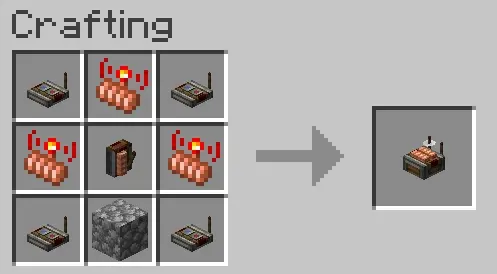
Peripheral type:
redstone_link_bridgeMethods:
getLinkSignal(freq1, freq2 [, color1 [, color2]]) -> numbersendLinkSignal(freq1, freq2, strength [, color1 [, color2]])freq1 and freq2 must be item IDs as strings.
Examples:
"minecraft:iron_ingot""minecraft:oak_sapling""minecraft:redstone"Use an empty string ("") if you want to represent an empty frequency value.
color1 and color2 are optional 24-bit RGB integers in the form 0xRRGGBB. They are only meaningful when the corresponding frequency item supports Minecraft's DYED_COLOR data component, which is only leather armor and leather horse armor in vanilla. A colored slot is on a different Redstone Link network from an uncolored slot of the same item, and different colors produce different networks.
The Minecraft Wiki Dye page lists the RGB value each of the 16 standard dyes produces when applied to leather armor in Java Edition. Useful values:
0xB02E26 -- Red Dye0x3C44AA -- Blue Dye0xFED83D -- Yellow Dye0x5E7C16 -- Green Dye0x1D1D21 -- Black Dye0xF9FFFE -- White DyePass nil (or simply omit the argument) for a slot that should remain uncolored. To color only the second slot, pass nil for the first.
local bridge = peripheral.find("redstone_link_bridge")
assert(bridge, "No redstone_link_bridge found")

-- Read an existing frequency pair
local current = bridge.getLinkSignal("minecraft:diamond", "minecraft:redstone")
print("Current signal:", current)

-- Send a signal to a frequency pair
bridge.sendLinkSignal("minecraft:diamond", "minecraft:redstone", 7)

-- Send on a color-tagged channel. This matches a physical Redstone Link
-- whose leather-armor slots were dyed with one Red Dye and one Blue Dye.
bridge.sendLinkSignal(
    "minecraft:leather_chestplate",
    "minecraft:leather_helmet",
    15,
    0xB02E26,   -- Red Dye
    0x3C44AA)   -- Blue Dye

-- Only the second slot is colored
bridge.sendLinkSignal(
    "minecraft:leather_chestplate",
    "minecraft:leather_helmet",
    15,
    nil,
    0x3C44AA)   -- Blue Dye
Project description from Modrinth.
Pick your setup
Choose the version and loader you play, then open the matching release.
Check the dependencies, then try the file in a copied instance before changing a world you care about.
Recent files
cccredstonelink-0.1.1.jar
26 Jun 2026
cccredstonelink-0.0.2.jar
12 May 2026
cccredstonelink-0.0.1.jar
12 May 2026
cccredstonelink-0.0.0.jar
12 May 2026
Looking for an older file? The official Modrinth project page is in Resources.
 mod
Continuum is a space exploration mod with a focus on planetary bodies as the central point instead of dimensions.
 mod
Display PvPHQ tiers on nametags, in the tab list and in chat
 mod
Enhance vanilla survival with wearable backpacks, smart inventory sorting, vein mining, tree felling, farming, villager rerolls, pet management, and extensive configuration.