Fabric API Needed by OtterLib 0.4.0.2+26.3
requiredMatching file found Matched file: 0.161.0+26.3

Modrinth · Minecraft mod
A cool new simple library mod that everyone can use!
Quick answer
OtterLib 0.4.0.2+26.3 targets 26.3 with Fabric, Quilt. Installation on the client is optional. Installation on the dedicated server is optional. All 1 required mods have matching files.
Where it goes
Installation on the client is optional. Installation on the dedicated server is optional.
The source marks this as usable on both the client and server.
0.4.0.2+26.3. Change the file and its required mods may change too.
Install Fabric API first. We found matching files for this game-version and loader setup.
We only count dependency files that match this setup. A file for another loader does not fill the gap.
Before you install it
Built for OtterLib 0.4.0.2+26.3. Pick another file and the loader, install side or required mods may change.
Use 0.4.0.2+26.3. It targets 26.3 with Fabric, Quilt; another release may have different loader, side or dependency requirements.
Install Fabric API first. We found matching files for this game-version and loader setup.
Installation on the client is optional. Installation on the dedicated server is optional.
Use the “Get this file” button beside 0.4.0.2+26.3. It opens that exact file at the source.
About this project
A simple library mod for minecraft, made mostly to develop my mods easier, but can be used by anyone!
Currently supported loaders: Fabric, Spigot, & Paper
Want to use OtterLib in your project? You can add it as a dependency in your build.gradle file:
repositories {
    maven {
        name "oth3rMavenSnapshots"
        url "https://maven.oth3r.one/snapshots"
    }
}
Implementing on each loader, where ${project.otterlib_version} is the current version of OtterLib for the loader (e.g. 0.2.0.0+1.21.6, 0.2.0.0+1.20-1.21.6)
// fabric
modImplementation "one.oth3r:otterlib:${project.otterlib_version}-fabric"
// spigot
implementation "one.oth3r:otterlib:${project.otterlib_version}-spigot"
// paper
implementation "one.oth3r:otterlib:${project.otterlib_version}-paper"
Visit the maven repository to see more indepth information about the library, including the latest versions.
sample usage:
player.sendMessage(new CTxT("Hello").color(Color.BLUE).bold(true).strikethrough(true)
    .append(new CTxT("World!!!!!!!!!").rainbow(new Rainbow(true)).underline(true).italic(true)).b());
in game example:

OtterLib provides a custom language reader that allows you to easily have server-side localization on all supported loaders. There is also support for a secondary location for locales for easy player overrides.
Adds an interface that enables easy config file creation with support for saving, loading, and updating versions easily.
updating an old entry from the json to the new version:
@Override
public void update(JsonElement jsonElement) {
    JsonObject file = jsonElement.getAsJsonObject();
    if (file.get("version").getAsDouble() == 1.0) {
        this.version = 1.1;
        this.test = file.get("test-bool").getAsBoolean();
    }
}
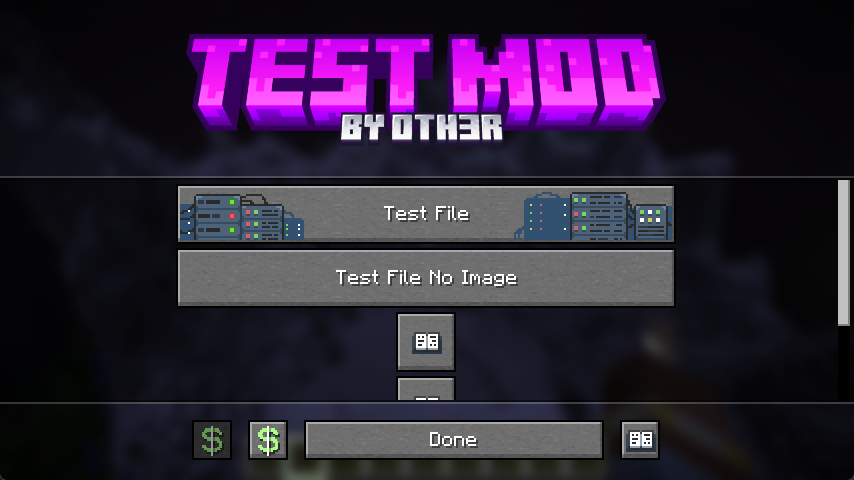
OtterLib offers a custom config screen that can be cuztomized to offer a way to edit multiple config files, link to social media, or even open different screens.
creating the screen:
client.setScreen(new ConfigScreen(client.currentScreen, Text.of("test"),
    new CustomImage(Identifier.of(FabricTest.MOD_ID, "textures/gui/banner.png"),240, 60),
    // the list of buttons to be displayed in the middle
    List.of(
            SimpleButton.Templates.fileEditor(new CTxT("Test File"), FabricTest.testFile, new CustomImage(Identifier.of(FabricTest.MOD_ID, "button/server_button"),246,26)).build(),
            SimpleButton.Templates.fileEditor(new CTxT("Test File No Image"), FabricTest.testFile).build(),
            SimpleButton.Templates.wiki(new CTxT("Help")).openLink("https://oth3r.one").size(30,30).build(),
            SimpleButton.Templates.wiki(new CTxT("Help")).openLink("https://oth3r.one").size(30,30).build(),
            SimpleButton.Templates.warning(new CTxT("Help")).openLink("https://oth3r.one").size(150,15).hideText(false).build()
    ),
    // the bottom buttons can be customized!
    List.of(
            new SimpleButton.Builder(new CTxT("Donate"))
                    .miniIcon(new CustomImage(Identifier.of(Assets.ID, "icon/donate"),15,15)).build(),
            SimpleButton.Templates.donate(new CTxT("Donate")).openLink(URI.create("https://ko-fi.com/oth3r")).build(),
            SimpleButton.Templates.done(new CTxT("Done")).build(),
            SimpleButton.Templates.wiki(new CTxT("Wiki")).openLink("https://oth3r.one").build()
    )));
main config screen in game:
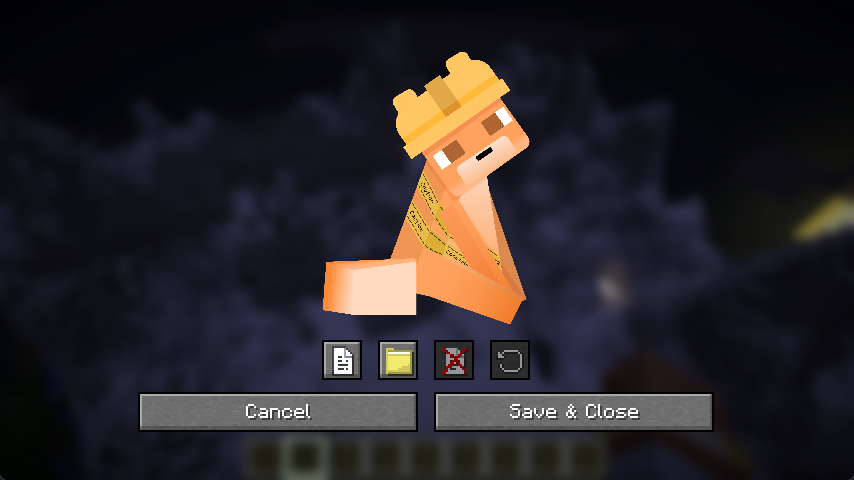
file editor in game: (individual entry editor is planned, this is just a simple placeholder)
Project description from Modrinth.
Pick your setup
Choose the version and loader you play, then open the matching release.
Showing the newest 12 of 25 game versions. Older files are in the list below.
Check the dependencies, then try the file in a copied instance before changing a world you care about.
Recent files
otterlib-0.4.0.2+26.3-fabric.jar
30 Sept 2026
otterlib-0.4.0.1+26.2-spigot.jar
24 Aug 2026
otterlib-0.4.0.1+26.2-paper.jar
24 Aug 2026
paper-0.4.0.0+26.2-paper-all.jar
28 Jun 2026
spigot-0.4.0.0+26.2-spigot-all.jar
28 Jun 2026
otterlib-0.4.0.0+26.2-fabric.jar
28 Jun 2026
otterlib-0.3.0.1+26.2-fabric.jar
21 Jun 2026
otterlib-0.3.0.1+26.1-fabric.jar
16 May 2026
otterlib-0.3.0.0+26.1.1-fabric.jar
1 Apr 2026
otterlib-0.3.0.0+26.1-fabric.jar
25 Mar 2026
otterlib-0.2.2.1+1.21.11-fabric.jar
10 Dec 2025
otterlib-0.2.2.1+1.21.10-fabric.jar
7 Oct 2025
Looking for an older file? The official Modrinth project page is in Resources.
 mod
mod👝 Living entities drop all their possible loot in a configurable amount, looting enchant supported.
 mod
modResource processing using molten materials, Create more resources from your ores !
 mod
modAn in-game visual node graph recipe & ratio calculator for GregTech CEu Modern.