Fabric API Needed by SwordSight 1.2
requiredMatching file found Matched file: 0.160.0+26.2

Modrinth · Minecraft mod
SwordSight makes weapons ignore grass tall grass and so on!
Quick answer
SwordSight 1.2 targets 26.2 with Fabric. Installation on the client is optional. Installation on the dedicated server is optional. All 1 required mods have matching files.
Where it goes
Installation on the client is optional. Installation on the dedicated server is optional.
The source marks this as usable on both the client and server.
1.2. Change the file and its required mods may change too.
Install Fabric API first. We found matching files for this game-version and loader setup.
We only count dependency files that match this setup. A file for another loader does not fill the gap.
Before you install it
Built for SwordSight 1.2. Pick another file and the loader, install side or required mods may change.
Use 1.2. It targets 26.2 with Fabric; another release may have different loader, side or dependency requirements.
Install Fabric API first. We found matching files for this game-version and loader setup.
Installation on the client is optional. Installation on the dedicated server is optional.
Use the “Get this file” button beside 1.2. It opens that exact file at the source.
About this project
SwordSight is a mod designed to enhance combat by preventing blocks like tall grass, flowers, and other non-solid clutter from blocking your weapon's line of sight, allowing you to hit enemies behind them seamlessly.
Alongside the original server-authoritative configuration system, SwordSight now ships with a full in-game configuration menu — a JEI/REI-style dual-list picker for choosing exactly which blocks are ignored, with dedicated handling for growth-stage crops so you can decide whether a fully-grown plant should still be farmable with your weapon.
All general questions, feature requests, and non-urgent bug reports should be posted in the appropriate channels on our Discord Server. We actively monitor the server and will respond as soon as possible. This ensures that the whole community can benefit from the discussion and solutions.
While we prefer all issues to be handled via the Discord server first, you are welcome to PM me directly under specific urgent circumstances:
I will endeavor to answer your PM as soon as I can to be helpful and see what I can do to resolve your urgent issue. However, please understand that immediate responses are not guaranteed, and private messaging is a professional courtesy, not an entitlement. Thank you for your understanding and cooperation!
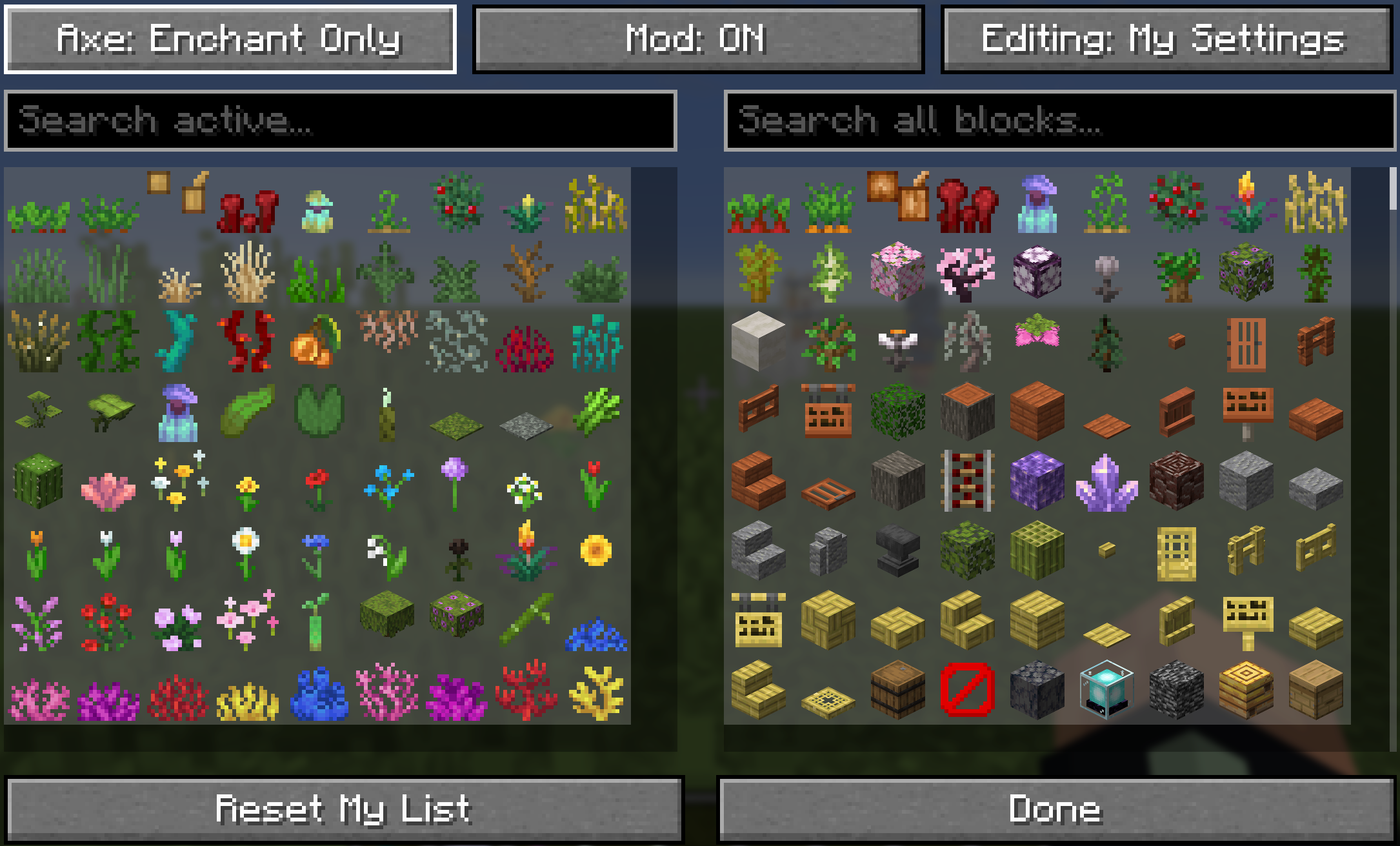
Press M (default, fully rebindable in Controls) or run /swordsight//swords to open SwordSight's config menu directly — no more chat commands needed to see what's active.
The shipped default configuration includes a comprehensive list of non-solid plant and clutter blocks, covering grasses, crops, flowers, vines, corals, and more.
// --- GRASSES, FERNS, BUSHES ---
"minecraft:short_grass",
"minecraft:tall_grass",
"minecraft:dead_bush",
"minecraft:fern",
"minecraft:large_fern",
"minecraft:short_dry_grass",
"minecraft:tall_dry_grass",
"minecraft:bush",
"minecraft:firefly_bush",

// --- CROPS & GROWABLES (with dedicated growth-stage handling — see In-Game Configuration Menu) ---
"minecraft:sugar_cane",
"minecraft:wheat",
"minecraft:carrots",
"minecraft:potatoes",
"minecraft:beetroots",
"minecraft:cocoa",
"minecraft:nether_wart",
"minecraft:torchflower_crop",
"minecraft:pitcher_crop",
"minecraft:sweet_berry_bush",
"minecraft:bamboo",
"minecraft:bamboo_sapling",
"minecraft:cactus",
"minecraft:cactus_flower",

// --- FLOWERS (Short & Tall) ---
"minecraft:poppy",
"minecraft:dandelion",
"minecraft:allium",
"minecraft:azure_bluet",
"minecraft:red_tulip",
"minecraft:orange_tulip",
"minecraft:white_tulip",
"minecraft:pink_tulip",
"minecraft:oxeye_daisy",
"minecraft:cornflower",
"minecraft:lily_of_the_valley",
"minecraft:wither_rose",
"minecraft:blue_orchid",
"minecraft:torchflower",
"minecraft:sunflower",
"minecraft:lilac",
"minecraft:rose_bush",
"minecraft:peony",
"minecraft:pink_petals",
"minecraft:wildflowers",

// --- VINES, ROOTS, FOLIAGE ---
"minecraft:vine",
"minecraft:twisting_vines",
"minecraft:twisting_vines_plant",
"minecraft:weeping_vines",
"minecraft:weeping_vines_plant",
"minecraft:cave_vines",
"minecraft:cave_vines_plant",
"minecraft:hanging_roots",
"minecraft:glow_lichen",
"minecraft:mangrove_propagule",
"minecraft:mushroom_stem",
"minecraft:crimson_roots",
"minecraft:warped_roots",
"minecraft:azalea",
"minecraft:flowering_azalea",
"minecraft:small_dripleaf",
"minecraft:big_dripleaf", // its stem segment always follows automatically
"minecraft:pitcher_plant",

// --- WATER PLANTS/CORALS ---
"minecraft:seagrass",
"minecraft:tall_seagrass",
"minecraft:kelp",
"minecraft:kelp_plant",
"minecraft:lily_pad",
"minecraft:tube_coral",
"minecraft:brain_coral",
"minecraft:bubble_coral",
"minecraft:fire_coral",
"minecraft:horn_coral",
"minecraft:tube_coral_fan",
"minecraft:brain_coral_fan",
"minecraft:bubble_coral_fan",
"minecraft:fire_coral_fan",
"minecraft:horn_coral_fan",
"minecraft:sea_pickle",
"minecraft:moss_carpet",
"minecraft:pale_moss_carpet"
Block objects keeps lookups fast during gameplay, with no per-hit performance cost.The hit-through functionality is strictly controlled by weapon type:
#minecraft:swords item tag), Tridents, and Maces./swordsight axe and /swordsight axe enchant.Commands are accessible using either /swordsight or the alias /swords, and now open the in-game configuration menu directly in addition to their usual chat output.
| Command | Description | Context |
|---|---|---|
/swordsight |
Displays the command list and links, and opens the configuration menu. | All contexts |
/swordsight reload |
Reloads the config from disk and updates the block cache. | Single-player / Server operators |
/swordsight list |
Shows all currently ignored blocks. | All contexts |
/swordsight list <item_id> |
Toggles an item/block in the ignored list. | Single-player / Server operators |
/swordsight axe |
Cycles Axe Hit-Through between Disabled / Enchant Only / Always Enabled. | Single-player / Server operators |
/swordsight axe enchant |
Toggles the enchantment requirement for axes. | Single-player / Server operators |
In multiplayer, players without server permission can still view the current configuration and freely manage their own personal profile through the in-game menu — only changes to the server's shared list require operator permission.
Project description from Modrinth.
Pick your setup
Choose the version and loader you play, then open the matching release.
Showing the newest 12 of 16 game versions. Older files are in the list below.
Check the dependencies, then try the file in a copied instance before changing a world you care about.
Recent files
swordsight-1.2.jar
10 Sept 2026
swordsight-1.2.jar
10 Sept 2026
swordsight-1.2.jar
9 Sept 2026
swordsight-1.2.jar
9 Sept 2026
swordsight-1.2.jar
9 Sept 2026
swordsight-1.2.jar
9 Sept 2026
swordsight-1.2.jar
9 Sept 2026
swordsight-1.2.jar
9 Sept 2026
swordsight-1.2.jar
9 Sept 2026
swordsight-1.1.jar
16 Jun 2026
swordsight-1.1.jar
1 May 2026
swordsight-1.1.jar
5 Apr 2026
Looking for an older file? The official Modrinth project page is in Resources.
 mod
modOfficially recognized community ports and special editions of Bird Watching, maintained by community contributors.
 mod
modSwordSight makes weapons ignore grass tall grass and so on! Customizeable to any block.
 mod
modRealistic military drones, FPV systems, modular assembly, component damage, voice chat and radios for Minecraft Forge 1.20.1.