Fabric API Needed by Signed Paintings 1.2.17-mc26.3
requiredMatching file found Matched file: 0.164.0+26.3
Modrinth · Minecraft mod
Display web images as vanilla-like paintings using signs, Scale images automatically for a pixelated look!
Quick answer
Signed Paintings 1.2.17-mc26.3 targets 26.3 with Fabric. It must be installed on the client. Do not install it on the dedicated server. All 1 required mods have matching files.
Where it goes
It must be installed on the client. Do not install it on the dedicated server.
This file is marked client-only.
1.2.17-mc26.3. Change the file and its required mods may change too.
Install Fabric API first. We found matching files for this game-version and loader setup.
We only count dependency files that match this setup. A file for another loader does not fill the gap.
Before you install it
Built for Signed Paintings 1.2.17-mc26.3. Pick another file and the loader, install side or required mods may change.
Use 1.2.17-mc26.3. It targets 26.3 with Fabric; another release may have different loader, side or dependency requirements.
Install Fabric API first. We found matching files for this game-version and loader setup.
It must be installed on the client. Do not install it on the dedicated server.
Use the “Get this file” button beside 1.2.17-mc26.3. It opens that exact file at the source.
About this project
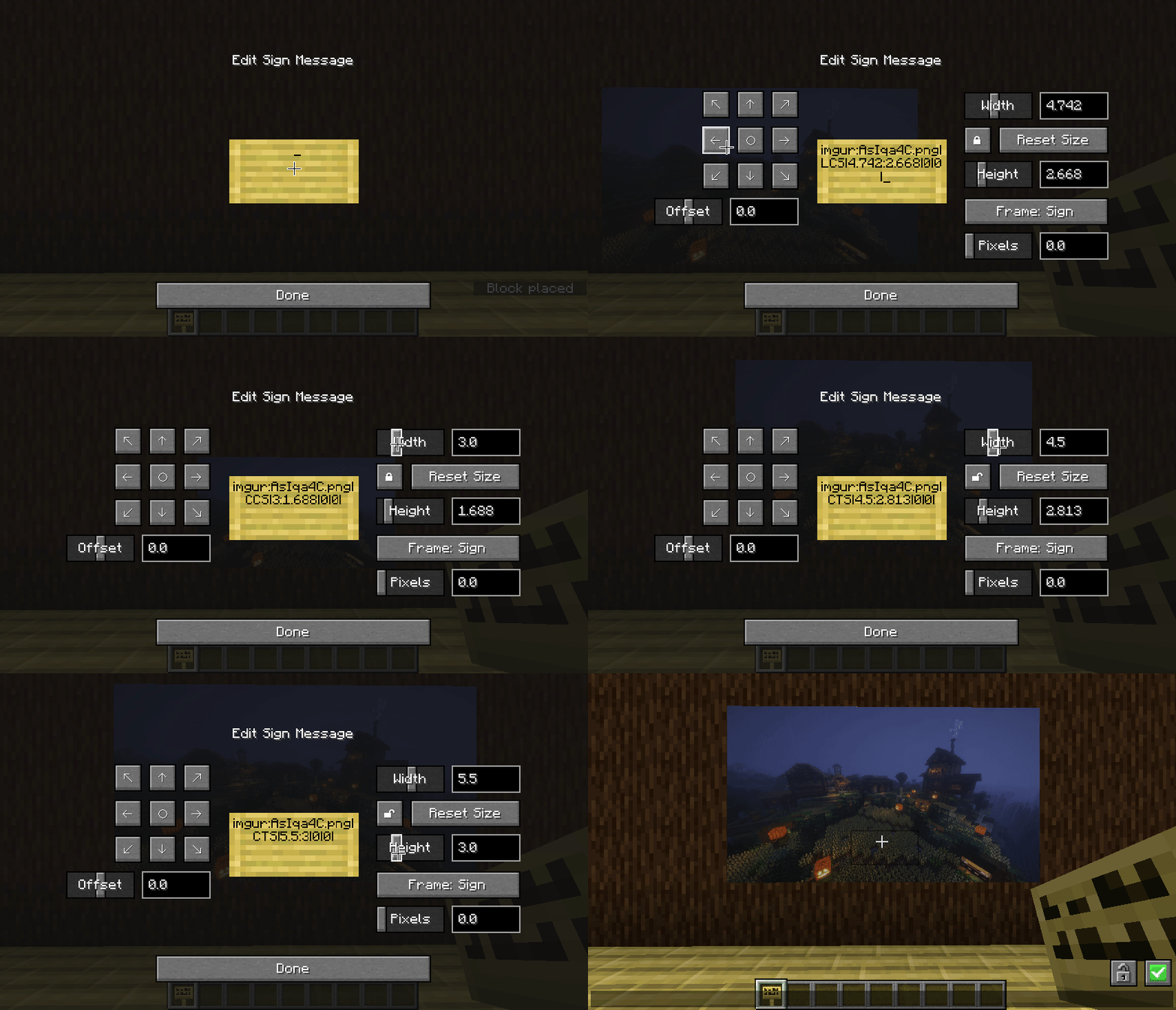
Bring your own custom images into the game as vanilla-like paintings using signs - anyone else with the mod will see them too! Just paste in an image URL into an empty sign!
Tweak the size and positioning of the painting within the sign's UI and see the changes live.
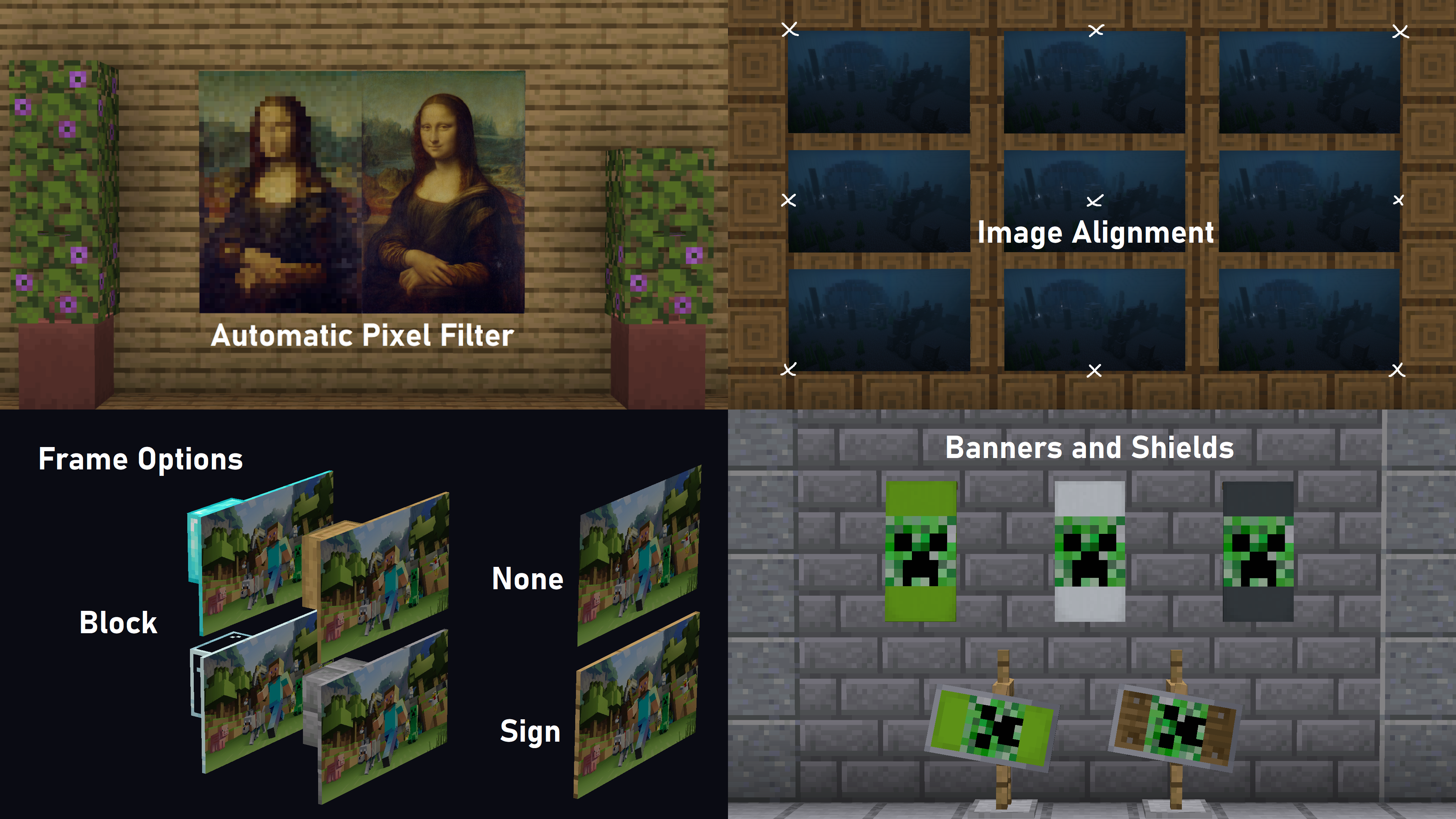
The mod can automatically scale the images to make them pixel consistent with Minecraft so they fit in - even for higher resolution texture packs
Avoid having to make map art!
/paintings:toggle all|banners|shields|signs - toggles rendering for images
/paintings:toggle culling - makes signs visible from further away, at the cost of worse fps - use this mod instead if you want a bit more control over the distance
/paintings:status all|<url> - gets info about what images are currently loaded
/paintings:upload <url> - upload an image from a url to imgur
if someone is being annoying, you can stop specific links from rendering:
/paintings:block add <url> - blocks a specific image, stopping it rendering
/paintings:block remove all|<url> - unblocks a specific image or all blocked images
/paintings:block list - lists all blocked links
/paintings:block auto - automatically blocks newly loading links
I use a high-re texture pack, does the pixel filter support this?
Yes! The pixel filter supports any resolution! Just move the slider or change the number.
Do I need to be connected to the internet to use the mod?
Yes, the mod downloads images from the Internet so a connection is a must! (loaded images will be cached for your current session, instead of redownloading for every individual sign)
Will my friends see the custom painting?
As long as your friends have the mod they will see exactly the same thing you do!
What if my friends don't have the mod?
They will see a sign with a URL and some text for the settings. However, you can hide the sign underground then shift the painting up using the offset slider (the text may also be compressed, in which case it would look like a bunch of thin lines)
Fabric? Forge? Quilt? Backports?
The mod is developed for the latest versions Fabric, and while untested for Quilt it should work - Forge is currently unsupported, Sinytra Connector may allow it to work on forge, but dont be suprised if you encounter bugs!
Project description from Modrinth.
Pick your setup
Choose the version and loader you play, then open the matching release.
Showing the newest 12 of 24 game versions. Older files are in the list below.
Check the dependencies, then try the file in a copied instance before changing a world you care about.
Recent files
signed_paintings-1.2.17-mc26.3.jar
10 Oct 2026
signed_paintings-1.2.16-mc26.3.jar
23 Sept 2026
signed_paintings-1.2.15-mc26.2.jar
10 Jul 2026
signed_paintings-1.2.14-mc26.2.jar
5 Jul 2026
signed_paintings-1.2.13-mc26.1.1.jar
25 Jun 2026
signed_paintings-1.2.12-mc26.1.1.jar
26 Apr 2026
signed_paintings-1.2.11-mc26.1.1.jar
15 Apr 2026
signed_paintings-1.2.10-mc1.21.11.jar
15 Mar 2026
signed_paintings-1.2.9-mc1.21.11.jar
11 Mar 2026
signed_paintings-1.2.8-mc1.21.11.jar
29 Dec 2025
signed_paintings-1.2.7-mc1.21.11.jar
23 Dec 2025
signed_paintings-1.2.7-mc1.21.9.jar
24 Nov 2025
Looking for an older file? The official Modrinth project page is in Resources.
 mod
modTOP, a WAILA alternative that shows information about what you're looking at
 mod
modNice Innovative Creative Enhancements - A mod about decoration
 mod
modA client sided Mod that let's you toggle the visibility of other player names at a push of a button.