Fabric API Needed by Cave Fog Stabilizer 2.0.1 for Fabric 1.21.8
requiredMatching file found Matched file: [1.21.8] Fabric API 0.136.1+1.21.8
CurseForge · Minecraft mod
Prevents time of day from affecting cave fog color
Quick answer
Cave Fog Stabilizer 2.0.1 for Fabric 1.21.8 targets 1.21.8, 1.21.6, 1.21.7 with Fabric. The project page does not say whether this file belongs on the client, dedicated server, or both. All 3 required mods have matching files.
Where it goes
The project page does not say whether this file belongs on the client, dedicated server, or both.
The source does not explicitly classify this release as client-only or server-only.
2.0.1 for Fabric 1.21.8. Change the file and its required mods may change too.
Install Fabric API, Fzzy Config, Fabric Language Kotlin first. We found matching files for this game-version and loader setup. 1 comes through another mod in the chain.
1 extra mod was pulled in by another dependency. Indented rows show who needs each one. We only count dependency files that match this setup. A file for another loader does not fill the gap.
Before you install it
Built for Cave Fog Stabilizer 2.0.1 for Fabric 1.21.8. Pick another file and the loader, install side or required mods may change.
Use 2.0.1 for Fabric 1.21.8. It targets 1.21.8, 1.21.6, 1.21.7 with Fabric; another release may have different loader, side or dependency requirements.
Install Fabric API, Fzzy Config, Fabric Language Kotlin first. We found matching files for this game-version and loader setup. 1 comes through another mod in the chain.
The project page does not say whether this file belongs on the client, dedicated server, or both.
Use the “Get this file” button beside 2.0.1 for Fabric 1.21.8. It opens that exact file at the source.
About this project
When Mojang added environmental fog to the game, the time of day started affecting how fog looks underground. I thought this didn't make sense, so I made this mod.
This mod prevents fog from being affected by the time of day only when the player is underground. This lets you have the new environmental fog on the surface while keeping cave fog unaffected.
Check out the Gallery tab for comparison images between this mod, vanilla after environmental fog, and vanilla before environmental fog.
c:is_cave / c:is_underground biome tags. Custom fog colors are kept as-is, only darkened by a configurable amount.The mod is configured through Fzzy Config. On 1.21.11 and newer, the options are also available on the Sodium settings screen when it's installed.
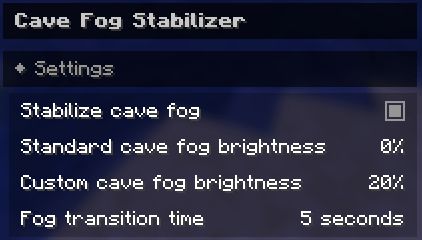
Project description from CurseForge.
Pick your setup
Choose the version and loader you play, then open the matching release.
Check the dependencies, then try the file in a copied instance before changing a world you care about.
Recent files
cave_fog_stabilizer-fabric-2.0.1-1.21.8.jar
7 Nov 2026
cave_fog_stabilizer-fabric-2.0.1-26.3.jar
7 Nov 2026
cave_fog_stabilizer-neoforge-2.0.1-26.2.jar
7 Nov 2026
cave_fog_stabilizer-neoforge-2.0.1-26.1.2.jar
7 Nov 2026
cave_fog_stabilizer-neoforge-2.0.1-1.21.8.jar
7 Nov 2026
cave_fog_stabilizer-fabric-2.0.1-26.1.2.jar
7 Nov 2026
cave_fog_stabilizer-neoforge-2.0.1-26.3.jar
7 Nov 2026
cave_fog_stabilizer-neoforge-2.0.1-1.21.11.jar
7 Nov 2026
cave_fog_stabilizer-fabric-2.0.1-1.21.10.jar
7 Nov 2026
cave_fog_stabilizer-neoforge-2.0.1-1.21.10.jar
7 Nov 2026
cave_fog_stabilizer-fabric-2.0.1-26.2.jar
7 Nov 2026
cave_fog_stabilizer-fabric-2.0.1-1.21.11.jar
7 Nov 2026
Looking for an older file? The official CurseForge project page is in Resources.
 mod
LDLib is a libarary mod for custom rendering, modular gui.
 mod
This mod is a remake of Old Mod TofuCraft made by tsuteto. add soybean As a new all-purpose food!
 mod
A mod that adds some new tools for Tinkers' Construct.