Vintage Story version
Back to mods 
Vintage Story Mod DB · Vintage Story mod
Lavoisier
WARNING: This mod doesn't really adds anything besides the chemistry crafting system, it's meant to be used by other mods as a library. You can use ChemistryLib or Alchemistry if you want some things to make. Also, this is NOT COMPATIBLE WITH VANILLA SULFURIC
Choose a version Pick your version below, then grab the matching file.
Quick answer
Which Lavoisier release should I use?
Latest stable file 1.3.4
Game version 1.22.0-pre.1, 1.22.0-pre.2, 1.22.0-pre.3
Loader Built-in Vintage Story mod system
Lavoisier 1.3.4 targets 1.22.0-pre.1, 1.22.0-pre.2, 1.22.0-pre.3. It must be installed on the client. Installation on the dedicated server is optional. No extra mods listed for this file.
Where it goes
Is Lavoisier required on the client, server, or both?
It must be installed on the client. Installation on the dedicated server is optional.
Client Required
Dedicated server Optional
Loader for this release Built-in Vintage Story mod system
Required install it here Optional supported, not mandatory Not supported do not install here Source doesn’t say do not assume
This release supports both sides, but the source does not require it on the server.
What else does Lavoisier 1.3.4 need?
1.3.4. Change the file and its required mods may change too.
This file does not list any required mods. Do not add a library just because a different file uses it.
This file does not list any required or optional mods.
Before you install it
Add Lavoisier without breaking your instance.
Built for Lavoisier 1.3.4. Pick another file and the loader, install side or required mods may change.
- 01
Stick to this file
Use 1.3.4. It targets 1.22.0-pre.1, 1.22.0-pre.2, 1.22.0-pre.3; another release may have different loader, side or dependency requirements.
- 02
Bring the mods it needs
This file does not list any required mods. Do not add a library just because a different file uses it.
- 03
Put it on the correct side
It must be installed on the client. Installation on the dedicated server is optional.
- 04
Pick the file you checked
Use the “Get this file” button beside 1.3.4. It opens that exact file at the source.
About this project
What does Lavoisier add?
WARNING: This mod doesn't really adds anything besides the chemistry crafting system, it's meant to be used by other mods as a library. You can use ChemistryLib or Alchemistry if you want some things to make.
Also, this is NOT COMPATIBLE WITH VANILLA SULFURIC ACID YET, anything that mentions sulfuric acid refers specifically to the chemistrylib one
Even though Lavoisier is fixed, my official position is to not use ChemistryLib right now: there's going to be a massive rebalancing update (to balance around the vanilla sulfuric acid recipe, which is currently completely separated from the ChemLib sulfuric acid), but said rebalancing will require a more in-depth Lavoisier update (actually closer to a rewrite)
So, you can play with it now to scratch that itch, but keep in mind that it's going to change, and chemicals are going to get much cheaper
If you find a bug, have a suggestion or want to talk, feel free to join my Discord server!
The mod The Twelve Keys adds an alchemy merchant that sells retort parts!
About the mod
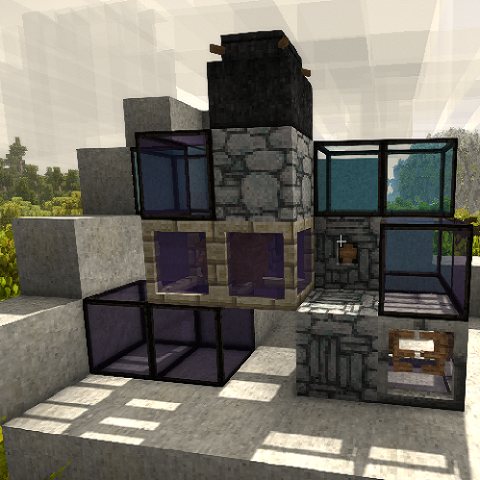
Lavoisier (named after Antoine Lavoisier, the father of chemistry) is a mod that adds a new crafting system based on early chemistry (right when it stopped being alchemy). This mod adds a new modular, multi-block chemistry apparatus, that can be used for anything from simple distillation to complex chemical synthesis.
This mod is a library: it's meant to be used along other mods that would add actual content (the mod by itself adds support for all boiler/condenser distillable liquids, using a boiling flask and a retort neck).
In Lavoisier, you will find a few new blocks:
The boiling flask, meant as a starting point for all synthesis. You can put both a solid and a liquid in a boiling flask to react (similar to a barrel), and after the reaction is complete, you can find up to one liquid and one solid byproduct inside.
The retort neck, that can be used to collect liquids after they reacted (don't forget to add a bowl to collect your distillate!). Including the byproducts, this crafting system can output up to two liquids and one solid.
The dissolver, that can, much like the retort neck, collect products after they reacted. The dissolver, however, can be filled with a liquid that will be used as another input, making it possible to use two liquid inputs in recipes. The dissolver can also gather both liquid and solid outputs.
To access the product content of a dissolver, you can right click it with an empty hand to collect a solid, or empty the reacting liquid first to access a liquid product.
Many components (the condenser, the reaction chamber, the reflux column and the catalyser for now) that are used to make more complex setups.
Be careful: you can only connect a single apparatus to another, and they have to all be oriented in the same direction (the boiling flask, having no orientation, can be placed however you like though)
Adding recipes and components
Adding new apparatus components and new recipes can be done purely using .json modding. A tutorial can be found in the wiki.
Here is an example of a recipe (the mead recipe doesn't actually involves salt, it's just to give an example)
Recipe example
{
"code": "distillingmeadcider",
"setup": [ "alembicboilingflask", "alembicretortneck" ],
"ticksPerItem": 40,
"liquidInput": {
"type": "item",
"code": "game:ciderportion-mead",
"stackSize": 10
},
"solidInput": {
"type": "item",
"code": "game:ciderportion-mead",
"stackSize": 1
},
"product": {
"type": "item",
"code": "game:spiritportion-mead",
"stackSize": 1
},
"liquidByproduct": {
"type": "item",
"code": "game:waterportion",
"stackSize": 9
},
"solidByproduct": {
"type": "item",
"code": "game:salt",
"stackSize": 1
}
}
Other possible setup components are "alembiccomponent-catalyser", "alembiccomponent-reactionchamber", "alembiccomponent-condenser" and "alembiccomponent-refluxvertical". Please note that all setups must start with a boiling flask, and it's recommanded to end with a retort neck if you want to have more than only byproducts.
If you want to add dissolver recipes, use another item stack named "endInput" which represents the dissolver's content. This has to be a liquid, or the recipe can't be matched. You should also end your setup with "alembicdissolver".
Please note that the game will stop checking for setup components after it finds a retort neck, so if you add components after a retort neck in your recipe, it will never be matched.
Please also note that you have to use stackSize even for liquids. For some reason, I can't get litres to parse correctly. Usually it's 1 item for 0.01L.
The "ticksPerItem" property represents the time it takes for the recipe to be handled once, 1 tick = 50 ms.
Be cautious: the mod doesn't check what you're doing and just lets you do it, and the game might not like it if, for instance, you try to put a solid item inside a liquid container. The game might also straight up crash if it fails to resolve an item sometimes.
If you want to add components, the only thing you have to do is make them orientable and make sure their item id starts with "alembic". The part right before the orientation (items have codes like "lavoisier:alembiccomponent-refluxvertical-north") should also end with "vertical" if your component is meant to be placed on top of another. You can look at the alembic component json for reference.
Development
Roadmap:
- Make a tutorial on how to create components and recipes
- Make an in-game handbook tutorial explaining how the system works
- Adding a new start block: the electrolysis flask (when the Electricity mod is installed)
- Add more sounds
- Randomised/mutliple byproducts/byproduct tables
- Maybe some way to have medium-scale production, I'm not sure I really want to add it but maybe funnels to automatically feed (or at least empty an output) stuff?
- Tiered components (clay, glass, copper)
- A new synthesis system: the athanor (reaction furnace, for higher temperatures)
- Add explosion risk when recipes are done poorly (got too hot, not the right tier...)
- Add actual temperature of reactions, and make it require fuel to heat
I am also planning to make more mods that will use Lavoisier in the (relatively) near future, including:
- A medicine mod, adding some antibiotics and other drugs
- Maybe an engines and transportation mod, since ChemistryLib adds explosive fuels
- Advanced metallurgy, like aluminium and titanium
- PetrochemistryLib, an expansion of ChemistryLib for petrol products (paraffin, bitumen, fuels, cheap benzene...)
Known issues:
- The condenser and the catalyser models don't connect correctly to the reflux column. They work just fine when using in recipes, but they look bad
- If you don't have the correct amounts of reagents, it won't react but it will still say "Will create [...]". It shouldn't say it (or should have another message saying that you don't have the correct amounts).
- When a dissolver finishes reacting and is empty, the last portion of liquid won't be transferred to the accessible liquid slot (for unknown reasons)
Translations:
English and French by myself
Ukrainian by Olexn
Project description from Vintage Story Mod DB.
Pick your setup
Lavoisier releases for each Vintage Story version.
Choose the version and loader you play, then open the matching release.
Vintage Story version
1.22.1
1 loader buildVintage Story version
1.22.0-rc.10
1 loader buildVintage Story version
1.22.0-rc.9
1 loader buildVintage Story version
1.22.0-rc.8
1 loader buildVintage Story version
1.22.0-rc.7
1 loader buildVintage Story version
1.22.0-rc.6
1 loader buildVintage Story version
1.22.0-rc.5
1 loader buildVintage Story version
1.22.0-rc.4
1 loader buildVintage Story version
1.22.0-rc.3
1 loader buildVintage Story version
1.22.0-rc.2
1 loader buildVintage Story version
1.22.0-rc.1
1 loader buildShowing the newest 12 of 56 game versions. Older files are in the list below.
Check the dependencies, then try the file in a copied instance before changing a world you care about.
Recent files
Lavoisier versions and loaders
1.3.4
lavoisier_1.3.4.zip
12 May 2026
Client Required Server Optional Dependencies No extras listed Listed on Release listing
Check the 1.22.2 setup 1.22.0-pre.11.22.0-pre.21.22.0-pre.31.22.0-pre.4 release
1.3.3
lavoisier_1.3.3.zip
3 Feb 2026
Client Source doesn’t say Server Source doesn’t say Dependencies No extras listed Listed on Release listing
Check the 1.21.6-rc.1 setup 1.21.0-pre.11.21.0-pre.21.21.0-pre.31.21.0-rc.1 release
1.3.1
lavoisier_1.3.1.zip
3 Mar 2025
Client Source doesn’t say Server Source doesn’t say Dependencies No extras listed Listed on Release listing
Check the 1.20.4 setup 1.20.11.20.21.20.31.20.4 release
1.3.0
lavoisier-1.3.0.zip
25 Jul 2023
Client Source doesn’t say Server Source doesn’t say Dependencies No extras listed Listed on Release listing
Check the 1.19.1 setup 1.18.41.18.51.18.61.18.7 release
1.2.8
lavoisier-1.2.8.zip
1 Jun 2023
Client Source doesn’t say Server Source doesn’t say Dependencies No extras listed Listed on Release listing
Check the 1.18.5 setup 1.18.41.18.5 release
1.2.7
lavoisier-1.2.7.zip
22 Apr 2023
Client Source doesn’t say Server Source doesn’t say Dependencies No extras listed Listed on Release listing
Check the 1.18.1 setup 1.18.01.18.1 release
1.2.6-pre.1
lavoisier-1.2.6-pre.1.zip
5 Mar 2023
Client Source doesn’t say Server Source doesn’t say Dependencies No extras listed Listed on Release listing
Check the 1.18.0-pre.0 setup 1.18.0-pre.0 release
1.2.6
lavoisier-1.2.6.zip
3 Mar 2023
Client Source doesn’t say Server Source doesn’t say Dependencies No extras listed Listed on Release listing
Check the 1.17.11 setup 1.17.101.17.11 release
1.2.5
lavoisier-1.2.5.zip
3 Mar 2023
Client Source doesn’t say Server Source doesn’t say Dependencies No extras listed Listed on Release listing
Check the 1.17.11 setup 1.17.101.17.11 release
1.2.4
lavoisier-1.2.4.zip
2 Mar 2023
Client Source doesn’t say Server Source doesn’t say Dependencies No extras listed Listed on Release listing
Check the 1.17.11 setup 1.17.101.17.11 release
1.2.3
lavoisier-1.2.3.zip
25 Feb 2023
Client Source doesn’t say Server Source doesn’t say Dependencies No extras listed Listed on Release listing
Check the 1.17.11 setup 1.17.101.17.11 release
1.2.2
lavoisier-1.2.2.zip
25 Feb 2023
Client Source doesn’t say Server Source doesn’t say Dependencies No extras listed Listed on Release listing
Check the 1.17.11 setup 1.17.101.17.11 release
Looking for an older file? The official Vintage Story Mod DB project page is in Resources.