Vintage Story version
Back to mods 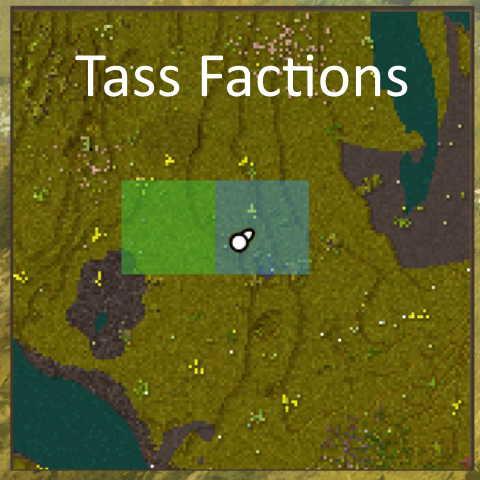
Vintage Story Mod DB · Vintage Story mod
TassFactions
Tass Factions features Factions and ranks • Players create and join factions. Four ranks: Owner, Officer, Member, Initiate. Rank controls who can build on faction land, manage members, claim and contest, and change settings. • Each faction has a map color, a
Choose a version Pick your version below, then grab the matching file.
Quick answer
Which TassFactions release matches 1.22.0?
Best match for your filters 0.6.0
Game version 1.22.0, 1.22.1, 1.22.2
Loader Built-in Vintage Story mod system
TassFactions 0.6.0 targets 1.22.0, 1.22.1, 1.22.2. It must be installed on the client. Installation on the dedicated server is optional. No extra mods listed for this file.
Where it goes
Is TassFactions required on the client, server, or both?
It must be installed on the client. Installation on the dedicated server is optional.
Client Required
Dedicated server Optional
Loader for this release Built-in Vintage Story mod system
Required install it here Optional supported, not mandatory Not supported do not install here Source doesn’t say do not assume
This release supports both sides, but the source does not require it on the server.
What else does TassFactions 0.6.0 need?
0.6.0 on 1.22.0. Every mod below is checked against that same setup.
This file does not list any required mods. Do not add a library just because a different file uses it.
This file does not list any required or optional mods.
Before you install it
Add TassFactions without breaking your instance.
Built for TassFactions 0.6.0 on 1.22.0. Pick another file and the loader, install side or required mods may change.
- 01
Stick to this file
Use 0.6.0. It targets 1.22.0, 1.22.1, 1.22.2; another release may have different loader, side or dependency requirements.
- 02
Bring the mods it needs
This file does not list any required mods. Do not add a library just because a different file uses it.
- 03
Put it on the correct side
It must be installed on the client. Installation on the dedicated server is optional.
- 04
Pick the file you checked
Use the “Get this file” button beside 0.6.0. It opens that exact file at the source.
About this project
What does TassFactions add?
Tass Factions features
Factions and ranks
- Players create and join factions. Four ranks: Owner, Officer, Member, Initiate. Rank controls who can build on faction land, manage members, claim and contest, and change settings.
- Each faction has a map color, a login message (MOTD), and a description.
- Faction-only chat channel.
Territory
- Claim one chunk at a time. A claim covers the full vertical column.
- New claims must be next to your existing territory. You cannot unclaim a chunk if doing so would split your territory in two.
- Non-members cannot build, break, or use blocks on your land.
Power
- Each member adds to your max power (default 40 each). A new member adds nothing for their first 24 hours. The Owner counts right away.
- Each claimed chunk costs power to hold (default 10). If your land costs more than your current power, you are overclaimed and your border chunks can be taken.
- Current power drops when a member dies (default 10) and regenerates over real time (default 10 per hour) up to your max.
- Changing these numbers while a world is running is safe. Existing factions are rescaled so they keep the same percentage of their max.
Contests (taking land)
- Stand on an enemy chunk that is on their border and next to your land, then start a contest. You cannot contest interior chunks, the enemy home chunk while they hold other land, or chunks you cannot afford.
- The timer uses the real clock (default 24 hours, half that against an overclaimed defender) and only counts down while the server is running.
- When the timer ends, if one of your members is standing on the chunk and no defender is, the chunk becomes yours. Otherwise the defender keeps it. A cooldown then blocks contesting that chunk again for a set time.
PvP
- Safezones are admin-marked chunks. Players cannot damage each other inside them. Mobs, falls, and the environment still deal damage.
- Faction members cannot damage each other anywhere.
Inactivity
- After a set number of days with no member online (default 14), a faction's power decays. Once it sits at zero power for a few more days, it disbands and its land becomes unclaimed.
Home and teleport
- A faction can set a home and teleport to it. Members can request teleports to each other. Both have a warmup that cancels if you move or take damage, and both have cooldowns.
Map
- Claimed chunks show as colored squares on the world map. Your own land has a white border, your home has a gold border, and a chunk being contested has a red border. Hovering shows the faction name.
Admin
- Admins can create, disband, and modify any faction, add or remove any player, mark safezones, and free chunks.
Saving
- Faction, member, territory, and contest data is saved and kept across version updates. It is never wiped.
Commands
Players (/f)
Faction basics:
/f create <name>: create a faction, you become Owner/f disband: dissolve your faction (Owner only)/f leave: leave your faction (Owner must transfer or disband first)/f list: list all factions/f info [name]: show your faction, or a named one
Members and ranks:
/f invite <player>: invite an online player (Officer or Owner)/f accept <faction>: accept an invite/f kick <player>: remove a member (Officer or Owner)/f rank <player> <initiate|member|officer>: set a member's rank (Officer or Owner)/f transfer <player>: give Owner to a member (you become Officer)
Territory:
/f claim: claim the chunk you are standing in (Officer or Owner)/f unclaim: release the chunk you are standing in (Officer or Owner)/f contest: start a timed capture of the enemy chunk you are standing in (Member or higher)/f contests: list contests your faction is attacking or defending, with time left
Identity and chat:
/f chat <message>: send a message to your faction only/f setcolor <r> <g> <b>: set your faction map color (Officer or Owner)/f motd <text>: set the login message (Officer or Owner)/f desc <text>: set the description shown in/f info(Officer or Owner)
Home and teleport:
/f sethome: set the faction home to your position (Officer or Owner)/f home: teleport to the faction home/ftp <player>: request a teleport to a faction member/ftp accept: allow a pending teleport request
Admins (/f admin, needs controlserver)
Chunk tools (act on the chunk you stand in):
/f admin free: return this chunk to wilderness/f admin safezone: mark this chunk a safezone/f admin info: show this chunk's state
On behalf of others:
/f admin create <faction> <player>: create a faction owned by an online player/f admin disband <faction>: disband a faction by name/f admin addmember <faction> <player>: add an online player to a faction/f admin removemember <player>: remove a player from their faction/f admin setrank <faction> <player> <rank>: set a member's rank/f admin transfer <faction> <player>: make a player the Owner/f admin setcolor <faction> <r> <g> <b>: set a faction's map color/f admin motd <faction> <text>: set a faction's MOTD/f admin desc <faction> <text>: set a faction's description
Project description from Vintage Story Mod DB.
Pick your setup
TassFactions releases for each Vintage Story version.
Choose the version and loader you play, then open the matching release.
Vintage Story version
1.22.5
1 loader buildVintage Story version
1.22.4
1 loader buildVintage Story version
1.22.3
1 loader buildVintage Story version
1.22.2
1 loader buildVintage Story version
1.22.1
1 loader buildVintage Story version
1.22.0
1 loader buildCheck the dependencies, then try the file in a copied instance before changing a world you care about.
Recent files
TassFactions versions and loaders
0.6.0
tassfactions_VS1.22.5_0.6.0.zip
1 Aug 2026
Client Required Server Optional Dependencies No extras listed Listed on Release listing
Check the 1.22.0 setup 1.22.01.22.11.22.21.22.3 release
0.5.0
tassfactions_0.5.0.zip
29 Jul 2026
Client Source doesn’t say Server Source doesn’t say Dependencies No extras listed Listed on Release listing
Check the 1.22.0 setup 1.22.01.22.11.22.21.22.3 release
0.4.2
tassfactions_0.4.2.zip
27 Jul 2026
Client Source doesn’t say Server Source doesn’t say Dependencies No extras listed Listed on Release listing
Check the 1.22.0 setup 1.22.01.22.11.22.21.22.3 release
0.4.1
tassfactions_0.4.1.zip
26 Jul 2026
Client Source doesn’t say Server Source doesn’t say Dependencies No extras listed Listed on Release listing
Check the 1.22.0 setup 1.22.01.22.11.22.21.22.3 release
0.2.3
tassfactions_0.2.3.zip
25 Jul 2026
Client Source doesn’t say Server Source doesn’t say Dependencies No extras listed Listed on Release listing
Check the 1.22.0 setup 1.22.01.22.11.22.21.22.3 release
Looking for an older file? The official Vintage Story Mod DB project page is in Resources.
 mod
mod Vintage Story
More Bugs
Adds termites, ants, more flies (they show you rot in containers), spiders and jumping spiders :3
 mod
mod Vintage Story
Requiem of Rust UI (RoRUI)
A redo of the background for the UI and sliders dots etc for in game this is an earthy rusty tone.
 mod
mod Vintage Story
Leaf Litter
Adds dynamic leaf litter that can be raked, composted, and used as mulch.