Vintage Story version
Back to mods 
Vintage Story Mod DB · Vintage Story mod
SlotMachine
SlotMachine No more gambling with your slots SlotMachine changes held-bag capacity through item-code patterns. The server owns the configuration and every client receives the same bag definitions. It does not guess compatibility from a list of mod names. In
Choose a version Pick your version below, then grab the matching file.
Quick answer
Which SlotMachine release matches 1.22.3?
Best match for your filters 0.1.0
Game version 1.22.3, 1.22.4, 1.22.5
Loader Built-in Vintage Story mod system
SlotMachine 0.1.0 targets 1.22.3, 1.22.4, 1.22.5. It must be installed on the client. Installation on the dedicated server is optional. No extra mods listed for this file.
Where it goes
Is SlotMachine required on the client, server, or both?
It must be installed on the client. Installation on the dedicated server is optional.
Client Required
Dedicated server Optional
Loader for this release Built-in Vintage Story mod system
Required install it here Optional supported, not mandatory Not supported do not install here Source doesn’t say do not assume
This release supports both sides, but the source does not require it on the server.
What else does SlotMachine 0.1.0 need?
0.1.0 on 1.22.3. Every mod below is checked against that same setup.
This file does not list any required mods. Do not add a library just because a different file uses it.
This file does not list any required or optional mods.
Before you install it
Add SlotMachine without breaking your instance.
Built for SlotMachine 0.1.0 on 1.22.3. Pick another file and the loader, install side or required mods may change.
- 01
Stick to this file
Use 0.1.0. It targets 1.22.3, 1.22.4, 1.22.5; another release may have different loader, side or dependency requirements.
- 02
Bring the mods it needs
This file does not list any required mods. Do not add a library just because a different file uses it.
- 03
Put it on the correct side
It must be installed on the client. Installation on the dedicated server is optional.
- 04
Pick the file you checked
Use the “Get this file” button beside 0.1.0. It opens that exact file at the source.
About this project
What does SlotMachine add?
SlotMachine
No more gambling with your slots
SlotMachine changes held-bag capacity through item-code patterns. The server owns the configuration and every client receives the same bag definitions.
It does not guess compatibility from a list of mod names. Instead, it works with vanilla bags and bags from other mods when they use Vintage Story's standard held-bag behavior.
The intent is simple: choose how much a bag can carry without putting the contents of existing bags at risk.
What SlotMachine changes
- Capacity by item code: set one bag, a family such as
game:backpack-*, or bags from another asset domain to the slot count you want. - Bags from other mods: standard held bags are detected by capability rather than mod id, so a compatible bag mod needs no dedicated SlotMachine integration.
- Existing bag support: bags grow when their contents are next loaded. Existing items stay in place and new slots start empty.
- Safe reductions: when a bag becomes smaller, SlotMachine compacts the slots that remain, moves overflow into valid player storage and other equipped bags, then drops anything that still does not fit. Items are never intentionally deleted.
- Dormant bags stay readable: an oversized bag keeps its old layout until it is equipped or opened. No slot is hidden before its contents can be migrated safely.
- Useful diagnostics: startup logs report matched rules, changed bag types, configured reductions, unmatched patterns, and custom bag implementations that were left unchanged.
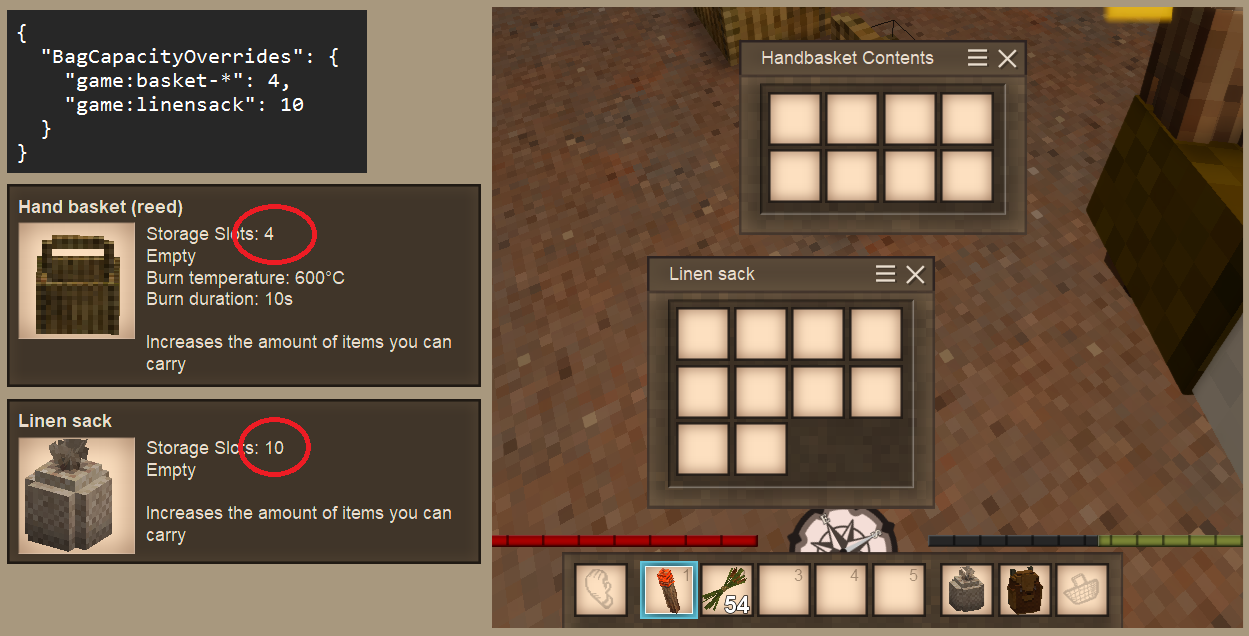
Balance the difficulty of the inventory slots management aspect of the game.
Safe resizing
New bags use the configured capacity immediately. Existing bags are handled when they become active.
An already-equipped bag is resized when its player finishes joining the world. Equipping another bag also triggers the check. A ground-stored or entity-attached bag is resized when opened.
If the remaining slots and the player's other storage are full, overflow is dropped near the player or the opened bag. The smaller layout is saved only after every item has somewhere to go.
Configuration
SlotMachine creates the following server-owned file on first run:
%APPDATA%\VintagestoryData\ModConfig\slotmachine.json
After editing the file, restart the dedicated server or reopen the singleplayer world.
| Setting | Default | Effect |
|---|---|---|
BagCapacityOverrides |
{} |
Maps item-code patterns to capacities from 1 through 256 |
Patterns accept * wildcards. An entry without a domain is treated as game:. Rules are checked in file order, and the first match wins. An empty map keeps the capacities supplied by the game and other mods.
|
|
Compatibility and installation
- Built for Vintage Story 1.22.3.
- Required on both the client and server. Clients and servers should use the same SlotMachine version.
- Standalone, with no required mod dependencies.
- Supports bags using the standard Vintage Story held-bag behavior.
- Custom bag implementations that ignore the standard capacity attribute are left unchanged and reported in the server log.
- SlotMachine does not resize placed chests, vessels, crates, or arbitrary block inventories.
Other Vintage Story patch versions remain unverified until their bag interaction paths are checked and tested.
Download the matching zip from the Files tab or use 1-click install. For a manual installation, place the zip in the Vintage Story Mods directory without unpacking it, then restart the game or server.
More information
- Source and full documentation
- Release history
- Feature status and design decisions
- Bug reports and feature requests
- Support development on Ko-fi
SlotMachine is actively developed. The public mod remains free.
Keywords: Storage, Inventory, Bag, Backpack, Basket, Capacity, Slots, Configuration, Server, Compatibility, Modding, Quality of Life
Project description from Vintage Story Mod DB.
Pick your setup
SlotMachine releases for each Vintage Story version.
Choose the version and loader you play, then open the matching release.
Vintage Story version
1.22.5
1 loader buildVintage Story version
1.22.4
1 loader buildVintage Story version
1.22.3
1 loader buildCheck the dependencies, then try the file in a copied instance before changing a world you care about.
Recent files
SlotMachine versions and loaders
0.1.0
slotmachine_0.1.0.zip
1 Aug 2026
Client Required Server Optional Dependencies No extras listed Listed on Release listing
Check the 1.22.3 setup 1.22.31.22.41.22.51.22.6 release
Looking for an older file? The official Vintage Story Mod DB project page is in Resources.
 mod
mod Vintage Story
Eternal Seraph: Chests
These chests were created for the [UA] Eternal Seraph server
 mod
mod Vintage Story
Ritual Apotheosis
Build ancient rites from fragments. The world is your altar. Dig deep. Seek truth. Light the fires.
 mod
mod Vintage Story
Eternal Seraph: Patch
Патч для серверу Вічний Серафим. Patch for the server Eternal Seraph.