Vintage Story version
Back to mods 
Vintage Story Mod DB · Vintage Story mod
vsbackup
vsbackup A Vintage Story backup utility for Linux. Description 1. Linux and Qt6 Only 2. No Windows or macOS support is planned 3. No GTK suport is planned 5. Testing is done on Gentoo Linux, so your mileage may vary Features 1. World centric backup 2. Multi
Choose a version Pick your version below, then grab the matching file.
Quick answer
Which vsbackup release should I use?
Latest stable file 1.3.0
Game version 0.0.0
Loader Built-in Vintage Story mod system
vsbackup 1.3.0 targets 0.0.0. The project page does not say whether this file belongs on the client, dedicated server, or both. No extra mods listed for this file.
Where it goes
Is vsbackup required on the client, server, or both?
The project page does not say whether this file belongs on the client, dedicated server, or both.
Client Source doesn’t say
Dedicated server Source doesn’t say
Loader for this release Built-in Vintage Story mod system
Required install it here Optional supported, not mandatory Not supported do not install here Source doesn’t say do not assume
No client/server declaration is available from this source.
What else does vsbackup 1.3.0 need?
1.3.0. Change the file and its required mods may change too.
This file does not list any required mods. Do not add a library just because a different file uses it.
This file does not list any required or optional mods.
Before you install it
Add vsbackup without breaking your instance.
Built for vsbackup 1.3.0. Pick another file and the loader, install side or required mods may change.
- 01
Stick to this file
Use 1.3.0. It targets 0.0.0; another release may have different loader, side or dependency requirements.
- 02
Bring the mods it needs
This file does not list any required mods. Do not add a library just because a different file uses it.
- 03
Put it on the correct side
The project page does not say whether this file belongs on the client, dedicated server, or both.
- 04
Pick the file you checked
Use the “Get this file” button beside 1.3.0. It opens that exact file at the source.
About this project
What does vsbackup add?
vsbackup
A Vintage Story backup utility for Linux.
Description
1. Linux and Qt6 Only
2. No Windows or macOS support is planned
3. No GTK suport is planned
5. Testing is done on Gentoo Linux, so your mileage may vary
Features
1. World centric backup
2. Multi-world picker
3. Automatic selection of Maps and mod files
4. Automatic exclusion of Backups, Logs, & Cache
5. Custom backup selections
Dependencies
1. Linux
2. Qt6
3. tar
4. zstd
5. libsqlite3.so (optional)
Backup
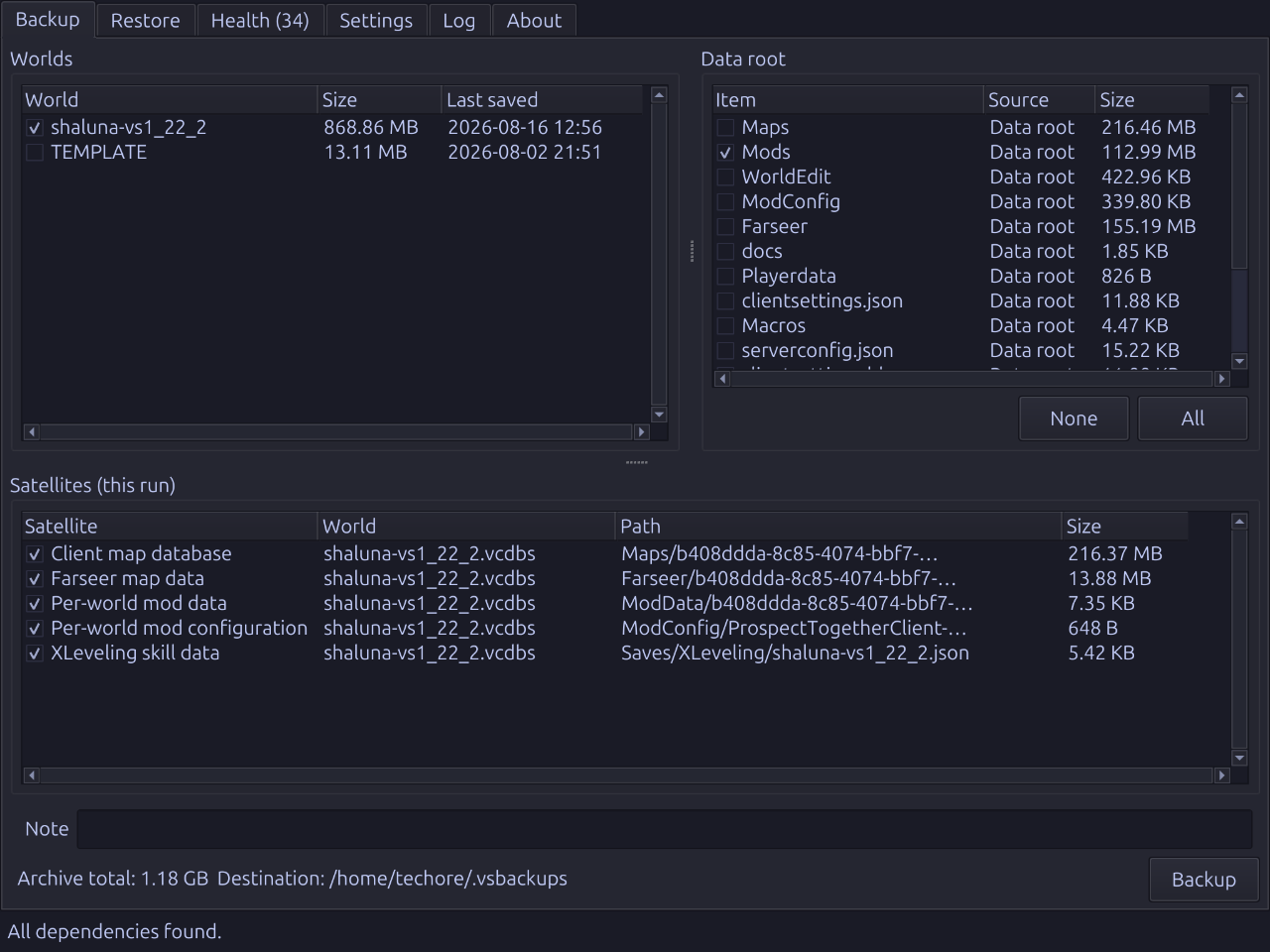
The Backup tab creates World backups.
A World backup archivesSaves/<save>.vcdbsand, if present, satellites files based on
World identifier.
Additional files and directories can be included. For example, Mods directory is not
captured automatically, but you may select it. Using Settings > Backup Paths > Include
and Exclude you may add or remove items from the Satellites picklist.
Backups are written ~/.vsbackups by default, but the location may be changed using
Settings > Paths.
Restore
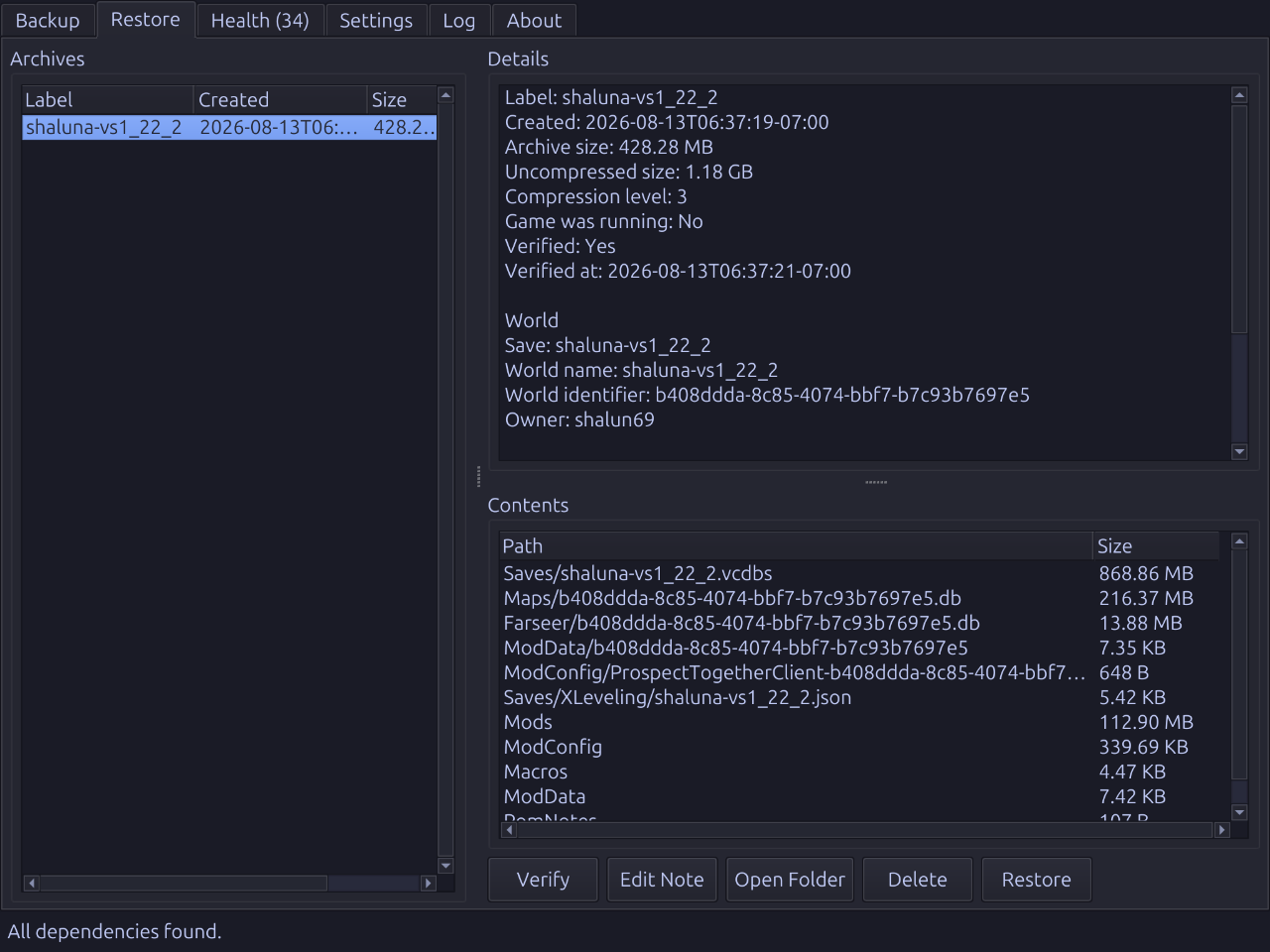
The Restore tab allows you to extract backups previously created with the Backup tab.
Select a backup from the list and the Restore button. The restore process will
extract all files from the backup archive location.
Backups can be restored to another computer meeting dependencies using the backup
and metadata files found in~/.vsbackups/. When restoring backups created using a
different user name, vsbackup will automatically update clientsettings.json and
serverconfig.json.
Installing
Use the download link above, unarchive, and runinstall.sh.1. tar -xzf vsbackup-<version>-linux-x64.tar.gz -C /tmp2. cd /tmp/vsbackup3. ./install.sh
This installs for your user only and touches nothing outside your home directory.

The installation creates these locations:
1. ~/.local/share/vsbackup/, program files including the binary and lib64/2. ~/.local/share/applications/vsbackup.desktop,desktop entry3. ~/.local/bin/vsbackup,symlink to the installed binary
Execution
Launch vsbackup from your desktop menu or application launcher. Typingvsbackupin a
terminal works, too, using a~/.local/bin/vsbackupsymbolic link.
On execution, vsbackup configuration is saved to ~/.config/vsbackup/config.json.
Uninstalling
Run the uninstaller thatinstall.shleft in the installed directory:~/.local/share/vsbackup/uninstall.sh
It removes the installation, desktop entry, and binary link, leaving your backups and
configuration alone.
Upgrading
Download the new archive, extract it, and run itsinstall.sh. It replaces the
installed directory wholesale.
Source
Project description from Vintage Story Mod DB.
Pick your setup
vsbackup releases for each Vintage Story version.
Choose the version and loader you play, then open the matching release.
Check the dependencies, then try the file in a copied instance before changing a world you care about.
Recent files
vsbackup versions and loaders
1.3.0
vsbackup-1.3.0-linux-x64.zip
12 Sept 2026
Client Source doesn’t say Server Source doesn’t say Dependencies No extras listed Listed on Release listing
Check the 0.0.0 setup 0.0.0 release
1.2.0
vsbackup-1.2.0-linux-x64.zip
20 Aug 2026
Client Source doesn’t say Server Source doesn’t say Dependencies No extras listed Listed on Release listing
Check the 0.0.0 setup 0.0.0 release
1.1.0
vsbackup-1.1.0-linux-x64.zip
17 Aug 2026
Client Source doesn’t say Server Source doesn’t say Dependencies No extras listed Listed on Release listing
Check the 0.0.0 setup 0.0.0 release
Looking for an older file? The official Vintage Story Mod DB project page is in Resources.
 mod
mod Vintage Story
Vanilla: Expanded
Aims to add quality-of-life enhancements, missing functionality, and minor bug fixes
 mod
mod Vintage Story
Advanced Tool Parts
Add handles and bindings to your tools to make them faster and last longer!
 mod
mod Vintage Story
Newfies MOTD Mod
The BEST server Message of the day mod!