Vintage Story version
Back to mods 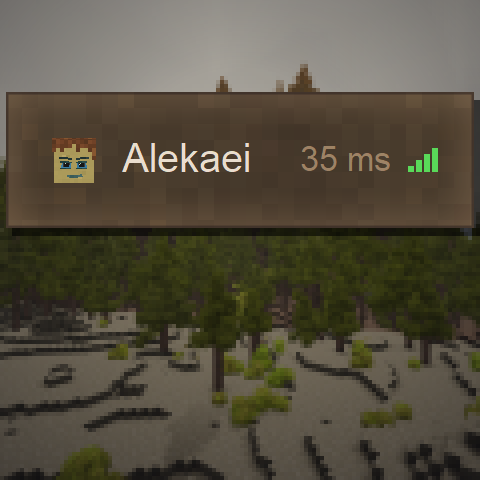
Vintage Story Mod DB · Vintage Story mod
Head Count
Headcount Hold Tab to see who is online. Headcount shows a player list with each player's actual head, name and ping, ordered by role, in a themed panel with a configurable header and footer. It can also keep heads hidden until you have met a player in game.
Choose a version Pick your version below, then grab the matching file.
Quick answer
Which Head Count release should I use?
Latest stable file 1.1.0
Game version 1.22.0, 1.22.1, 1.22.2
Loader Built-in Vintage Story mod system
Head Count 1.1.0 targets 1.22.0, 1.22.1, 1.22.2. It must be installed on the client. Installation on the dedicated server is optional. No extra mods listed for this file.
Where it goes
Is Head Count required on the client, server, or both?
It must be installed on the client. Installation on the dedicated server is optional.
Client Required
Dedicated server Optional
Loader for this release Built-in Vintage Story mod system
Required install it here Optional supported, not mandatory Not supported do not install here Source doesn’t say do not assume
This release supports both sides, but the source does not require it on the server.
What else does Head Count 1.1.0 need?
1.1.0. Change the file and its required mods may change too.
This file does not list any required mods. Do not add a library just because a different file uses it.
This file does not list any required or optional mods.
Before you install it
Add Head Count without breaking your instance.
Built for Head Count 1.1.0. Pick another file and the loader, install side or required mods may change.
- 01
Stick to this file
Use 1.1.0. It targets 1.22.0, 1.22.1, 1.22.2; another release may have different loader, side or dependency requirements.
- 02
Bring the mods it needs
This file does not list any required mods. Do not add a library just because a different file uses it.
- 03
Put it on the correct side
It must be installed on the client. Installation on the dedicated server is optional.
- 04
Pick the file you checked
Use the “Get this file” button beside 1.1.0. It opens that exact file at the source.
About this project
What does Head Count add?
Headcount
Hold Tab to see who is online. Headcount shows a player list with each player's actual head, name and ping, ordered by role, in a themed panel with a configurable header and footer. It can also keep heads hidden until you have met a player in game.
Works on dedicated servers and singleplayer. Needed on both server and client.
✨ Features
Real player heads
Each head is a render of that player's character head, built from their skin, hair, eyes, face and beard parts. It is drawn on your client from the game's own assets.
Ping at a glance
Ping in ms plus four signal bars: four green under 75 ms, three green under 150 ms, two yellow under 250 ms, one red above. Players fill columns top to bottom; the panel stays above the crosshair and clear of the minimap, and when everyone doesn't fit the list splits into pages that advance on their own while you hold the key.
Meet before you see
Optional RequireMeeting: a player's head shows as a grey "?" until you have been within MeetDistance blocks of them. Meeting is mutual and saved with the world. The server decides this, so clients never receive the appearance of players they haven't met. Names and ping are always shown.
Header and footer
Lines above and below the list, each with left, center and right parts. Supports VTML (bold, italic, colours) and variables such as player count, online time and game date.
Role order and colours
You are listed first, then players by server role with the highest privilege first, then by name. Names of players whose role is not the server's default role are tinted with that role's colour, so staff stand out. The server can turn off role ordering (SortByRole) and colours (ShowRoleColors); each client can choose whether to be listed first (SelfFirst).
Four themes
vintage matches the game's dialogs; simple is a flat translucent panel. vintagecompact and simplecompact are the same with a smaller head. The server sets the default and each player can pick their own.
Server and client settings
The server can turn heads off for everyone, and a client can turn them off for itself. Config files are created on first run.
🚀 Quick start
- Install the mod on the server and on every client (or in singleplayer).
- Join and hold Tab.
- Optional: edit
ModConfig/headcount-server.jsonon the server (header, footer,RequireMeeting, role options) and restart it. - Optional: pick a theme with
.headcount theme simple(or.hc theme vintagecompactfor smaller heads).
⌨️ Commands
Client-side chat commands, no privileges needed.
| Command | What it does |
|---|---|
.headcount theme |
Lists the themes and shows the current one |
.headcount theme <name> |
Switches to vintage, simple, vintagecompact or simplecompact and saves it to your client config |
.headcount theme default |
Goes back to the server's default theme |
.hc |
Short alias for .headcount, e.g. .hc theme simple |
The key is Show player list in Controls (Tab by default) and can be rebound.
⚙️ Configuration
Files are created with defaults on first run. Restart the server after changing the server config.
Server (ModConfig/headcount-server.json)
| Setting | Default | What it does |
|---|---|---|
ShowHeads |
true | Show heads at all. When false, no client shows heads |
RequireMeeting |
false | Hide a player's head until you have met them |
MeetDistance |
8 | Blocks within which two players meet (same dimension, checked once a second) |
DefaultTheme |
vintage | Theme for clients that haven't chosen one: vintage, simple, vintagecompact or simplecompact |
Header |
one line | List of lines, each with Left, Center, Right. Default: left Players {{player_count}}/{{max_players}}, right {{online_time}} |
Footer |
empty | Same format as Header |
SortByRole |
true | List higher server roles first. When false, role levels are not sent to clients |
ShowRoleColors |
true | Tint names of non-default roles with the role colour. When false, role colours are not sent to clients |
Client (ModConfig/headcount-client.json)
| Setting | Default | What it does |
|---|---|---|
ShowHeads |
true | Show heads on this client. Heads only show when both server and client allow them |
Theme |
"" (server default) | vintage, simple, vintagecompact, simplecompact, or empty to follow the server's DefaultTheme. Unknown names fall back to vintage |
SelfFirst |
true | List yourself first |
PageSeconds |
5 | Seconds per page while the key is held and the list doesn't fit (minimum 1). Each press starts at page 1 |
Header and footer example
"Header": [
  { "Left": "Players {{player_count}}/{{max_players}}", "Right": "{{online_time}}" }
],
"Footer": [
  { "Center": "{{game_date}}" }
]
A line whose three parts are all empty after substitution is dropped, and with no lines left the section is hidden. The panel widens to fit the widest line. Text supports the game's VTML (<strong>, <i>, <font color="#ff8080">, ...), one line per part.
Variables are filled in on the client and refreshed while the list is shown. An unknown {{name}} is left as written.
| Variable | Value |
|---|---|
{{player_count}} |
Players online |
{{max_players}} |
Server player limit |
{{server_name}} |
Server name |
{{world_name}} |
World name |
{{player_name}} |
Your name |
{{ping}} |
Your ping in ms |
{{online_time}} |
Time since you joined, m:ss or h:mm:ss |
{{time}} |
Real clock, HH:mm |
{{game_time}} |
In-game time, HH:mm |
{{game_date}} |
In-game date, e.g. 12 May, Year 3 |
{{day}} |
Day of the in-game month |
{{month}} |
In-game month |
{{year}} |
In-game year |
{{season}} |
In-game season |
❓ FAQ
Do players need to install it?
Yes. The server sends the roster and each client draws the list. A client on a server without the mod shows nothing.
Tab doesn't open chat any more.
While the list key is held, the vanilla Tab chat binding is consumed. Rebind Show player list in Controls to use another key. The mod logs a note if its key is shared with another action.
Are heads hidden until met by default?
No. RequireMeeting is off by default and everyone's head is shown. When it is on, you always see your own head.
Why does a player show a "?" head?
Either you haven't met them yet (with RequireMeeting), or their head couldn't be rendered, for example because their appearance data is missing.
How is the list ordered?
You first (client SelfFirst), then by server role with the highest privilege first (server SortByRole), then by name. Names of non-default roles use the role's colour from the server's role setup; default-role and white names keep the theme colour. If the server turns role ordering or colours off, that role data is not sent to clients.
How do I get the smaller heads back?
Use the compact themes: .headcount theme vintagecompact or simplecompact (same look otherwise), or set DefaultTheme on the server.
Can I turn heads off?
Yes. On the server, ShowHeads false hides them for everyone. On a client, ShowHeads false hides them for that player only.
Disclaimer: This mod was made with the help of AI.
Project description from Vintage Story Mod DB.
Pick your setup
Head Count releases for each Vintage Story version.
Choose the version and loader you play, then open the matching release.
Vintage Story version
1.22.6
1 loader buildVintage Story version
1.22.5
1 loader buildVintage Story version
1.22.4
1 loader buildVintage Story version
1.22.3
1 loader buildVintage Story version
1.22.2
1 loader buildVintage Story version
1.22.1
1 loader buildVintage Story version
1.22.0
1 loader buildCheck the dependencies, then try the file in a copied instance before changing a world you care about.
Recent files
Head Count versions and loaders
1.1.0
headcount_1.1.0.zip
12 Nov 2026
Client Required Server Optional Dependencies No extras listed Listed on Release listing
Check the 1.22.7 setup 1.22.01.22.11.22.21.22.3 release
1.0.0
headcount_1.0.0.zip
10 Nov 2026
Client Required Server Optional Dependencies No extras listed Listed on Release listing
Check the 1.22.7 setup 1.22.01.22.11.22.21.22.3 release
Looking for an older file? The official Vintage Story Mod DB project page is in Resources.
 mod
Vintage Story
RunicMagic
Discover a world specific runic language, research its words, and write your own spells.
 mod
Vintage Story
𝓦𝓻𝓲𝓽𝓽𝓮𝓷 𝓦𝓸𝓻𝓭 - parchment and book overhaul
Parchment and book overhaul. Parchments can be placed on walls, adds nickname-only signatures
 mod
Vintage Story
Vell Chopped & Fletched
A chopping block, bark and feather-free arrows - less early-game grind for wood, sticks and arrows.