Vintage Story version
Back to mods 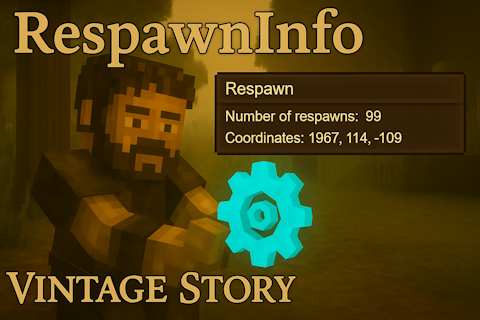
Vintage Story Mod DB · Vintage Story mod
RespawnInfo
✔️ You can install/uninstall this mod whenever you like, it won't affect your world. Show how many respwan you have under player stats "gui" when you open it. Type in the chat : /rp you can reset gui position with the command : .rpguireset yo
Choose a version Pick your version below, then grab the matching file.
Quick answer
Which RespawnInfo release matches 1.18.15?
Best match for your filters 1.0.9
Game version 1.18.10, 1.18.11, 1.18.12
Loader Built-in Vintage Story mod system
RespawnInfo 1.0.9 targets 1.18.10, 1.18.11, 1.18.12. It must be installed on the client. Installation on the dedicated server is optional. No extra mods listed for this file.
Where it goes
Is RespawnInfo required on the client, server, or both?
It must be installed on the client. Installation on the dedicated server is optional.
Client Required
Dedicated server Optional
Loader for this release Built-in Vintage Story mod system
Required install it here Optional supported, not mandatory Not supported do not install here Source doesn’t say do not assume
This release supports both sides, but the source does not require it on the server.
What else does RespawnInfo 1.0.9 need?
1.0.9 on 1.18.15. Every mod below is checked against that same setup.
This file does not list any required mods. Do not add a library just because a different file uses it.
This file does not list any required or optional mods.
Before you install it
Add RespawnInfo without breaking your instance.
Built for RespawnInfo 1.0.9 on 1.18.15. Pick another file and the loader, install side or required mods may change.
- 01
Stick to this file
Use 1.0.9. It targets 1.18.10, 1.18.11, 1.18.12; another release may have different loader, side or dependency requirements.
- 02
Bring the mods it needs
This file does not list any required mods. Do not add a library just because a different file uses it.
- 03
Put it on the correct side
It must be installed on the client. Installation on the dedicated server is optional.
- 04
Pick the file you checked
Use the “Get this file” button beside 1.0.9. It opens that exact file at the source.
About this project
What does RespawnInfo add?
✔️ You can install/uninstall this mod whenever you like, it won't affect your world.
Show how many respwan you have under player stats "gui" when you open it.
Type in the chat : /rp
you can reset gui position with the command : .rpguireset
you can disable the gui with the command : .rpguioff
and also enable it with the command : .rpguion
The gui is automatically opened/closed with Character stats gui.
You can adjust the GUI position manually — I designed it this way to stay compatible with any other mods.
If another mod adds more stats, you can simply move the window.
The “?” button provides information to help new players understand how temporal gears work.
Feel free to send me translation file ! You find it inside the .zip
Spoiler!
{
"rp": "Remaining respawns: {0}",
"infrp": "Infinite respawn",
"norp": "You have not set any respawn points!",
"rpcoord": "Respawn Coordinates:\n{0}, {1}, {2}",
"rpwinname": "Respawn",
"rpguion": "Respawn GUI enabled",
"rpguioff": "Respawn GUI disabled",
"rpguiinfo": "You can use these commands in chat:\n<strong>/rp</strong> To display the number of respawns\n<strong>.rpguireset</strong> To reset the window position\n<strong>.rpguioff</strong> To disable the display of the `respawn` window\n<strong>.rpguion</strong> To reactivate the display of the `respawn` window\n\n<font size=18><strong>Spawn point:</strong></font>\n<font size=15>When a player starts a game or joins a server, their character appears at the initial spawn point of the world. Each time the character dies, they will be sent back to respawn around their initial spawn point until they acquire a <a href=\"handbook://item-gear-temporal\">temporal gear </a>. Using this item allows a player to choose any location as their spawn point. Each player in a game must acquire their own time gear, and resetting one player's spawn point does not affect another player's spawn point. A player can reset their spawn point at any time using a new time gear. </font>\r\n\r\n<font size=18><strong>Reset:</strong></font>\r\n<font size=15>Place the time gear in a free slot from your toolbar. With the Time Gear in your right hand, aim at a block and hold the right mouse button to activate the item. During activation, your screen will shake quite dramatically. When the time gear has been consumed, the shaking will stop and your spawn point will have been reset. </font>"
}
"rp": "Remaining respawns: {0}",
"infrp": "Infinite respawn",
"norp": "You have not set any respawn points!",
"rpcoord": "Respawn Coordinates:\n{0}, {1}, {2}",
"rpwinname": "Respawn",
"rpguion": "Respawn GUI enabled",
"rpguioff": "Respawn GUI disabled",
"rpguiinfo": "You can use these commands in chat:\n<strong>/rp</strong> To display the number of respawns\n<strong>.rpguireset</strong> To reset the window position\n<strong>.rpguioff</strong> To disable the display of the `respawn` window\n<strong>.rpguion</strong> To reactivate the display of the `respawn` window\n\n<font size=18><strong>Spawn point:</strong></font>\n<font size=15>When a player starts a game or joins a server, their character appears at the initial spawn point of the world. Each time the character dies, they will be sent back to respawn around their initial spawn point until they acquire a <a href=\"handbook://item-gear-temporal\">temporal gear </a>. Using this item allows a player to choose any location as their spawn point. Each player in a game must acquire their own time gear, and resetting one player's spawn point does not affect another player's spawn point. A player can reset their spawn point at any time using a new time gear. </font>\r\n\r\n<font size=18><strong>Reset:</strong></font>\r\n<font size=15>Place the time gear in a free slot from your toolbar. With the Time Gear in your right hand, aim at a block and hold the right mouse button to activate the item. During activation, your screen will shake quite dramatically. When the time gear has been consumed, the shaking will stop and your spawn point will have been reset. </font>"
}
Project description from Vintage Story Mod DB.
Pick your setup
RespawnInfo releases for each Vintage Story version.
Choose the version and loader you play, then open the matching release.
Vintage Story version
1.22.4
1 loader buildVintage Story version
1.22.3
1 loader buildVintage Story version
1.22.2
1 loader buildVintage Story version
1.22.1
1 loader buildVintage Story version
1.22.0-rc.10
1 loader buildVintage Story version
1.22.0-rc.9
1 loader buildVintage Story version
1.22.0-rc.8
1 loader buildVintage Story version
1.22.0-rc.7
1 loader buildVintage Story version
1.22.0-rc.6
1 loader buildVintage Story version
1.22.0-rc.5
1 loader buildVintage Story version
1.22.0-rc.4
1 loader buildShowing the newest 12 of 94 game versions. Older files are in the list below.
Check the dependencies, then try the file in a copied instance before changing a world you care about.
Recent files
RespawnInfo versions and loaders
1.0.9
ResPawn_1.0.9.zip
25 Dec 2023
Client Required Server Optional Dependencies No extras listed Listed on Release listing
Check the 1.18.15 setup 1.18.101.18.111.18.121.18.13 release
1.0.8
ResPawn_1.0.8.zip
1 Dec 2023
Client Source doesn’t say Server Source doesn’t say Dependencies No extras listed Listed on Release listing
Check the 1.18.15 setup 1.18.101.18.111.18.121.18.13 release
1.0.7
ResPawn_1.0.7.zip
22 Nov 2023
Client Source doesn’t say Server Source doesn’t say Dependencies No extras listed Listed on Release listing
Check the 1.18.15 setup 1.18.101.18.111.18.121.18.13 release
Looking for an older file? The official Vintage Story Mod DB project page is in Resources.