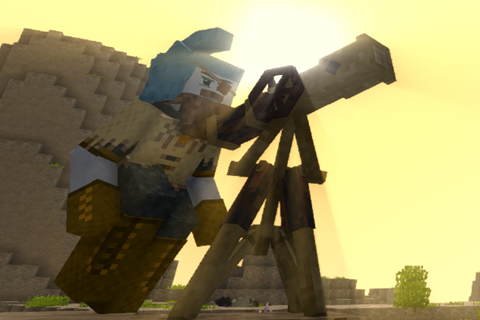
WeaponPack Alpha- Expanding your armory Optional for Useful Stuff 2.3.2
optionalNo matching file
Vintage Story Mod DB · Vintage Story mod
This mod contains a whole bunch of my crazy ideas and experiments. This is a WIP and as time goes on I will add more little things I come up with. See the homepage for more detailed information about what it adds. Let me know of any suggestions/bugs on the for
Quick answer
Useful Stuff 2.3.2 targets 1.16.3. It must be installed on the client. Installation on the dedicated server is optional. No extra mods listed for this file.
Where it goes
It must be installed on the client. Installation on the dedicated server is optional.
This release supports both sides, but the source does not require it on the server.
2.3.2. Change the file and its required mods may change too.
This file does not list any required mods. Do not add a library just because a different file uses it.
We only count dependency files that match this setup. A file for another loader does not fill the gap.
Before you install it
Built for Useful Stuff 2.3.2. Pick another file and the loader, install side or required mods may change.
Use 2.3.2. It targets 1.16.3; another release may have different loader, side or dependency requirements.
This file does not list any required mods. Do not add a library just because a different file uses it.
It must be installed on the client. Installation on the dedicated server is optional.
Use the “Get this file” button beside 2.3.2. It opens that exact file at the source.
About this project
This mod contains a whole bunch of my crazy ideas and experiments. This is a WIP and as time goes on I will add more little things I come up with. See the homepage for more detailed information about what it adds. Let me know of any suggestions/bugs on the forums and enjoy! Features include:
The sluice ramp can separate rocks and valuables from any pannable soil/block, meaning you do not have to spend hours knee-deep in water filling your inventory with junk to find valuables. To use the ramp first you need a small current of water, the lowest current it will go to. Put the ramp below it and if you placed it right you should see water flow down. Place a hopper directly on top of the sluice and fill it with pannable soils, like sand, gravel, etc, and voila! Items separated fall out the front of it. Keep in mind it only gives potentially one item per block vs panning potential eight.
The tentbag allows the player to create a temporary structure and carry it around with them, making a nomadic lifestyle even in the most hostile terrain possible. Create a structure within a 7X3X7 area and right-click the ground underneath the structure in the center to pack it up. The ground does not count and does not get packed! There must not be banned blocks in the area(rock, static translocators, etc.) and containers and item piles will drop their contents upon packing. To unpack you need solid 7X7 ground and a completely clear 7X3X7 area above that. Right-click on the block underneath the center to deploy. It costs 100 saturation to pack up and unpack a tent
These amazing climbing tools allow you to climb any block or surface. It can only be made from iron+ materials and requires that you have two, one in each hand in order to climb. Climbing with these will slowly damage them over time, and they can be repaired by the Necessaries Grindstone. Will not work near a boss.
This crudely put together glider can help transverse mountainous areas much faster. Much caution and care must be taken not to land too hard or land in the wrong spot. Jump off a cliff or ledge with the glider in hand to glide. Look where you want to go and press space to stop and fall normally. Do not hold space. Looking down will cause you to descend faster but gain much more horizontal speed. Aiming towards the horizon will cause you to descend slower, while looking up will slow you down horizontally and even make you go backwards. Looking too far up or too far down will cause you to stall, losing all your momentum and crashing to the ground. There are updrafts all over the world and will help you with sustained flight. Gliders cannot be used in caves.
Setting up chutes and need an orientation the game does not support? No more of that with bendy chutes! Crafted with two chute sections and a rusty gear. Will automatically snap to any other bendy chute or container.
Give your arrows a little more of a kick, by giving them a tip!
Explosive Arrows
Crafted by placing an ore blasting bomb and arrow in crafting grid. Explodes on impact and destroys the arrow
Fire Arrows
Crafted by placing a lit torch, fat, and an arrow into the crafting grid. Lights entities on fire upon impact and loses it's tip
Beenade Arrows
Crafted by placing a filled beenade and arrow into the crafting grid. Releases 1-2 swarms of bees on impact and loses it's tip
Tranquilizer Arrows
Crafted by placing an arrow, resin, and either a golden poppy or catmint in crafting grid. Slows target down by 10% per hit and multiple hits can stop them from moving. (Note: Hostile entities can still attack and jump). Lasts for 1 in game hour. Has no effect of mechanical mobs
Heart Stopper Arrows
Crafted by placing an arrow, resin, death cap or funeral bell mushroom, and lily of the valley in the crafting grid. After 1 in game hour it deals 75% of the animals maximum health as damage. Effect does not stack. Has no effect on mechanical mobs
Weapons Pack + Neccessaries
My patch I made for the weapon pack mod to allow it's weapons to be sharpened by Necessaries grindstone has been incorporated
Lantern Clip-on
Lanterns can be clipped on a backpack to free up your hands. The leftmost backpack must be a backpack item(hunter backpack, leather backpack, or the upgradeable backpacks from ABCS mod) and the lantern must be placed in the first inventory slot in the top left, it must be a vanilla lantern, Primitive Survival wooden lantern, or a MoreClasses lantern to work.
Other Changes:
The gas mask is an item that works with the Asphyxia mod. When the user puts it on, in the mask slot, it will protect them from the toxic effects of nitrogen dioxide, sulfur dioxide, coal dust, and silica dust. It will take damage over time and if fully depleted will no longer protect you. Use charcoal to refill the filter like you would use linen to repair it.
Disclaimer: Please post any bug reports, suggestions, and feedback on the forum page of this mod. Anywhere else, such as Discord, will be ignored!
Project description from Vintage Story Mod DB.
Pick your setup
Choose the version and loader you play, then open the matching release.
Check the dependencies, then try the file in a copied instance before changing a world you care about.
Recent files
usefulstuff_v2.3.2.zip
23 Feb 2022
usefulstuff_v2.3.1.zip
16 Feb 2022
usefulstuff_v2.3.0.zip
7 Feb 2022
usefulstuff_v2.2.3.zip
24 Jan 2022
usefulstuff_v2.2.2.zip
1 Nov 2021
usefulstuff_v2.2.1.zip
20 Oct 2021
usefulstuff_v2.2.0.zip
5 Sept 2021
usefulstuff_v2.1.3.zip
29 Aug 2021
usefulstuff_v2.1.2.zip
12 Aug 2021
usefulstuff_v2.1.1.zip
7 Aug 2021
usefulstuff_v2.1.0.zip
6 Aug 2021
usefulstuff_v2.0.1.zip
18 Jul 2021
Looking for an older file? The official Vintage Story Mod DB project page is in Resources.