Vintage Story version
Back to mods 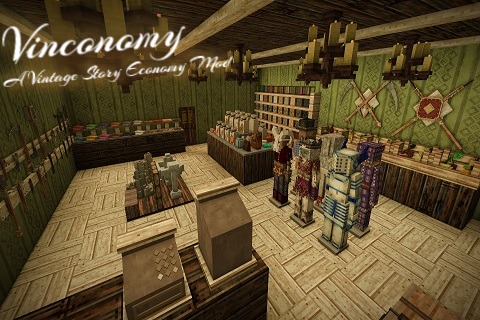
Vintage Story Mod DB · Vintage Story mod
Vinconomy - A Vintage Story Economy Mod
Vinconomy Purpose The goal of this was to sink or swim trying to get started into modding Vintage Story. I did not see any up-to-date trade mods, and the ones currently available either do not work on the most recent version of the game, or do not fit my tas
Choose a version Pick your version below, then grab the matching file.
Quick answer
Which Vinconomy - A Vintage Story Economy Mod release matches 1.21.4?
Best match for your filters 5.1.2
Game version 1.21.0, 1.21.1-rc.1, 1.21.1-rc.2
Loader Built-in Vintage Story mod system
Vinconomy - A Vintage Story Economy Mod 5.1.2 targets 1.21.0, 1.21.1-rc.1, 1.21.1-rc.2. It must be installed on the client. Installation on the dedicated server is optional. No extra mods listed for this file.
Where it goes
Is Vinconomy - A Vintage Story Economy Mod required on the client, server, or both?
It must be installed on the client. Installation on the dedicated server is optional.
Client Required
Dedicated server Optional
Loader for this release Built-in Vintage Story mod system
Required install it here Optional supported, not mandatory Not supported do not install here Source doesn’t say do not assume
This release supports both sides, but the source does not require it on the server.
What else does Vinconomy - A Vintage Story Economy Mod 5.1.2 need?
5.1.2 on 1.21.4. Every mod below is checked against that same setup.
This file does not list any required mods. Do not add a library just because a different file uses it.
This file does not list any required or optional mods.
Before you install it
Add Vinconomy - A Vintage Story Economy Mod without breaking your instance.
Built for Vinconomy - A Vintage Story Economy Mod 5.1.2 on 1.21.4. Pick another file and the loader, install side or required mods may change.
- 01
Stick to this file
Use 5.1.2. It targets 1.21.0, 1.21.1-rc.1, 1.21.1-rc.2; another release may have different loader, side or dependency requirements.
- 02
Bring the mods it needs
This file does not list any required mods. Do not add a library just because a different file uses it.
- 03
Put it on the correct side
It must be installed on the client. Installation on the dedicated server is optional.
- 04
Pick the file you checked
Use the “Get this file” button beside 5.1.2. It opens that exact file at the source.
About this project
What does Vinconomy - A Vintage Story Economy Mod add?
Vinconomy
Purpose
The goal of this was to sink or swim trying to get started into modding Vintage Story. I did not see any up-to-date trade mods, and the ones currently available either do not work on the most recent version of the game, or do not fit my tastes / needs. I wanted a trading mod that is useful, aesthetic, configurable to suit a more widespread use-case, and one that does not require any sort of commands in chat to function.
Features
- Vinconomy has numerous different types of stalls for visual theming and display possibilities
- Clothing Stand - Allows you to sell both Armor *AND* Clothing! You can finally show off those fancy shirts, boots, and accessories!
- Trade Mat (Single / Double Tiers) - A simple mat for displaying a general selection of items.
- Produce Crate - A crate mainly designated for selling food or other perishible goods
- Purchase Crate - A 2 slot crate dedicated to buying items in bulk from other players. Buy low, sell high!
- Meal Stall - Sell meals to your customers BYOB Style! (Bring Your Own Bowl)
- Sculpture Pad - Create your own sculputres and sell them in wholely with up to a 5x5x5 size
- Shop Shelf - A simple wall shelf for disaplying a general selection of items in more horizontally challenged areas
- Tool Rack - A rack for displaying all your tools for sale
- Weapon Rack - A rack for selling up to 2 different weapons and a shield
- ATM / Register - Stores all your currency, profits, and allows you to convert currencies from one form to another.
- Gacha Stall / Gacha Loader - Gacha/Gumball chance-based purchases! Throw in a bunch of items and see what you get!
- Purchase Crate - Allows you to buy items from other players in bulk without filling up your register!
- Chisel Support - Want to further customize the stalls? Add a Chiseled Block to the decoration slot to change the model of your stalls
- "Admin" shops which can provide an unlimited amount of items without having to restock the stalls.
- Centralized retrieval of currency. No need to check each and every site for payment. It will all be located in the shop's Register
- Protection System - No need to claim the land around your shop to protect your goods. Comes built in!
- Configurable Perish speeds - Prevent your food from spoiling with a customizable configuration to modify the rate at which perishibles spoil
- Ledger System - Don't worry about having to keep track of who buys what, when, and where! We've got you covered!
- Catalog System - Don't know what shops exist, or what they sell? Check the catalog! Everything you need to know in a single handy book!
- Shop Co-Ownership - Want to run a shop with a friend? Just give them permission and they can help keep things running smoothly!
- Coupons and Trade Passes - Need to limit which players can buy from your store? Maybe you only want citizens of your town to be able to participate in trade? Set up a Trade Pass! Only those with the required pass can purchase from your stalls. Or maybe you're feeling generous and want do give them some discounts - then start handing out coupons for a Buy One Get One Free deal, or a 40% discount on all goods!
- Cross Server Trading - Don't feel like playing on a server and wanna fly Solo? Maybe your community has multiple servers and you want to link them together? Join a public or private trade network, register your server with the system, and start raking in those Rusty Gears!
Customization
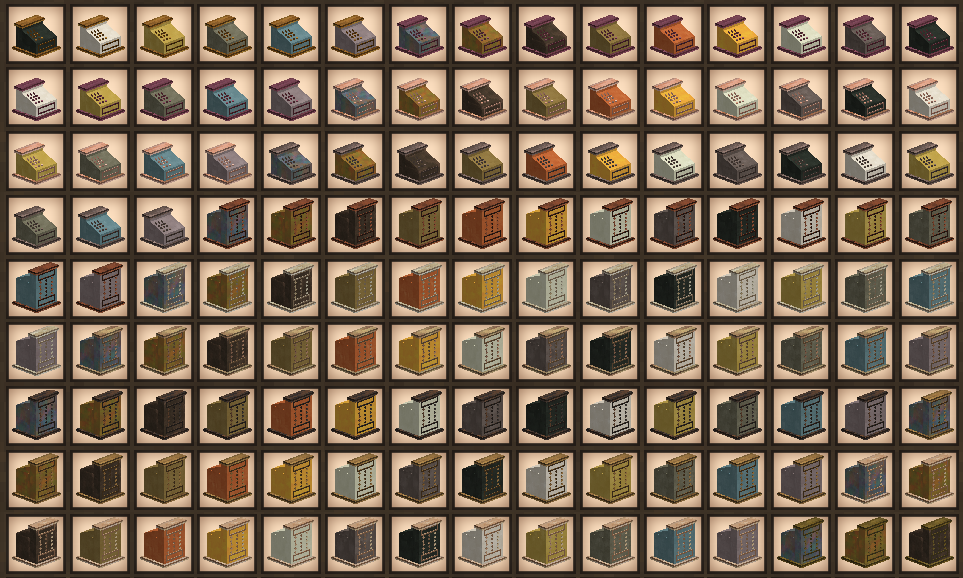
Each Stall can be created with different materials which will affect its look. This allows you to match the visual theme of your shop builds.
Player Shops - Selling
Player Shops - Selling
The system works via Shops and Stalls. The player can place various types of Stalls to which may be linked to a Shop Register. Any goods provided at the stalls will be paid for on-site, and any proceeds will be stored directly in the Register. Each stall may have one or more different types of goods, and each stall must be part of a shop in order to function.
To open a shop, you will need one or more Stalls and a Register. First place the Register in a location where you will often be checking for payment. There is currently no limit on distance to the stalls themselves. From there, you can open the interface and set the name of your shop - it can be anything you like. Any payment for items will end up here. Be sure to clear out your Register occasionally, as you cannot make a sale if you do not have enough space for payment.
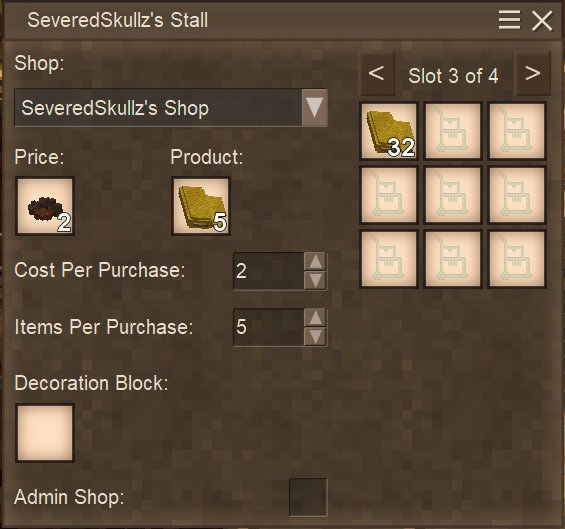
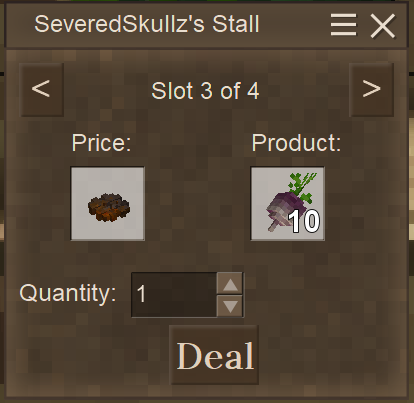
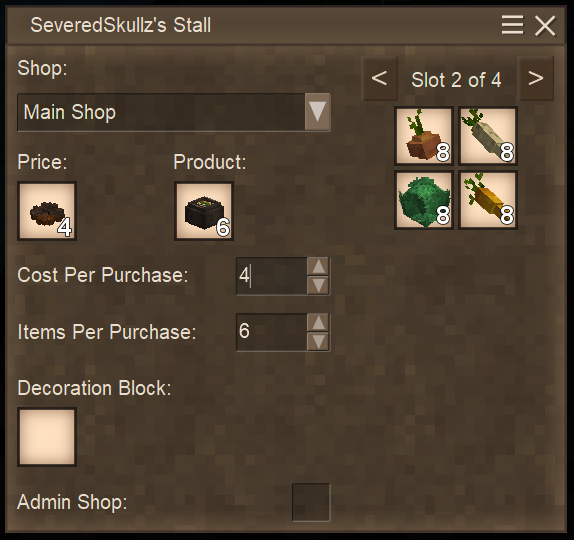
Next for each Stall you wish to place, place it down in a suitable location to sell your goods. Most stalls have 4 stock slots, with 9 slots for each stall, for a total of 36 total stacks of goods. As an owner, you can Sneak-Rightclick to add an item to that Stall Slot, or Sneak-Sprint-Rightclick to add multiple. Each slot can only hold items of the same type, so you cannot put Turnips and Parsnips in the same Stall Slot, for example. If you wish to manage multiple slots without having to exit and right click on a different stall slot, you can switch slots with the arrow buttons on the top right. You may also change the Items Per Purchase amount in order to sell more than one item for each sale. The Currency slot below the Price label can take any item you see fit for payment. Note that you do not need to sacrifice the item for payment like in other mods - The slot will clone the itemstack when you click on it. You can also click on the price item slot to clear it.
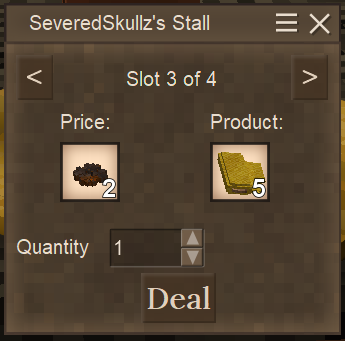
If you've configured everything correctly, once a player tries to access your stall, they will be shown the price they need to pay, as well as the product they will recieve. They can increase the number of purchases by adjusting the Quantity option on the menu before pressing the "Deal" button
Regarding Admin Shops:
Admin Shop Info
If you have the "Gamemode" permission, you can also set this stall as an Admin Shop which will allow you to sell infinite amounts of items without having to restock the stall. If you wish to still collect payment for these purchases - for example to use the currency again for situations such as limited circulation - you can set the shop as you would with a normal Stall. If you wish for the payment items to simply be deleted, leave the Shop set to "None"
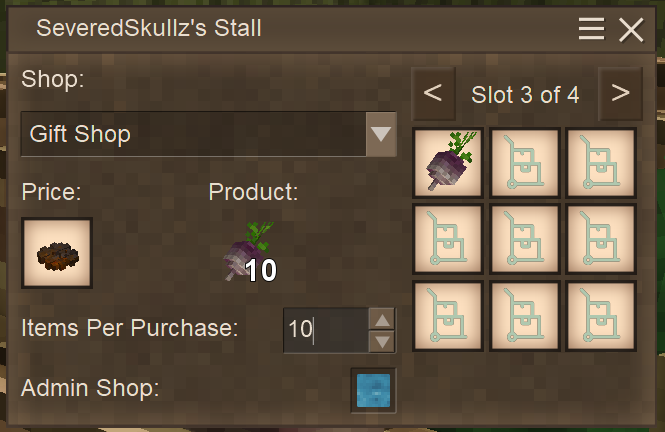
Things to note:
- The stall will not function if there is no price set for the item
- The stall will not function if there is no Shop set for the stall (Unless it is an Admin Shop)
Player Shops - Buying
Player Shops - Buying
Purchases can be made simply by having the payment in your hand and Sneak-Rightclicking on the desired slot to make a purchase. Sprint-Sneak-Rightclicking will purchas items 5 at a time. Note that this is multiplied by the "Items Per Purchase" modifier, so if a stall sells 10 Turnips per gear, you would be purchasing 50 turnips. You may also simply right click the stall in order to see via a GUI what is for sale and for how much. you can then initiate the trade by clicking the "Deal" button.
Stall / GUI Explanations
Register Configuration
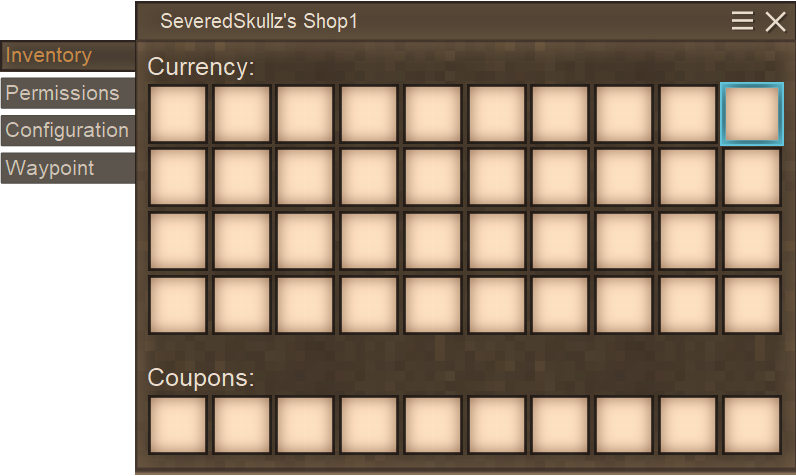
The register is broken up into different tabs for convienence and organization. The first tab quite simply holds all the items that are collected from purchases made at your shop. Any currency used will be inserted into the Currency slots, and coupons used will be inserted into the dedicated Coupons slots
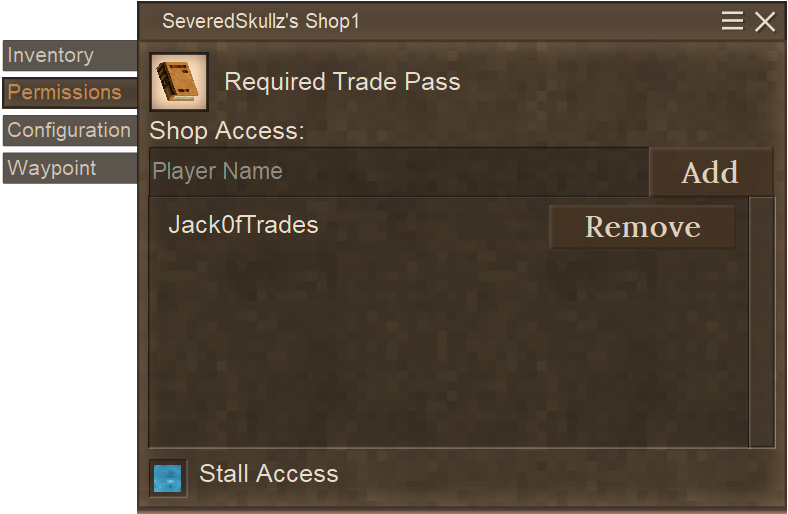
In order to set up a Trade Pass or add other players for access to your shops, go to the Permissions tab. Note that if you click the Stall Access checkbox at the bottom, any players granted Register access will also be able to access your stalls for that shop too.
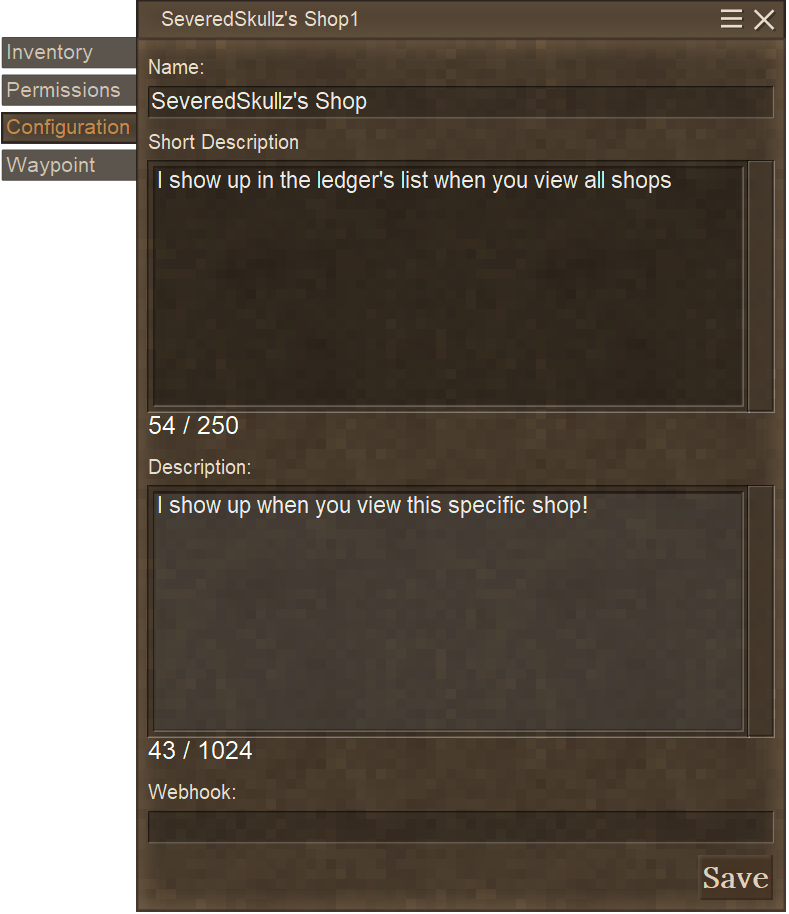
On the configuration page, you can rename your shop, as well as a Short Description that will show up in the Ledger's Shop List, as well as a longer description that will show up when viewing that specific shop. Note that VHTML is supported on both of these fields.
You may also provide a Discord Webhook so that any time someone purchases items from your shop, a notification message will appear via the webhook.
Lastly, is the Waypoint page. You may set a custom waypoint to be displayed to all players on the server in order to advertize your shop and its location. If the waypoint is visible to players, the location will also show up in the Ledger, along with a link to view the location directly in the map.
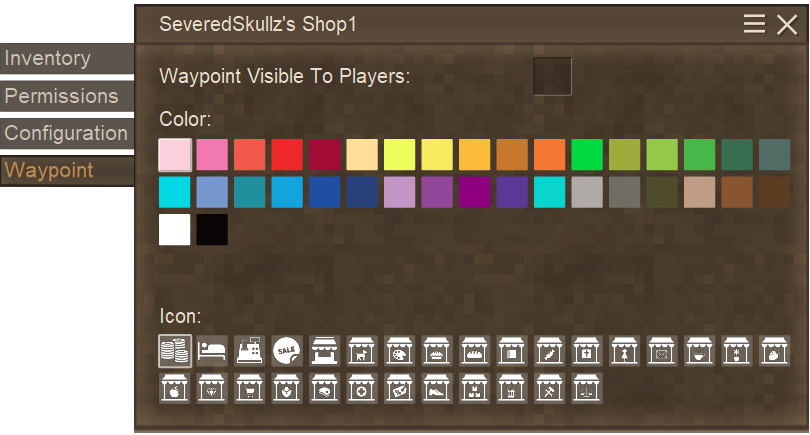
Ledger
The Ledger can be used in order to view all sales for a given Month/Year. Vinconomy automatically records the transactions, and a Ledger does not need to be in the register or even crafted at the time of sale. Years worth of sales may pass before you finally get around to needing a Ledger, but fret not! All your previous sales will still show up once you craft and link it to your shop. The ledger will group entries by the person purchasing items and its type. Multiple/repeated sales will all be condensed into a single line if the Product and Currency used remains the same.
The Ledger works in two ways:
- If you are an Admin and in Creative mode, an Unlinked Ledger will show all Admin Stall trades (Stalls that do not have a respective Shop and the "Admin Stall" box is checked on the GUI).
- If you are normal player, you must "bind" the ledger to a specific shop, and the ledger will show trades only for that shop. Note that this is independent of who opens it, so if you give the ledger to another player, they will be able to see the sales for as long as they have the Ledger item.
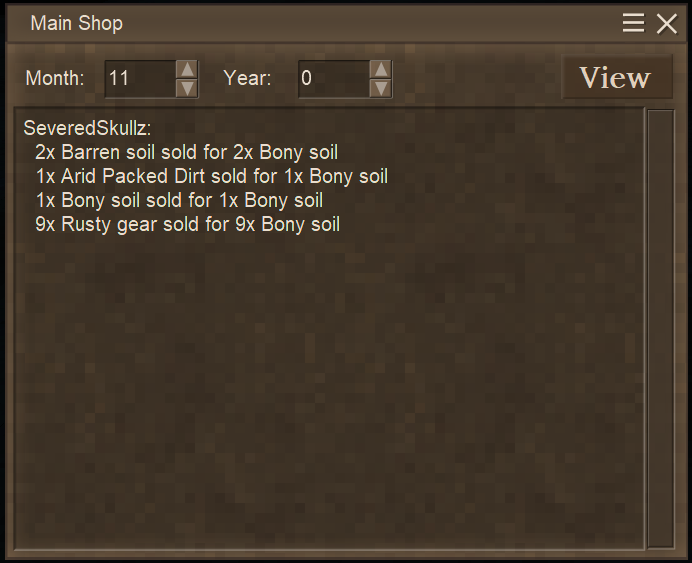
Catalog
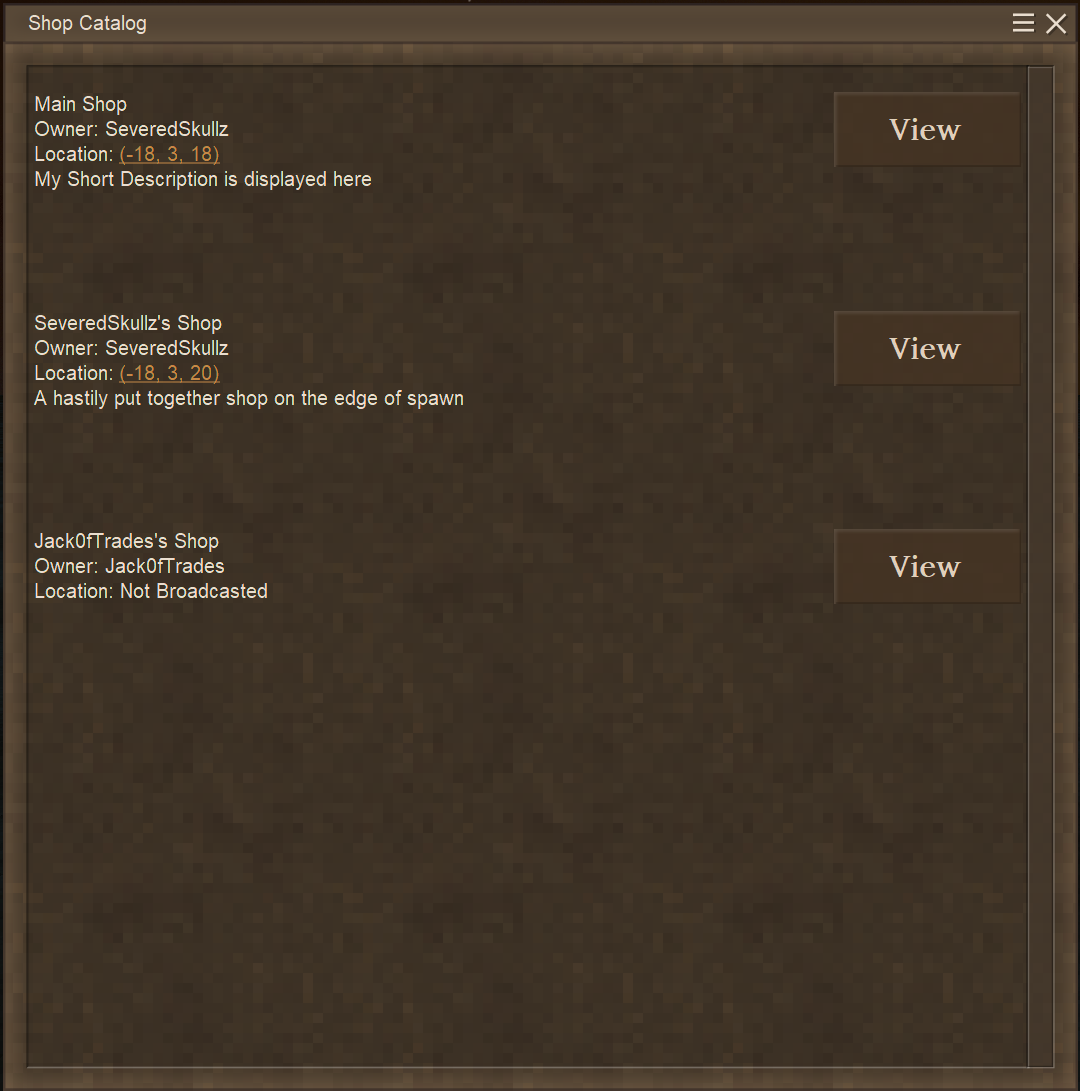
The Catalog lists all shops on the server that are currently active. Their Name and Owner is always displayed, but the location only appears with a Map Link if the waypoint is broadcasted. Clicking this link will automatically open the map and focus on that map location - No need to manually navigate to those coordinates!
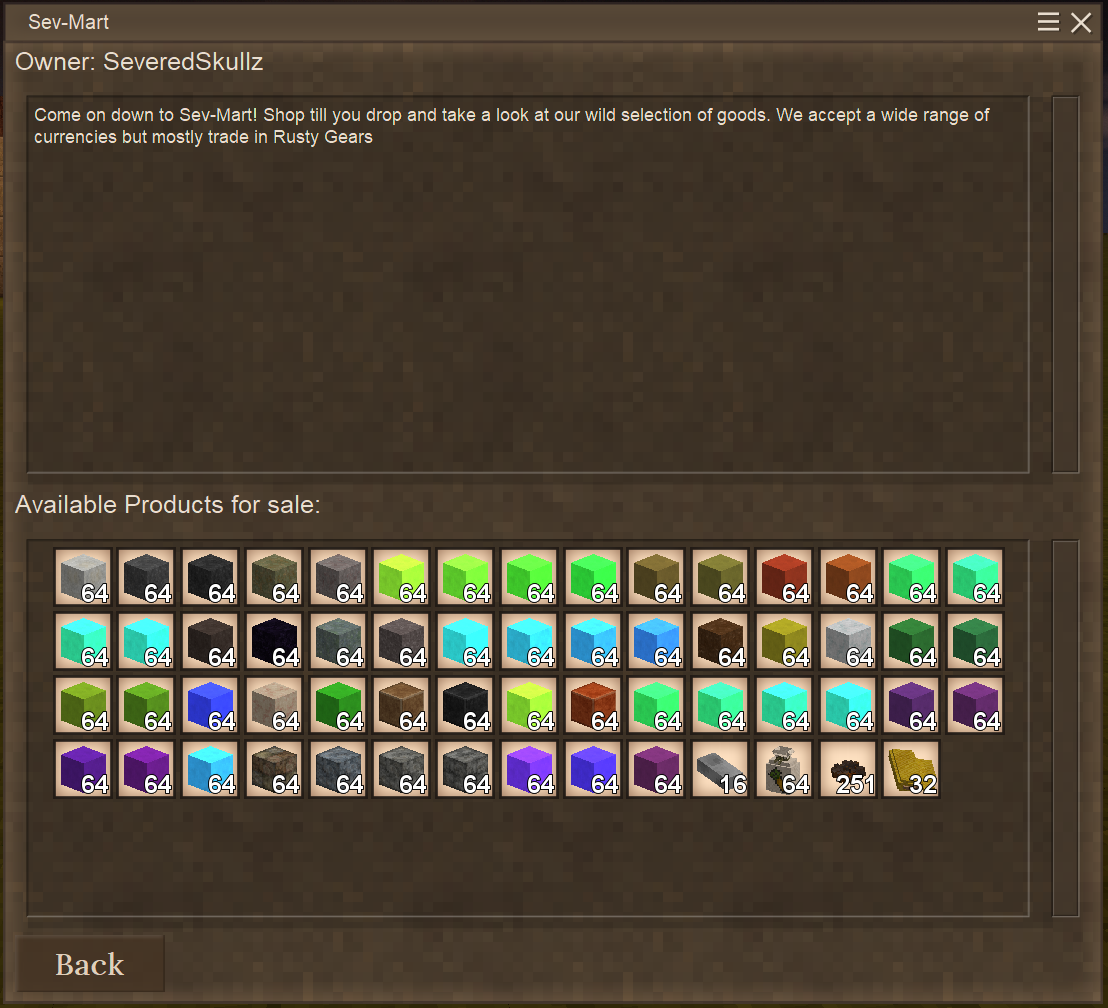
Clicking any of the respective "View" buttons will open the shop's inventory, as well as show its Long Description. This way you can see at a glance which items are currently for sale at that shop.
Meal Stall
The Meal Stall is useful if you want to sell food to players without needing to sell the food container along with it. Unlike most Stalls, you cannot add/remove contents directly from inside the GUI. Instead, you must transfer contents with containers like Bowls, Cooking Pots, and Crocks. For convienence, the GUI shows you the exact recipe used for that slot. Each stall slot can support up to 64 Servings.
Coupon Cutter
The Coupon Cutter can create bonuses for purches for a specific selection of shops, or all of them owned by you. These bonuses can be in the form of Bonus Product or Price Discounts. Each coupon needs Parchment to craft, but produces 16 Coupons at a time.
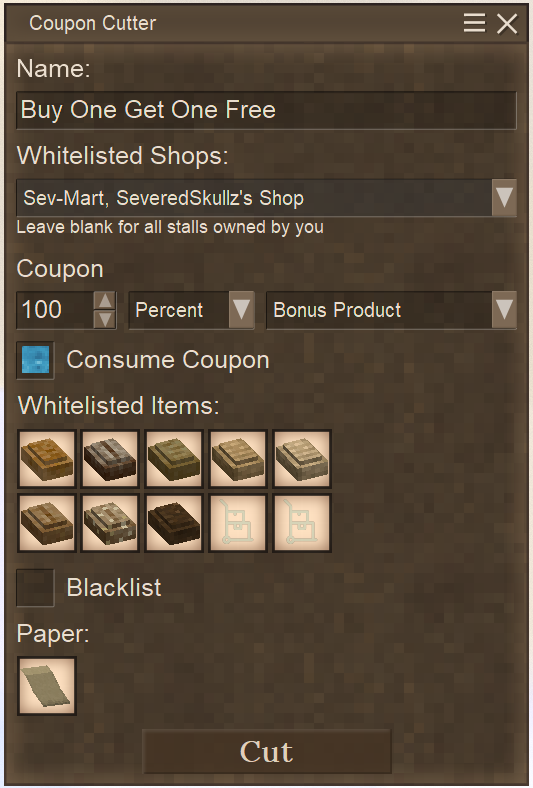
A Coupon can be given a name to help distinguish what the coupon is for. You may also select the shops the coupon is honored by, or leave it blank to allow all shops owned by you to honor the coupon.
You may also specify an item Whitelist/Blacklist of items that the coupon applies to, up to 10 items. Leaving this list blank means it will work for any item. In our example above, we have a Whitelist containing a selection of Bread - so this copuon only applies for those specific bread types and would not apply to other food such as pies.
Coupons can offer bonuses as a flat-rate "Unit" basis, or a percentage.
- Unit - The bonus or discount is explicitly supplied. As an example, a 5 Unit Price Discount would subtract 5 units from the cost of the item. E.g. an item being sold for 15 Rusty Gears with a 5 Unit Discount would only cost 10 Rusty Gears
- Percentage - The bonus or discount is proportional to the cost of the item, with the result rounded down to the nearest whole number. As an example an item being sold for 15 Rusty Gears with a 10% Discount would only cost 14 Rusty Gears (15 x 0.1 = 1.5, rounded down = 1 Rusty Gear savings)
Note that the system will automatically handle preserving coupons that do not actually offer a discount. This means that if you used a 10% Discount coupon on something being sold for 5 Rusty Gears, the coupon would not be used as it did not actually save you any money (5 x 0.1 = 0.5 Rounded Down = 0 Rusty Gear Savings)
Teller Machine
The Teller Machine is your way of allowing players to exchange currencies with you, provided you have enough stock in your register for the trade. For servers that utilize multiple forms of currency with mods such as Coinage, you can allow your players to freely exchange for the exact currency type required.
Note that these trades are bidirectional and cannot be restricted - you cannot offer a trade where the player pays 1 Gold Coin and receives 10 Silver Coins, but then ask the player to pay for 15 Silver Coins for 1 Gold Coin in return. Teller Machines operate on equivalence - If something cost 1 US Dollar, you can pay for it with 4 Quarters, 10 Dimes, 20 Nickels, 100 Pennies, etc. I am not required to have a 1 US Dollar Bill on me to buy the item - It works the same way here.
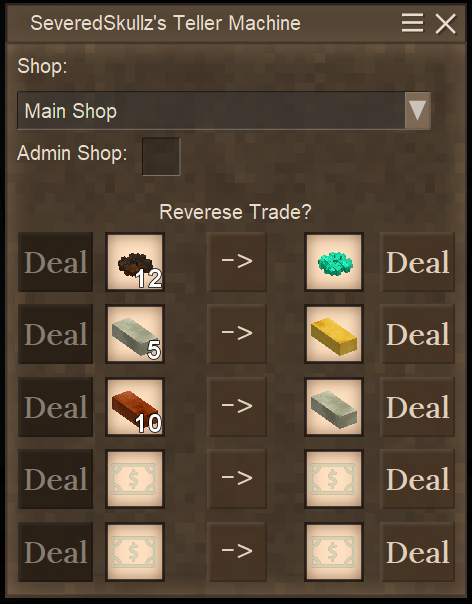
In the example above, I can exchange 12 Rusty Gears for a Temporal Gear, or exchange 1 Temporal Gear for 12 Rusty Gears. To change the direction, simply press the "Reverse Trade" button in the middle, which will enable the other "Deal" button.
Configuration
There are many configuration options in mind for Viconomy. Currently the only implemented feature is Food Decay. As these stalls will likely not be in a well-preserved location, their decay rate is statically set to a constant rate. This rate is configurable and can even be completely turned off to stop food rotting entirely. Other plans include limits on shops, stalls, items used for currency, and time-locked sales (RP Store's "Open Hours")
Translations
Want to help translate Vinconomy? See our Crowdin repository!
Known Issues
- Crates do not tesselate properly and will display the generic "?" block instead.
- Using mods to alter or change item names or decriptions and using quotations in the name can mess up the ledger parser. This is a bug within Vintage Story itself and I cannot fix.
For Issues, Comments, Concerns, or Feedback:
Feel free to use the Official Vintage Story Discord's Mod Page (Make sure youre in the Offical Vintage Story Discord for the link to work!) for support, or message me directly (SeveredSkullz). My response times will likely be much faster on there. I still check the ModDB from time to time, though!
Project description from Vintage Story Mod DB.
Pick your setup
Vinconomy - A Vintage Story Economy Mod releases for each Vintage Story version.
Choose the version and loader you play, then open the matching release.
Vintage Story version
1.21.6-rc.1
1 loader buildVintage Story version
1.21.6
1 loader buildVintage Story version
1.21.5
1 loader buildVintage Story version
1.21.4
1 loader buildVintage Story version
1.21.3
1 loader buildVintage Story version
1.21.2-rc.3
1 loader buildVintage Story version
1.21.2-rc.2
1 loader buildVintage Story version
1.21.2-rc.1
1 loader buildVintage Story version
1.21.2
1 loader buildVintage Story version
1.21.1-rc.2
1 loader buildVintage Story version
1.21.1-rc.1
1 loader buildShowing the newest 12 of 81 game versions. Older files are in the list below.
Check the dependencies, then try the file in a copied instance before changing a world you care about.
Recent files
Vinconomy - A Vintage Story Economy Mod versions and loaders
5.1.2
vinconomy_5.1.2.zip
2 Dec 2025
Client Required Server Optional Dependencies No extras listed Listed on Release listing
Check the 1.21.4 setup 1.21.01.21.1-rc.11.21.1-rc.21.21.1 release
5.1.1
vinconomy_5.1.1.zip
11 Nov 2025
Client Source doesn’t say Server Source doesn’t say Dependencies No extras listed Listed on Release listing
Check the 1.21.4 setup 1.21.01.21.1-rc.11.21.1-rc.21.21.1 release
5.1.0
vinconomy_5.1.0.zip
7 Nov 2025
Client Source doesn’t say Server Source doesn’t say Dependencies No extras listed Listed on Release listing
Check the 1.21.4 setup 1.21.01.21.1-rc.11.21.1-rc.21.21.1 release
5.0.8
vinconomy_5.0.8.zip
30 Oct 2025
Client Source doesn’t say Server Source doesn’t say Dependencies No extras listed Listed on Release listing
Check the 1.21.4 setup 1.21.01.21.1-rc.11.21.1-rc.21.21.1 release
5.0.7
vinconomy_5.0.7.zip
23 Oct 2025
Client Source doesn’t say Server Source doesn’t say Dependencies No extras listed Listed on Release listing
Check the 1.21.4 setup 1.21.01.21.1-rc.11.21.1-rc.21.21.1 release
5.0.6
vinconomy_5.0.6.zip
20 Oct 2025
Client Source doesn’t say Server Source doesn’t say Dependencies No extras listed Listed on Release listing
Check the 1.21.4 setup 1.21.01.21.1-rc.11.21.1-rc.21.21.1 release
5.0.5
vinconomy_5.0.5.zip
18 Oct 2025
Client Source doesn’t say Server Source doesn’t say Dependencies No extras listed Listed on Release listing
Check the 1.21.4 setup 1.21.01.21.1-rc.11.21.1-rc.21.21.1 release
5.0.4
vinconomy_5.0.4.zip
13 Oct 2025
Client Source doesn’t say Server Source doesn’t say Dependencies No extras listed Listed on Release listing
Check the 1.21.4 setup 1.21.0-pre.11.21.0-pre.21.21.0-pre.31.21.0-rc.1 release
Looking for an older file? The official Vintage Story Mod DB project page is in Resources.