Vintage Story version
Back to mods 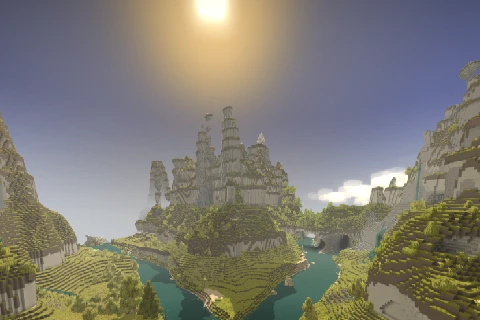
Vintage Story Mod DB · Vintage Story mod
Rivers
Adds rivers, which are flowing bodies of water, and lakes at the ends of them. Rivergen uses 1-100 for config values and this one uses 0-1, if you have lakes everywhere reset your config. Required Worldgen Settings Oceans are required to generate rivers. 30
Choose a version Pick your version below, then grab the matching file.
Quick answer
Which Rivers release matches 1.20.0-rc.6?
Best match for your filters 4.0.1
Game version 1.20.0-rc.6
Loader Built-in Vintage Story mod system
Rivers 4.0.1 targets 1.20.0-rc.6. It must be installed on the client. Installation on the dedicated server is optional. No extra mods listed for this file.
Where it goes
Is Rivers required on the client, server, or both?
It must be installed on the client. Installation on the dedicated server is optional.
Client Required
Dedicated server Optional
Loader for this release Built-in Vintage Story mod system
Required install it here Optional supported, not mandatory Not supported do not install here Source doesn’t say do not assume
This release supports both sides, but the source does not require it on the server.
What else does Rivers 4.0.1 need?
4.0.1 on 1.20.0-rc.6. Every mod below is checked against that same setup.
This file does not list any required mods. Do not add a library just because a different file uses it.
This file does not list any required or optional mods.
Before you install it
Add Rivers without breaking your instance.
Built for Rivers 4.0.1 on 1.20.0-rc.6. Pick another file and the loader, install side or required mods may change.
- 01
Stick to this file
Use 4.0.1. It targets 1.20.0-rc.6; another release may have different loader, side or dependency requirements.
- 02
Bring the mods it needs
This file does not list any required mods. Do not add a library just because a different file uses it.
- 03
Put it on the correct side
It must be installed on the client. Installation on the dedicated server is optional.
- 04
Pick the file you checked
Use the “Get this file” button beside 4.0.1. It opens that exact file at the source.
About this project
What does Rivers add?
Adds rivers, which are flowing bodies of water, and lakes at the ends of them.
Rivergen uses 1-100 for config values and this one uses 0-1, if you have lakes everywhere reset your config.
Required Worldgen Settings
Oceans are required to generate rivers. 300-500% landcover scale and 50% landcover works good.
Where Does The River Go?
The river may come from in-land and flow out to an ocean.
Why are there lakes everywhere?
At some point this config setting was changed from an integer to a 0-1 percentage. Delete your config or fix it.
API
Once the first part of a chunk is generated (NewGenTerra) some data will be stored inside chunks IF a river is within range of them.
float[] flowVectors:
Stored inside the chunk at y0, or the bottom chunk of the column. Retrieved with GetModdata("flowVectors"), or ModDataCache.Get() which will not de-serialize it every time it's fetched.
Index is retrieved by localZ * 32 + localX coordinates for the X vector, multiply the index by 2 for the Z vector.
Available on both the client and the server, used for rendering flowing water and physics.
ushort[] riverDistance:
Stored inside the column map chunk. Retrieved with GetModdata("riverDistance").
Index is retrieved by localZ * 32 + localX.
Available on the server, has the distance in blocks from the edge of a river, or 0 if it's inside the river bank.
There is no caching for this, do not GetModdata in hot paths or cache it yourself.
Config, explanation of settings: https://github.com/glutzer/Rivers-Mod/blob/master/Rivers/src/RiverConfig.cs
Project description from Vintage Story Mod DB.
Pick your setup
Rivers releases for each Vintage Story version.
Choose the version and loader you play, then open the matching release.
Vintage Story version
1.22.2
1 loader buildVintage Story version
1.22.0-rc.5
1 loader buildVintage Story version
1.21.6
1 loader buildVintage Story version
1.21.1
1 loader buildVintage Story version
1.21.0-rc.7
1 loader buildVintage Story version
1.21.0-rc.6
1 loader buildVintage Story version
1.20.12
1 loader buildVintage Story version
1.20.0-rc.8
1 loader buildVintage Story version
1.20.0-rc.6
1 loader buildVintage Story version
1.20.0-pre.0
1 loader buildVintage Story version
1.20.0
1 loader buildShowing the newest 12 of 21 game versions. Older files are in the list below.
Check the dependencies, then try the file in a copied instance before changing a world you care about.
Recent files
Rivers versions and loaders
4.0.1
rivers_4.0.1.zip
29 Dec 2024
Client Required Server Optional Dependencies No extras listed Listed on Release listing
Check the 1.20.0-rc.6 setup 1.20.0-rc.6 release
4.0.0
rivers_4.0.0.zip
28 Dec 2024
Client Source doesn’t say Server Source doesn’t say Dependencies No extras listed Listed on Release listing
Check the 1.20.0-rc.6 setup 1.20.0-rc.6 release
Looking for an older file? The official Vintage Story Mod DB project page is in Resources.