Quick answer
Which Auto Config Lib release should I use?
Latest stable file 2.0.10
Game version 1.22.0-pre.1, 1.22.0-pre.2, 1.22.0-pre.3
Loader Built-in Vintage Story mod system
Auto Config Lib 2.0.10 targets 1.22.0-pre.1, 1.22.0-pre.2, 1.22.0-pre.3. It must be installed on the client. Installation on the dedicated server is optional. All 2 required mods have matching files.
Where it goes
Is Auto Config Lib required on the client, server, or both?
It must be installed on the client. Installation on the dedicated server is optional.
Client Required
Dedicated server Optional
Loader for this release Built-in Vintage Story mod system
Required install it here Optional supported, not mandatory Not supported do not install here Source doesn’t say do not assume
This release supports both sides, but the source does not require it on the server.
What else does Auto Config Lib 2.0.10 need?
2.0.10. Change the file and its required mods may change too.
Install Config lib, ImGui first. We found matching files for this game-version and loader setup. 1 comes through another mod in the chain.
1 listed on this file 1 pulled in by one of those mods
Matching file found Matched file: 1.13.2
ImGui Needed by Config lib pulled inMatching file found Matched file: 1.2.0
1
extra mod was pulled in by another dependency.
Indented rows show who needs each one. We only count dependency files that match this setup. A file for another loader does not fill the gap.
Before you install it
Add Auto Config Lib without breaking your instance.
Built for Auto Config Lib 2.0.10. Pick another file and the loader, install side or required mods may change.
- 01
Stick to this file
Use 2.0.10. It targets 1.22.0-pre.1, 1.22.0-pre.2, 1.22.0-pre.3; another release may have different loader, side or dependency requirements.
- 02
Bring the mods it needs
Install Config lib, ImGui first. We found matching files for this game-version and loader setup. 1 comes through another mod in the chain.
- 03
Put it on the correct side
It must be installed on the client. Installation on the dedicated server is optional.
- 04
Pick the file you checked
Use the “Get this file” button beside 2.0.10. It opens that exact file at the source.
About this project
What does Auto Config Lib add?
Ever wanted to edit some setting through ConfigLib's mod setting menu, only to realize the other mod doesn't have a ConfigLib implementation? Well I haven't but I'm here to try and fix this anyway.
Features:
- Automated ConfigLib implementation for Typed Configs (meaning configs that have an actual code class associated with it)
- World Config gets added to ConfigLib automatically as well
- Shows description from code documentation*
- Supports data annotation attributes
*This required the creator of the mod to enable the output of the documentation file
Suported data annotations:
- DisplayName (sets the name in config)
- Description (sets the description in config)
- Category (sets the group to display this item under)
- DefaultValue (sets the value to use for the reset button)
- ReadOnly (sets whether this value should be editable or just displayed)
- Browsable (sets whether this item should be visible, by default fields & properties are considered browseable(true) while methods are considered browseable(false) and yes changing this will make the method show up as a button in the config)
- Range (sets the minimum and maximum value for numbers, as long as the min or max is not infinite this will also turn it into a slider)
- MaxLength (sets the maximum length of the string field, default MaxLength is 128)
- DisplayFormat (sets the display format, currently only supports "P" for showing floats as percentages where 0 is considered 0% and 1 is considered 100%)
Note for modders: if you want a more complete code first config management (and not just configLib integration) then consider using InsanityLib instead
Project description from Vintage Story Mod DB.
Pick your setup
Auto Config Lib releases for each Vintage Story version.
Choose the version and loader you play, then open the matching release.
Vintage Story version
1.22.0-rc.10
1
loader build Vintage Story version
1.22.0-rc.9
1
loader build Vintage Story version
1.22.0-rc.8
1
loader build Vintage Story version
1.22.0-rc.7
1
loader build Vintage Story version
1.22.0-rc.6
1
loader build Vintage Story version
1.22.0-rc.5
1
loader build Vintage Story version
1.22.0-rc.4
1
loader build Vintage Story version
1.22.0-rc.3
1
loader build Vintage Story version
1.22.0-rc.2
1
loader build Vintage Story version
1.22.0-rc.1
1
loader build Vintage Story version
1.22.0-pre.5
1
loader build Vintage Story version
1.22.0-pre.4
1
loader build Showing the newest 12 of 54 game versions.
Older files are in the list below.
Check the dependencies, then try the file in a copied instance before changing a world you care about.
Recent files
Auto Config Lib versions and loaders
autoconfiglib_2.0.10.zip
10 Mar 2026
Client Required Server Optional Dependencies 2 required · matched Listed on Release listing
Check the 1.22.0-rc.10 setup → 1.22.0-pre.11.22.0-pre.21.22.0-pre.31.22.0-pre.4 release
autoconfiglib_2.0.9.zip
10 Sept 2025
Client Required Server Optional Dependencies 1 required · 1 unchecked Listed on Release listing
Check the 1.21.6-rc.1 setup → 1.21.0-pre.11.21.0-pre.21.21.0-pre.31.21.0-rc.1 release
autoconfiglib_2.0.8.zip
28 Aug 2025
Client Required Server Optional Dependencies 1 required · 1 unchecked Listed on Release listing
Check the 1.21.0 setup → autoconfiglib_2.0.7.zip
26 Aug 2025
Client Required Server Optional Dependencies 1 required · 1 unchecked Listed on Release listing
Check the 1.21.0 setup → autoconfiglib_2.0.6.zip
12 Feb 2025
Client Required Server Optional Dependencies 1 required · 1 unchecked Listed on Release listing
Check the 1.20.11 setup → 1.20.01.20.11.20.21.20.3 release
autoconfiglib_2.0.5.zip
11 Feb 2025
Client Required Server Optional Dependencies 1 required · 1 unchecked Listed on Release listing
Check the 1.20.4-rc.4 setup → autoconfiglib_2.0.4.zip
27 Jan 2025
Client Required Server Optional Dependencies 1 required · 1 unchecked Listed on Release listing
Check the 1.20.3 setup → autoconfiglib_2.0.3.zip
27 Jan 2025
Client Required Server Optional Dependencies 1 required · 1 unchecked Listed on Release listing
Check the 1.20.3 setup → autoconfiglib_2.0.2.zip
15 Jan 2025
Client Required Server Optional Dependencies 1 required · 1 unchecked Listed on Release listing
Check the 1.20.0-rc.9 setup → autoconfiglib_2.0.1.zip
12 Jan 2025
Client Required Server Optional Dependencies 1 required · 1 unchecked Listed on Release listing
Check the 1.20.0-rc.8 setup → autoconfiglib_1.2.3.zip
9 Jan 2025
Client Required Server Optional Dependencies 1 required · 1 unchecked Listed on Release listing
Check the 1.20.0-rc.8 setup → autoconfiglib_1.2.1.zip
8 Jan 2025
Client Required Server Optional Dependencies 1 required · 1 unchecked Listed on Release listing
Check the 1.20.0-rc.8 setup → 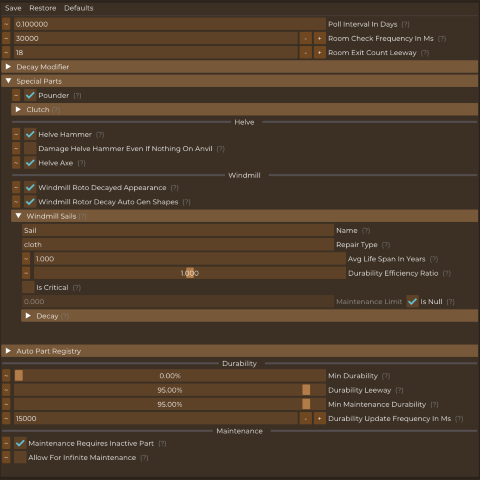
 mod
mod mod
mod mod
mod