Vintage Story version
Back to mods 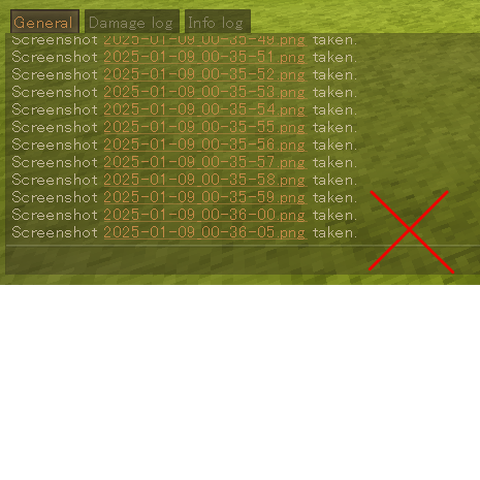
Vintage Story Mod DB · Vintage Story mod
No Screenshot Message
Overview This mod disables "Screenshot ***.png taken." chat message that appears when you take a screenshot. The snapshot sound will still play. This mod runs on client side, so it's available in MP without server installation. (Some servers might not allow
Choose a version Pick your version below, then grab the matching file.
Quick answer
Which No Screenshot Message release matches 1.22.5?
Best match for your filters 0.1.1
Game version 1.19.8, 1.20.0-rc.1, 1.20.0-rc.2
Loader Built-in Vintage Story mod system
No Screenshot Message 0.1.1 targets 1.19.8, 1.20.0-rc.1, 1.20.0-rc.2. It must be installed on the client. Do not install it on the dedicated server. No extra mods listed for this file.
Where it goes
Is No Screenshot Message required on the client, server, or both?
It must be installed on the client. Do not install it on the dedicated server.
Client Required
Dedicated server Not supported
Loader for this release Built-in Vintage Story mod system
Required install it here Optional supported, not mandatory Not supported do not install here Source doesn’t say do not assume
This Vintage Story file is marked client-only.
What else does No Screenshot Message 0.1.1 need?
0.1.1 on 1.22.5. Every mod below is checked against that same setup.
This file does not list any required mods. Do not add a library just because a different file uses it.
This file does not list any required or optional mods.
Before you install it
Add No Screenshot Message without breaking your instance.
Built for No Screenshot Message 0.1.1 on 1.22.5. Pick another file and the loader, install side or required mods may change.
- 01
Stick to this file
Use 0.1.1. It targets 1.19.8, 1.20.0-rc.1, 1.20.0-rc.2; another release may have different loader, side or dependency requirements.
- 02
Bring the mods it needs
This file does not list any required mods. Do not add a library just because a different file uses it.
- 03
Put it on the correct side
It must be installed on the client. Do not install it on the dedicated server.
- 04
Pick the file you checked
Use the “Get this file” button beside 0.1.1. It opens that exact file at the source.
About this project
What does No Screenshot Message add?
Overview
This mod disables "Screenshot ***.png taken." chat message that appears when you take a screenshot.
The snapshot sound will still play.
This mod runs on client side, so it's available in MP without server installation.
(Some servers might not allow client side mods.)
Help/Contact
If you encounter any problems or have feature requests, please do one of the following:
- Create an issue on the GitHub (click Issue Tracker tab on this page)
- Post in the forum thread for this mod on the Vintage Story Discord server (click Homepage tab on this page)
These methods align with how I handle reports for other mods (even for other games), making it easier for me to track and respond.
Note: Comments on this page are rarely checked.
Search keywords: screenshot notification F12 turn off
Project description from Vintage Story Mod DB.
Pick your setup
No Screenshot Message releases for each Vintage Story version.
Choose the version and loader you play, then open the matching release.
Vintage Story version
1.22.4
1 loader buildVintage Story version
1.22.3
1 loader buildVintage Story version
1.22.2
1 loader buildVintage Story version
1.22.1
1 loader buildVintage Story version
1.22.0-rc.10
1 loader buildVintage Story version
1.22.0-rc.9
1 loader buildVintage Story version
1.22.0-rc.8
1 loader buildVintage Story version
1.22.0-rc.7
1 loader buildVintage Story version
1.22.0-rc.6
1 loader buildVintage Story version
1.22.0-rc.5
1 loader buildVintage Story version
1.22.0-rc.4
1 loader buildShowing the newest 12 of 69 game versions. Older files are in the list below.
Check the dependencies, then try the file in a copied instance before changing a world you care about.
Recent files
No Screenshot Message versions and loaders
0.1.1
noscreenshotmessagemod_0.1.1.zip
8 Jan 2025
Client Required Server Not supported Dependencies No extras listed Listed on Release listing
Check the 1.22.5 setup 1.19.81.20.0-rc.11.20.0-rc.21.20.0-rc.3 release
Looking for an older file? The official Vintage Story Mod DB project page is in Resources.
 mod
mod Vintage Story
Requiem of Rust UI (RoRUI)
A redo of the background for the UI and sliders dots etc for in game this is an earthy rusty tone.
 mod
mod Vintage Story
Lunchbox
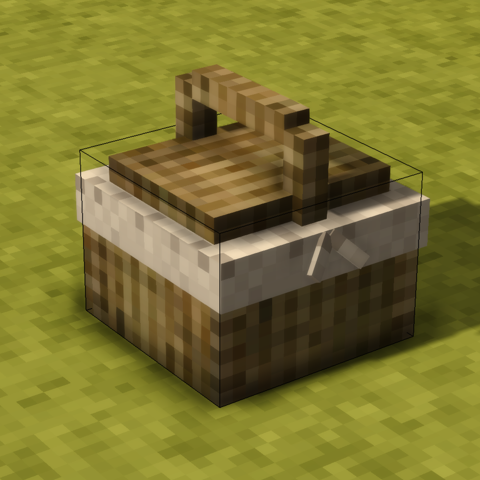
Adds storage containers which automatically feeds the player when hungry
 mod
mod Vintage Story
Boric Alchemy
Boric Alchemy adds chemical routes to create and refine resources, and create alchemical marvels!