Vintage Story version
Back to mods 
Vintage Story Mod DB · Vintage Story mod
NDL TimeTracker
***I always recommend you write down your world times before updating versions just incase. There should be no loss of time with any updates (other then a full game reinstall) but you never know!*** About Mod: This mod tracks your playtime on any given world
Choose a version Pick your version below, then grab the matching file.
Quick answer
Which NDL TimeTracker release should I use?
Latest stable file 5.0.1
Game version 1.22.0, 1.22.1, 1.22.2
Loader Built-in Vintage Story mod system
NDL TimeTracker 5.0.1 targets 1.22.0, 1.22.1, 1.22.2. It must be installed on the client. Do not install it on the dedicated server. No extra mods listed for this file.
Where it goes
Is NDL TimeTracker required on the client, server, or both?
It must be installed on the client. Do not install it on the dedicated server.
Client Required
Dedicated server Not supported
Loader for this release Built-in Vintage Story mod system
Required install it here Optional supported, not mandatory Not supported do not install here Source doesn’t say do not assume
This Vintage Story file is marked client-only.
What else does NDL TimeTracker 5.0.1 need?
5.0.1. Change the file and its required mods may change too.
This file does not list any required mods. Do not add a library just because a different file uses it.
This file does not list any required or optional mods.
Before you install it
Add NDL TimeTracker without breaking your instance.
Built for NDL TimeTracker 5.0.1. Pick another file and the loader, install side or required mods may change.
- 01
Stick to this file
Use 5.0.1. It targets 1.22.0, 1.22.1, 1.22.2; another release may have different loader, side or dependency requirements.
- 02
Bring the mods it needs
This file does not list any required mods. Do not add a library just because a different file uses it.
- 03
Put it on the correct side
It must be installed on the client. Do not install it on the dedicated server.
- 04
Pick the file you checked
Use the “Get this file” button beside 5.0.1. It opens that exact file at the source.
About this project
What does NDL TimeTracker add?
***I always recommend you write down your world times before updating versions just incase. There should be no loss of time with any updates (other then a full game reinstall) but you never know!***
About Mod:
This mod tracks your playtime on any given world (hours and minutes). I know it the game tracks for singleplayer but I wanted a mod that tracks time played on multiplayer worlds since there is no built in system for that.
- Displays time on screen via HUD in upper right next to mini-map
Hotkey:
- default key - num8 (8 key on the numberpad)
- can be changed in the controls menu
Commands:
.playtime - type this command in chat and it will display your time!
.playtime "<hr> <min>" This command allows you to set your time (for if you have been keeping track before you added this mod like I have)
- example: ".playtime set 1 20" This sets your playtime to 1hr 20mins
- WARNING: If you do "/playtime <playername>" and don't put in the hours or minutes it will act like you put in 0 0 and reset your playtime.
Migration Instructions (4.0.0 version):
Migration Method 1 (manual)
- Before updating to 1.21
-
- Record all your world times somewhere (notepad, pen paper, where ever)
-
- Update to 1.21 and update mod to 4.0.0
- Go in each world and run the command .playtime <Username> <hrs> <mins>
Migration Method 2 (bulk/less manual)
- Update to 1.21
- Update Mod to 4.0.0
-
- Load into your world
- Your time will show 0hr 0min, this is fine
- Go into your Vintage Story installation path
- Copy the folder named "playtime"
- Go to your "VintagestoryData" folder
- Probably located in your Appdata Folder
- Open File Explorer and type %Appdata% in the path bar
- Look for the folder named "NDL-TimeTracker"
- Past your "playtime" folder in there
- Replace the one in there if there is one
- Probably located in your Appdata Folder
-
- Your time should now be restored
- Reach out if this fails
Planned Workings:
- none at the moment
Feedback/Suggestions/Support:
I livestream on Twitch or Youtube (ad-free) monday-thursday (6pm est - 10pm est) Typically I play vintage story but on occasion might dive into a random game. I welcome suggestion and feedback on the mod in chat there or you can leave a comment below.
- You can also join my personal discord channel via - https://discord.gg/6qQZYPU
- Please use the channel #ndl-timetracker for any comments/chat regarding this mod! (going to be at the bottom of the channel list, in the VS-MODS Category)
Other Mods By Author:


Project description from Vintage Story Mod DB.
Pick your setup
NDL TimeTracker releases for each Vintage Story version.
Choose the version and loader you play, then open the matching release.
Vintage Story version
1.22.1
1 loader buildVintage Story version
1.22.0
1 loader buildVintage Story version
1.21.6
1 loader buildVintage Story version
1.21.5
1 loader buildVintage Story version
1.21.4
1 loader buildVintage Story version
1.21.3
1 loader buildVintage Story version
1.21.2
1 loader buildVintage Story version
1.21.1
1 loader buildVintage Story version
1.21.0
1 loader buildVintage Story version
1.20.12
1 loader buildVintage Story version
1.20.11
1 loader buildShowing the newest 12 of 23 game versions. Older files are in the list below.
Check the dependencies, then try the file in a copied instance before changing a world you care about.
Recent files
NDL TimeTracker versions and loaders
5.0.1
ndltimetracker_5.0.1.zip
19 May 2026
Client Required Server Not supported Dependencies No extras listed Listed on Release listing
Check the 1.22.2 setup 1.22.01.22.11.22.2 release
5.0.0
ndltimetracker_5.0.0.zip
9 Mar 2026
Client Required Server Not supported Dependencies No extras listed Listed on Release listing
Check the 1.22.0 setup 1.22.0 release
4.0.1
ndltimetracker_4.0.1.zip
31 Oct 2025
Client Required Server Not supported Dependencies No extras listed Listed on Release listing
Check the 1.21.6 setup 1.21.51.21.6 release
4.0.0
ndltimetracker_4.0.0.zip
26 Aug 2025
Client Required Server Not supported Dependencies No extras listed Listed on Release listing
Check the 1.21.4 setup 1.21.01.21.11.21.21.21.3 release
3.2.0
ndltimetracker_3.2.0.zip
28 Feb 2025
Client Required Server Not supported Dependencies No extras listed Listed on Release listing
Check the 1.20.12 setup 1.20.01.20.11.20.21.20.3 release
3.1.2
ndltimetracker_3.1.2.zip
4 Feb 2025
Client Required Server Not supported Dependencies No extras listed Listed on Release listing
Check the 1.20.4 setup 1.20.31.20.4 release
3.0.2
ndltimetracker_3.0.2.zip
3 Feb 2025
Client Required Server Not supported Dependencies No extras listed Listed on Release listing
Check the 1.20.3 setup 1.20.3 release
3.0.1
ndltimetracker_3.0.1.zip
3 Feb 2025
Client Required Server Not supported Dependencies No extras listed Listed on Release listing
Check the 1.20.3 setup 1.20.3 release
3.0.0
ndltimetracker_3.0.0.zip
2 Feb 2025
Client Required Server Not supported Dependencies No extras listed Listed on Release listing
Check the 1.20.3 setup 1.20.3 release
2.0.0
ndltimetracker_2.0.0.zip
30 Jan 2025
Client Required Server Not supported Dependencies No extras listed Listed on Release listing
Check the 1.20.3 setup 1.20.3 release
1.1.0
ndltimetracker_1.1.0.zip
28 Jan 2025
Client Required Server Not supported Dependencies No extras listed Listed on Release listing
Check the 1.20.3 setup 1.20.3 release
1.0.0
ndltimetracker_1.0.0.zip
27 Jan 2025
Client Required Server Not supported Dependencies No extras listed Listed on Release listing
Check the 1.20.3 setup 1.20.3 release
Looking for an older file? The official Vintage Story Mod DB project page is in Resources.
 mod
mod Vintage Story
Status Hud Continued
Displays status information on the HUD.
 mod
mod Vintage Story
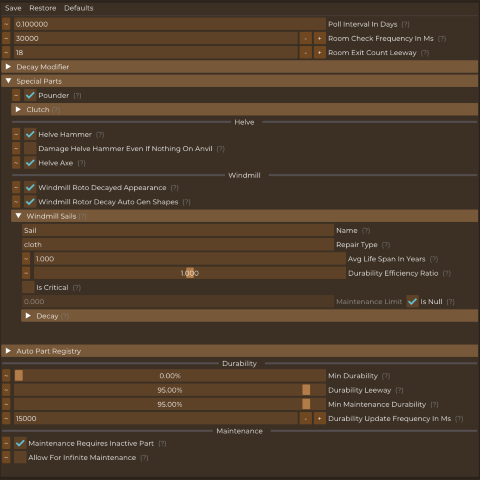
Auto Config Lib
Auto generates ConfigLib implementation for mods that don't add their own
 mod
mod Vintage Story
Newfies Server Essentials Suite
Newfies Server Essentials Suite 🛡️ Protect 🧾 Investigate ⚡ Diagnose 🛠️ Manage