Vintage Story version
Back to mods 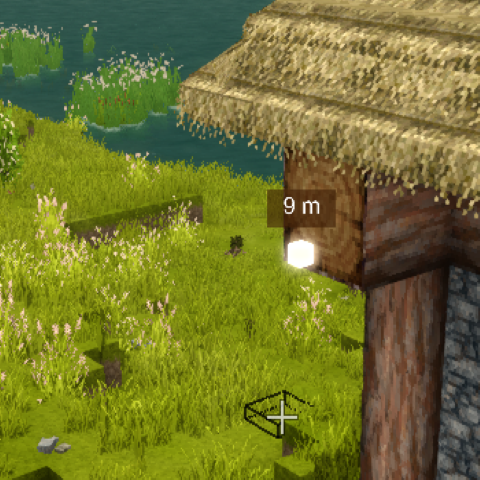
Vintage Story Mod DB · Vintage Story mod
Ping Markers
Ping Markers I just missed this feature so much I had to add it. The goal is to improve cooperation and the sense of co-presence in the game with other players. By default, if the player is in any group, it pings all players in their group. If they aren't i
Choose a version Pick your version below, then grab the matching file.
Quick answer
Which Ping Markers release should I use?
Latest stable file 1.2.0
Game version 1.22.0-pre.1, 1.22.0-pre.2, 1.22.0-pre.3
Loader Built-in Vintage Story mod system
Ping Markers 1.2.0 targets 1.22.0-pre.1, 1.22.0-pre.2, 1.22.0-pre.3. It must be installed on the client. Installation on the dedicated server is optional. No extra mods listed for this file.
Where it goes
Is Ping Markers required on the client, server, or both?
It must be installed on the client. Installation on the dedicated server is optional.
Client Required
Dedicated server Optional
Loader for this release Built-in Vintage Story mod system
Required install it here Optional supported, not mandatory Not supported do not install here Source doesn’t say do not assume
This release supports both sides, but the source does not require it on the server.
What else does Ping Markers 1.2.0 need?
1.2.0. Change the file and its required mods may change too.
This file does not list any required mods. Do not add a library just because a different file uses it.
This file does not list any required or optional mods.
Before you install it
Add Ping Markers without breaking your instance.
Built for Ping Markers 1.2.0. Pick another file and the loader, install side or required mods may change.
- 01
Stick to this file
Use 1.2.0. It targets 1.22.0-pre.1, 1.22.0-pre.2, 1.22.0-pre.3; another release may have different loader, side or dependency requirements.
- 02
Bring the mods it needs
This file does not list any required mods. Do not add a library just because a different file uses it.
- 03
Put it on the correct side
It must be installed on the client. Installation on the dedicated server is optional.
- 04
Pick the file you checked
Use the “Get this file” button beside 1.2.0. It opens that exact file at the source.
About this project
What does Ping Markers add?
Ping Markers
I just missed this feature so much I had to add it.
The goal is to improve cooperation and the sense of co-presence in the game with other players.
By default, if the player is in any group, it pings all players in their group. If they aren't in a group, it broadcasts to the whole server (intended for smaller servers).
How to Use
Press V to ping.
(This can be changed in Settings > Controls, just search for "ping").
Features & Roadmap
[x] Color pings based on players (dynamically via eye color or custom hex)
[x] Ping type based on what is pinged (entity, block...)
[x] Add player name to ping
[x] Ping sticks to entities (follows animals/players as they move)
[x] Config with mod properties
[x] Configurable max distance + allow global pings
[ ] Add map marker to pinged location
Configuration
Configuration files are generated after running the game with the mod installed. They can be found in your Vintage Story data folder:
%AppData%/VintagestoryData/ModConfig/
Server Configuration (PingMarkersConfig-Server.json)
| Setting | Default | Description |
EnableGlobalPings |
false |
If true, a player's pings are broadcast to all online players in the server (when they aren't in a group). |
Client Configuration (PingMarkersConfig-Client.json)
| Setting | Default | Description |
MaxRenderDistanceMeters |
10000 |
Maximum visual range from which ping markers can be seen. |
MaxPingDistanceMeters |
100 |
Maximum distance the player's view raycast can travel when creating new pings. |
CooldownSeconds |
1.0 |
Cooling delay needed between ping casts. |
DistanceTextDigits |
0 |
Number of decimal digits shown along with the distance text. |
ShowDistance |
true |
Displays the numerical distance overlay above the markers. |
ShowPlayerName |
true |
Shows the name of the player who cast the ping. |
ShowPingedTargetName |
false |
Displays the specific name of the entity or block that was pinged. |
ShowPingedTargetType |
false |
Displays the type of the target pinged (E for entity, B for block). |
ColorByEyeColor |
true |
Dynamically colors the ping based on the player's custom eye color. |
CustomPingColorHex |
"#ffffff" |
Custom hex color used if ColorByEyeColor is set to false. |
StickToEntities |
true |
Pings attached to entities (like players or animals) will follow them as they move. |
Project description from Vintage Story Mod DB.
Pick your setup
Ping Markers releases for each Vintage Story version.
Choose the version and loader you play, then open the matching release.
Vintage Story version
1.22.1
1 loader buildVintage Story version
1.22.0-rc.10
1 loader buildVintage Story version
1.22.0-rc.9
1 loader buildVintage Story version
1.22.0-rc.8
1 loader buildVintage Story version
1.22.0-rc.7
1 loader buildVintage Story version
1.22.0-rc.6
1 loader buildVintage Story version
1.22.0-rc.5
1 loader buildVintage Story version
1.22.0-rc.4
1 loader buildVintage Story version
1.22.0-rc.3
1 loader buildVintage Story version
1.22.0-rc.2
1 loader buildVintage Story version
1.22.0-rc.1
1 loader buildShowing the newest 12 of 75 game versions. Older files are in the list below.
Check the dependencies, then try the file in a copied instance before changing a world you care about.
Recent files
Ping Markers versions and loaders
1.2.0
pingmarkers_1.2.0.zip
8 May 2026
Client Required Server Optional Dependencies No extras listed Listed on Release listing
Check the 1.22.2 setup 1.22.0-pre.11.22.0-pre.21.22.0-pre.31.22.0-pre.4 release
1.1.1
PingMarkers_1.1.1.zip
14 Apr 2025
Client Required Server Optional Dependencies No extras listed Listed on Release listing
Check the 1.21.7 setup 1.20.0-pre.01.20.0-rc.11.20.0-rc.21.20.0-rc.3 release
1.1.0
PingMarkers_1.1.0.zip
5 Apr 2025
Client Required Server Optional Dependencies No extras listed Listed on Release listing
Check the 1.20.7 setup 1.20.61.20.7 release
1.0.2
PingMarkers_1.0.2.zip
1 Apr 2025
Client Required Server Optional Dependencies No extras listed Listed on Release listing
Check the 1.20.7 setup 1.20.61.20.7 release
1.0.1
PingMarkers_1.0.1.zip
1 Apr 2025
Client Required Server Optional Dependencies No extras listed Listed on Release listing
Check the 1.20.7 setup 1.20.61.20.7 release
1.0.0
PingMarkers_1.0.0.zip
1 Apr 2025
Client Required Server Optional Dependencies No extras listed Listed on Release listing
Check the 1.20.6 setup 1.20.6 release
Looking for an older file? The official Vintage Story Mod DB project page is in Resources.