![[Discord]](https://imgur.playat.ch/v1/image?url=https%3A%2F%2Fi.imgur.com%2Fhbs3hRb.png&sig=uGCIg2phlPmujFpx_45LYZzo6m0FByQ5Sy5FNuglUcs)

Vintage Story version
Back to mods 
Vintage Story Mod DB · Vintage Story mod
GlooMeClasses
GlooMeClasses A standalone class mod focused on making each class desireable in their own right, with unique appeals for each. Have you ever used a class mod, only to see that a few classes are objectively better than others, while the other classes got negl
Choose a version Pick your version below, then grab the matching file.
Quick answer
Which GlooMeClasses release should I use?
Latest stable file 1.2.4
Game version 1.22.0-pre.1, 1.22.0-pre.2, 1.22.0-pre.3
Loader Built-in Vintage Story mod system
GlooMeClasses 1.2.4 targets 1.22.0-pre.1, 1.22.0-pre.2, 1.22.0-pre.3. It must be installed on the client. Installation on the dedicated server is optional. No extra mods listed for this file.
Where it goes
Is GlooMeClasses required on the client, server, or both?
It must be installed on the client. Installation on the dedicated server is optional.
Client Required
Dedicated server Optional
Loader for this release Built-in Vintage Story mod system
Required install it here Optional supported, not mandatory Not supported do not install here Source doesn’t say do not assume
This release supports both sides, but the source does not require it on the server.
What else does GlooMeClasses 1.2.4 need?
1.2.4. Change the file and its required mods may change too.
This file does not list any required mods. Do not add a library just because a different file uses it.
This file does not list any required or optional mods.
Before you install it
Add GlooMeClasses without breaking your instance.
Built for GlooMeClasses 1.2.4. Pick another file and the loader, install side or required mods may change.
- 01
Stick to this file
Use 1.2.4. It targets 1.22.0-pre.1, 1.22.0-pre.2, 1.22.0-pre.3; another release may have different loader, side or dependency requirements.
- 02
Bring the mods it needs
This file does not list any required mods. Do not add a library just because a different file uses it.
- 03
Put it on the correct side
It must be installed on the client. Installation on the dedicated server is optional.
- 04
Pick the file you checked
Use the “Get this file” button beside 1.2.4. It opens that exact file at the source.
About this project
What does GlooMeClasses add?
GlooMeClasses
A standalone class mod focused on making each class desireable in their own right, with unique appeals for each.
Have you ever used a class mod, only to see that a few classes are objectively better than others, while the other classes got neglected? This is the very problem that sparked this mod's creation. I haven't seen a single class mod that doesn't half-ass (Intentionally or unintentionally) some classes.
There are plenty that have wonderful concepts, and beautifully crafted mechanics, but the developers don't know how to balance classes properly. This mod aims to change that. I want people to have a class they can actually have fun with outside of just the name behind it.
The classes in this mod all interact with one another, and will interact with each other more and more as future updates come along.
There are in game handbook guides for the crystal skull, alchemist's temporal transmutation, alchemist's calcium nitrate refining, and stainless steel creation.
We are actively looking for more mod developers to join our team!
C# experience isn't required, but that's where we need 90% of the help. Despite this fact, modelers, json writers, and artists are welcome to join if you think you can assist with things that are on the roadmap.
GlooMeGlo is currently working 6 days a week, with 10-12 hour days each. Jon and Nanotect have other stuff going on as well, though they help where they can.
There are plenty more features planned, bugs to be squashed, and balancing changes to be made. If you'd like to join us, please add gloomeglo on discord.
GlooMeGlo is currently working 6 days a week, with 10-12 hour days each. Jon and Nanotect have other stuff going on as well, though they help where they can.
There are plenty more features planned, bugs to be squashed, and balancing changes to be made. If you'd like to join us, please add gloomeglo on discord.
Roadmap
Here you can find a full comprehensive list of everything that has been done, everything that will be done, and everything that is in progress:
GlooMeClasses Roadmap
GlooMeClasses Roadmap
Traits FAQ
- Foraging: Mushrooms, Berries, and fruits.
- Wild crop drop: Only wild crops. Does not affect cultivated ones.
- Wild crop drop: Only wild crops. Does not affect cultivated ones.
Features
- Metal pots with different serving sizes (For all cooking recipes, including ones that dirty the pots)
- Armor kits to repair armor
- Tool kits to repair tools, reducing the total hp of the tool by 10% for each repair. This way blacksmith is still ideal for repairing tools (if you have smithingplus installed.) or making new ones, while giving the option to repair tools while out and about.
- Unique backpacks for the Merchant and Miner that offer more storage space than vanilla, and a passive light.
- Fertilizers for the homesteader
- Stainless steel for the alchemist and chef, with more uses to come later
- more damage buffs and debuffs towards mechanicals
- Temporal stability related buffs and debuffs
- Craftable and fireable designer vessels, planters, and flowerpots
- several hidden vanilla items are now craftable
- Crystal skull can be used to find broken translocators
- Damage buffs and debuffs towards rusted creatures
- Craftable forlorn hope estoc for the Oathkeeper, with more content on the way for him
- Clockmaker is able to heal hacked locusts with various metal parts
- New rework related to the riddle below
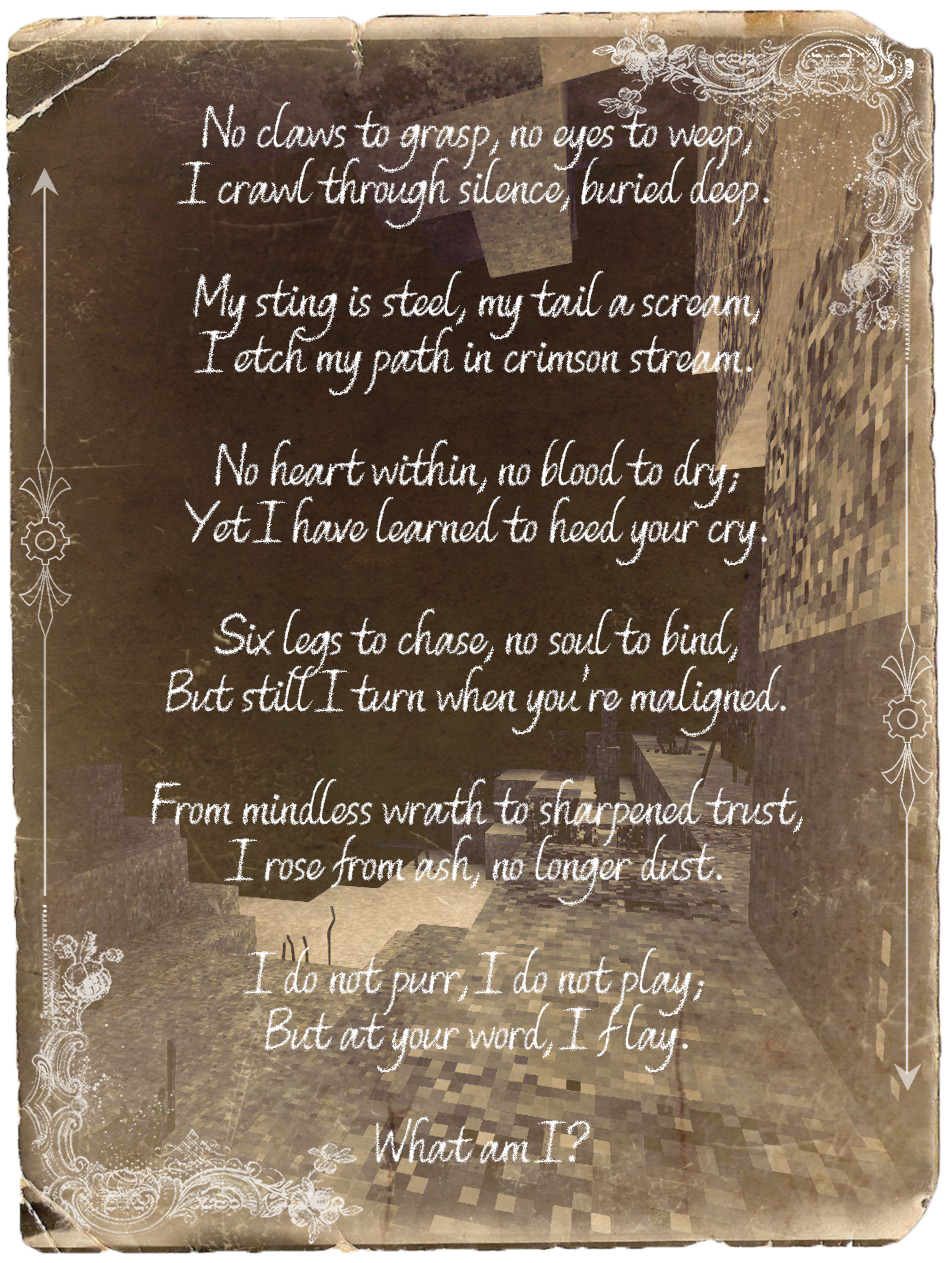
- Armor kits to repair armor
- Tool kits to repair tools, reducing the total hp of the tool by 10% for each repair. This way blacksmith is still ideal for repairing tools (if you have smithingplus installed.) or making new ones, while giving the option to repair tools while out and about.
- Unique backpacks for the Merchant and Miner that offer more storage space than vanilla, and a passive light.
- Fertilizers for the homesteader
- Stainless steel for the alchemist and chef, with more uses to come later
- more damage buffs and debuffs towards mechanicals
- Temporal stability related buffs and debuffs
- Craftable and fireable designer vessels, planters, and flowerpots
- several hidden vanilla items are now craftable
- Crystal skull can be used to find broken translocators
- Damage buffs and debuffs towards rusted creatures
- Craftable forlorn hope estoc for the Oathkeeper, with more content on the way for him
- Clockmaker is able to heal hacked locusts with various metal parts
- New rework related to the riddle below
Known Issues
- Malefactor needs a rework. They're completely overshadowed by the other classes. Ideas welcome, the ability to craft a rondel dagger and more slings are the only ideas at the moment.
- Gasifier doesn't have any fuel rendered inside when it's being filled with fuel or said fuel is burning
- Gasifier doesn't have any fuel rendered inside when it's being filled with fuel or said fuel is burning
Credits
- JonR for his invaluable work on the mod. He is an amazing person, this mod would not have been made without him.
- Trazh, my girlfriend for her amazing work on the mod thumbnail. Her linktree is here if you're ever interested in commissioning her.
- Kanahaku's temporal dust model and recipe, though we changed it to be more lore friendly for this mod.
- LazyLion93's smithing recipe for the forlorn hope estoc.
- l33tmaan and Pursec for their permission to use their frying pan model for the Peddler's Pack.
- Gizmagus for the base mod, though it is now abandoned.
- misterandydandy for permission to use his code to have our peddler's pack and prospector's pack have a passive light level when worn.
- SpearAndFang for his help with various .jsons, for the base of the troubleshooting steps, and for permission to use his living dead sounds as a base for the crystal skull.
- Kappir for his permission to use his standalone pottery mod for this class mod.
- CaptainOats for his assistance in getting the peddler's pack working properly.
- DespondantNova on discord/twitch, for the wonderful work on the riddle image.
- nanotect for joining the team, and helping out with bug fixes and new content!
- DeanBro for the ukrainian translation
- Trazh, my girlfriend for her amazing work on the mod thumbnail. Her linktree is here if you're ever interested in commissioning her.
- Kanahaku's temporal dust model and recipe, though we changed it to be more lore friendly for this mod.
- LazyLion93's smithing recipe for the forlorn hope estoc.
- l33tmaan and Pursec for their permission to use their frying pan model for the Peddler's Pack.
- Gizmagus for the base mod, though it is now abandoned.
- misterandydandy for permission to use his code to have our peddler's pack and prospector's pack have a passive light level when worn.
- SpearAndFang for his help with various .jsons, for the base of the troubleshooting steps, and for permission to use his living dead sounds as a base for the crystal skull.
- Kappir for his permission to use his standalone pottery mod for this class mod.
- CaptainOats for his assistance in getting the peddler's pack working properly.
- DespondantNova on discord/twitch, for the wonderful work on the riddle image.
- nanotect for joining the team, and helping out with bug fixes and new content!
- DeanBro for the ukrainian translation
DO NOT SEND CRASHLOGS/BUG REPORTS IN THE COMMENTS. USE THE ISSUE TRACKER AND TROUBLESHOOTING STEPS PROVIDED.
Any crashlogs/bug reports will be counted as blatant ignorance and spam, and will be deleted.
Troubleshooting
The information below can help you troubleshoot issues with mods. Most of it is not specific to this mod.
IMPORTANT
1. Make sure that your game version matches the mod version!
The "Files" tab above has different versions available for download.
Note: Ensure that you are using the latest mod version for your game version.
2. Tidy up your mods!
a. From the in game Mod Manager, click "Open Mods Folder". Exit the game.
b. Ensure there's only one copy of each mod in the mods folder - delete all others.
c. Go up one folder level and go into the "Cache" folder. Delete everything inside that folder.
d. Start the game, go back into the Mod Manager, and click the "Reload mods" button. Make sure that the mods are enabled.
Note: I never recommend disabling mods via the in-game Mod Manager - Open the Mods Folder and remove the disabled mod(s) completely from that folder.
Note 2: Don't unzip any mods. Just drop them in your mods folder zipped.
3. Increase your texture atlas sizes!
If your game's texture atlases are too small all kinds of problems can crop up, from things in game having wrong textures to invisible blocks to the game crashing.
Pick ONE method below:
METHOD 1: Have the person that is experiencing the problem run these two commands in game (and then restart their game):
.clientconfig maxTextureAtlasWidth 8192
.clientconfig maxTextureAtlasHeight 8192
METHOD 2: Have the person that is experiencing the problem edit their %AppData%/Roaming/VintagestoryData/clientsettings.json file and change these two settings to something like:
"maxTextureAtlasWidth" : 8192,
"maxTextureAtlasHeight" : 8192,
4. Test removal of mods one by one
This is for those with extensive modlists and troubleshooting which mod(s) are at fault. Sometimes it may be multiple conflicting mods.
a: Remove any new mod(s) you added recently. One of these might be causing the issue.
b: Downgrade game version and see if the issue persists, as an update might've broken some mods. See step 1.
c: Remove a mod from the mods folder, delete the cache, restart the game, test. Repeat until issue is gone.
d: Once the mod has been removed that was causing the issue, verify that it was indeed that mod, by reinstalling it to see if the issue comes back.
e: Reinstall the mod(s) that were at fault, then test other mods in the same fashion. Repeat until issue is gone.
f: Once issue is gone and secondary problematic mod has been found, you now have identified the two (or more) mods that conflict with one another.
Congratulations! You have now found the mods that conflict with each other. Report this to the corresponding mod developers. They will appreciate this, as they no longer have to guess and sift through your massive modlist to find out what the issue is.
OPTIONAL
On rare occasions, the game has become corrupted and needs to be reinstalled. Simply re-run the installer and reinstall it. Only takes a minute.
Please ask before forking the mod, I don't usually mind so long as you ask me beforehand, and the changes you plan to make are large enough to warrant a fork. If the changes are too small to warrant one, simply make a patch mod or help me develop the mod further! You can reach me on discord, it's the same username as here.
Want to suggest class ideas? You can join my Discord! You can either join just to help out with the classes, or play on our rp server!
Enjoying my mods? You can support me on Ko-fi. Any help is appreciated!
 Ko-fi
Ko-fi
Enjoying my mods? You can support me on Patreon. Any help is appreciated!
Project description from Vintage Story Mod DB.
Pick your setup
GlooMeClasses releases for each Vintage Story version.
Choose the version and loader you play, then open the matching release.
Vintage Story version
1.22.0-rc.9
1 loader buildVintage Story version
1.22.0-rc.8
1 loader buildVintage Story version
1.22.0-rc.7
1 loader buildVintage Story version
1.22.0-rc.6
1 loader buildVintage Story version
1.22.0-rc.5
1 loader buildVintage Story version
1.22.0-rc.4
1 loader buildVintage Story version
1.22.0-rc.3
1 loader buildVintage Story version
1.22.0-rc.2
1 loader buildVintage Story version
1.22.0-rc.1
1 loader buildVintage Story version
1.22.0-pre.5
1 loader buildVintage Story version
1.22.0-pre.4
1 loader buildShowing the newest 12 of 24 game versions. Older files are in the list below.
Check the dependencies, then try the file in a copied instance before changing a world you care about.
Recent files
GlooMeClasses versions and loaders
1.2.4
gloomeclasses_1.2.4.zip
27 Apr 2026
Client Required Server Optional Dependencies No extras listed Listed on Release listing
Check the 1.22.0-rc.10 setup 1.22.0-pre.11.22.0-pre.21.22.0-pre.31.22.0-pre.4 release
1.2.3
gloomeclasses-1.2.3.zip
14 Jan 2026
Client Required Server Optional Dependencies No extras listed Listed on Release listing
Check the 1.21.6-rc.1 setup 1.21.51.21.6-rc.11.21.6 release
1.2.2
gloomeclasses_1.2.2.zip
1 Jan 2026
Client Required Server Optional Dependencies No extras listed Listed on Release listing
Check the 1.21.6-rc.1 setup 1.21.51.21.6-rc.11.21.6 release
1.2.1
gloomeclasses_1.2.1.zip
14 Dec 2025
Client Required Server Optional Dependencies No extras listed Listed on Release listing
Check the 1.21.6-rc.1 setup 1.21.51.21.6-rc.11.21.6 release
1.2.0
gloomeclasses_1.2.0.zip
13 Dec 2025
Client Required Server Optional Dependencies No extras listed Listed on Release listing
Check the 1.21.5 setup 1.21.5 release
1.0.10
gloomeclasses_1.0.10.zip
25 Sept 2025
Client Required Server Optional Dependencies No extras listed Listed on Release listing
Check the 1.21.1-rc.2 setup 1.21.01.21.1-rc.11.21.1-rc.21.21.1 release
1.0.9
gloomeclasses_1.0.9.zip
20 Sept 2025
Client Required Server Optional Dependencies No extras listed Listed on Release listing
Check the 1.21.1-rc.2 setup 1.21.01.21.1-rc.11.21.1-rc.21.21.1 release
1.0.8
gloomeclasses_1.0.8.zip
20 Sept 2025
Client Required Server Optional Dependencies No extras listed Listed on Release listing
Check the 1.21.1 setup 1.21.1 release
1.0.7
gloomeclasses_1.0.7.zip
7 Sept 2025
Client Required Server Optional Dependencies No extras listed Listed on Release listing
Check the 1.21.0 setup 1.21.0 release
1.0.6
gloomeclasses_1.0.6.zip
13 Aug 2025
Client Required Server Optional Dependencies No extras listed Listed on Release listing
Check the 1.20.12 setup 1.20.12 release
1.0.5
gloomeclasses_1.0.5.zip
1 Aug 2025
Client Required Server Optional Dependencies No extras listed Listed on Release listing
Check the 1.20.12 setup 1.20.12 release
1.0.4
gloomeclasses_1.0.4.zip
19 Jul 2025
Client Required Server Optional Dependencies No extras listed Listed on Release listing
Check the 1.20.12 setup 1.20.12 release
Looking for an older file? The official Vintage Story Mod DB project page is in Resources.
 mod
mod Vintage Story
Better Attack
Hit an enemy in front of you even if you miss
 mod
mod Vintage Story
Animated Projectiles
Spinning projectiles, boomerangs and more for better visuals!
mod
Vintage Story
MechaSeraphComanion - OtterCreekOfficial
A companion mod for the Robo/Mecha Seraph mod by skullanizer, Gekkota.