Vintage Story version
Back to mods 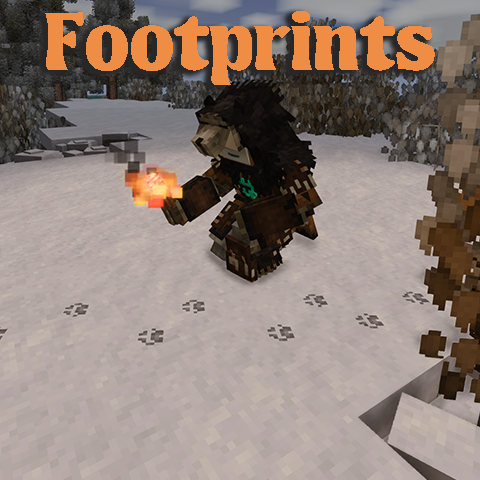
Vintage Story Mod DB · Vintage Story mod
Footprints
Overview: Footprints adds visible footprints for animals and players when they move. Behavior: • Only appears on soft materials (soil, gravel, sand, clay, peat, snow, etc.) • Rust/lore-related creature footprints are toggleable (disabled by default). • Ta
Choose a version Pick your version below, then grab the matching file.
Quick answer
Which Footprints release matches 1.22.0?
Best match for your filters 1.2.5
Game version 1.22.0, 1.22.1, 1.22.2
Loader Built-in Vintage Story mod system
Footprints 1.2.5 targets 1.22.0, 1.22.1, 1.22.2. It must be installed on the client. Installation on the dedicated server is optional. No extra mods listed for this file.
Where it goes
Is Footprints required on the client, server, or both?
It must be installed on the client. Installation on the dedicated server is optional.
Client Required
Dedicated server Optional
Loader for this release Built-in Vintage Story mod system
Required install it here Optional supported, not mandatory Not supported do not install here Source doesn’t say do not assume
This release supports both sides, but the source does not require it on the server.
What else does Footprints 1.2.5 need?
1.2.5 on 1.22.0. Every mod below is checked against that same setup.
This file does not list any required mods. Do not add a library just because a different file uses it.
This file does not list any required or optional mods.
Before you install it
Add Footprints without breaking your instance.
Built for Footprints 1.2.5 on 1.22.0. Pick another file and the loader, install side or required mods may change.
- 01
Stick to this file
Use 1.2.5. It targets 1.22.0, 1.22.1, 1.22.2; another release may have different loader, side or dependency requirements.
- 02
Bring the mods it needs
This file does not list any required mods. Do not add a library just because a different file uses it.
- 03
Put it on the correct side
It must be installed on the client. Installation on the dedicated server is optional.
- 04
Pick the file you checked
Use the “Get this file” button beside 1.2.5. It opens that exact file at the source.
About this project
What does Footprints add?
Overview:
Footprints adds visible footprints for animals and players when they move.
Behavior:
- Only appears on soft materials (soil, gravel, sand, clay, peat, snow, etc.)
- Rust/lore-related creature footprints are toggleable (disabled by default).
- Tamed animals (generation > 0) are excluded by default.
- Custom footprint size and texture per entity type.
- Opacity decreases as it decays, takes 6 in-game hours.
Configuration:
- Fully configurable!
- High / Low resolution textures.
- Materials and Animals whitelist.
- Local toggle: Players can disable the footprint effect locally, even if enabled on the server.
- Toggleable rust/lore-related creature footprints.
- Crouching toggle mode (disabled by default) footprints are visible only while sneaking (fade-in/fade-out duration is configurable in the Rendering Tab).
- Server authority: Players and/or Animals footprints are controlled by the server and can be toggle for everyone.
- Customizable player footprint texture.
- Partial server-controlled settings, with the ability for the client to opt-out.
The mod can be uninstalled mid-playthrough without issues.
Advanced Configuration Explanation:
Advanced Configuration Explanation:
- Custom player footprints (Local only)
To enable custom footprints, check the `Custom footprint texture` checkbox and configure the `Texture width` and `Texture height` in the settings to match the dimensions of your texture file. Save the settings and restart your game.
Next, navigate to the mod folder and replace the texture in the following path with your custom file:
`assets/footprints/textures/decals/custom-png`
- Partial Server-Controlled
If the server config `Broadcast configs to client` is enabled, the server will broadcast the configuration settings to the client, which will override the client’s local settings.
By default, the client automatically accepts the configuration shared by the server. However, the client can opt out by unchecking the `Accept server configuration` setting.
- Custom Materials Whitelist:
Technically, the whitelist uses `.startsWith` on the block code . For example, a simple value like `soil` will include all soil types, while something like (`soil-low-none`,`soil-medium-none`,...) would result in a more natural result (only on dirt without grass). It's a bit tedious but allows full customization, even with modded blocks, while keeping performance higher than with RegEx.
This is commonly used for quick compatibility with other mods such as Terrain Slabs, which require adding "terrainslabs:" to the list.
- Custom Animals Whitelist:
The Custom Animals Whitelist operates similarly to the Materials Whitelist but applies to entity codes.
(Optional) Requirements for the config menu (Optional):
Compatible with the following mods:
Animal mods:
-
- Archosaur Fix'd
- Cats
- Draconis
- Elk Variants
- Equus: Medieval Horses
- Equus: Wild Horses
- Fantasy Creatures Reborn
- Fauna of the Stone Age Collection
- Feverstone's Horses
- Feverstone Wilds
- Haz's Jackalopes
- Legacy of the Phanerozoic v1.22 (Added by the Author, Custom Textures will come later)
- Medieval expansion patch
- Pegasus
- The Critters Pack 1.21 & Version 1.22
Player models:
Planned features (subject to change during development):
-
??
- Conversion to Client-Side only, with an optional server mod for configuration synchronization. [On Ice]
Performance:
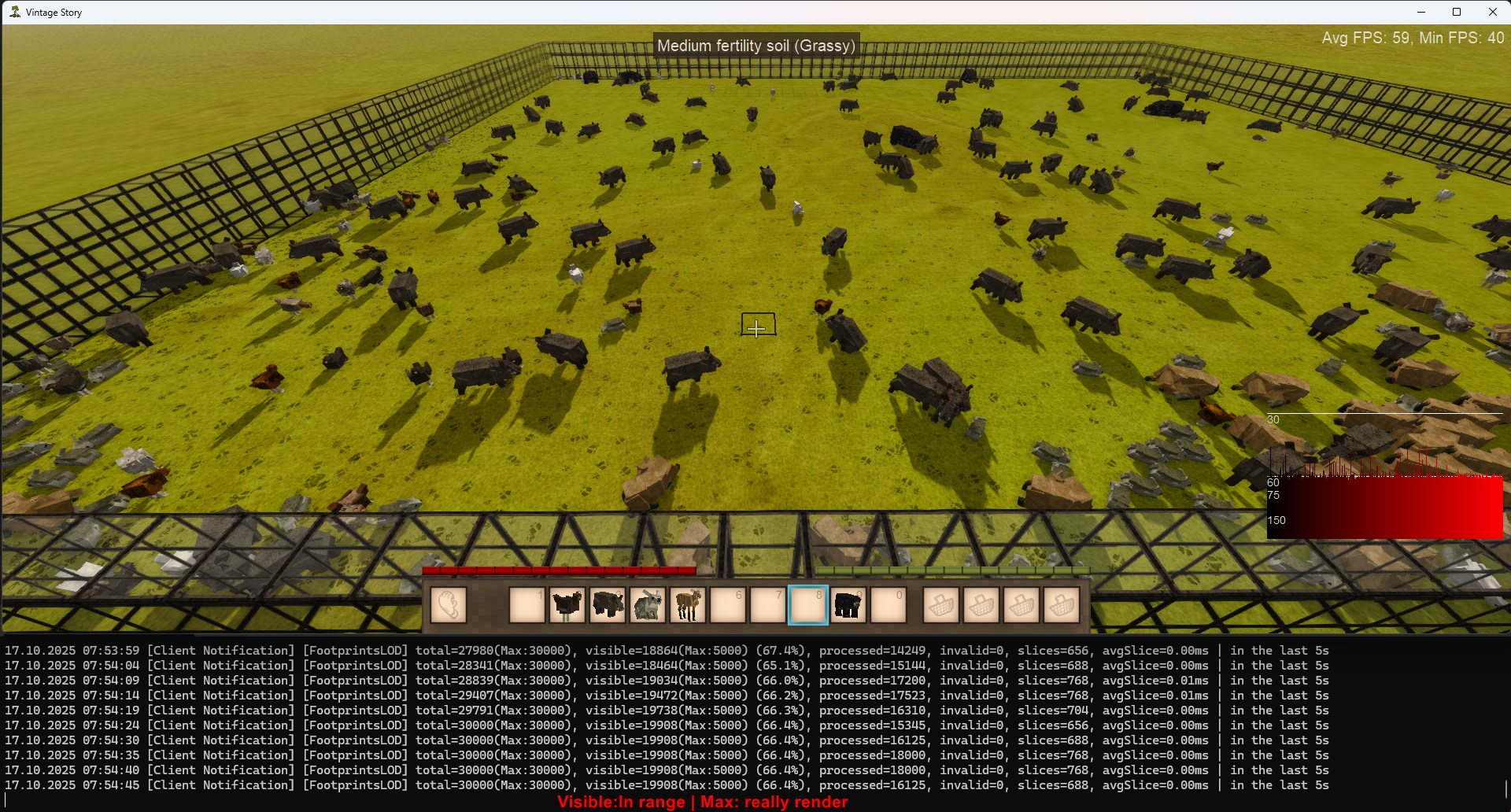
Well-tested but some bugs may remain. Handles 100+ mods for hours without noticeable impact. I couldn't test this on a large server, but for other cases the default setting should be enough for most. I included a stress test below. If your game reach this point, you probably don't need this mod to locate animal! The same debug logger is available in the config for your personal tuning.
Spoiler! (Screenshot Stress Test)
(400+ animals with default settings)
I started to notice significant fps drop at >60k prints in memory and 20k visibles. Default values are 30k and 5k.
Troubleshooting:
Troubleshooting:
-------
Low FPS / Performance Issues: Here is a list of configs (rendering tab) that might help improve performance:
- Low resolution: Reduces the size of the texture by about x2 (From ~10x10 to ~6x6 px).
- Rendering distance: Reduces the range of visible prints.
- Max footprints: Reduces the total footprint count in memory (no new prints generate once the limit is reached).
- Max visible: Reduces the amount of textures rendered. Best for dense areas like barns or multiplayer villages.
- Sneaking/Crouching Mode: Limits rendering to only when crouching. Useful for saving performance when not hunting.
-------
Where to edit the configs: You can adjust settings via the in-game menu (requires ConfigLib & ImGUI; a new button appears in the Escape Menu) OR manually edit the JSON file: VintageStoryData/ModConfig/Footprints-....json
- Footprints-Client: Only affects your local game.
- Footprints-Server: Affects all players in multiplayer (and acts as Client for you in singleplayer).
-------
Gray/White Textures or Visible Squares/Rectangles: Usually caused by missing assets or shader/driver issues.
- Missing textures: Reinstall the mod.
- Shader issues: Your GPU may not support the shader. Try updating your drivers and or switching your rendering source if your pc components support it.
-------
Missing Specific Textures:
- Check if the entity is included in the whitelist config. (If you use the whitelist feature)
- If modded, verify if the entity from the mod is listed as compatible.
- Mod updates can break compatibility patches. Check logs for
"Footprints"and"patch"warnings/errors. - Enable "Debug Logging", for details keep reading "Missing Textures (Nothing visible)" below.
-------
Missing Textures (Nothing visible):
- Check configs or reset them.
- Enable "Debug Logging" and wait a few seconds. A grid of textures should appear near the player, and a diagnostic log will generate. Share the logs and your modlist if the issue persist.
-------
Visible Prints Through Fog: Known issue, often worse with high sea levels, fog mods, or shader mods. No full fix currently, but the effect should remain limited. Fixed in v1.2.4
Credits:
TheDoctorW -> Mod Icon and screenshots.
Lalijara -> Footprints Textures (CC BY-NC 4.0)
Cube-> Rust/lore-related creature Footprints Textures
Rage4556 and more -> PlayTesters before release.
Dimeymer -> Russian translation.
Contact info:
Discord: aylor
Project description from Vintage Story Mod DB.
Pick your setup
Footprints releases for each Vintage Story version.
Choose the version and loader you play, then open the matching release.
Vintage Story version
1.22.3
1 loader buildVintage Story version
1.22.2
1 loader buildVintage Story version
1.22.1
1 loader buildVintage Story version
1.22.0-pre.1
1 loader buildVintage Story version
1.22.0
1 loader buildVintage Story version
1.21.6-rc.1
1 loader buildVintage Story version
1.21.6
1 loader buildVintage Story version
1.21.5
1 loader buildVintage Story version
1.21.4
1 loader buildVintage Story version
1.21.3
1 loader buildVintage Story version
1.21.2
1 loader buildCheck the dependencies, then try the file in a copied instance before changing a world you care about.
Recent files
Footprints versions and loaders
1.2.5
Footprints-v1.2.5.zip
13 Jul 2026
Client Required Server Optional Dependencies No extras listed Listed on Release listing
Check the 1.22.0 setup 1.22.01.22.11.22.21.22.3 release
1.2.4
Footprints-v1.2.4.zip
19 Jun 2026
Client Source doesn’t say Server Source doesn’t say Dependencies No extras listed Listed on Release listing
Check the 1.22.0 setup 1.22.01.22.11.22.21.22.3 release
1.2.3
Footprints-v1.2.3.zip
3 Jun 2026
Client Source doesn’t say Server Source doesn’t say Dependencies No extras listed Listed on Release listing
Check the 1.22.0 setup 1.22.01.22.11.22.21.22.3 release
1.2.2
Footprints-v1.2.2.zip
21 May 2026
Client Source doesn’t say Server Source doesn’t say Dependencies No extras listed Listed on Release listing
Check the 1.22.0 setup 1.22.01.22.11.22.21.22.3 release
Looking for an older file? The official Vintage Story Mod DB project page is in Resources.