Vintage Story version
Back to mods 
Vintage Story Mod DB · Vintage Story mod
VS Village
Do NOT send a PR without speaking to MiraLeaps FIRST. If you want to help out with code, please talk to me. If you send me a PR without talking about what's going on first, it will be rejected. If you send an AI generated PR with 'fixes', it will be rejected.
Choose a version Pick your version below, then grab the matching file.
Quick answer
Which VS Village release matches 1.22.2?
Best match for your filters 6.0.1
Game version 1.22.0, 1.22.1, 1.22.2
Loader Built-in Vintage Story mod system
VS Village 6.0.1 targets 1.22.0, 1.22.1, 1.22.2. It must be installed on the client. Installation on the dedicated server is optional. No extra mods listed for this file.
Where it goes
Is VS Village required on the client, server, or both?
It must be installed on the client. Installation on the dedicated server is optional.
Client Required
Dedicated server Optional
Loader for this release Built-in Vintage Story mod system
Required install it here Optional supported, not mandatory Not supported do not install here Source doesn’t say do not assume
This release supports both sides, but the source does not require it on the server.
What else does VS Village 6.0.1 need?
6.0.1 on 1.22.2. Every mod below is checked against that same setup.
This file does not list any required mods. Do not add a library just because a different file uses it.
This file does not list any required or optional mods.
Before you install it
Add VS Village without breaking your instance.
Built for VS Village 6.0.1 on 1.22.2. Pick another file and the loader, install side or required mods may change.
- 01
Stick to this file
Use 6.0.1. It targets 1.22.0, 1.22.1, 1.22.2; another release may have different loader, side or dependency requirements.
- 02
Bring the mods it needs
This file does not list any required mods. Do not add a library just because a different file uses it.
- 03
Put it on the correct side
It must be installed on the client. Installation on the dedicated server is optional.
- 04
Pick the file you checked
Use the “Get this file” button beside 6.0.1. It opens that exact file at the source.
About this project
What does VS Village add?
Do NOT send a PR without speaking to MiraLeaps FIRST.
If you want to help out with code, please talk to me. If you send me a PR without talking about what's going on first, it will be rejected. If you send an AI generated PR with 'fixes', it will be rejected. If you have a BUG or and ISSUE report it through NORMAL means. If you are just looking to contribute to the wellbeing and expansion of this mod....talk to me first. I welcome help on things, but coordinate WITH ME. This has happened twice now, and both times the people submitting the PR did not take the time to actually understand the codebase before doing a drive-by PRing. This wastes my time because I have to look and then respond and then deal with it. If you find an actual issue in the mod while you are playing and you want to take a crack at fixing it, great....do a bug report and in that bug report tell me how you figure out how to fix it and show me your work. The unfortunate reality of the times we are living in is that people who do not understand good code practice are firing these things off and then can't really come to back up the changes themselves. That's not a contribution. I was granted stewardship over this mod and I take that very seroiusly. I put hours of work into testing and all that....respect that.
Summary
This mod adds villages and their inhabitants to your Vintage Story playthroughs. You can found your very own villages and watch its inhabitants follow their daily routines. If you install an extension for village generation (or create your own for that matter), it will even generate villages into your world.
NOTICE:
If you are having an issue with a Village Addon-on Mod (Towers, Viking Villages, Simple, etc), unless there is a logged exception or a crash that names this mod in the error, please report those issues on the addon's page, not this one. We can't do much of anything about issues with those mods, such as Villagers not spawning. Make sure you are using the addon mods updated to the current version of the game!
Features
Founding Villages
You can craft a "Summoning Horn" to summon a Settlement Keeper. These mechanical beings will manifest all items needed for founding your very own village in exchange for rusty gears. Once you have set up a mayors workstation you can manage your village and hire new townspeople from there.

Villager Types:
- Farmer: Farmers provide food for the village. Their daily routine is to tend to the fields nearby their workstations. They will make sure the crops are watered and cultivated. Cultivation can make crops grow much faster than ususal, but it requires a lot of work, so not many crops can be cultivated at a time.
- Shepherd: Shepherds tend to the animals of a village which also provides food. Their daily routine is to check on the animals and place feed into any troughs near their workstations.
- Herbalist: Herbalists are healers. They will buy foraged things from you, which they will make into things like healing items and candels for you to purchase. If you get hurt, you can visit the Herbalist and they will care for you.
- Smith: The hardworking Smiths spends their day forging metal items. You can sell them Ingots you smelt and they will craft toolheads which you can purchase.
- Soldier: Soldiers patrol and guard the village. They will spend their day checking in with the villagers and watching after things. If they see a threat, they will respond!
- Archer: Archers are soldiers who focus on protecting from range (Or they are supposed to, this is a bit bugged RN).
- Trader: The village Trader ensures you are stocked up on all the things you need to keep a village going. They will buy various things from you as you go.
- Builder: The Builder can be hired to build structures for you, for a cost!
- Mayor: (Not able to be hired) Mayors can be found in other villages you might run into around the world (if you have a village extension installed). They run their villages and see to matters of infrastruture and support.
Villager Hiring Requirements
Villager Hiring Requirements:
Villagers have certain needs that must be met before they can be brought to the Village. To get the details on this, Speak to your Village Settlement Keeper
Beds: Villager's beds must be indoors.
Farmers: 20 blocks of farmland closeby where you place their workstation.
Shepherds: 5 animals and 1 trough inside of a pen with their workstation. The pen must be made of fences with a gate and be no larger than 15x15. Alternatively you may set this up in a barn.
Traders: Traders need a shop that's enclosed with only their workstation, a table, chest, crate, shelf, and light source.
Herbalists: They also need an enclosed shop with only their workstation, a table, reed chest, cabinet, a barrel, a flower pot, and light source.
Bakers: Bakers can share their workspace with other bakers, but need a Barrel, Clay Oven, Table, a firepit, and Storage Vessel
Smiths: Can also share their workspace with up to one other Smith. They need a Forge and an Anvil to do their work.
Builders: Can share their workspace. They need a table, a toolrack with a saw and hammer, and a Crate to get their work done!
Soldiers and Archers: They need you to make a Barracks that is 7x7 for training and emergency use. Within they need a tool-rack with either a spear for each soldier or a bow for each archer.
Village Fixtures:
- Mayor Workstation: This should be your first purchase when you summon the Settlement Keeper! This allows you to manage your village. Make sure you place it near the center of your village lands! When you first interact with the station, you can name and set the radius for your village (100 is a recommended start), then you can see the statistics. Once you've named the village, it is now established and you can start placing Workstations, Braziers, Wapoint posts, and Beds! When you place your first Villager Bed (in a nice safe place!) and Workstation (I recommend hiring a Farmer first!), then you can hire your first villager! Hiring Villagers requires having enough food coming in from Farmers and Shepherds, so those should be your first picks. At any time (especially if they are bugged) you can dimiss a villager and they will leave (despawn).
- Brazier: The Brazier is a gathering point where your villagers can relax and be social after a hard day of work. Essential for their ongoing happiness!
- Villager Bed: Villagers need somewhere to sleep, these beds can be purchased from the Village Trader as only they can source the unique materials which the villagers need for a good night's sleep.
- Villager Workstation: Each type of villager has a workstation. You will want to place these near the areas where they will work. You can set up a shop for your trader, a workshop for you Smith, and a Apothecary for you Herbalist. Farmers and Shepherds need their stations near to the fields and animals. All centralized on the Mayor station which will server as thier morning check-in area. Soldier stations can be set up near the center too, or at checkpoints as you like.
- Waypoint Post: These work like street-signs in larger villages to help keep your villagers from getting lost and give them the ability to confidently find their way on longer walks.
- Market Stall: This struture attracts Travelling Traders to your village!
How to build a proper Room for your Villagers:
Currently, in order for a space to pass a check for things like a Villager's Bed, the space must be closed in properly. This means solid walls, with a door and no open-spaces (chimney's need trapdoors to seal them). Windows qualify, but are optional. Chiseled blocks can cause issues (we'll come back to those). The check for this to work relies on the base-game 'Is-this-a-room' mechanic; if another mod is modifying this check, it could also cause issues (please keep that in mind when making reports). Usually, if you get the "indoors" status on your character sheet, the room should be good to go.
If you've got a bed placed in a room and it still says its not properly placed try the following:
- Are there any Chiseled Blocks as walls? If so, remove them temporarily and replace them with other blocks for now. When the check is passed, you can replace them. Chiseled Block Retention mod -should- make these pass if you use it, but this is untested.
- Are you using a Crude Door? These do not actually enclose the room and will fail the check.
- Is the space larger than 7x7x7? This will also fail a check.
- Try using the debug command /debug rooms hi. This will give you an overlay or a fail-state. If the overlay is green, the room passes. If red, the room is semi-recongnized but not passing the check. Otherwise you might get the message "no room detected" (or something like that). If green, the bed placement should work. To remove the overlay, use /debug rooms unhi
- If the rooms check comes back green and the bed STILL is not placing, make sure you have no other beds placed down other than those already taken by villagers. The villagers grab the beds nearest their viable workstations, so if another bed is down, even in a temp position, it could be the culprit. Also, it could be the case of having 'ghost' structures from if there were things copied in or spawned in or things removed via world edit tools that leave lingering registrations. Check to see if your bed count on your mayor station is accurate. If not, pick up the unowned bed (or beds) you are trying to get working, then look for any remaining beds that have no villagers and you can hit the remove structure button. This should clear them from your village and let that function. This is a super rare case to happen.
- If none of that is working, put in a bug-report! (make sure you tag MiraLeaps!
TIps:
- Villagers work best with easy to navigate areas. They will go up and down stairs, and make their way around and through most stuff, but the clearer the path, the happier they are.
- Villagers prefer when their beds are indoors. You don't have to build them a house, but that is an option!
- The Mayor station is best at the center of the village. The Mayor station is the center point when you create the village. If you set it to 100, then 100 blocks from that station will count as part of the village. Villagers use it to get a start on navigating too.
- Villager shops for those that stick near their workstations like the trader, smith, and herbalist, need some room to breathe. You can put them against a wall, but the room itself works well at around 5x5 blocks with a roof.
- The Brazier needs a nice open area outside for everyone to gather up, especially if you get a large population. You can buy multiple and the Villagers will go to the nearest if you need to keep them split up for some reason.
Villager Quirks
- Villagers can get 'stuck' in place sometimes. Don't worry, they are probably just lost in thought or having a standing nap, or disassociating.....the world is broken and that can weigh heavy, just give them time and they'll catch up.
- Villagers sometimes want to cuddle up at night. Randomly, if beds are close by, villagers might shift and cuddle with other villagers. This is a perfectly normal cultural thing. (And a silly bug)
- Villagers sometimes sleep....walk. Much like the random cuddling, sometimes villagers will be so drawn to their work you might find them scooting along the ground at night, heading for the fields. They yern for the fields. Don't worry too much, they'll be fine. (another silly little bug. Both are rare but happen)
- If at any time a villager is just completely refusing to work, you can dismiss them. It is sad to see them go, but sometimes things happen.
- Check your Mayor Station if a Villager is stuck for too long, especially if they are stuck somewhere other than bed, they might have decided to leave the village without saying (rare rare bug, but happens)
NOTICE: Villagers can have issues with modded doors. Depending on the naming convention used by the mod maker in the mod, the doors could work perfectly or fail miserably. If you are having trouble with your villagers pathing through gates and doors, try switching them out for vanilla versions and see if that helps!
Interacting with villagers
Most villagers will follow simple daily routines. They will try to look busy at their workstation during the day, chill at the fireplace sold by the trader during the evening and sleep in their beds during the night.
If you have VS Quest installed, you can interact with your villagers to accept and complete quests for a variety of different rewards.
Village Generation
Village Generation Details
This mod comes with its own simple village generation system. By default this system is disabled for people who prefer to build their own villages rather than stumble upon pre generated ones. But if you install a village extension, you can get village generation into your worldgen.
If you dont like the buildings from Simple Villages, you can create your own villages by utilizing the custom village generator.
The approach we follow in this mod to generate a village is simple yet powerful. Due to its simplicity however it comes with a couple of drawbacks that hopefully become clear when talking about its functionality.
To generate a village during worldgen or via command (try "/genvillage"), a grid system is used which operates as follows:
- An empty grid is generated. The size of the grid depends on the size of the village that needs to be created. So far it is usually 9x9, 17x17 or 25x25 pixels wide. As all of the affected chunks need to be loaded during village generation, we can not really create any larger villages with this system.There is a list of available villages loaded during worldgen. A fitting village is choosen randomly from this list and the grid is initialized accordingly. Each entry in that list defines the contents and size of the village. It states how many types of certain houses it needs, for example 3 gardens, 2 farmers houses and 1 soldier watchtower. In a separate list a bunch of houses are specified to be matched to the village types. Each house has a unique id, a non unique type (e.g. garden, farmer, soldier) as well as attributes for its size and a link to the schematic file.

- After creating the village grid, it is time to put some houses inside. The necessary houses for the current village type are selected randomly depending on the types needed to create the village. Each selected house is then randomly rotated and placed inside the grid with a single path in front of its main door. During that process we need to keep in mind that between every two houses there needs to be at least one empty space for a path, so we can not just place them anywhere.

- The entrances of all house are connected with path blocks. The village is now completely simulated and ready to be generated into the world. Therefore the pixel coordinates of the grid system need to be converted back into in game coordinates. Each path square is 2x2 blocks wide, whereas each small house is 7x7 blocks wide (with medium houses being 16x16 and large ones being 34x34). The coordinates [x, y] on the grid therefore translate into [x * 2 + (x / 2) * 5, y * 2 + (y / 2) * 5] in game coordinates. After translating the grid coordinates into the real ones, all house schematics and path blocks are placed and the village is generated for players to explore.

To utilize this for your own villages, you basically have to create your own mod similar to Simple Villages. Here is a short explanation of its contents:
- A couple of different house schematic files to put inside the village
- Every house has to be one of three sizes (7x7, 16x16, 34x34)
- A house should contain a spawner block that actually spawns in the villagers after being generated
- All schematics have to be placed under /worldgen/vsvillage/..
- A list of houses inside of /config/villagestructures.json that links to the schematics by doing the following
- The code of the house has to be the filename of the schematic
- A group that contains information about what type of building it is (for example farmer, garden, dungeon,...). All groupnames can be freely chosen
- An attachmentpoint between one and three (this determines the direction the door is pointing at and I always forget which number is for which direction
- A vertical offset: If your house has a cellar, you might want to put it a couple of blocks underground
- A size: small=7x7, medium=16x16, large=34x34
- A list of available names for villages located in /config/villagenames.json
- A list of village types inside of /config/villagetypes.json
- Code: Unique id of the corresponding village, used for spawning it in via genvillage command
- Names: Which list of names should be used for this village
- StreetCode: Block code of the street block of this village
- BridgeCode: Block code of the bridge block of this village
- Height/ Width: How many grid clusters should be used for this village
- Min/Max stuff: Limit the spawn conditions of the village
- Structuregroups: List of houses that belong to this village
- Code: links to the group of the villagestructures.json
- Size: links to the size of the villagestructures.json
- MinStructuresPerVillage: How many of these houses should at least be created inside your villages
- MaxStructuresPerVillage: How many of these houses should at most be created inside your villages
Troubleshooting/ Commands
Pathfinding
If your villagers are not finding their way around the village, try the "/villagerpath" (or "/vp") command. You can type "/villagerpath start" and "/villagerpath end" to see which path a villager would take between two points.

VS Village uses a two staged pathfinding system. In addition to regular AStar pathfinding, there are Waypoints scattered across the village that connect to eachother and help the villagers navigate that way. To see if your waypoints are connected correctly, you can use "/highlightvillagewaypoints" (or "/hvw") to highlight all connections of the nearest waypoint.
Points of Interest
If you want to know, what a village consists of, you can type "/highlightvillageplaces" (or "/hvp") to highlight all places relevant to a villages as well as its outer border.

You can use "/highlightvillagerbelongings" (or "/hvb") if you are standing next to a villager/ bed/ workstation to highlight the villager/ bed/ workstation belonging to it.
Config Options:
- VillageChance: This is the chance that a village will spawn when a village addon is loaded with the mod. .5 is = to around 500% the intended spawning value.
- WorldGenBufferBlocks: this is the amount of 'buffer' villages that spawn in will get between them and story-locations at a minimum (includes traders).
- ChiseledBlocksCountAsWalls: If set to true, this turns on our version of Chiseld Block Retention (A lighter version of the standalone mod) so that Chiseled Blocks count as rooms for Villager Hiring
RoadMap:
Roadmap Details
Notice: This is not a promise, anything listed here is subject to change depending on time, viablility, and ability. I will always do my best to get stuff in, but I have limits.
Late May-June 2026: "Paths and Professions" Update, Mod version 6
Professions and Profits is in the early planning stages as of April 2026. The update is planned on focusing on adding several new Villager types to the hiring options, giving villagers more dynamic dialogue so you can learn snippets about the original lore I'm writing as background fluff if you'd like, and a new system for player-owned shops.
Planned Villager additions:
- Angler
- Builder
- Tailor
- Scholar
- Prospector
- Potter
- Artist
- Woodworker
Some of these will provide the option to acquire things normally locked behind traits. These will work towards future plans of a more dynamic Village Economy system thats not really a plan so much as a concept at this point.
Pathfinding optimization: I am working on pathfinding opitmizations to make it even better, have less stuck and fail states, and cover larger villages. I will probably make this an ongoing primary focus until it is in a state I consider optimal.
July-August 2026: "Raiders and Refugees" Update, Mod version 7
This update is planned on adding two new aspects: Raiders, who will originate from villages turned to desperate evil acts by the hardships of the world, and Refugees: Victims of the rust creatures and the storms, or perhaps the afforementioned Raiders.
Raiders will hopefully offer something new to fight against that's not Rust based, or an Animal. If it works out, you will find camps of Raiders spawning occasionally in addition to their roaming bands. These camps will have loot and Refugees to rescue.
The Refugees will offer an alternative way to recruit Villagers. You will find them, as mentioned, as captives or as a random encounter in the world. If you can rescue them and keep them safe, and have food to spare, they will join your village. Each Refugee, if things work as planned, will have a set of skills which will allow you to assign them to a job in the village. Some may not fit in, some may not be all that skilled, and then you have to make a call....do you keep them around even if they can't contribute in a meaningful way, or do make the hard call and keep your scarce resources for those who can grown the Village.
End of Summer or Fall 2026: "Clockworks and Coinage" Update, Mod version 8
Very early concept stages on this, but at some point I want to add in a Clockmaker and Entropic villager who both have different ties to the Rust. The Coinage side of the update will be where I try to implement a more rich and dynamic interactive Village Economy with supply chains and active provision tracking. At some point, maybe in this update, I would like to add a Village prestige system too that tracks and grants different things based on how well your village is set up and so forth.
Copying Villages Via World-Edit:
Warning: If you copy your villages via world-edit tools, ensure that no villagers or Workstations/beds/other present when you do so. Their ownership will not transfer and you can wind up with 'orphaned' Villagers and 'ghost' workstations. For the workstations/beds/other you can break them as you would to move other blocks and put them in a chest to copy them over without having to buy them again. There are some new buttons in the Mayor's station that can mark workstations as invalid, and check for orphaned villagers and despawn them.
Contribute
Translations
If you want to help translate the mod into your language, head over to the Crowdin Project to upload your community translation. I use a small script that automatically downloads the translations before every new release.
Features Requests:
If there is a feature that you are desperately missing just drop us a comment here and we'll get back to you as soon as possible!
Thanks to the ever wonderful Emeralddragons for the lovely new village photos :)
BUG REPORT NOTICE:
If you are coming to report a bug or issue with the mod, it is REQUIRED that you provide your SERVER-MAIN.log from the game session in which you encoutered the issues. Without Logs, We can only take broad guesses based on your reports, and that usually isn't helpful. If you report an issue without including the log, the post will not be followed up on.
How to find your logs and post them:
You will first need to navigate over to your Vintage Story Data Folder (not the Install Folder).
Typically it is found (on windows): C:\Users\<username>\AppData\Roaming\VintagestoryData (replace C: with the drive letter the data folder is found)
This is where you had to install your Mods, but if you had them installed via server join you might not know where this is.
In this directory you will see a Folder named Logs, and within this folder you will see a few .log files.
The file that we need is the server-main file. If the observed issue was during a previous session, look in the Archive folder and find the date/time closest to when you remember the incident occuring.
From this point, you have two options: you can reach out on Discord in the VSvillage channel (linked above) and upload your log there -or- you can upload the log to a hosting site and link it in the comments below. If you use GitHub, you can post the issues there using the issue tracker, it has log upload options as well.
If you comment here, please tag MiraLeaps so that your report can be handled as fast as possible. Please add a description of the issue with as much detail as reasonable and that you can remember and describe. If you need to write it in another language so that you can capture the details naturally, I will use google translate and follow-up on things that were maybe lost in the translation.
Please leave any commentary or opinion out of this context, especially if you have a bad attitude about it.
I usually respond to reports with tags within half a day or so, but please be patient
Personal Note: Mod makers work pretty tirelessly to keep the mods you love working at a quality you expect, the least you can do is work with us by reading existing documentation such as what is presented here. I, MiraLeaps, am setting a boundary on this that is in respect for my time and energy. I am a mom with a family and a job. This is my spare time hobby. I love making mods, I love helping people out with those and other mods, and I love making sure the mods I work on are performing the best they can...but I also love spending time with my family, actually playing games, and doing other stuff besides bug hunting. Bug hunting can take hours of effort. It can be stressful. Please, if you like these mods, help the hardworking modders out by providing logs, accurate reports, and by searching around the existing comments to see if the issues were talked about already. This isn't an indictment of anyone, and its not written in anger: I just have to set a boundary here if I am going to keep up working on this and my other projects.
Note on Errors:
If you are seing things in your logs that look like this regarding villagers:
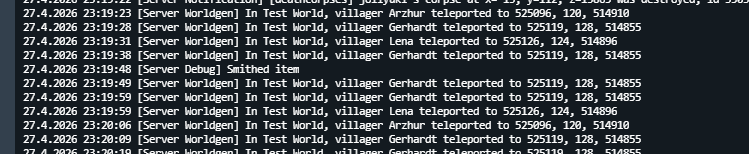
These are NOT our villagers. These are Villagers from the base game story Village.
Project description from Vintage Story Mod DB.
Pick your setup
VS Village releases for each Vintage Story version.
Choose the version and loader you play, then open the matching release.
Vintage Story version
1.22.2
1 loader buildVintage Story version
1.22.1
1 loader buildVintage Story version
1.22.0-rc.10
1 loader buildVintage Story version
1.22.0-rc.9
1 loader buildVintage Story version
1.22.0-rc.8
1 loader buildVintage Story version
1.22.0-rc.7
1 loader buildVintage Story version
1.22.0-rc.6
1 loader buildVintage Story version
1.22.0-rc.5
1 loader buildVintage Story version
1.22.0-rc.4
1 loader buildVintage Story version
1.22.0-rc.3
1 loader buildVintage Story version
1.22.0-rc.2
1 loader buildShowing the newest 12 of 55 game versions. Older files are in the list below.
Check the dependencies, then try the file in a copied instance before changing a world you care about.
Recent files
VS Village versions and loaders
6.0.1
vsvillage_v6.0.1.zip
9 Jun 2026
Client Required Server Optional Dependencies No extras listed Listed on Release listing
Check the 1.22.2 setup 1.22.01.22.11.22.21.22.3 release
6.0.0
vsvillage_v6.0.0.zip
8 Jun 2026
Client Source doesn’t say Server Source doesn’t say Dependencies No extras listed Listed on Release listing
Check the 1.22.2 setup 1.22.01.22.11.22.21.22.3 release
5.1.8
vsvillage_v5.1.8.zip
3 Jun 2026
Client Source doesn’t say Server Source doesn’t say Dependencies No extras listed Listed on Release listing
Check the 1.22.2 setup 1.22.01.22.11.22.21.22.3 release
5.1.7
vsvillage_v5.1.7.zip
1 Jun 2026
Client Source doesn’t say Server Source doesn’t say Dependencies No extras listed Listed on Release listing
Check the 1.22.2 setup 1.22.01.22.11.22.21.22.3 release
5.1.6
vsvillage_v5.1.6.zip
28 May 2026
Client Source doesn’t say Server Source doesn’t say Dependencies No extras listed Listed on Release listing
Check the 1.22.2 setup 1.22.01.22.11.22.2 release
5.1.5
vsvillage_v5.1.5.zip
17 May 2026
Client Source doesn’t say Server Source doesn’t say Dependencies No extras listed Listed on Release listing
Check the 1.22.2 setup 1.22.01.22.11.22.2 release
5.1.4
vsvillage_v5.1.4.zip
3 May 2026
Client Source doesn’t say Server Source doesn’t say Dependencies No extras listed Listed on Release listing
Check the 1.22.2 setup 1.22.01.22.11.22.2 release
5.1.3
vsvillage_v5.0.3.zip
2 May 2026
Client Source doesn’t say Server Source doesn’t say Dependencies No extras listed Listed on Release listing
Check the 1.22.2 setup 1.22.01.22.11.22.2 release
Looking for an older file? The official Vintage Story Mod DB project page is in Resources.