Vintage Story version
Back to mods 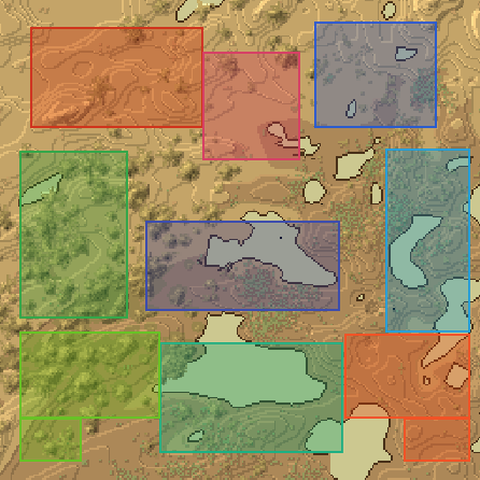
Vintage Story Mod DB · Vintage Story mod
Claims Map
Claims Map adds a land claims overlay to your world map and minimap. Every claim on the server renders as a coloured rectangle so you can see at a glance who owns what. Hover any claim for full details without leaving the map. Features • All Features are ful
Choose a version Pick your version below, then grab the matching file.
Quick answer
Which Claims Map release should I use?
Latest stable file 1.3.0
Game version 1.22.0-pre.1, 1.22.0-pre.2, 1.22.0-pre.3
Loader Built-in Vintage Story mod system
Claims Map 1.3.0 targets 1.22.0-pre.1, 1.22.0-pre.2, 1.22.0-pre.3. It must be installed on the client. Do not install it on the dedicated server. No extra mods listed for this file.
Where it goes
Is Claims Map required on the client, server, or both?
It must be installed on the client. Do not install it on the dedicated server.
Client Required
Dedicated server Not supported
Loader for this release Built-in Vintage Story mod system
Required install it here Optional supported, not mandatory Not supported do not install here Source doesn’t say do not assume
This Vintage Story file is marked client-only.
What else does Claims Map 1.3.0 need?
1.3.0. Change the file and its required mods may change too.
This file does not list any required mods. Do not add a library just because a different file uses it.
This file does not list any required or optional mods.
Before you install it
Add Claims Map without breaking your instance.
Built for Claims Map 1.3.0. Pick another file and the loader, install side or required mods may change.
- 01
Stick to this file
Use 1.3.0. It targets 1.22.0-pre.1, 1.22.0-pre.2, 1.22.0-pre.3; another release may have different loader, side or dependency requirements.
- 02
Bring the mods it needs
This file does not list any required mods. Do not add a library just because a different file uses it.
- 03
Put it on the correct side
It must be installed on the client. Do not install it on the dedicated server.
- 04
Pick the file you checked
Use the “Get this file” button beside 1.3.0. It opens that exact file at the source.
About this project
What does Claims Map add?
Claims Map adds a land claims overlay to your world map and minimap. Every claim on the server renders as a coloured rectangle so you can see at a glance who owns what. Hover any claim for full details without leaving the map.
Features
- All Features are fully Configurable from ModConfig/claimmap.json.
- Land claims update in real time without requiring client or server to restart.
- Land claims render as semi-transparent coloured rectangles on both the world map and minimap.
- Each player's claims use a unique colour derived from their player ID, consistent across sessions and servers.
- Your own claims highlight in a distinct configurable (by default, gold) colour.
- Hover any claim to see the owner name and start/end coordinates, adjusted to match the in-game display.
- Hover your own claim to see which players and groups have access, along with their permission level (Build, Use, Traverse).
- Claims who has permissions open to everyone show a line listing what everyone is permitted to do.
- When installed server-side, the server pushes and enforces its config to every connecting client.
- Trader and Story locations are hidden.
Configuration
The config file is auto-generated at ModConfig/claimmap.json on first run with comments explaining each option.
- Disabled (true/false: defaults to false) disables the mod entirely without uninstalling it.
- ShowOwnClaimHighlighted (true/false: defaults to true) highlights your own claims in gold instead of the standard owner colour.
- ShowOnlyOwnClaims (true/false: defaults to false) hides all claims except your own.
- ShowOnMinimap (true/false: defaults to true) toggles the minimap overlay independently from the world map.
- ShowCoordinates (true/false: defaults to true) shows or hides the start/end coordinate line in the hover tooltip.
- ShowClaimDescription (true/false: defaults to true) shows or hides the claim title in the hover tooltip.
- ShowPermissions (true/false: defaults to true) shows or hides player, group, and public permissions in the hover tooltip.
- OwnClaimColor — (string: defaults to "#CC8800" - a deepish gold )hex colour for your own claim highlight color.
- FillAlpha — (float: defaults to 0.25 ) transparency of the claim's interior color, from 0.0 to 1.0.
- BorderAlpha — (float: defaults to 0.75) transparency of the claim's border color, from 0.0 to 1.0.
Compatibility
- Side: Universal. Clients do not need the mod installed; server installation enables config sync only.
- Required on client: No
- Required on server: No
- No known conflicts with other mods.
Disclaimer
AI assistance was used during development to research the Vintage Story codebase. All design decisions, code implementation, artwork, and screenshots are my own or other accredited peoples work.
Project description from Vintage Story Mod DB.
Pick your setup
Claims Map releases for each Vintage Story version.
Choose the version and loader you play, then open the matching release.
Vintage Story version
1.22.1
1 loader buildVintage Story version
1.22.0-rc.10
1 loader buildVintage Story version
1.22.0-rc.9
1 loader buildVintage Story version
1.22.0-rc.8
1 loader buildVintage Story version
1.22.0-rc.7
1 loader buildVintage Story version
1.22.0-rc.6
1 loader buildVintage Story version
1.22.0-rc.5
1 loader buildVintage Story version
1.22.0-rc.4
1 loader buildVintage Story version
1.22.0-rc.3
1 loader buildVintage Story version
1.22.0-rc.2
1 loader buildVintage Story version
1.22.0-rc.1
1 loader buildShowing the newest 12 of 18 game versions. Older files are in the list below.
Check the dependencies, then try the file in a copied instance before changing a world you care about.
Recent files
Claims Map versions and loaders
1.3.0
claimmap-v1.3.0-exuriel.zip
19 May 2026
Client Required Server Not supported Dependencies No extras listed Listed on Release listing
Check the 1.22.2 setup 1.22.0-pre.11.22.0-pre.21.22.0-pre.31.22.0-pre.4 release
Looking for an older file? The official Vintage Story Mod DB project page is in Resources.
mod
Vintage Story
Slightly Better Boats
Fixes several collision issues and yaw/roll/pitch handling states for riding on rivers
 mod
mod Vintage Story
Minimally Invasive Performance Tweaks
Client-side performance mod that should not break other mods.
 mod
mod Vintage Story
Eternal Seraph: Patch
Патч для серверу Вічний Серафим. Patch for the server Eternal Seraph.