Vintage Story version
Back to mods 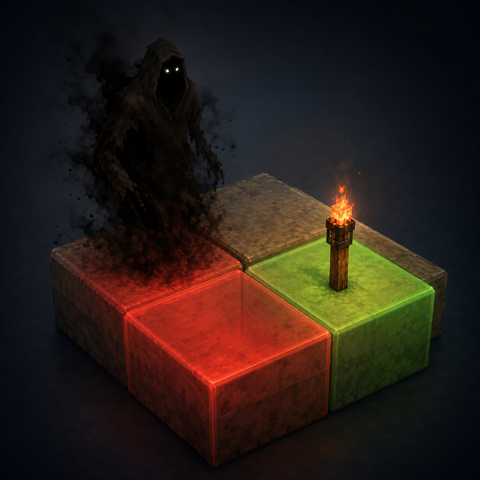
Vintage Story Mod DB · Vintage Story mod
Spawn Highlight - Reborn
New: Every spawnable block can now tell you how dangerous it is, not just whether something can spawn there. Spawn Highlight - Reborn Highlights blocks where drifters can spawn. A maintained continuation of the original [Spawn Highlight](https://mods.vintag
Choose a version Pick your version below, then grab the matching file.
Quick answer
Which Spawn Highlight - Reborn release should I use?
Latest stable file 1.3.0
Game version 1.22.0, 1.22.1, 1.22.2
Loader Built-in Vintage Story mod system
Spawn Highlight - Reborn 1.3.0 targets 1.22.0, 1.22.1, 1.22.2. It must be installed on the client. Do not install it on the dedicated server. No extra mods listed for this file.
Where it goes
Is Spawn Highlight - Reborn required on the client, server, or both?
It must be installed on the client. Do not install it on the dedicated server.
Client Required
Dedicated server Not supported
Loader for this release Built-in Vintage Story mod system
Required install it here Optional supported, not mandatory Not supported do not install here Source doesn’t say do not assume
This Vintage Story file is marked client-only.
What else does Spawn Highlight - Reborn 1.3.0 need?
1.3.0. Change the file and its required mods may change too.
This file does not list any required mods. Do not add a library just because a different file uses it.
This file does not list any required or optional mods.
Before you install it
Add Spawn Highlight - Reborn without breaking your instance.
Built for Spawn Highlight - Reborn 1.3.0. Pick another file and the loader, install side or required mods may change.
- 01
Stick to this file
Use 1.3.0. It targets 1.22.0, 1.22.1, 1.22.2; another release may have different loader, side or dependency requirements.
- 02
Bring the mods it needs
This file does not list any required mods. Do not add a library just because a different file uses it.
- 03
Put it on the correct side
It must be installed on the client. Do not install it on the dedicated server.
- 04
Pick the file you checked
Use the “Get this file” button beside 1.3.0. It opens that exact file at the source.
About this project
What does Spawn Highlight - Reborn add?
New: Every spawnable block can now tell you how dangerous it is, not just whether something can spawn there.
Spawn Highlight - Reborn
Highlights blocks where drifters can spawn.
A maintained continuation of the original [Spawn Highlight](https://mods.vintagestory.at/show/mod/7845) mod by MistAway, repacked and updated for the current game version.
Press Ctrl+L to show/hide highlights. The keybinding can be changed in the in-game controls.
Default colors:
- Red — drifters can spawn on this block
- Green — drifters cannot spawn on this block because it is sufficiently lit
- Not highlighted — drifters will never spawn on this block (lower slabs, chiseled blocks, etc.)
Remember that drifters will not spawn under sunlight, and will spawn anywhere they want while a temporal storm is in progress.
For each block in the configured radius the mod checks:
1. Block has a solid upper side
2. Upper block is air or tall grass
3. Block-source (non-natural) light level is greater than 7
Danger tier labels
On each spawnable (red) block within the label radius, the mod draws the highest drifter/shiver tier that can spawn at that depth. The value comes straight from the vanilla spawn tables, so it depends purely on depth (light and block conditions are shared across these tiers and already drive the red/green color). Labels are color-coded from green (safest) to red (deadliest), with a distinct violet for the special 4* band.
| Label | Tier | Mobs | Normalized depth (0 = world bottom, 1 = sea level, 2 = world top) |
|---|---|---|---|
| 0 | surface / normal | drifter-normal, shiver-surface | 0.89 – 2.0 |
| 1 | deep | drifter-deep, shiver-deep | 0.55 – 0.89 |
| 2 | tainted | drifter-tainted, shiver-tainted | 0.35 – 0.55 |
| 3 | corrupt | drifter-corrupt, shiver-corrupt | 0.23 – 0.35 |
| 4 | nightmare | drifter-nightmare, shiver-nightmare | ≤ 0.23 (outside the band below) |
| 4* | stilt / bellhead shivers (+ nightmare) | shiver-stilt, shiver-bellhead | 0.10 – 0.19 |
Commands
.sphi — Prints the list of available subcommands
.sphi on — Enable highlights
.sphi off — Disable highlights
.sphi radius <number> — Change size of the scanned cube around you. Default 20
.sphi lightthreshold <0..33> — Minimum block-light level at which a block is treated as safe (green). Default 7 (vanilla)
.sphi litcolor #RRGGBBAA — Color for sufficiently lit (safe) zones. Default #00FF0020
.sphi spawncolor #RRGGBBAA — Color for spawnable zones. Default #FF000020
.sphi serversync on / off — Accept (default) or ignore server-pushed config. No arg = show current state.
.sphi numbers on / off / <radius> — Show danger-tier labels (0–4, 4*) on spawnable blocks; a number sets the label radius. Default on, radius 8
Config
If you prefer JSON over commands, edit spawnhighlightreborn-config.json in VintagestoryData\ModConfig:
Config-Client (spawnhighlightreborn-config.json):
{
"Radius": 20,
"LightThreshold": 7,
"SafeColor": "#00FF0020",
"SpawnableColor": "#FF000020",
"IgnoreServerSync": null
"ShowTierNumbers": null,
"TierNumberRadius": null
}
IgnoreServerSync: null or false (default) — accept server-pushed defaults for the session
IgnoreServerSync: true — always use the values above, ignore the server
ShowTierNumbers: null or true (default) — draw the danger-tier labels; false hides them
TierNumberRadius: null (default 8) — how far out labels are drawn
Config-Server (spawnhighlightreborn-server.json):
{
"PushToClients": true,
"Radius": 20,
"LightThreshold": 7,
"SafeColor": "#00FF0020",
"SpawnableColor": "#FF000020"
}
PushToClients: true (default) — every joining player gets these values for the session. Their own client config is untouched and returns when they disconnect
PushToClients: false — server keeps its values to itself; clients use only their local configs
The server config is not created for single-player worlds — solo games always use the client config.
Project description from Vintage Story Mod DB.
Pick your setup
Spawn Highlight - Reborn releases for each Vintage Story version.
Choose the version and loader you play, then open the matching release.
Vintage Story version
1.22.2
1 loader buildVintage Story version
1.22.1
1 loader buildVintage Story version
1.22.0
1 loader buildCheck the dependencies, then try the file in a copied instance before changing a world you care about.
Recent files
Spawn Highlight - Reborn versions and loaders
1.3.0
SpawnHighlightReborn-1.3.0.zip
1 Jul 2026
Client Required Server Not supported Dependencies No extras listed Listed on Release listing
Check the 1.22.3 setup 1.22.01.22.11.22.21.22.3 release
1.2.0
SpawnHighlightReborn-1.2.0.zip
29 May 2026
Client Required Server Not supported Dependencies No extras listed Listed on Release listing
Check the 1.22.2 setup 1.22.01.22.11.22.2 release
1.1.0
SpawnHighlightReborn-1.1.0.zip
13 May 2026
Client Required Server Not supported Dependencies No extras listed Listed on Release listing
Check the 1.22.2 setup 1.22.01.22.11.22.2 release
1.0.0
SpawnHighlightReborn-1.0.0.zip
3 May 2026
Client Required Server Not supported Dependencies No extras listed Listed on Release listing
Check the 1.22.2 setup 1.22.01.22.11.22.2 release
Looking for an older file? The official Vintage Story Mod DB project page is in Resources.