Vintage Story version
Back to mods 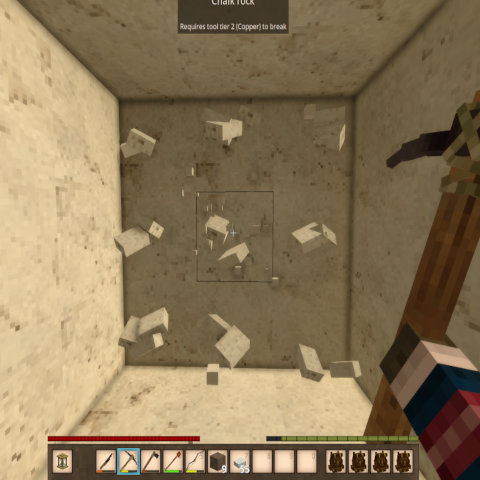
Vintage Story Mod DB · Vintage Story mod
Pattern Mining
Pattern Mining (formerly Vertical Mining) ...:::What's New:::... Pattern Mining 3.5.0 — Axes Pattern mining now works with axes, alongside pickaxes and shovels. Hold one to cycle patterns with Ctrl+P and to break the pattern's extra blocks. Axes are
Choose a version Pick your version below, then grab the matching file.
Quick answer
Which Pattern Mining release should I use?
Latest stable file 3.5.0
Game version 1.22.7
Loader Built-in Vintage Story mod system
Pattern Mining 3.5.0 targets 1.22.7. It must be installed on the client. Installation on the dedicated server is optional. No extra mods listed for this file.
Where it goes
Is Pattern Mining required on the client, server, or both?
It must be installed on the client. Installation on the dedicated server is optional.
Client Required
Dedicated server Optional
Loader for this release Built-in Vintage Story mod system
Required install it here Optional supported, not mandatory Not supported do not install here Source doesn’t say do not assume
This release supports both sides, but the source does not require it on the server.
What else does Pattern Mining 3.5.0 need?
3.5.0. Change the file and its required mods may change too.
This file does not list any required mods. Do not add a library just because a different file uses it.
This file does not list any required or optional mods.
Before you install it
Add Pattern Mining without breaking your instance.
Built for Pattern Mining 3.5.0. Pick another file and the loader, install side or required mods may change.
- 01
Stick to this file
Use 3.5.0. It targets 1.22.7; another release may have different loader, side or dependency requirements.
- 02
Bring the mods it needs
This file does not list any required mods. Do not add a library just because a different file uses it.
- 03
Put it on the correct side
It must be installed on the client. Installation on the dedicated server is optional.
- 04
Pick the file you checked
Use the “Get this file” button beside 3.5.0. It opens that exact file at the source.
About this project
What does Pattern Mining add?
Pattern Mining (formerly Vertical Mining)
...:::What's New:::...
Pattern Mining 3.5.0 — Axes
Pattern mining now works with axes, alongside pickaxes and shovels. Hold one to
cycle patterns with Ctrl+P and to break the pattern's extra blocks.
Axes are a demolition tool, not a logging tool. An axe only widens a hit on
man-made woodwork — planks, slabs, stairs, fences, gates, doors, ladders,
support beams, furniture, placed logs. Trees and natural wood are left alone:
standing trunks, branches, leaves, bamboo, fern trees, and deadfall like rotten
logs, loose sticks and driftwood.
Tree felling is untouched. Swinging an axe at a tree never triggers a pattern,
so you won't shear the planks off a treehouse while chopping the trunk beside
it, and the hit costs no extra durability.
Shovels now work with Pattern Mining!
- Hold a shovel (or a pickaxe, as before) and press Ctrl+P to cycle patterns.
- Shovels dig soil, gravel, sand and snow. Stone, ore and wood in your pattern
are left standing — switch to a pickaxe for those.
- Bug fix: a full pattern could destroy a nearly-spent tool despite the
"tools won't break from pattern mining" rule. Fixed. -
Adds a Single 1x1 pattern that breaks only the block you hit — no extra tool
wear, no mining speed penalty. It's now the pattern you start on, so you can
leave Pattern Mining enabled all the time and it won't change how you mine
until you cycle to something bigger.Single 1x1 is first in the cycle. Your existing pattern carries across on your
next login — if you were mining with Cross, you'll still be on Cross.The on-screen dot grid is now larger and tighter, so the active pattern reads
as one shape at a glance. Both are adjustable in patternmining.json:
HudScale for dot size (default 1.6) and HudDotSpacing for the gap between
them (default 0.72, lower is tighter).
The pattern-cycle key is rebindable — change it in Settings > Controls or in
patternmining.json.
Side: Client and Server
Hotkeys: Ctrl+P (cycle patterns) Commands: /pm (toggle on/off)
New: on-screen pattern indicator. A small 3×3 dot grid shows the shape of your active mining pattern while Pattern Mining is enabled, tucked just left of the off-hand slot. It hides when you
toggle off with /pm, and follows pattern cycling live. Turn it off with "ShowHud": false in patternmining.json.
Description
Pattern Mining expands on the original Vertical Mining concept by giving you five
distinct mining patterns to choose from, all accessible through a simple hotkey.
Whether you're shaft mining, clearing tunnels, or carving out rooms, there's a
pattern to match your task. Larger patterns come with trade-offs — increased tool
wear and slower mining speed — keeping things balanced and grounded in realistic
gameplay. As of 3.0.0, those trade-offs are fully configurable.
Mining Patterns
| Pattern | Shape | Extra Blocks | Tool Wear | Mining Speed |
|---|---|---|---|---|
| Center 1x1 | Center | 1 | Normal | 100% |
| Vertical 1x2 | Center + below | 1 | Normal | 100% |
| Column 1x3 | Center + above + below | 2 | +10% | 85% |
| Horizontal 3x1 | Center + left + right | 2 | +15% | 85% |
| Cross | Center + above + below + left + right | 4 | +20% | 70% |
| Tunnel 3x3 | Full 3x3 face | 8 | +25% | 50% |
Pattern Diagrams
Center 1x1    Vertical 1x2    Column 1x3    Horizontal 3x1    Cross      Tunnel 3x3
  _ _ _          _ _ _           _ x _         _ _ _             _ x _      x x x
  _ x _          _ x _           _ x _         x x x             x x x      x x x
  _ _ _          _ x _           _ x _         _ _ _             _ x _      x x x
How to Use
1. Type `/pm` in chat to toggle Pattern Mining on.
2. Hold a pickaxe or shovel and press **Ctrl+P** to cycle through the five mining patterns.
The selected pattern and its stats are displayed in the chat window.
3. Mine any block — the extra blocks in your selected pattern will break automatically, based on which face of the block you hit.
4. Hold **Sneak** while mining to temporarily override the pattern and mine only a single block.
5. Type `/pm` again to toggle Pattern Mining off. Mining speed returns to normal.
Changing the "Cycle Mining Pattern" key
The default is Ctrl+P. To change it, pick whichever is easier:
In-game (easiest): Settings → Controls → search "Cycle Mining Pattern" → click it and press your new key. This overrides the config file.
Config file: edit patternmining.json in your Vintage Story ModConfig folder, then restart the game:
- Windows: %APPDATA%\VintagestoryData\ModConfig\patternmining.json
- Linux: ~/.config/VintagestoryData/ModConfig/patternmining.json
- macOS: ~/Library/Application Support/VintagestoryData/ModConfig/patternmining.json
"CycleHotkey": "P",
"CycleHotkeyCtrl": true,
"CycleHotkeyShift": false,
"CycleHotkeyAlt": false
CycleHotkey takes a key name — a letter (P, M), punctuation (Comma, Period), or function key (F6). Set any of the Ctrl/Shift/Alt flags to true to require that modifier. An unrecognized key
falls back to Ctrl+P.
Upgrading from an older version? If your patternmining.json predates v3.1.0 it won't have these lines — just add them inside the { }, or delete the file and let the mod regenerate it.
Crafting
No crafting required. The mod uses a chat command and hotkey to control.
Notes
- Defaults to **OFF** for new players.
- Works with pickaxes and shovels.
- A pickaxe or shovel must be highlighted in order to cycle through mining patterns with Ctrl+P.
- Extra blocks must be within your tool's mining tier to be broken.
- Horizontal patterns (Horizontal, Cross, Tunnel) are orientation-aware — left and right are based on which face of the block you're hitting, so the pattern always aligns with the wall in front of you.
- Your pickaxe or shovel will not break from pattern mining — if it reaches 1 durability remaining, extra blocks stop breaking.
- Mining speed reduction is applied as a player stat modifier while Pattern Mining is active. It is removed when you toggle off with `/pm`.
AI Disclosure: This mod was developed with the assistance of AI tools, and its full source code is linked on this page for anyone who wants to review it. If AI-assisted content isn't for you, please filter or skip this mod. The comment section is reserved for bug reports, compatibility questions, and gameplay feedback.
Project description from Vintage Story Mod DB.
Pick your setup
Pattern Mining releases for each Vintage Story version.
Choose the version and loader you play, then open the matching release.
Vintage Story version
1.22.4
1 loader buildVintage Story version
1.22.3
1 loader buildVintage Story version
1.22.2
1 loader buildCheck the dependencies, then try the file in a copied instance before changing a world you care about.
Recent files
Pattern Mining versions and loaders
3.5.0
PatternMining-3.5.0.zip
24 Oct 2026
Client Required Server Optional Dependencies No extras listed Listed on Release listing
Check the 1.22.7 setup 1.22.7 release
3.4.0
PatternMining-3.4.0.zip
30 Aug 2026
Client Required Server Optional Dependencies No extras listed Listed on Release listing
Check the 1.22.7 setup 1.22.7 release
3.3.0
PatternMining-3.3.0.zip
29 Aug 2026
Client Required Server Optional Dependencies No extras listed Listed on Release listing
Check the 1.22.7 setup 1.22.7 release
3.2.2
PatternMining-3.2.2.zip
22 Aug 2026
Client Required Server Optional Dependencies No extras listed Listed on Release listing
Check the 1.22.7 setup 1.22.7 release
3.2.1
PatternMining.zip
23 Jul 2026
Client Required Server Optional Dependencies No extras listed Listed on Release listing
Check the 1.22.4 setup 1.22.4 release
3.2.0
PatternMining.zip
31 May 2026
Client Required Server Optional Dependencies No extras listed Listed on Release listing
Check the 1.22.3 setup 1.22.3 release
3.1.1
PatternMining.zip
31 May 2026
Client Required Server Optional Dependencies No extras listed Listed on Release listing
Check the 1.22.3 setup 1.22.3 release
3.0.0
PatternMining.zip
30 May 2026
Client Required Server Optional Dependencies No extras listed Listed on Release listing
Check the 1.22.2 setup 1.22.2 release
Looking for an older file? The official Vintage Story Mod DB project page is in Resources.
 mod
mod Vintage Story
SapTap
Tap resin-oozing pine and acacia with metal spiles; hang a bucket, collect sap by the season.
 mod
mod Vintage Story
Leaf Litter
Adds dynamic leaf litter that can be raked, composted, and used as mulch.
 mod
mod Vintage Story
Vintage Fantasy
Whole buncha random shit to make the 194+ mods of the server not murder each other in their sleep