Vintage Story version
Back to mods 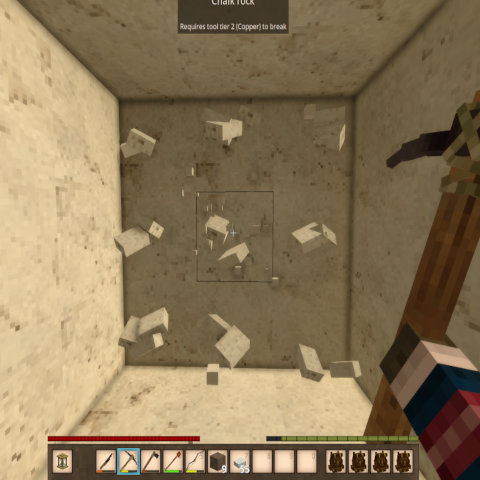
Vintage Story Mod DB · Vintage Story mod
Pattern Mining
Pattern Mining (formerly Vertical Mining) ...:::What's New:::... The pattern-cycle key is rebindable — change it in Settings > Controls or in patternmining.json. Side: Client and Server Hotkeys: Ctrl+P (cycle patterns) Commands: /pm (toggle on/off)
Choose a version Pick your version below, then grab the matching file.
Quick answer
Which Pattern Mining release matches 1.22.4?
Best match for your filters 3.2.1
Game version 1.22.4
Loader Built-in Vintage Story mod system
Pattern Mining 3.2.1 targets 1.22.4. It must be installed on the client. Installation on the dedicated server is optional. No extra mods listed for this file.
Where it goes
Is Pattern Mining required on the client, server, or both?
It must be installed on the client. Installation on the dedicated server is optional.
Client Required
Dedicated server Optional
Loader for this release Built-in Vintage Story mod system
Required install it here Optional supported, not mandatory Not supported do not install here Source doesn’t say do not assume
This release supports both sides, but the source does not require it on the server.
What else does Pattern Mining 3.2.1 need?
3.2.1 on 1.22.4. Every mod below is checked against that same setup.
This file does not list any required mods. Do not add a library just because a different file uses it.
This file does not list any required or optional mods.
Before you install it
Add Pattern Mining without breaking your instance.
Built for Pattern Mining 3.2.1 on 1.22.4. Pick another file and the loader, install side or required mods may change.
- 01
Stick to this file
Use 3.2.1. It targets 1.22.4; another release may have different loader, side or dependency requirements.
- 02
Bring the mods it needs
This file does not list any required mods. Do not add a library just because a different file uses it.
- 03
Put it on the correct side
It must be installed on the client. Installation on the dedicated server is optional.
- 04
Pick the file you checked
Use the “Get this file” button beside 3.2.1. It opens that exact file at the source.
About this project
What does Pattern Mining add?
Pattern Mining (formerly Vertical Mining)
...:::What's New:::...
The pattern-cycle key is rebindable — change it in Settings > Controls or in
patternmining.json.
Side: Client and Server
Hotkeys: Ctrl+P (cycle patterns) Commands: /pm (toggle on/off)
New: on-screen pattern indicator. A small 3×3 dot grid shows the shape of your active mining pattern while Pattern Mining is enabled, tucked just left of the off-hand slot. It hides when you
toggle off with /pm, and follows pattern cycling live. Turn it off with "ShowHud": false in patternmining.json.
Description
Pattern Mining expands on the original Vertical Mining concept by giving you five
distinct mining patterns to choose from, all accessible through a simple hotkey.
Whether you're shaft mining, clearing tunnels, or carving out rooms, there's a
pattern to match your task. Larger patterns come with trade-offs — increased tool
wear and slower mining speed — keeping things balanced and grounded in realistic
gameplay. As of 3.0.0, those trade-offs are fully configurable.
Mining Patterns
| Pattern | Shape | Extra Blocks | Tool Wear | Mining Speed |
|---|---|---|---|---|
| Vertical 1x2 | Center + below | 1 | Normal | 100% |
| Column 1x3 | Center + above + below | 2 | +10% | 85% |
| Horizontal 3x1 | Center + left + right | 2 | +15% | 85% |
| Cross | Center + above + below + left + right | 4 | +20% | 70% |
| Tunnel 3x3 | Full 3x3 face | 8 | +25% | 50% |
Pattern Diagrams
Vertical 1x2    Column 1x3     Horizontal 3x1     Cross          Tunnel 3x3
  _ _ _            _ x _           _ _ _           _ x _           x x x
  _ x _            _ x _           x x x           x x x           x x x
  _ x _            _ x _           _ _ _           _ x _           x x x
How to Use
1. Type `/pm` in chat to toggle Pattern Mining on.
2. Hold a pickaxe and press **Ctrl+P** to cycle through the five mining patterns.
The selected pattern and its stats are displayed in the chat window.
3. Mine any block — the extra blocks in your selected pattern will break automatically, based on which face of the block you hit.
4. Hold **Sneak** while mining to temporarily override the pattern and mine only a single block.
5. Type `/pm` again to toggle Pattern Mining off. Mining speed returns to normal.
Changing the "Cycle Mining Pattern" key
The default is Ctrl+P. To change it, pick whichever is easier:
In-game (easiest): Settings → Controls → search "Cycle Mining Pattern" → click it and press your new key. This overrides the config file.
Config file: edit patternmining.json in your Vintage Story ModConfig folder, then restart the game:
- Windows: %APPDATA%\VintagestoryData\ModConfig\patternmining.json
- Linux: ~/.config/VintagestoryData/ModConfig/patternmining.json
- macOS: ~/Library/Application Support/VintagestoryData/ModConfig/patternmining.json
"CycleHotkey": "P",
"CycleHotkeyCtrl": true,
"CycleHotkeyShift": false,
"CycleHotkeyAlt": false
CycleHotkey takes a key name — a letter (P, M), punctuation (Comma, Period), or function key (F6). Set any of the Ctrl/Shift/Alt flags to true to require that modifier. An unrecognized key
falls back to Ctrl+P.
Upgrading from an older version? If your patternmining.json predates v3.1.0 it won't have these lines — just add them inside the { }, or delete the file and let the mod regenerate it.
Crafting
No crafting required. The mod uses a chat command and hotkey to control.
Notes
- Defaults to **OFF** for new players.
- Only works with pickaxes.
- A pickaxe must be highlighted in order to cycle through mining patterns with Ctrl+P.
- Extra blocks must be within your tool's mining tier to be broken.
- Horizontal patterns (Horizontal, Cross, Tunnel) are orientation-aware — left and right are based on which face of the block you're hitting, so the pattern always aligns with the wall in front of you.
- Your pickaxe will not break from pattern mining — if it reaches 1 durability remaining, extra blocks stop breaking.
- Mining speed reduction is applied as a player stat modifier while Pattern Mining is active. It is removed when you toggle off with `/pm`.
Project description from Vintage Story Mod DB.
Pick your setup
Pattern Mining releases for each Vintage Story version.
Choose the version and loader you play, then open the matching release.
Vintage Story version
1.22.3
1 loader buildVintage Story version
1.22.2
1 loader buildCheck the dependencies, then try the file in a copied instance before changing a world you care about.
Recent files
Pattern Mining versions and loaders
3.2.1
PatternMining.zip
23 Jul 2026
Client Required Server Optional Dependencies No extras listed Listed on Release listing
Check the 1.22.4 setup 1.22.4 release
Looking for an older file? The official Vintage Story Mod DB project page is in Resources.