Vintage Story version
Back to mods 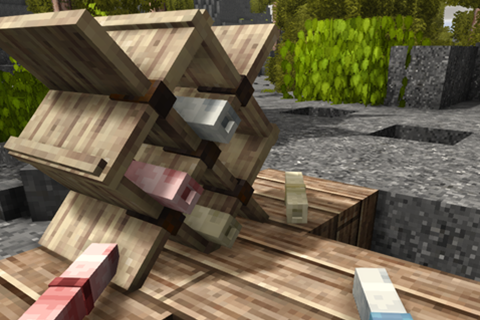
Vintage Story Mod DB · Vintage Story mod
Player Titles
My first mod! Player Titles! This mod allows Admins to directly set or create various scrolls that can assign Titles to players. The three scrolls are: Title Scroll: Set the title with /titlescroll set <titleid> <playername>. When used, bestows that title on
Choose a version Pick your version below, then grab the matching file.
Quick answer
Which Player Titles release matches 1.21.6-rc.1?
Best match for your filters 0.2.1
Game version 1.21.5, 1.21.6-rc.1, 1.21.6
Loader Built-in Vintage Story mod system
Player Titles 0.2.1 targets 1.21.5, 1.21.6-rc.1, 1.21.6. It must be installed on the client. Installation on the dedicated server is optional. No extra mods listed for this file.
Where it goes
Is Player Titles required on the client, server, or both?
It must be installed on the client. Installation on the dedicated server is optional.
Client Required
Dedicated server Optional
Loader for this release Built-in Vintage Story mod system
Required install it here Optional supported, not mandatory Not supported do not install here Source doesn’t say do not assume
This release supports both sides, but the source does not require it on the server.
What else does Player Titles 0.2.1 need?
0.2.1 on 1.21.6-rc.1. Every mod below is checked against that same setup.
This file does not list any required mods. Do not add a library just because a different file uses it.
This file does not list any required or optional mods.
Before you install it
Add Player Titles without breaking your instance.
Built for Player Titles 0.2.1 on 1.21.6-rc.1. Pick another file and the loader, install side or required mods may change.
- 01
Stick to this file
Use 0.2.1. It targets 1.21.5, 1.21.6-rc.1, 1.21.6; another release may have different loader, side or dependency requirements.
- 02
Bring the mods it needs
This file does not list any required mods. Do not add a library just because a different file uses it.
- 03
Put it on the correct side
It must be installed on the client. Installation on the dedicated server is optional.
- 04
Pick the file you checked
Use the “Get this file” button beside 0.2.1. It opens that exact file at the source.
About this project
What does Player Titles add?
My first mod!
Player Titles!
This mod allows Admins to directly set or create various scrolls that can assign Titles to players.
The three scrolls are:
Title Scroll: Set the title with /titlescroll set <titleid> <playername>. When used, bestows that title on the player
Punishment Scroll: Set the punishment title with /titlescroll setpunishment [titleid] [playername]. When used, bestows a Punishment Title on that player. Punishment titles are forced to be displayed and cannot be cleared.
Punishments now have a consent option in the traitstitles.json. When set to true, the target player will be asked to Accept or Decline a punishment. Declining a punishment does not consume the scroll.
Pardon Scroll: Set the Pardon with /titlescroll setpardon [playername]. When used, will Pardon that player, removing any Punishment Titles and restoring their old title if they had one
New titles can be easily added using the traittitles.json config. A title requires 3 components.
The id: This is the internal id that the mod reads eg. "id": "village_elder",
displayName: This is the name displayed above a players head. eg "displayName": "Village Elder",
unique: This true or false condition indicates if only one of these titles can be assigned at a time. eg "unique": true
The full list of commands are:
/title add <player> <titleId> : Admin command. Adds a title to a players Title List
/title remove <player> <titleId>: Admin Command. Removes a title from a players Title List
/title set [player] <titleid>: Player Command, allows player to set which of their titles is displayed
title clear [player]: Clear displayed title
/title list [player]: Lists titles available to target player
/title titles: Lists titles available to yourself
/titlescroll set <titleId>: Admin Command. Sets a Title Scrolll
/titlescroll info: Identifies the Title on a title scroll
/titlescroll setpunishment <titleId> <playerName> : Admin Command. Sets a Punishment Scroll
/titlescroll setpardon <playerName>: Admion Command. Sets a Pardon Scroll
Compatibilties:
Unknown!
Incompatibilities:
hideplayernames - Currently does not hide player titles. Compat is in the works!
AI Statement:
AI was used in the creation of this mod. I am a very new coder, and I learn by doing, but I also know that if I don't see tangible results, I quickly lose motivation to work. I have used AI not to completely write the code, but to help me identify what to write, and trouble shoot errors as they come up, as well as to teach me what various code means and why. My intention is to completely learn by doing until I am able to write my own code entirely. Once I am able, I will return and rewrite all my code so it is entirely mine.
Project description from Vintage Story Mod DB.
Pick your setup
Player Titles releases for each Vintage Story version.
Choose the version and loader you play, then open the matching release.
Vintage Story version
1.22.2
1 loader buildVintage Story version
1.22.1
1 loader buildVintage Story version
1.22.0
1 loader buildVintage Story version
1.21.7
1 loader buildVintage Story version
1.21.6-rc.1
1 loader buildVintage Story version
1.21.6
1 loader buildVintage Story version
1.21.5
1 loader buildCheck the dependencies, then try the file in a copied instance before changing a world you care about.
Recent files
Player Titles versions and loaders
0.2.1
TraitTitles.zip
6 Jun 2026
Client Required Server Optional Dependencies No extras listed Listed on Release listing
Check the 1.21.6-rc.1 setup 1.21.51.21.6-rc.11.21.61.21.7 release
Looking for an older file? The official Vintage Story Mod DB project page is in Resources.