Vintage Story version
Back to mods 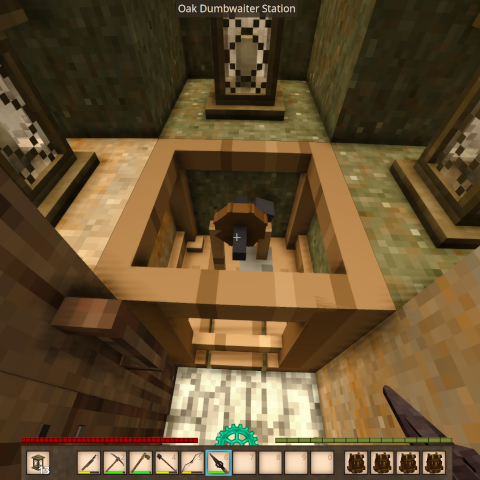
Vintage Story Mod DB · Vintage Story mod
Dumbwaiter
Dumbwaiter A medieval-style lift for moving between vertically-separated floors. Step onto a station, pull the lever, and ride a brief, atmospheric transition — chain rattle, pulley squeal, wood groan, and a fade — to its paired station above or below. Perfec
Choose a version Pick your version below, then grab the matching file.
Quick answer
Which Dumbwaiter release matches 1.22.4?
Best match for your filters 0.3.1
Game version 1.22.4
Loader Built-in Vintage Story mod system
Dumbwaiter 0.3.1 targets 1.22.4. It must be installed on the client. Installation on the dedicated server is optional. No extra mods listed for this file.
Where it goes
Is Dumbwaiter required on the client, server, or both?
It must be installed on the client. Installation on the dedicated server is optional.
Client Required
Dedicated server Optional
Loader for this release Built-in Vintage Story mod system
Required install it here Optional supported, not mandatory Not supported do not install here Source doesn’t say do not assume
This release supports both sides, but the source does not require it on the server.
What else does Dumbwaiter 0.3.1 need?
0.3.1 on 1.22.4. Every mod below is checked against that same setup.
This file does not list any required mods. Do not add a library just because a different file uses it.
This file does not list any required or optional mods.
Before you install it
Add Dumbwaiter without breaking your instance.
Built for Dumbwaiter 0.3.1 on 1.22.4. Pick another file and the loader, install side or required mods may change.
- 01
Stick to this file
Use 0.3.1. It targets 1.22.4; another release may have different loader, side or dependency requirements.
- 02
Bring the mods it needs
This file does not list any required mods. Do not add a library just because a different file uses it.
- 03
Put it on the correct side
It must be installed on the client. Installation on the dedicated server is optional.
- 04
Pick the file you checked
Use the “Get this file” button beside 0.3.1. It opens that exact file at the source.
About this project
What does Dumbwaiter add?
Dumbwaiter
A medieval-style lift for moving between vertically-separated floors. Step onto a station, pull the lever, and ride a brief, atmospheric transition — chain rattle, pulley squeal, wood groan, and a fade — to its paired station above or below. Perfect for cliff-side bases, multi-floor towers, mineshafts, and deep cellars.
How it works
Place a Dumbwaiter Station at each end of your shaft, link them with a Rope Link, and you have a working lift. Activating one station whisks you to the other through a short immersive sequence whose length scales with the distance traveled.
New "Labels" section covering the sneak + right-click label mechanic with ink & quill (reusable) or charcoal (consumed with a return chance), and noting that each station displays the other end's label so you know where the ride goes.
Crafting
Dumbwaiter Station (3×3 grid) — craft two, one for each end:
[Board] [      ] [Board]
[Nails] [ Slab ] [Nails]
[Board] [      ] [Board]
- Board (any wood) ×2 per corner — 8 total
- Metal nails & strips (any metal) ×2 each — 4 total
- Plank slab (any wood) ×1 in the center
Dumbwaiter Rope Link (1×2 grid) — the pairing tool:
[ Rusty Gear x2 ]
[   Rope x12    ]
Consumed when a link is successfully made.
Linking two stations
- Place one station at the bottom of your shaft, one at the top.
- Right-click the first station with the Rope Link → "Dumbwaiter anchor set."
- Right-click the second station with the Rope Link → "Dumbwaiter linked! Distance: N blocks."
Both ends now remember each other, and the link item is consumed.
Sending a container with the Dumbwaiter
1. Have a linked pair of stations. The dumbwaiter must already be linked with a Rope Link — look at the station and the info box will say something like "Linked to a station 31 blocks below."
2. Put a container on top of the station. Stand beside the station (not on the platform) and place a chest, basket, or storage vessel on top of the hoist frame — aim at the top of the frame and sneak + right-click to place it, exactly like placing on any other block. If you use CarryOn, you can carry a full vessel over on your shoulder and set it down on the frame the same way (sneak + right-click, empty hands). It can be full — contents come along.
3. Send it. Still standing beside the station, right-click the station (no sneak). You'll hear the chain rattle and pulley squeal — at the end of it, the container is gone from your end and sitting on top of the station at the other end, with everything inside untouched. Chest labels survive too.
4. Collect it at the far end. Break it loose, open it in place, or CarryOn it off the frame. The landing spot must be collected before the next delivery can arrive there.
Things that will stop a send: a blocked landing spot at the far end, a walled-off shaft, a trunk (too bulky), or a reinforced/locked container. If anything changes mid-trip — someone breaks the container or fills the landing spot — the mechanism jams safely and the container stays where it was. Nothing is ever lost.
Limits & behavior
- Max vertical distance: 192 blocks
- Max horizontal offset: 4 blocks (allows slightly angled shafts)
- Transition time: ~1–3 seconds, scaling with trip distance
- Cooldown after arrival: ~0.5–2 seconds, scaling with trip distance
- The destination must be loaded and unobstructed — the lift will not drop you into a wall.
- One rider at a time per station (prevents double-activation).
Configurable
A dumbwaiter.json config file (auto-generated in ModConfig) lets you tune max distance, horizontal offset, transition and cooldown timing, sound volume, and an optional toggle for the screen-fade effect.
Compatibility
- Built for Vintage Story 1.22+
- Universal (required on client and server); safe for multiplayer.
Project description from Vintage Story Mod DB.
Pick your setup
Dumbwaiter releases for each Vintage Story version.
Choose the version and loader you play, then open the matching release.
Vintage Story version
1.22.3
1 loader buildCheck the dependencies, then try the file in a copied instance before changing a world you care about.
Recent files
Dumbwaiter versions and loaders
0.3.1
dumbwaiter-0.3.1.zip
23 Jul 2026
Client Required Server Optional Dependencies No extras listed Listed on Release listing
Check the 1.22.4 setup 1.22.4 release
Looking for an older file? The official Vintage Story Mod DB project page is in Resources.