EasyHome-v1.0.12.jar
17 Jan 2026
Client Not supported Server Required Dependencies No extras listed Listed on Project page
Check the setup 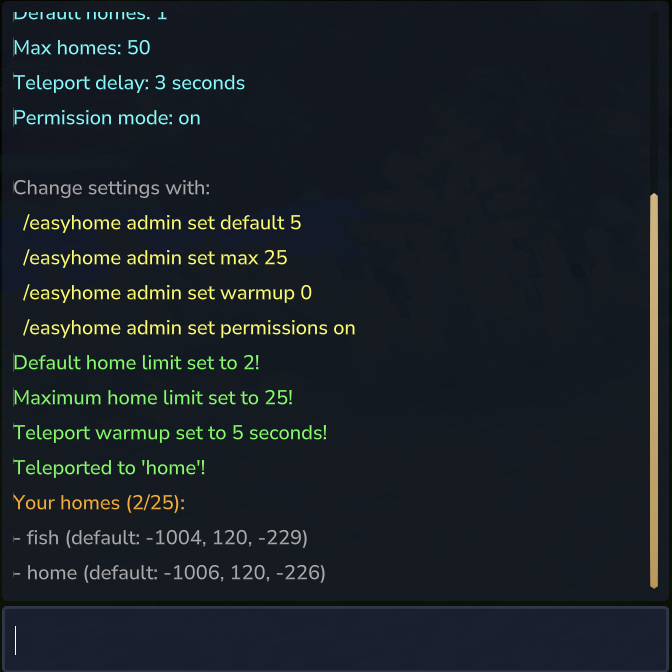
CurseForge · Hytale mod
Simple home teleportation for Hytale servers. Set homes, teleport back instantly. Fully customizable: adjustable limits, teleport delays, and permission-based tiers. No config files needed—configure everything in-game with /easyhome admin.
Quick answer
EasyHome-v1.0.12.jar targets Hytale. Do not install it as a separate client mod. Enable it on the world host—the local server in singleplayer or the dedicated server in multiplayer. No required dependencies listed for this file.
Where it goes
Do not install it as a separate client mod. Enable it on the world host—the local server in singleplayer or the dedicated server in multiplayer.
Put Hytale mods on the world host or dedicated server. Singleplayer runs a local server too; Hytale does not use separate client mods.
EasyHome-v1.0.12.jar. Change the file and its required mods may change too.
This file does not list any required mods. Do not add a library just because a different file uses it.
This file does not list any required or optional project dependencies. Check the creator notes before changing an existing world.
Before you install it
Built for EasyHome-v1.0.12.jar. Pick another file and the loader, install side or required mods may change.
Use EasyHome-v1.0.12.jar. It targets Hytale; another release may target a different game build or dependency set.
This file does not list any required mods. Do not add a library just because a different file uses it.
Do not install it as a separate client mod. Enable it on the world host—the local server in singleplayer or the dedicated server in multiplayer.
Use the “Get this file” button beside EasyHome-v1.0.12.jar. It opens that exact file at the source.
About this project
Let players save locations and teleport back instantly! Perfect for survival servers.
Built for the European Hytale survival server at play.hyfyve.net
mods/ folder/sethome/home from anywhere!That's it! Players can now save and teleport to their favorite spots.
| Command | What it does |
|---|---|
/sethome |
Save where you're standing as "home" |
/sethome base |
Save where you're standing as "base" |
/home |
Teleport to "home" |
/home base |
Teleport to "base" |
/homes |
See all your saved homes |
/delhome base |
Delete "base" |
/homehelp |
Show help |
Run this in your console:
perm group add Adventure homes.use
Done! Players can now use /sethome and /home.
Want everyone to have 3 homes?
/easyhome admin set default 3
Want to turn off the teleport delay?
/easyhome admin set warmup 0
Want instant teleport for admins only?
perm group add admin homes.bypass.warmup
/easyhome admin config
/easyhome admin set default 5
/easyhome admin set max 25
/easyhome admin set warmup 5
Set to 0 for instant teleport.
/easyhome admin set permissions off
When OFF: Everyone gets the same number of homes.
When ON: You can give different groups different limits using permissions.
Want VIPs to have more homes than regular players? Here's how:
First, turn on permission mode:
/easyhome admin set permissions on
Then set up your groups:
perm group add Adventure homes.use
perm group add Adventure homes.limit.1

perm group add vip homes.use
perm group add vip homes.limit.5

perm group add admin homes.use
perm group add admin homes.limit.unlimited
perm group add admin homes.admin
Now regular players get 1 home, VIPs get 5, and admins get unlimited!
| Permission | What it does |
|---|---|
homes.use |
Can use home commands |
homes.admin |
Can use /easyhome admin |
homes.limit.1 |
Can have 1 home |
homes.limit.3 |
Can have 3 homes |
homes.limit.5 |
Can have 5 homes |
homes.limit.10 |
Can have 10 homes |
homes.limit.25 |
Can have 25 homes |
homes.limit.50 |
Can have 50 homes |
homes.limit.unlimited |
Can have max homes |
homes.bypass.warmup |
Teleports instantly (no delay) |
/easyhome admin set default 3
/easyhome admin set permissions off
/easyhome admin set warmup 0
Either increase the default limit:
/easyhome admin set default 5
Or give them a higher permission:
perm user add PlayerName homes.limit.10
MIT - Use it however you like!
Project description from CurseForge.
Recent files
17 Jan 2026
14 Jan 2026
14 Jan 2026
Looking for an older file? The official CurseForge project page is in Resources.
 mod
modTurn gathered resources into permanent progression through configurable item collections, milestones, rewards, and prestige.
 mod
modReposition any HUD via /ghud sliders. Works with any plugin, no code changes needed. Server-side only.
 mod
modPlotSquared-style plot world for Hytale: claim & protect plots, merge any shape, per-plot weather/time, trust/visitor rights, transfer, plus creature & liquid anti-grief — all via a clickable /plot menu.