Hytale version
Back to mods 
CurseForge · Hytale mod
Sound Controller
Allows individual control over every sound in Hytale. FROM 0% TO 500%!
Choose a version Pick your version below, then grab the matching file.
Quick answer
Which Sound Controller release should I use?
Latest stable file sound-control-3.3.0.jar
Game version 0.5
Mod system Built-in Hytale mod system
Sound Controller sound-control-3.3.0.jar targets 0.5. Do not install it as a separate client mod. Enable it on the world host—the local server in singleplayer or the dedicated server in multiplayer. No required dependencies listed for this file.
Where it goes
Where should Sound Controller be installed in Hytale?
Do not install it as a separate client mod. Enable it on the world host—the local server in singleplayer or the dedicated server in multiplayer.
Separate client mod Not supported
World host / dedicated server Required
Mod system for this release Built-in Hytale mod system
Required install it here Optional supported, not mandatory Not supported do not install here Source doesn’t say do not assume
Put Hytale mods on the world host or dedicated server. Singleplayer runs a local server too; Hytale does not use separate client mods.
What else does Sound Controller sound-control-3.3.0.jar need?
sound-control-3.3.0.jar. Change the file and its required mods may change too.
This file does not list any required mods. Do not add a library just because a different file uses it.
This file does not list any required or optional project dependencies. Check the creator notes before changing an existing world.
Before you install it
Add Sound Controller without breaking your instance.
Built for Sound Controller sound-control-3.3.0.jar. Pick another file and the loader, install side or required mods may change.
- 01
Stick to this file
Use sound-control-3.3.0.jar. It targets 0.5; another release may target a different game build or dependency set.
- 02
Bring the mods it needs
This file does not list any required mods. Do not add a library just because a different file uses it.
- 03
Enable it on the world host
Do not install it as a separate client mod. Enable it on the world host—the local server in singleplayer or the dedicated server in multiplayer.
- 04
Pick the file you checked
Use the “Get this file” button beside sound-control-3.3.0.jar. It opens that exact file at the source.
About this project
What does Sound Controller add?

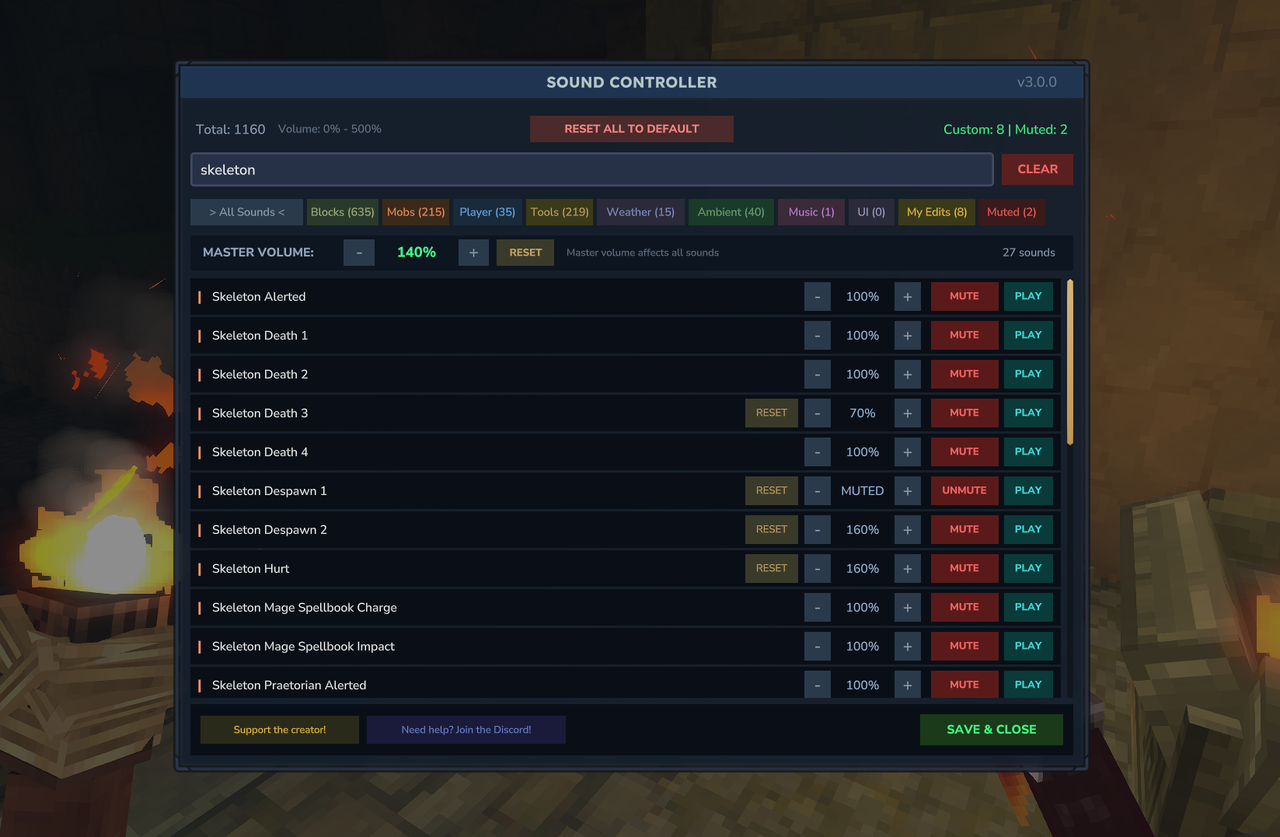
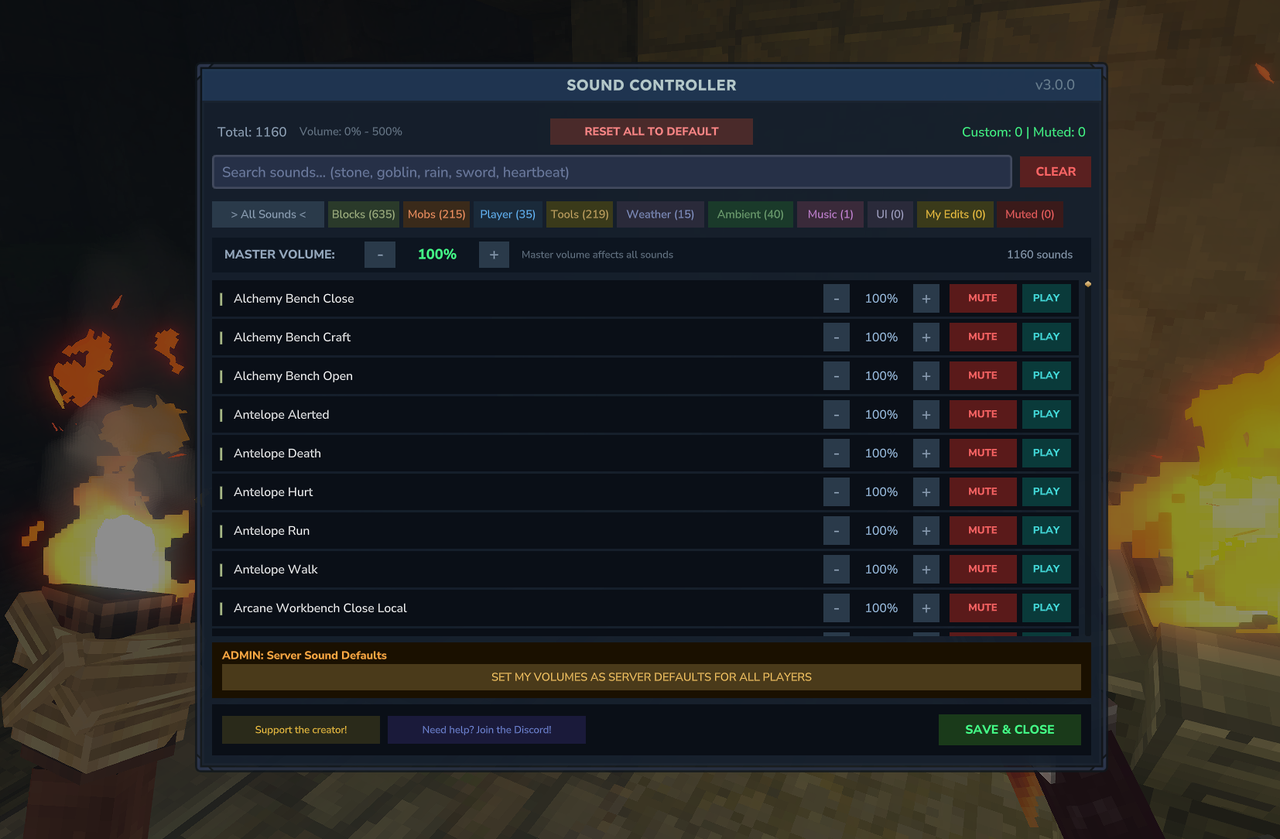
This simple mod allows complete control over all sounds in Hytale. Admins can also override sound levels for all players.
Is your dog being too annoying? Mute it!
Is it too quiet and you want to hear it's adorable barks better? Pump it up to 200 or 500%!
Tired of hearing your friend open and close a chest? You can make that quieter too!
When you open a world with the mod loaded you will get a message in chat saying what command to use to open the control panel ( /soundctrl ). If this message does not show up then you have not loaded the mod correctly.
If you are adding it to an existing world you need to go to that world's settings menu in the world selector and enable it. If this is a new world make sure you enable to mod.
For any questions, support, or bug reports please join our Discord!https://discord.gg/Ey6Pap4jzk
Enjoying the mod? Consider buying me a coffee!
https://buymeacoffee.com/backslashrobotics
Use creator code ROBOT when buying or upgrading Hytale to show your support!
Project description from CurseForge.
Pick your setup
Sound Controller releases for each Hytale build.
Choose the version and loader you play, then open the matching release.
Check the dependencies, then try the file in a copied instance before changing a world you care about.
Recent files
Sound Controller releases and Hytale builds
sound-control-3.3.0.jar
2 Jun 2026
Client Not supported Server Required Dependencies No extras listed Listed on Project page
Check the 0.5 setup 0.5 release
sound-control-3.2.0.jar
17 Apr 2026
Client Not supported Server Required Dependencies No extras listed Listed on Project page
Check the setup sound-control-3.1.0.jar
30 Mar 2026
Client Not supported Server Required Dependencies No extras listed Listed on Project page
Check the setup sound-control-3.0.6.jar
22 Feb 2026
Client Not supported Server Required Dependencies No extras listed Listed on Project page
Check the setup sound-control-3.0.5.jar
17 Feb 2026
Client Not supported Server Required Dependencies No extras listed Listed on Project page
Check the setup sound-control-3.0.4.jar
14 Feb 2026
Client Not supported Server Required Dependencies No extras listed Listed on Project page
Check the setup sound-control-3.0.2.jar
14 Feb 2026
Client Not supported Server Required Dependencies No extras listed Listed on Project page
Check the setup sound-control-3.0.1.jar
13 Feb 2026
Client Not supported Server Required Dependencies No extras listed Listed on Project page
Check the setup sound-control-3.0.0.jar
7 Feb 2026
Client Not supported Server Required Dependencies No extras listed Listed on Project page
Check the setup sound-control-2.1.0.jar
22 Jan 2026
Client Not supported Server Required Dependencies No extras listed Listed on Project page
Check the setup sound-control-2.0.6.jar
15 Jan 2026
Client Not supported Server Required Dependencies No extras listed Listed on Project page
Check the setup sound-control-1.0.0.jar
14 Jan 2026
Client Not supported Server Required Dependencies No extras listed Listed on Project page
Check the setup Looking for an older file? The official CurseForge project page is in Resources.
 mod
mod CurseForge · Hytale
Fullmetal Labyrinth
Adds a brand-new Labyrinth Dimension featuring a vast desert surface and an endless maze stretching deep below. Discover unique locations and face a variety of dangerous new enemies as you explore its depths!
 mod
mod CurseForge · Hytale
Leafy Cushions
A simple mod that adds cushioning to leaves. Fell down a cliff? You'd better pray there is a tree under you!
 mod
mod CurseForge · Hytale
NCS88 No mob regen
A small, server-side Hytale Update 6 mod that prevents NPCs from immediately regenerating health after fleeing combat.