HideArmor-0.8.0-alpha.jar
18 Jan 2026
Client Not supported Server Required Dependencies No extras listed Listed on Project page
Check the setup 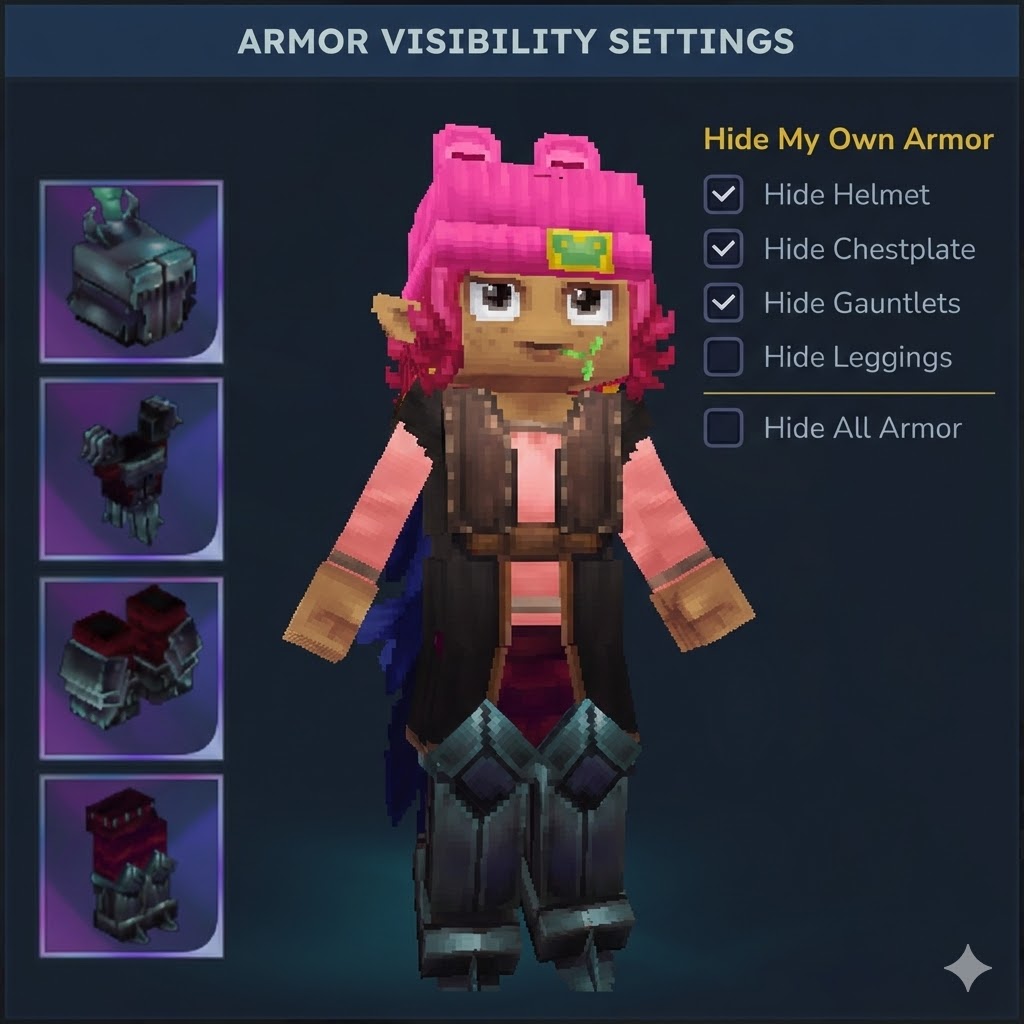
CurseForge · Hytale mod
A Hytale plugin that allows players to toggle the visibility of their armor pieces while maintaining full protection benefits.
Quick answer
Hide Armor Command HideArmor-0.8.0-alpha.jar targets Hytale. Do not install it as a separate client mod. Enable it on the world host—the local server in singleplayer or the dedicated server in multiplayer. No required dependencies listed for this file.
Where it goes
Do not install it as a separate client mod. Enable it on the world host—the local server in singleplayer or the dedicated server in multiplayer.
Put Hytale mods on the world host or dedicated server. Singleplayer runs a local server too; Hytale does not use separate client mods.
HideArmor-0.8.0-alpha.jar. Change the file and its required mods may change too.
This file does not list any required mods. Do not add a library just because a different file uses it.
This file does not list any required or optional project dependencies. Check the creator notes before changing an existing world.
Before you install it
Built for Hide Armor Command HideArmor-0.8.0-alpha.jar. Pick another file and the loader, install side or required mods may change.
Use HideArmor-0.8.0-alpha.jar. It targets Hytale; another release may target a different game build or dependency set.
This file does not list any required mods. Do not add a library just because a different file uses it.
Do not install it as a separate client mod. Enable it on the world host—the local server in singleplayer or the dedicated server in multiplayer.
Use the “Get this file” button beside HideArmor-0.8.0-alpha.jar. It opens that exact file at the source.
About this project
A Hytale plugin that allows players to toggle the visibility of their armor pieces while maintaining full protection benefits. Now featuring a privacy-focused mutual opt-in system for multiplayer interactions, LuckPerms integration, and comprehensive admin controls.
Commands now require proper permissions! By default, permission nodes may be ALLOWED unless explicitly denied. For security, we recommend using LuckPerms and explicitly denying admin commands for default players. See Permission Setup below.
v0.8.0-alpha - Internationalization & UI Improvements
/hidearmor and /hidearmoradmin GUIs0.7.2-alpha - LuckPerms Integration & Permission Enforcement
/lp when installed0.7.1-alpha - Stability Fixes
Ancient Gateways world transition lag spike0.7.0-alpha - Admin Features
/hidearmoradmin)Hide Individual Armor Pieces - Toggle visibility for helmet, chestplate, gauntlets, and leggings independently
Multiplayer Support - Hide other players' armor with a Mutual Opt-In system (requires permission from both parties)
Privacy Control - Granular "Allow Others" permissions ensure you maintain control over your appearance
Persistent State - All preferences are automatically saved and restored
Native GUI - Modern, interactive Hytale UI with three distinct configuration sections
LuckPerms Integration - Seamless permission management when LuckPerms is installed
Better Modlist Support - Shows mod logo when Better Modlist is installed
Built-in translations for English, Spanish, Portuguese, French, German, and Russian. Change language directly from the UI or via /hidearmor language <code>.
When armor visibility updates during inventory changes (equipping/unequipping), a brief flicker may occur. This is due to Hytale's packet system processing the original item before our filter applies.
Mitigation Options:
refreshDelayMs in players.json (default: 50ms, range: 10-1000ms)| Command | Permission | Description |
|---|---|---|
/hidearmor |
dev.nxtime.hidearmor.command.hidearmor |
Open armor visibility menu |
/hidearmor {piece} |
dev.nxtime.hidearmor.command.hidearmor |
Toggle specific armor piece |
/hidehelmet |
dev.nxtime.hidearmor.command.hidehelmet |
Quick helmet toggle |
| Command | Permission | Description |
|---|---|---|
/hidearmoradmin |
dev.nxtime.hidearmor.command.hidearmoradmin |
Admin configuration menu |
/hidearmoradmin reload |
dev.nxtime.hidearmor.command.hidearmoradmin |
Reload config from disk |
By default, Hytale may ALLOW commands if permissions are not explicitly set. This includes admin commands! Always configure permissions properly.
Install LuckPerms for advanced permission management. HideArmor automatically detects LuckPerms and uses it for all permission checks.
Deny admin access by default:
/lp group default permission set dev.nxtime.hidearmor.command.hidearmoradmin false
Grant player commands to a group:
/lp group member permission set dev.nxtime.hidearmor.command.hidearmor true
/lp group member permission set dev.nxtime.hidearmor.command.hidehelmet true
Grant admin commands to admins only:
/lp group admin permission set dev.nxtime.hidearmor.command.hidearmoradmin true
Use the "Setup Permissions" button in /hidearmoradmin to automatically configure player permissions!
Modify your permissions.json:
{
  "users": { ... },
  "groups": {
    "Default": [],
    "OP": ["*"],
    "Adventure": [
      "dev.nxtime.hidearmor.command.hidearmor",
      "dev.nxtime.hidearmor.command.hidehelmet"
    ]
  }
}
Note: Do NOT add
dev.nxtime.hidearmor.command.hidearmoradminto player groups - this should be admin-only!
Settings are stored in plugins/HideArmor/players.json:
| Setting | Default | Description |
|---|---|---|
defaultMask |
0 |
Default visibility for new players |
forcedMask |
0 |
Force hide (overrides player preferences) |
refreshDelayMs |
50 |
Delay before armor refresh (10-1000ms) |
Project description from CurseForge.
Recent files
18 Jan 2026
17 Jan 2026
16 Jan 2026
16 Jan 2026
15 Jan 2026
15 Jan 2026
15 Jan 2026
14 Jan 2026
Looking for an older file? The official CurseForge project page is in Resources.
 mod
modLegend of Zelda style dungeons and items brought to Hytale!
 mod
modPathforge adds PoE-inspired RPG progression to Hytale — leveling, attributes, a passive skill tree, and gear crafting with rarity and affixes — all in one hub UI.
 mod
modVillagers with their own name, face and personality that you can befriend, marry, hire and raise a family with — in villages you build, rank up and govern by decree.