x3Dev-Waypoints-1.2.0.jar
15 Jan 2026
Client Not supported Server Required Dependencies No extras listed Listed on Project page
Check the setup 
CurseForge · Hytale mod
A quick & easy waypoint/marker management system with a UI for players! Supports Custom Icons!
Quick answer
Quick Waypoints x3Dev-Waypoints-1.2.0.jar targets Hytale. Do not install it as a separate client mod. Enable it on the world host—the local server in singleplayer or the dedicated server in multiplayer. No required dependencies listed for this file.
Where it goes
Do not install it as a separate client mod. Enable it on the world host—the local server in singleplayer or the dedicated server in multiplayer.
Put Hytale mods on the world host or dedicated server. Singleplayer runs a local server too; Hytale does not use separate client mods.
x3Dev-Waypoints-1.2.0.jar. Change the file and its required mods may change too.
This file does not list any required mods. Do not add a library just because a different file uses it.
This file does not list any required or optional project dependencies. Check the creator notes before changing an existing world.
Before you install it
Built for Quick Waypoints x3Dev-Waypoints-1.2.0.jar. Pick another file and the loader, install side or required mods may change.
Use x3Dev-Waypoints-1.2.0.jar. It targets Hytale; another release may target a different game build or dependency set.
This file does not list any required mods. Do not add a library just because a different file uses it.
Do not install it as a separate client mod. Enable it on the world host—the local server in singleplayer or the dedicated server in multiplayer.
Use the “Get this file” button beside x3Dev-Waypoints-1.2.0.jar. It opens that exact file at the source.
About this project
Add custom waypoint markers to your compass and world map with an intuitive UI interface! Now supports custom icons!
Showcase: https://youtu.be/WNWsY8Y6JDE
Starting with v1.2.0, custom icon support has been added. Simply start the server up with the plugin installed to let it generate the mod folder. Then navigate into x3Dev_Waypoints/icons and drop in your .png files. Assuming you have OP or x3dev.waypoints.admin permission, simply execute /waypoint reloadicons to refresh the icons, then make a new waypoint and select your new icon from the dropdown! Note: If the icons fail to load in-game, relog or restart the server. Example: https://aka.x3.dev/s/uNDnw5/raw.mp4
IMPORTANT: YOU MUST HAVE OP or give yourself permissions:
| Permission | Description |
|---|---|
x3dev.waypoints.create |
Create personal waypoints |
x3dev.waypoints.share |
Share waypoints with other players |
x3dev.waypoints.teleport |
Teleport to own waypoints |
x3dev.waypoints.teleport.waypoint_name |
Teleport to a specific waypoint by name |
x3dev.waypoints.teleport.* |
Teleport to any waypoint |
x3dev.waypoints.server.create |
Create and edit server waypoints |
x3dev.waypoints.server.remove |
Remove server waypoints |
x3dev.waypoints.server.teleport |
Teleport to server waypoints |
x3dev.waypoints.server.* |
All server waypoint permissions |
x3dev.waypoints.admin |
Bypass all permission checks |
x3dev.waypoints.* |
All waypoint permissions |
Notes:
x3dev.waypoints.teleport.my_base/perm group add Adventure x3dev.waypoints.create
/perm group add Adventure x3dev.waypoints.share
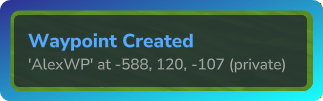
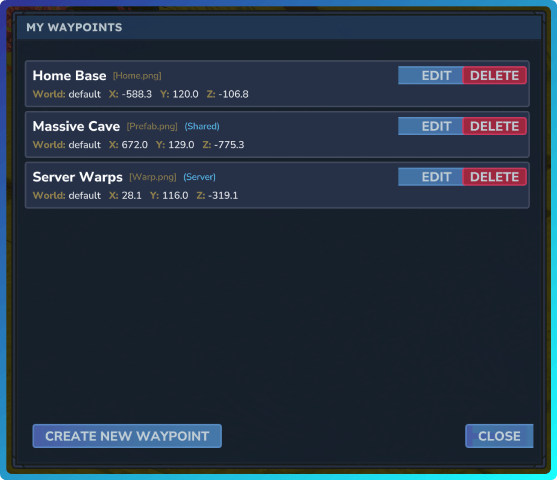

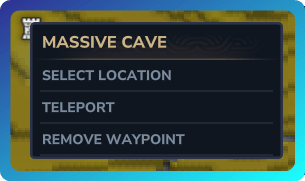
Project description from CurseForge.
Recent files
15 Jan 2026
15 Jan 2026
14 Jan 2026
Looking for an older file? The official CurseForge project page is in Resources.
 mod
modAdds a brand-new Labyrinth Dimension featuring a vast desert surface and an endless maze stretching deep below. Discover unique locations and face a variety of dangerous new enemies as you explore its depths!
 mod
modMakes tools matter. Blocks require the right tool, hard materials can't be broken by hand, and broken tools need to be fully repaired before they can be used again
 mod
modLevelable mineral generators.